Odd networking behaviour on wife's U230

brightmal

New member
Local time
11:36 PM
Messages
23
This netbook is being odd. It started with detecting the onboard wireless as off when it was on. Got around this with a usb wifi stick. Then system refused to see network with that. Tried rebooting, disabling then re-enabling, with both network adapters, no luck.
Plugged in an ethernet cable and it just got odder. I can detect other PCs on the lan, and copy data both ways, but can't access the internet from the netbook, even though I can from my desktop, connected through the same router (TP-Link TD-W8960N). When other desktops are connected to the lan, they have no trouble connecting to the net, but the network troubleshooter on the U230 keeps saying the the router is not connecting to the net.
Any help would be appreciated.
 

My Computer My Computer

Computer Manufacturer/Model Number
Home-built
OS
Windows 7 Home Premium 64bit
CPU
AMD Phenom II 965
Motherboard
ASRock AOD790GX128M
Memory
8GB DDR2 1066
Graphics Card(s)
2x HD 4770 Crossfire
Sound Card
Integrated
Monitor(s) Displays
22" BenQ LCD
Screen Resolution
1680x1050
Hard Drives
1x 1TB WD SATA
1x 400GB WD SATA
PSU
Antech 450W
Case
Antech Sonata III
Cooling
Air
Keyboard
Microsoft el-cheapo
Mouse
Steel Series Ikari
Internet Speed
1500kbpsdown/256kbpsup
Hi please try these TCPIP stack resets and see if things improve.

Open a cmd prompt by right clicking and choosing run as administrator and then type:

netsh int ip reset reset.log press enter
netsh int ipv6 reset reset.log press enter
netsh winsock reset catalog press enter
ipconfig /flushdns press enter and restart computer

Please let us know the results please.
 

My Computer My Computer

Computer Manufacturer/Model Number
HP Compaq 6715B
OS
Windows 7 Ultimate x64
CPU
AMD turion 64x2 TL-64 2.2Ghz
Motherboard
HC030
Memory
Sodimm DDR2 4GB
Graphics Card(s)
ATI Radeon 1250 128MB IGP
Hard Drives
Fujitsu Siemens 500GB sata 3.0 Gb/s
Still Stuck

Tried it, still no luck.
To be clear, the message returned by Windows Network Diagnostics is:
Your computer seems to be correctly configured, but the device or resource (DNS server) is not responding.
I'm posting this message from a desktop pc connected to the same router. And the desktop and netbook can see each other and swap files via the same router.
 

My Computer My Computer

Computer Manufacturer/Model Number
Home-built
OS
Windows 7 Home Premium 64bit
CPU
AMD Phenom II 965
Motherboard
ASRock AOD790GX128M
Memory
8GB DDR2 1066
Graphics Card(s)
2x HD 4770 Crossfire
Sound Card
Integrated
Monitor(s) Displays
22" BenQ LCD
Screen Resolution
1680x1050
Hard Drives
1x 1TB WD SATA
1x 400GB WD SATA
PSU
Antech 450W
Case
Antech Sonata III
Cooling
Air
Keyboard
Microsoft el-cheapo
Mouse
Steel Series Ikari
Internet Speed
1500kbpsdown/256kbpsup
Also of note, Windows is seeing 3 network adaptors.
Realtek PCIe GBE Family Controller
Microsoft Virtual Wifi Miniport adapter (not connected)
802.11bgn 1T1R Mini Card Wireless Adapter (not connected)
The 1T1R is named as the second Wireless Network Connection.
Using Fn+F8 brings up an icon in the bottom right-hand corner of the screen, but seems to have no other effect.
 

My Computer My Computer

Computer Manufacturer/Model Number
Home-built
OS
Windows 7 Home Premium 64bit
CPU
AMD Phenom II 965
Motherboard
ASRock AOD790GX128M
Memory
8GB DDR2 1066
Graphics Card(s)
2x HD 4770 Crossfire
Sound Card
Integrated
Monitor(s) Displays
22" BenQ LCD
Screen Resolution
1680x1050
Hard Drives
1x 1TB WD SATA
1x 400GB WD SATA
PSU
Antech 450W
Case
Antech Sonata III
Cooling
Air
Keyboard
Microsoft el-cheapo
Mouse
Steel Series Ikari
Internet Speed
1500kbpsdown/256kbpsup
Hi sorry i have not got back to you an oversight on my part.

The realtek is for a wired connection and you want wireless.

You can safely disable the microsoft virtual wi-fi miniport adapter it is not needed and has been known to interfere with wireless connections on occasion.

The 1TR is the adapter that you will use.

Now please try and connect to your router SSID please by clicking on the steps in bottom right hand corner of the taskbar and select your routers SSID click to connect and enter your network key if prompted to do so.

If there are any limited connectivtiy messages or an exclamtion mark over steps please let us know.

In addition can you please open a cmd prompt and type ipconfig /all press enter and post results in your next post.

Also can you download xirrus Wi-Fi inspector from the link below and install it please run the program and please take a screenshot of what it displays after opening up fully.

To take a screenshot please press CTRL+PRINTSCREEN and then open up ms paint and click paste from the menu and save to your desktop then plese upload the screnshot to here in your next reply please.
 

My Computer My Computer

Computer Manufacturer/Model Number
HP Compaq 6715B
OS
Windows 7 Ultimate x64
CPU
AMD turion 64x2 TL-64 2.2Ghz
Motherboard
HC030
Memory
Sodimm DDR2 4GB
Graphics Card(s)
ATI Radeon 1250 128MB IGP
Hard Drives
Fujitsu Siemens 500GB sata 3.0 Gb/s
Without the ethernet, there are no available connections at all. The OS will either not turn on the 1T1R, or if I manually turn it on via function key, will not see it as turned on. Once I've posted this, I'll check out the xirrus software.
The ipconfig without ethernet is as follows:

Microsoft Windows [Version 6.1.7601]
Copyright (c) 2009 Microsoft Corporation. All rights reserved.

C:\windows\system32>ipconfig/all

Windows IP Configuration

Host Name . . . . . . . . . . . . : AJ
Primary Dns Suffix . . . . . . . :
Node Type . . . . . . . . . . . . : Hybrid
IP Routing Enabled. . . . . . . . : No
WINS Proxy Enabled. . . . . . . . : No

Wireless LAN adapter Wireless Network Connection:

Media State . . . . . . . . . . . : Media disconnected
Connection-specific DNS Suffix . :
Description . . . . . . . . . . . : Microsoft Virtual WiFi Miniport Adapter
Physical Address. . . . . . . . . : 40-61-86-9E-7E-32
DHCP Enabled. . . . . . . . . . . : Yes
Autoconfiguration Enabled . . . . : Yes

Wireless LAN adapter Wireless Network Connection 2:

Media State . . . . . . . . . . . : Media disconnected
Connection-specific DNS Suffix . :
Description . . . . . . . . . . . : 802.11bgn 1T1R Mini Card Wireless Adapter

Physical Address. . . . . . . . . : 40-61-86-9E-7E-33
DHCP Enabled. . . . . . . . . . . : Yes
Autoconfiguration Enabled . . . . : Yes

Ethernet adapter Local Area Connection:

Media State . . . . . . . . . . . : Media disconnected
Connection-specific DNS Suffix . :
Description . . . . . . . . . . . : Realtek PCIe GBE Family Controller
Physical Address. . . . . . . . . : 40-61-86-AD-EA-F3
DHCP Enabled. . . . . . . . . . . : Yes
Autoconfiguration Enabled . . . . : Yes

Tunnel adapter Local Area Connection* 18:

Media State . . . . . . . . . . . : Media disconnected
Connection-specific DNS Suffix . :
Description . . . . . . . . . . . : Teredo Tunneling Pseudo-Interface
Physical Address. . . . . . . . . : 00-00-00-00-00-00-00-E0
DHCP Enabled. . . . . . . . . . . : No
Autoconfiguration Enabled . . . . : Yes

Tunnel adapter isatap.{6800C41F-7D96-48DB-BCFE-5E167554DF5C}:

Media State . . . . . . . . . . . : Media disconnected
Connection-specific DNS Suffix . :
Description . . . . . . . . . . . : Microsoft ISATAP Adapter
Physical Address. . . . . . . . . : 00-00-00-00-00-00-00-E0
DHCP Enabled. . . . . . . . . . . : No
Autoconfiguration Enabled . . . . : Yes

Tunnel adapter isatap.{C4A0B7B2-819C-4366-A5C7-90B41D1ED236}:

Media State . . . . . . . . . . . : Media disconnected
Connection-specific DNS Suffix . :
Description . . . . . . . . . . . : Microsoft ISATAP Adapter #2
Physical Address. . . . . . . . . : 00-00-00-00-00-00-00-E0
DHCP Enabled. . . . . . . . . . . : No
Autoconfiguration Enabled . . . . : Yes

Tunnel adapter isatap.{573F5542-989E-4602-AA79-C0A9FDAAEFB5}:

Media State . . . . . . . . . . . : Media disconnected
Connection-specific DNS Suffix . :
Description . . . . . . . . . . . : Microsoft ISATAP Adapter #4
Physical Address. . . . . . . . . : 00-00-00-00-00-00-00-E0
DHCP Enabled. . . . . . . . . . . : No
Autoconfiguration Enabled . . . . : Yes

C:\windows\system32>
 
Last edited:

My Computer My Computer

Computer Manufacturer/Model Number
Home-built
OS
Windows 7 Home Premium 64bit
CPU
AMD Phenom II 965
Motherboard
ASRock AOD790GX128M
Memory
8GB DDR2 1066
Graphics Card(s)
2x HD 4770 Crossfire
Sound Card
Integrated
Monitor(s) Displays
22" BenQ LCD
Screen Resolution
1680x1050
Hard Drives
1x 1TB WD SATA
1x 400GB WD SATA
PSU
Antech 450W
Case
Antech Sonata III
Cooling
Air
Keyboard
Microsoft el-cheapo
Mouse
Steel Series Ikari
Internet Speed
1500kbpsdown/256kbpsup
On looking at the ipconfig, I've got to say, I have no idea what's up with the tunnel adapter. WTF is that all about?
 

My Computer My Computer

Computer Manufacturer/Model Number
Home-built
OS
Windows 7 Home Premium 64bit
CPU
AMD Phenom II 965
Motherboard
ASRock AOD790GX128M
Memory
8GB DDR2 1066
Graphics Card(s)
2x HD 4770 Crossfire
Sound Card
Integrated
Monitor(s) Displays
22" BenQ LCD
Screen Resolution
1680x1050
Hard Drives
1x 1TB WD SATA
1x 400GB WD SATA
PSU
Antech 450W
Case
Antech Sonata III
Cooling
Air
Keyboard
Microsoft el-cheapo
Mouse
Steel Series Ikari
Internet Speed
1500kbpsdown/256kbpsup
Ran xirrus, connected with onboard wifi, no problem. Happy about that, but WTF was the OS doing?
Ah well, never mind, all sorted now. Thank you Cyberman.
 

My Computer My Computer

Computer Manufacturer/Model Number
Home-built
OS
Windows 7 Home Premium 64bit
CPU
AMD Phenom II 965
Motherboard
ASRock AOD790GX128M
Memory
8GB DDR2 1066
Graphics Card(s)
2x HD 4770 Crossfire
Sound Card
Integrated
Monitor(s) Displays
22" BenQ LCD
Screen Resolution
1680x1050
Hard Drives
1x 1TB WD SATA
1x 400GB WD SATA
PSU
Antech 450W
Case
Antech Sonata III
Cooling
Air
Keyboard
Microsoft el-cheapo
Mouse
Steel Series Ikari
Internet Speed
1500kbpsdown/256kbpsup
Its Deja Vu all over again. After a restart, the 1T1R can access the router, but is reporting that the router has no access to the net.
 

My Computer My Computer

Computer Manufacturer/Model Number
Home-built
OS
Windows 7 Home Premium 64bit
CPU
AMD Phenom II 965
Motherboard
ASRock AOD790GX128M
Memory
8GB DDR2 1066
Graphics Card(s)
2x HD 4770 Crossfire
Sound Card
Integrated
Monitor(s) Displays
22" BenQ LCD
Screen Resolution
1680x1050
Hard Drives
1x 1TB WD SATA
1x 400GB WD SATA
PSU
Antech 450W
Case
Antech Sonata III
Cooling
Air
Keyboard
Microsoft el-cheapo
Mouse
Steel Series Ikari
Internet Speed
1500kbpsdown/256kbpsup
Please post another ipconfig /all now you can connect to the router.

Also please do the xirrus screenshot at the same time.

Please disable the wifi miniport adapter go to start>control panel>Network and sharing centre>change adapter settings and right click the microsoft virtual miniport adapter andselect disable please.
 

My Computer My Computer

Computer Manufacturer/Model Number
HP Compaq 6715B
OS
Windows 7 Ultimate x64
CPU
AMD turion 64x2 TL-64 2.2Ghz
Motherboard
HC030
Memory
Sodimm DDR2 4GB
Graphics Card(s)
ATI Radeon 1250 128MB IGP
Hard Drives
Fujitsu Siemens 500GB sata 3.0 Gb/s
Unfortunately, my wife did a restart and now the OS is saying that the 1T1R is switched off. According to Xirrus it is enabled, but not connected. And I've disabled the virtual adapter.
Here's the result of ipconfig/all :
C:\windows\system32>ipconfig/all

Windows IP Configuration

Host Name . . . . . . . . . . . . : AJ
Primary Dns Suffix . . . . . . . :
Node Type . . . . . . . . . . . . : Hybrid
IP Routing Enabled. . . . . . . . : No
WINS Proxy Enabled. . . . . . . . : No

Wireless LAN adapter Wireless Network Connection:

Media State . . . . . . . . . . . : Media disconnected
Connection-specific DNS Suffix . :
Description . . . . . . . . . . . : Microsoft Virtual WiFi Miniport Adapter
Physical Address. . . . . . . . . : 40-61-86-9E-7E-32
DHCP Enabled. . . . . . . . . . . : Yes
Autoconfiguration Enabled . . . . : Yes

Wireless LAN adapter Wireless Network Connection 2:

Media State . . . . . . . . . . . : Media disconnected
Connection-specific DNS Suffix . :
Description . . . . . . . . . . . : 802.11bgn 1T1R Mini Card Wireless Adapter

Physical Address. . . . . . . . . : 40-61-86-9E-7E-33
DHCP Enabled. . . . . . . . . . . : Yes
Autoconfiguration Enabled . . . . : Yes

Ethernet adapter Local Area Connection:

Media State . . . . . . . . . . . : Media disconnected
Connection-specific DNS Suffix . :
Description . . . . . . . . . . . : Realtek PCIe GBE Family Controller
Physical Address. . . . . . . . . : 40-61-86-AD-EA-F3
DHCP Enabled. . . . . . . . . . . : Yes
Autoconfiguration Enabled . . . . : Yes

Tunnel adapter Local Area Connection* 18:

Media State . . . . . . . . . . . : Media disconnected
Connection-specific DNS Suffix . :
Description . . . . . . . . . . . : Teredo Tunneling Pseudo-Interface
Physical Address. . . . . . . . . : 00-00-00-00-00-00-00-E0
DHCP Enabled. . . . . . . . . . . : No
Autoconfiguration Enabled . . . . : Yes

Tunnel adapter isatap.{C4A0B7B2-819C-4366-A5C7-90B41D1ED236}:

Media State . . . . . . . . . . . : Media disconnected
Connection-specific DNS Suffix . :
Description . . . . . . . . . . . : Microsoft ISATAP Adapter
Physical Address. . . . . . . . . : 00-00-00-00-00-00-00-E0
DHCP Enabled. . . . . . . . . . . : No
Autoconfiguration Enabled . . . . : Yes

Tunnel adapter isatap.{573F5542-989E-4602-AA79-C0A9FDAAEFB5}:

Media State . . . . . . . . . . . : Media disconnected
Connection-specific DNS Suffix . :
Description . . . . . . . . . . . : Microsoft ISATAP Adapter #3
Physical Address. . . . . . . . . : 00-00-00-00-00-00-00-E0
DHCP Enabled. . . . . . . . . . . : No
Autoconfiguration Enabled . . . . : Yes

Tunnel adapter isatap.{6800C41F-7D96-48DB-BCFE-5E167554DF5C}:

Media State . . . . . . . . . . . : Media disconnected
Connection-specific DNS Suffix . :
Description . . . . . . . . . . . : Microsoft ISATAP Adapter #4
Physical Address. . . . . . . . . : 00-00-00-00-00-00-00-E0
DHCP Enabled. . . . . . . . . . . : No
Autoconfiguration Enabled . . . . : Yes
 

My Computer My Computer

Computer Manufacturer/Model Number
Home-built
OS
Windows 7 Home Premium 64bit
CPU
AMD Phenom II 965
Motherboard
ASRock AOD790GX128M
Memory
8GB DDR2 1066
Graphics Card(s)
2x HD 4770 Crossfire
Sound Card
Integrated
Monitor(s) Displays
22" BenQ LCD
Screen Resolution
1680x1050
Hard Drives
1x 1TB WD SATA
1x 400GB WD SATA
PSU
Antech 450W
Case
Antech Sonata III
Cooling
Air
Keyboard
Microsoft el-cheapo
Mouse
Steel Series Ikari
Internet Speed
1500kbpsdown/256kbpsup
The Screenshot is attached
 

Attachments

  • xirrus1.jpg
    xirrus1.jpg
    115.6 KB · Views: 3

My Computer My Computer

Computer Manufacturer/Model Number
Home-built
OS
Windows 7 Home Premium 64bit
CPU
AMD Phenom II 965
Motherboard
ASRock AOD790GX128M
Memory
8GB DDR2 1066
Graphics Card(s)
2x HD 4770 Crossfire
Sound Card
Integrated
Monitor(s) Displays
22" BenQ LCD
Screen Resolution
1680x1050
Hard Drives
1x 1TB WD SATA
1x 400GB WD SATA
PSU
Antech 450W
Case
Antech Sonata III
Cooling
Air
Keyboard
Microsoft el-cheapo
Mouse
Steel Series Ikari
Internet Speed
1500kbpsdown/256kbpsup
I also tried reinstalling xirrus, but no luck there.
 

My Computer My Computer

Computer Manufacturer/Model Number
Home-built
OS
Windows 7 Home Premium 64bit
CPU
AMD Phenom II 965
Motherboard
ASRock AOD790GX128M
Memory
8GB DDR2 1066
Graphics Card(s)
2x HD 4770 Crossfire
Sound Card
Integrated
Monitor(s) Displays
22" BenQ LCD
Screen Resolution
1680x1050
Hard Drives
1x 1TB WD SATA
1x 400GB WD SATA
PSU
Antech 450W
Case
Antech Sonata III
Cooling
Air
Keyboard
Microsoft el-cheapo
Mouse
Steel Series Ikari
Internet Speed
1500kbpsdown/256kbpsup
Connecting to the net via ethernet, after a restart. Dunno why, here's some data:
C:\windows\system32>ipconfig/all

Windows IP Configuration

Host Name . . . . . . . . . . . . : AJ
Primary Dns Suffix . . . . . . . :
Node Type . . . . . . . . . . . . : Hybrid
IP Routing Enabled. . . . . . . . : No
WINS Proxy Enabled. . . . . . . . : No

Wireless LAN adapter Wireless Network Connection:

Media State . . . . . . . . . . . : Media disconnected
Connection-specific DNS Suffix . :
Description . . . . . . . . . . . : Microsoft Virtual WiFi Miniport Adapter
Physical Address. . . . . . . . . : 40-61-86-9E-7E-32
DHCP Enabled. . . . . . . . . . . : Yes
Autoconfiguration Enabled . . . . : Yes

Wireless LAN adapter 1T1R:

Media State . . . . . . . . . . . : Media disconnected
Connection-specific DNS Suffix . :
Description . . . . . . . . . . . : 802.11bgn 1T1R Mini Card Wireless Adapt

Physical Address. . . . . . . . . : 40-61-86-9E-7E-33
DHCP Enabled. . . . . . . . . . . : Yes
Autoconfiguration Enabled . . . . : Yes

Ethernet adapter Local Area Connection:

Connection-specific DNS Suffix . :
Description . . . . . . . . . . . : Realtek PCIe GBE Family Controller
Physical Address. . . . . . . . . : 40-61-86-AD-EA-F3
DHCP Enabled. . . . . . . . . . . : Yes
Autoconfiguration Enabled . . . . : Yes
Link-local IPv6 Address . . . . . : fe80::28c8:7dfc:720e:c4f7%10(Preferred)
IPv4 Address. . . . . . . . . . . : 192.168.1.101(Preferred)
Subnet Mask . . . . . . . . . . . : 255.255.255.0
Lease Obtained. . . . . . . . . . : Tuesday, 13 November 2012 6:13:00 PM
Lease Expires . . . . . . . . . . : Wednesday, 14 November 2012 6:13:00 PM
Default Gateway . . . . . . . . . : 192.168.1.1
DHCP Server . . . . . . . . . . . : 192.168.1.1
DHCPv6 IAID . . . . . . . . . . . : 234890274
DHCPv6 Client DUID. . . . . . . . : 00-01-00-01-13-ED-15-2C-40-61-86-AD-EA-

DNS Servers . . . . . . . . . . . : 192.168.1.1
NetBIOS over Tcpip. . . . . . . . : Enabled

Tunnel adapter Local Area Connection* 18:

Connection-specific DNS Suffix . :
Description . . . . . . . . . . . : Teredo Tunneling Pseudo-Interface
Physical Address. . . . . . . . . : 00-00-00-00-00-00-00-E0
DHCP Enabled. . . . . . . . . . . : No
Autoconfiguration Enabled . . . . : Yes
IPv6 Address. . . . . . . . . . . : 2001:0:9d38:6ab8:14dd:2e3c:3f57:fe9a(Pr
erred)
Link-local IPv6 Address . . . . . : fe80::14dd:2e3c:3f57:fe9a%23(Preferred)
Default Gateway . . . . . . . . . : ::
NetBIOS over Tcpip. . . . . . . . : Disabled

Tunnel adapter isatap.{6800C41F-7D96-48DB-BCFE-5E167554DF5C}:

Media State . . . . . . . . . . . : Media disconnected
Connection-specific DNS Suffix . :
Description . . . . . . . . . . . : Microsoft ISATAP Adapter
Physical Address. . . . . . . . . : 00-00-00-00-00-00-00-E0
DHCP Enabled. . . . . . . . . . . : No
Autoconfiguration Enabled . . . . : Yes

Tunnel adapter isatap.{573F5542-989E-4602-AA79-C0A9FDAAEFB5}:

Media State . . . . . . . . . . . : Media disconnected
Connection-specific DNS Suffix . :
Description . . . . . . . . . . . : Microsoft ISATAP Adapter #3
Physical Address. . . . . . . . . : 00-00-00-00-00-00-00-E0
DHCP Enabled. . . . . . . . . . . : No
Autoconfiguration Enabled . . . . : Yes

Tunnel adapter isatap.{5963C2EB-0680-4944-98DD-7F81FBF0A89D}:

Media State . . . . . . . . . . . : Media disconnected
Connection-specific DNS Suffix . :
Description . . . . . . . . . . . : Microsoft ISATAP Adapter #4
Physical Address. . . . . . . . . : 00-00-00-00-00-00-00-E0
DHCP Enabled. . . . . . . . . . . : No
Autoconfiguration Enabled . . . . : Yes
 

My Computer My Computer

Computer Manufacturer/Model Number
Home-built
OS
Windows 7 Home Premium 64bit
CPU
AMD Phenom II 965
Motherboard
ASRock AOD790GX128M
Memory
8GB DDR2 1066
Graphics Card(s)
2x HD 4770 Crossfire
Sound Card
Integrated
Monitor(s) Displays
22" BenQ LCD
Screen Resolution
1680x1050
Hard Drives
1x 1TB WD SATA
1x 400GB WD SATA
PSU
Antech 450W
Case
Antech Sonata III
Cooling
Air
Keyboard
Microsoft el-cheapo
Mouse
Steel Series Ikari
Internet Speed
1500kbpsdown/256kbpsup
Do you have internet connectivity on the ethernet connection just so we know that it is not a general network issue?

The 1TR is the built in wireless adapter isn't it?

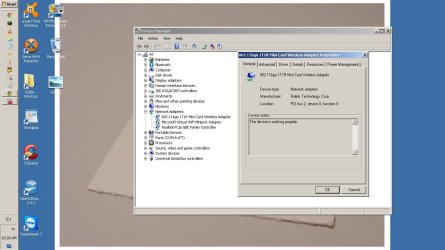
Can you provide me with a screenshot of device manager with network adapters expanded and expand your wireless adapter also please and include in the screenshot.
 

My Computer My Computer

Computer Manufacturer/Model Number
HP Compaq 6715B
OS
Windows 7 Ultimate x64
CPU
AMD turion 64x2 TL-64 2.2Ghz
Motherboard
HC030
Memory
Sodimm DDR2 4GB
Graphics Card(s)
ATI Radeon 1250 128MB IGP
Hard Drives
Fujitsu Siemens 500GB sata 3.0 Gb/s
I did notice the option was ticked to allow the computer to turn off the network adapter. I'll try de-selecting that one.
 

Attachments

  • 1T1R general.jpg
    1T1R general.jpg
    86.9 KB · Views: 5

My Computer My Computer

Computer Manufacturer/Model Number
Home-built
OS
Windows 7 Home Premium 64bit
CPU
AMD Phenom II 965
Motherboard
ASRock AOD790GX128M
Memory
8GB DDR2 1066
Graphics Card(s)
2x HD 4770 Crossfire
Sound Card
Integrated
Monitor(s) Displays
22" BenQ LCD
Screen Resolution
1680x1050
Hard Drives
1x 1TB WD SATA
1x 400GB WD SATA
PSU
Antech 450W
Case
Antech Sonata III
Cooling
Air
Keyboard
Microsoft el-cheapo
Mouse
Steel Series Ikari
Internet Speed
1500kbpsdown/256kbpsup
Well, that didn't work. Still can't connect with wifi.
 

My Computer My Computer

Computer Manufacturer/Model Number
Home-built
OS
Windows 7 Home Premium 64bit
CPU
AMD Phenom II 965
Motherboard
ASRock AOD790GX128M
Memory
8GB DDR2 1066
Graphics Card(s)
2x HD 4770 Crossfire
Sound Card
Integrated
Monitor(s) Displays
22" BenQ LCD
Screen Resolution
1680x1050
Hard Drives
1x 1TB WD SATA
1x 400GB WD SATA
PSU
Antech 450W
Case
Antech Sonata III
Cooling
Air
Keyboard
Microsoft el-cheapo
Mouse
Steel Series Ikari
Internet Speed
1500kbpsdown/256kbpsup
The 1TR is installed looking at device manager and is turned on can you select your router SSID and try and connect to it and report back whehter it connects if it does not please post the error message it gives you.
 

My Computer My Computer

Computer Manufacturer/Model Number
HP Compaq 6715B
OS
Windows 7 Ultimate x64
CPU
AMD turion 64x2 TL-64 2.2Ghz
Motherboard
HC030
Memory
Sodimm DDR2 4GB
Graphics Card(s)
ATI Radeon 1250 128MB IGP
Hard Drives
Fujitsu Siemens 500GB sata 3.0 Gb/s
I can't select the router SSID to connect to it. Without the ethernet cable, the networking icon just says no connections available.
 

My Computer My Computer

Computer Manufacturer/Model Number
Home-built
OS
Windows 7 Home Premium 64bit
CPU
AMD Phenom II 965
Motherboard
ASRock AOD790GX128M
Memory
8GB DDR2 1066
Graphics Card(s)
2x HD 4770 Crossfire
Sound Card
Integrated
Monitor(s) Displays
22" BenQ LCD
Screen Resolution
1680x1050
Hard Drives
1x 1TB WD SATA
1x 400GB WD SATA
PSU
Antech 450W
Case
Antech Sonata III
Cooling
Air
Keyboard
Microsoft el-cheapo
Mouse
Steel Series Ikari
Internet Speed
1500kbpsdown/256kbpsup
Please check verify that all your Network Services are Started.
Click on Start, type services.msc then press enter.

• COM+ Event System (for WZC issues)
• Computer Browser
• DHCP Client
• DNS Client
• Network Connections
• Network Location Awareness
• Remote Procedure Call (RPC)
• Server
• TCP/IP Netbios helper
• Wireless Zero Configuration ( XP wireless configurations only)
• WLAN AutoConfig ( Vista/7 wireless configurations only)
• Workstation
 

My Computer My Computer

Computer Manufacturer/Model Number
HP Compaq 6715B
OS
Windows 7 Ultimate x64
CPU
AMD turion 64x2 TL-64 2.2Ghz
Motherboard
HC030
Memory
Sodimm DDR2 4GB
Graphics Card(s)
ATI Radeon 1250 128MB IGP
Hard Drives
Fujitsu Siemens 500GB sata 3.0 Gb/s
Back
Top