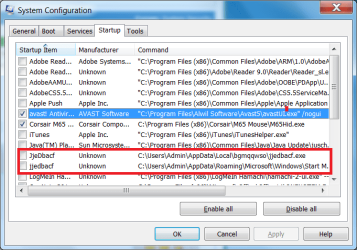
Solved Odd startup enteries

TheCase

New member
Member
Local time
1:40 PM
Messages
40
Hi,

I found the following two entries (see picture) in my startup. I could not load Google Chrome until they were disabled and my mouse had a constant loading circle. How can I remove these completely rather than just disabling them from starting


Thanks

 

Attachments

  • startup.png
    startup.png
    25.1 KB · Views: 10

My Computer

OS
Windows 7
CPU
Intel i7 920
Graphics Card(s)
NVida GTX 275
Monitor(s) Displays
Samsung 2333SW
Thanks. Is it sufficient enough just to remove the files at their location and then the start up entries?
 

My Computer

OS
Windows 7
CPU
Intel i7 920
Graphics Card(s)
NVida GTX 275
Monitor(s) Displays
Samsung 2333SW
Using that method should remove them .. Or you could use Ccleaner though i would rather do it myself than use any other program .. The choice is yours ...
 

My Computer

Computer Manufacturer/Model Number
W530-3630QM1
OS
windows 7 home 64bit
CPU
INTEL-CORE I7
Memory
16GB
Hard Drives
750GB
Browser
Chrome
Back
Top