
Office 2010 Beta - impressed so far

jimbo45

New member
Guru
Gold Member
VIP
Local time
11:35 AM
Messages
5,941
Location
Hafnarfjörður IS
Hi there
I've been playing around with the Office beta 2010 -- only EXCEL at the moment

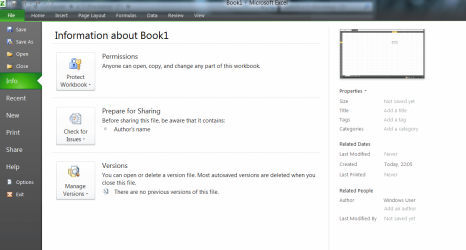
It seems to have a nicer interface -- I'm glad the hideous Office 2007 blob has gone

The start menu is much nicer - and as always if you don't like the large ribbon you can get rid of it with CTRL+F1. CTRL+F1 again brings it back.


Anyway here's the start menu in 2010 for EXCEL. (I changed the background in options to BLACK - I prefer it to the default white one).

Seems to run old 2003 / 2007 version spreadsheets with macros etc etc OK.

(I'm testing this in a W7 pro X-64 Virtual machine -- I don't want to screw up any of my actual work documents while testing this).:mad:

I am hoping the language packs will apear soon for a proper test.

So far looks good MS.

Cheers
jimbo
 

Attachments
  • ofice2010.png
    ofice2010.png
    47.6 KB · Views: 53

My Computer My Computer

Computer type
PC/Desktop
Computer Manufacturer/Model Number
Custom built, several laptops HP/ASUS
OS
Linux CENTOS 7 / various Windows OS'es and servers
CPU
Intel i7 Intel i5
Memory
8GB, 16GB
Graphics Card(s)
On Motherboard
Sound Card
Realtek HD audio
Monitor(s) Displays
Apple Cinema display, Samsung LCD
Screen Resolution
1920 X 1080
Hard Drives
4 X 1TB SATA
Mouse
Toshiba wireless laser
Internet Speed
> 20MB up
I agree, seems to have a nicer feel to the entire suite.

One problem I am finding is with Outlook, when minimized to the tray this version does not show the new mail icon as it does with OL 2007.
 

My Computer My Computer

Computer Manufacturer/Model Number
My Build
OS
win7 Ult 64
CPU
i7 3930K & 3960X
Motherboard
ASUS P9X79 Deluxe
Memory
16GB G-Skill 2133MHz
Graphics Card(s)
Sapphire HD 7970
Sound Card
On-board
Monitor(s) Displays
ASUS 27 inch
Screen Resolution
1920X1080
Hard Drives
Crucial M4 256GB, 1.5TB WD Black for Data/Images
PSU
Corsair AX1200
Case
NZXT 810
Cooling
Custom Loop, Swiftech HDBlock
Keyboard
Mionix
Mouse
Mionix
Internet Speed
Cable
Jimbo

Languages should not be long
Copy of a mail I received yesterday :)
We are very happy to announce the following international language versions of the Microsoft Office 2010 Click-to-Run Beta (build 4536.1000), are NOW also available at http://connect.microsoft.com/office.
• German
• Spanish
• French
• Japanese
• Chinese Simplified
• Russian
The setup exe's for each of these languages is located your Downloads section.
As a valued Beta participant, you also play important role in preparing Office 2010 for the rest of the world! We again thank you for your continued participation, feedback, and hard work.


-------------------------------------------------------------------------
Microsoft respects your privacy. Please read our online Privacy Statement.

You are receiving this email because you are a participant in a Microsoft Connect beta program. You can end your participation in a program at any time by visiting Your Dashboard (http://connect.microsoft.com/dashboard/) page and choosing "End Your Participation" for that program. If you have signed up to be contacted about participating in new Microsoft Connect programs, surveys, and events, you will continue to receive those communications unless you unsubscribe by going to Your Profile (http://connect.microsoft.com/profile.aspx). To set your contact preferences for other Microsoft communications, see the communications preferences section of the Microsoft Privacy Statement.

Alternatively, if you would prefer to no longer to be contacted by Microsoft Connect, send an email to [email protected] with "UNSUBSCRIBE" in the subject line and we will unregister from Microsoft Connect all up. This is an unmonitored e-mail address, so do not reply to this message.

Microsoft Corporation
One Microsoft Way
Redmond, WA 98052
 

My Computers My Computers

System One System Two

  • Computer type
    PC/Desktop
    Computer Manufacturer/Model Number
    ChillBlast - Custom to my design
    OS
    Windows 11 Pro x64 [Latest Release and Release Preview]
    CPU
    Ryzen 9 5950X, 3.8 - 5.2 MHz
    Motherboard
    Asus Prime X570-Pro
    Memory
    64GB [2 x 32GB] DDR4 3200MHz
    Graphics Card(s)
    4GB NVIDIA GEFORCE GTX 1650 Ti
    Sound Card
    On-board SPDIF to 5.1 System + HDMI [5.1 system]
    Monitor(s) Displays
    32" UHD 32 Bit HDR Monitor + 43" UHD 4K 32Bit HDR TV
    Screen Resolution
    2 x 3840 x 2160 @60Hz
    Hard Drives
    1TB M2 SSD OS, 500GB Fast Access SSD, 2 x 8TB Data + Various Externals from 1TB to 4TB, 10TB NAS
    PSU
    NZXT C750 80 PLUS Gold 750W Modular PSU
    Case
    Workstation Case [Matt Black]
    Cooling
    NZXT Kraken X63 280mm CPU Cooler +2x Quiet Case fans
    Keyboard
    Logitech Wireless MX Keys & K400 + others
    Mouse
    Logitech Wireless MX Master 3S
    Internet Speed
    920 MB Down 50 MB Up
    Antivirus
    BitDefender Total Security Pro
    Browser
    Chrome (always run latest Non-Beta)
    Other Info
    Also run ...
    Laptop - Quad 8GB - Windows 10 Pro x64
    Nexus 7 Android tablet x2
    Samsung 10.2" tablet
    Blackview TAB 8 4G Android Tablet c/w Keyboard
    Wacom Intuos Pro Medium Pen Pad
    Wacom Intuos Pro Small Pen Pad
    Wacom Expresskeys Remote
    Loopdeck+ Graphics Controller
    Shuttle Pro v2 Control
  • Computer type
    Laptop
    System Manufacturer/Model Number
    Dell XPS 17 10750H
    OS
    Windows 11 Pro x64 Latest RP
    CPU
    Intel I7 10750H 5.0GHz
    Motherboard
    Dell XPS
    Memory
    32GB [2x16GB] DDR4 2933 MHz
    Graphics Card(s)
    nVidia GTX1650Ti 4 GB GDDR6
    Sound Card
    Stock [Realtek] 4 Speaker
    Monitor(s) Displays
    17" IPS UHD+ Infinity Edge Touchscreen
    Screen Resolution
    3840 x 2400
    Hard Drives
    2TB M2 NVMe, 4TB External + various 500GB & 1TB External NVMe (also have access to spinner HDD from
    PSU
    Stock
    Case
    Stock XPS Aluminium & Carbon Fibre
    Cooling
    Stock - Active Fan Control
    Keyboard
    Backlit + Various Logitech
    Mouse
    Stock Track Pad + Logitech MX Trackball
    Internet Speed
    72 MB Down 18MB Up
    Browser
    Chrome
    Other Info
    Also run ...
    Laptop - Quad 8GB - Windows 10 Pro x64
    Nexus 7 Android tablet x2
    10.2" tablet
    Sony Z3 Android Smartphone
    Wacom Intuos Pro Medium Pen Pad
    Wacom Intuos Pro Small Pen Pad
    Wacom Expresskeys Remote
    Loopdeck+ Graphics Controller
    Shuttle Pro v2 Control Pad
    10TB NAS
Issues

I've discovered some issues with the beta.
  1. Outlook will not sync in Itunes, Itunes does not recognise outlook as mail default. I set it to default, you cannot modify the itunes addins under the command tab, nor does it come up in the certificate tab.
  2. Word will not accept incoming data from another app via the clipboard. If you use a text editor and use the clipboard to paste it to a word doc it will not paste up using the format option.
  3. And my biggest peeve, you cannot customise any ribbons, either using vba or vbase. :rolleyes:
 

My Computer My Computer

Computer Manufacturer/Model Number
Custom Build
OS
Windows 7 7600 1 X64
CPU
AMD PHENOM II X 550 PROCESSOR 3.1 ghz
Motherboard
ASUS M4A78-TE
Memory
Corsair 4 gig ddr 3
Graphics Card(s)
ati radeon 3300
Sound Card
ati hd
Monitor(s) Displays
syncmaster 2033sw
Screen Resolution
1600X900 60 hz refresh
Hard Drives
twin_seagates SATA's 1 TB & 500 Gig, hitachi_slimline 160 gig
PSU
antec_550 watt
Case
cooler master GLite
Cooling
stock_heat sink
Internet Speed
20mbs up/ 1.5mbs down
Other Info
favorite child "stewie"
favorite dog "brian"
Back
Top