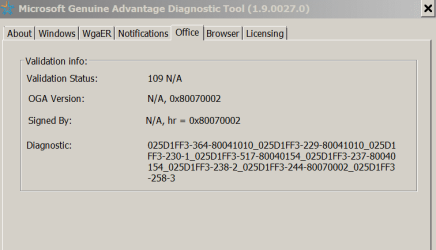
What’s happening on this Office 2010 Home & Student?
This thread is for the Office gurus.
I'm trying to make Office 2010 64 2010 Home & Student work on a Win 7 pro 64 laptop.
It was on a friend’s laptop that died. He gave me the license and a Proofing tools package he bought as he is using a new Office version.
These are the steps I did:
- Ran setup.exe
- Entered the key
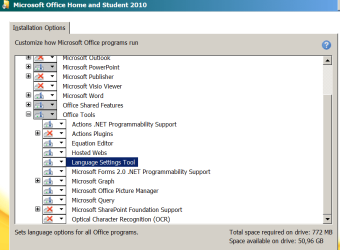
- Selected the options (Word, Excel. PPoint) and deselect other features (one note, languages etc)
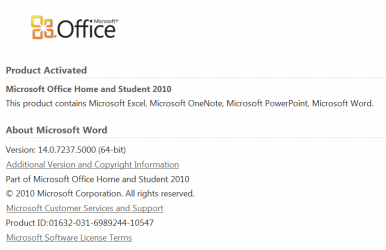
The Office has installed, it’s activated but has the following problems:
- All the shortcuts created on Start – Microsoft Office doesn’t work. It gives me an error that the shortcut can’t work. So I went to C:\Program Files\Microsoft Office\Office14 and created a shortcut for winword.exe, Excel.exe and Powerpnt.exe and they work. Exeption is OIS.exe (Picture Manager) that doesn’t (error: Microsoft Office has stopped Working).
- If I double click a Word, Excel or Powerpoint document, they don’t launch Word, Excel or Powerpoint, it runs into the same process than a shortcut.
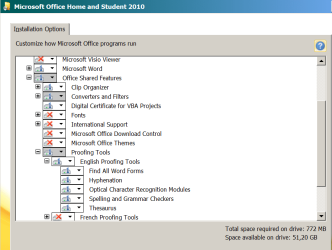
- I have manually set the installation, choosing what to install. But I run setup – change, and most all items that I had choose d to install on my computer now shows as “Run on fist use”
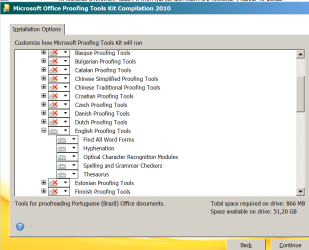
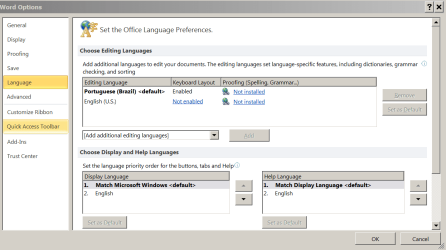
- The proofing tools shows as not installed, even with English and Portuguese installed with the a Proofing tools package.
- I ran WU and it had installed more than 60 updates to Office and more than 70 to the Proofing tools.
I have used same Office 2010 installation package on many computers (different keys) and they are working fine.
Can someone explain me what’s going on?
This thread is for the Office gurus.
I'm trying to make Office 2010 64 2010 Home & Student work on a Win 7 pro 64 laptop.
It was on a friend’s laptop that died. He gave me the license and a Proofing tools package he bought as he is using a new Office version.
These are the steps I did:
- Ran setup.exe
- Entered the key
- Selected the options (Word, Excel. PPoint) and deselect other features (one note, languages etc)
The Office has installed, it’s activated but has the following problems:
- All the shortcuts created on Start – Microsoft Office doesn’t work. It gives me an error that the shortcut can’t work. So I went to C:\Program Files\Microsoft Office\Office14 and created a shortcut for winword.exe, Excel.exe and Powerpnt.exe and they work. Exeption is OIS.exe (Picture Manager) that doesn’t (error: Microsoft Office has stopped Working).
- If I double click a Word, Excel or Powerpoint document, they don’t launch Word, Excel or Powerpoint, it runs into the same process than a shortcut.
- I have manually set the installation, choosing what to install. But I run setup – change, and most all items that I had choose d to install on my computer now shows as “Run on fist use”
- The proofing tools shows as not installed, even with English and Portuguese installed with the a Proofing tools package.
- I ran WU and it had installed more than 60 updates to Office and more than 70 to the Proofing tools.
I have used same Office 2010 installation package on many computers (different keys) and they are working fine.
Can someone explain me what’s going on?
Attachments
My Computers
-
At a glance
Windows 7 HP 64i5 6600K - 800MHz to 4200MHz4+4G GSkill DDR4 3000IG - Intel 530- Computer type
- PC/Desktop
- Computer Manufacturer/Model Number
- custom build
- OS
- Windows 7 HP 64
- CPU
- i5 6600K - 800MHz to 4200MHz
- Motherboard
- GA-Z170-HD3P
- Memory
- 4+4G GSkill DDR4 3000
- Graphics Card(s)
- IG - Intel 530
- Monitor(s) Displays
- Samsung 226BW
- Screen Resolution
- 1680x1050
- Hard Drives
- (1) -1 SM951 – 128GB M.2 AHCI PCIe SSD drive for Windows 7 and Lubuntu
(2) -1 WD SATA 3 - 1T for Data
(3) -1 WD SATA 3 - 1T for backup
- PSU
- Thermaltake 450W TR2 gold
- Keyboard
- Old and good Chicony mechanical keyboard
- Mouse
- Logitech mX performance - 9 buttons (had to disable some)
- Internet Speed
- 500Mb/s
- Browser
- Firefox 64
- Other Info
- TinyWall firewall
-
At a glance
Windows 7 Proi7-4500U 800MHz to 3.0GHz(4+4)G DDR3 1600IG intel 4400 + NVIDIA GeForce GT 745M- Computer type
- Laptop
- System Manufacturer/Model Number
- Asus Q550LF
- OS
- Windows 7 Pro
- CPU
- i7-4500U 800MHz to 3.0GHz
- Motherboard
- Asus Q550LF
- Memory
- (4+4)G DDR3 1600
- Graphics Card(s)
- IG intel 4400 + NVIDIA GeForce GT 745M
- Sound Card
- Realtek
- Monitor(s) Displays
- LG Display LP156WF4-SPH1
- Screen Resolution
- 1920 x 1080
- Hard Drives
- BX500 120G SSD for Windows and programs +
1T HDD for data
- Internet Speed
- 500 Mb/s
- Browser
- Firefox
- Other Info
- TinyWall firewall