Office 2010 Office File Type Descriptions & Icons Incorrect

mbwilde

New member
Local time
7:49 AM
Messages
6
Okay, I've never posted on anything like this before so bear with me please. I've got an issue and it's driving me nuts because I can't resolve it. I'll try and give a description of what I did. Any help would be greatly appreciated!

I purchased a new Dell computer (Windows 7 Home Premium 64bit) that came with a trial version of Office 2010. I had previously purchased an Office 2010 Pro so I wanted to install the full version on my computer. When I did, I had both versions installed, so I uninstalled the trial version. That's when I think my problem arose, but I can't say for sure that it didn't exist before that because I hadn't even looked.

Here's the problem:
When I'm in Windows Explorer looking at my files, my Excel and Word files (.doc, .docx, .xls, .xlsx) show up with an improper file type description. Instead of saying "Microsoft Word Document" or "Microsoft Excel 1997-2003 Worksheet" (or whatever they're supposed to say) the simply say "DOCX File" or "XLS File". Not only that, but the icons don't look right either. They sort of look right, but they're smaller and sort of greyed out (Except the .docx icon is just a white page with lines object).

The strange thing is, is that ALL my other Office files show up with correct descriptions and icons etc. (.ppt, .pptx, .csv....etc - ALL of them!)

What I've tried to fix it:
I uninstalled all Office Products and then reinstalled Office 2010.

I tried MS's little bug finder program that popped up on their website.

I've tried associating the Word files with WordPad and then back to Word.

It seems like there was more things I've tried, but that is all I remember right now. I've attached a screen shot of one of my folders so you can see what I mean. If anyone has a similar problem, or knows how to fix it, please let me know! Thanks!


[I forgot to mention, when I select any of the problem file types, they still open in the correct default program without any prompting...if that matters at all]
 

Attachments

Last edited:

My Computer My Computer

At a glance

Windows 7 Home Premium 64bit
OS
Windows 7 Home Premium 64bit
Hi,

Welcome to SevenForums.

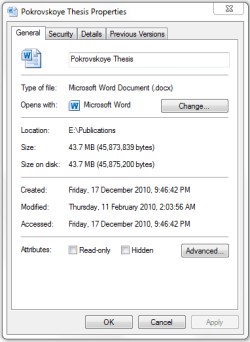
If you right-click on one of your Word documents and choose properties, does the icon look correct in that panel? Like this:

Regards,
Golden
 

Attachments

  • Capture.PNG
    Capture.PNG
    10.5 KB · Views: 37

My Computer My Computer

At a glance

Windows 10 Pro x64 ; Xubuntu x64Intel i7 860 @ 2.80 GHz O/C'ed to 4.0GHz16GB Corsair Vengance DDR3 @ 661 MHz Dual Cha...EVGA NVidia GTX 560 1024MB
Computer type
PC/Desktop
Computer Manufacturer/Model Number
Golden Mk. I.4
OS
Windows 10 Pro x64 ; Xubuntu x64
CPU
Intel i7 860 @ 2.80 GHz O/C'ed to 4.0GHz
Motherboard
Gigabyte P55A-UD3R Rev.1. Award BIOS F13
Memory
16GB Corsair Vengance DDR3 @ 661 MHz Dual Channel (9-9-9-24)
Graphics Card(s)
EVGA NVidia GTX 560 1024MB
Sound Card
Realtek Integrated
Monitor(s) Displays
Dual Samsung SyncMaster 2494HS
Screen Resolution
1920*1080 and 1920*1080
Hard Drives
1*Samsung 840 EVO 120GB SSD;
1*OCZ Vertex 2 60GB SSD;
2*Samsung F3 SpinPoint 1TB in RAID0;
1*Samsung F1 SpinPoint 1TB;
2*Western Digital 1TB External USB 3.0
1*Western Digital 500GB External USB 3.0
1*Seagate 500GB External USB 2.0
PSU
Thermaltake ToughPower QFan 750W
Case
Thermaltake Element S VK60001W2Z
Cooling
Corsair H60 Water Cooling, 2*230mm and 2*80mm case fans
Keyboard
Logitech G110
Mouse
Logitech MX518
no it is not correct...it still just looks like the white page with lines
 

My Computer My Computer

At a glance

Windows 7 Home Premium 64bit
OS
Windows 7 Home Premium 64bit
OK. And if you click the Change button on that panel and then associate with Word, it still looks the same?
 

My Computer My Computer

At a glance

Windows 10 Pro x64 ; Xubuntu x64Intel i7 860 @ 2.80 GHz O/C'ed to 4.0GHz16GB Corsair Vengance DDR3 @ 661 MHz Dual Cha...EVGA NVidia GTX 560 1024MB
Computer type
PC/Desktop
Computer Manufacturer/Model Number
Golden Mk. I.4
OS
Windows 10 Pro x64 ; Xubuntu x64
CPU
Intel i7 860 @ 2.80 GHz O/C'ed to 4.0GHz
Motherboard
Gigabyte P55A-UD3R Rev.1. Award BIOS F13
Memory
16GB Corsair Vengance DDR3 @ 661 MHz Dual Channel (9-9-9-24)
Graphics Card(s)
EVGA NVidia GTX 560 1024MB
Sound Card
Realtek Integrated
Monitor(s) Displays
Dual Samsung SyncMaster 2494HS
Screen Resolution
1920*1080 and 1920*1080
Hard Drives
1*Samsung 840 EVO 120GB SSD;
1*OCZ Vertex 2 60GB SSD;
2*Samsung F3 SpinPoint 1TB in RAID0;
1*Samsung F1 SpinPoint 1TB;
2*Western Digital 1TB External USB 3.0
1*Western Digital 500GB External USB 3.0
1*Seagate 500GB External USB 2.0
PSU
Thermaltake ToughPower QFan 750W
Case
Thermaltake Element S VK60001W2Z
Cooling
Corsair H60 Water Cooling, 2*230mm and 2*80mm case fans
Keyboard
Logitech G110
Mouse
Logitech MX518
It is already associated with Word, but I have tried changing it and switching it back and it still looks the same.
 

My Computer My Computer

At a glance

Windows 7 Home Premium 64bit
OS
Windows 7 Home Premium 64bit

My Computer My Computer

At a glance

Windows 10 Pro x64 ; Xubuntu x64Intel i7 860 @ 2.80 GHz O/C'ed to 4.0GHz16GB Corsair Vengance DDR3 @ 661 MHz Dual Cha...EVGA NVidia GTX 560 1024MB
Computer type
PC/Desktop
Computer Manufacturer/Model Number
Golden Mk. I.4
OS
Windows 10 Pro x64 ; Xubuntu x64
CPU
Intel i7 860 @ 2.80 GHz O/C'ed to 4.0GHz
Motherboard
Gigabyte P55A-UD3R Rev.1. Award BIOS F13
Memory
16GB Corsair Vengance DDR3 @ 661 MHz Dual Channel (9-9-9-24)
Graphics Card(s)
EVGA NVidia GTX 560 1024MB
Sound Card
Realtek Integrated
Monitor(s) Displays
Dual Samsung SyncMaster 2494HS
Screen Resolution
1920*1080 and 1920*1080
Hard Drives
1*Samsung 840 EVO 120GB SSD;
1*OCZ Vertex 2 60GB SSD;
2*Samsung F3 SpinPoint 1TB in RAID0;
1*Samsung F1 SpinPoint 1TB;
2*Western Digital 1TB External USB 3.0
1*Western Digital 500GB External USB 3.0
1*Seagate 500GB External USB 2.0
PSU
Thermaltake ToughPower QFan 750W
Case
Thermaltake Element S VK60001W2Z
Cooling
Corsair H60 Water Cooling, 2*230mm and 2*80mm case fans
Keyboard
Logitech G110
Mouse
Logitech MX518
tried running rebuilding the icon cache...no dice...same problems still exist
 

My Computer My Computer

At a glance

Windows 7 Home Premium 64bit
OS
Windows 7 Home Premium 64bit
Mmmm. Odd.....I need to give this some more thought. Perhaps someone else might have some suggestions in the mean time.
 

My Computer My Computer

At a glance

Windows 10 Pro x64 ; Xubuntu x64Intel i7 860 @ 2.80 GHz O/C'ed to 4.0GHz16GB Corsair Vengance DDR3 @ 661 MHz Dual Cha...EVGA NVidia GTX 560 1024MB
Computer type
PC/Desktop
Computer Manufacturer/Model Number
Golden Mk. I.4
OS
Windows 10 Pro x64 ; Xubuntu x64
CPU
Intel i7 860 @ 2.80 GHz O/C'ed to 4.0GHz
Motherboard
Gigabyte P55A-UD3R Rev.1. Award BIOS F13
Memory
16GB Corsair Vengance DDR3 @ 661 MHz Dual Channel (9-9-9-24)
Graphics Card(s)
EVGA NVidia GTX 560 1024MB
Sound Card
Realtek Integrated
Monitor(s) Displays
Dual Samsung SyncMaster 2494HS
Screen Resolution
1920*1080 and 1920*1080
Hard Drives
1*Samsung 840 EVO 120GB SSD;
1*OCZ Vertex 2 60GB SSD;
2*Samsung F3 SpinPoint 1TB in RAID0;
1*Samsung F1 SpinPoint 1TB;
2*Western Digital 1TB External USB 3.0
1*Western Digital 500GB External USB 3.0
1*Seagate 500GB External USB 2.0
PSU
Thermaltake ToughPower QFan 750W
Case
Thermaltake Element S VK60001W2Z
Cooling
Corsair H60 Water Cooling, 2*230mm and 2*80mm case fans
Keyboard
Logitech G110
Mouse
Logitech MX518
Hi,

I haven't been able to think of a solution yet, so am going to request more help for you.

Regards,
Golden
 

My Computer My Computer

At a glance

Windows 10 Pro x64 ; Xubuntu x64Intel i7 860 @ 2.80 GHz O/C'ed to 4.0GHz16GB Corsair Vengance DDR3 @ 661 MHz Dual Cha...EVGA NVidia GTX 560 1024MB
Computer type
PC/Desktop
Computer Manufacturer/Model Number
Golden Mk. I.4
OS
Windows 10 Pro x64 ; Xubuntu x64
CPU
Intel i7 860 @ 2.80 GHz O/C'ed to 4.0GHz
Motherboard
Gigabyte P55A-UD3R Rev.1. Award BIOS F13
Memory
16GB Corsair Vengance DDR3 @ 661 MHz Dual Channel (9-9-9-24)
Graphics Card(s)
EVGA NVidia GTX 560 1024MB
Sound Card
Realtek Integrated
Monitor(s) Displays
Dual Samsung SyncMaster 2494HS
Screen Resolution
1920*1080 and 1920*1080
Hard Drives
1*Samsung 840 EVO 120GB SSD;
1*OCZ Vertex 2 60GB SSD;
2*Samsung F3 SpinPoint 1TB in RAID0;
1*Samsung F1 SpinPoint 1TB;
2*Western Digital 1TB External USB 3.0
1*Western Digital 500GB External USB 3.0
1*Seagate 500GB External USB 2.0
PSU
Thermaltake ToughPower QFan 750W
Case
Thermaltake Element S VK60001W2Z
Cooling
Corsair H60 Water Cooling, 2*230mm and 2*80mm case fans
Keyboard
Logitech G110
Mouse
Logitech MX518
I would really appreciate that. Thank you very much.
 

My Computer My Computer

At a glance

Windows 7 Home Premium 64bit
OS
Windows 7 Home Premium 64bit
Have you found a fix for this one? I have exactly the same problem except, without thinking, I installed Office 2007 before uninstalling the 2010 trial version.
The icon is the blank one with lines and the letters docx, opens correctly and when looking at the properties the correct icon appears for Microsoft Office Word. All the other Office file extensions are associating with the right icon.
The machine is a new Dell with Windows 7 Professional 64 bit.
It is driving me mad.
 

My Computer My Computer

At a glance

Windows xp 32bit
OS
Windows xp 32bit
Nope...still no fix...I'm still hoping that Golden's help will be forthcoming. But as of now, I've just consigned myself to live with it.
 

My Computer My Computer

At a glance

Windows 7 Home Premium 64bit
OS
Windows 7 Home Premium 64bit
Hi mbwilde
This sounds a bit bizzare, but after trying everything I could find on this and other discussions, I tried thinking of what I might have changed on a new computer to make this happen, all I did, or so I thought, was copy Documents and Desktop from the old machine to the new one. I showed hidden files on the desktop and found a configuration file with reference to iconcache (can't remember exactly what is was as it is a computer I set up for a client). I renamed that file and all my problems went away! All Word icons are now Word icons :-)
 

My Computer My Computer

At a glance

Windows xp 32bit
OS
Windows xp 32bit
Files associated with Word are wrong

I am having the same problem as well. All of the files I use associated with Word are just white pages with lines. It happened the EXACT same way as well. I had a trial version of Office installed and I installed 2007 first and then removed the trial. All of my files have been little white pages with lines on them ever since. Is there anyway to fix this? The Icon Cache restore doesn't work I've tried it hundreds of times in different ways that other forums have suggested. how to fix this problem!!??
 

My Computer My Computer

At a glance

Windows 7 Home Premium 64bit
OS
Windows 7 Home Premium 64bit
Windows Installer Folder

I realize that this is an old thread, and you may have solved your problem already, but I recently got the same problem after taking ownership of my windows folder and running a utilities program to clean my PC. The problem is most likely with your Installer system folder, if you go into explorer and paste this path in "C:\Windows\Installer\{90140000-003D-0000-0000-0000000FF1CE}" it will take you to the folder where Microsoft Office 2010 stores the files associated with the file icons. If this folder is missing like it was in my case try downloading ShadowExplorer to recover this folder and FileTypesMan to change the icons back once you restored your folder.

Hopefully this at least might help someone down the line.
:)
 

My Computer My Computer

At a glance

Windows 7 Home Premium 64bit
Computer type
Laptop
Computer Manufacturer/Model Number
HP
OS
Windows 7 Home Premium 64bit
Antivirus
avast!
Browser
Google Chrome
1) in "search/run" type "ois"
2) Select ---> Menu
3) Select ---> Detect and Repair ( leave last check-box "UN-checked" )
4) WHALLA!

If the above doesn't work, try having BOTH check-boxes "checked" in no 3 above...
 

My Computer My Computer

At a glance

windows 7
OS
windows 7
Back
Top