Office 2010 SP2 Released - Any Issues With Updating??

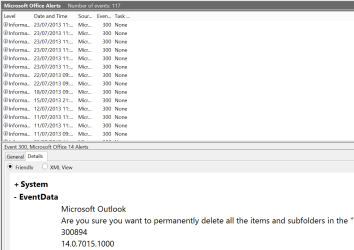
anyone see a fix yet? If i do not see one by the end of this week I will remove sp2 because the event log is just getting too large from all the error msgs in it from Outlook and it is a pain to keep deleting my log and all my clients who installed it
 

My Computer My Computer

At a glance

Windows 7 Pro 32/64 bit and Windows 10 Pro 32...4gigsAMD Radeon HD and Nvidia
Computer type
PC/Desktop
Computer Manufacturer/Model Number
Dell Computers
OS
Windows 7 Pro 32/64 bit and Windows 10 Pro 32 Bit/64bit
Memory
4gigs
Graphics Card(s)
AMD Radeon HD and Nvidia
Monitor(s) Displays
Samsung 24". INC 19". Dell 22 ". Dell 17" & 19"
It has been said to uninstall sp2 until Microsoft issues a hotfix
you can see it here

OL2010: Error ID 27 since SP2 "Calendar Folder property is missing" / "Calendar Folder property is empty"


"Thanks for your all feedback. I have received many reports like you after they installed Office 2010 SP2. When you are encountered the such problem, please temporarily to remove the service package until there is any hotfix released. Thank for your understanding."
Tony Chen
TechNet Community Support

I am removing the service pack now
 

My Computer My Computer

At a glance

Windows 7 Pro 32/64 bit and Windows 10 Pro 32...4gigsAMD Radeon HD and Nvidia
Computer type
PC/Desktop
Computer Manufacturer/Model Number
Dell Computers
OS
Windows 7 Pro 32/64 bit and Windows 10 Pro 32 Bit/64bit
Memory
4gigs
Graphics Card(s)
AMD Radeon HD and Nvidia
Monitor(s) Displays
Samsung 24". INC 19". Dell 22 ". Dell 17" & 19"
I just removed sp2 off my computer and reopend Outlook and NO more error msgs. I will wait till Microsoft fixes this before i reinstall it
 

My Computer My Computer

At a glance

Windows 7 Pro 32/64 bit and Windows 10 Pro 32...4gigsAMD Radeon HD and Nvidia
Computer type
PC/Desktop
Computer Manufacturer/Model Number
Dell Computers
OS
Windows 7 Pro 32/64 bit and Windows 10 Pro 32 Bit/64bit
Memory
4gigs
Graphics Card(s)
AMD Radeon HD and Nvidia
Monitor(s) Displays
Samsung 24". INC 19". Dell 22 ". Dell 17" & 19"
Hi there
I'd suggest if you have more than one computer to update use the download facility then you only have to download ONCE. Quite a lot of people have Office installed on more than one machine (for example Use at Home, Educational institutional use if you are a student, and the Student and Teacher editions --allowed on 3 computers).

Remember also that this SP2 package doesn't include updates for VISIO and PROJECT if you have also installed these - so download the SP2 updates for those separately as well.

In answer to the OP's question -- no problem whatsoever on the 32 bit versions -- all my EXCEL plugins / addins still worked too. (My OS's are 64 bit but I stayed with the 32 bit version of Ms office).

Cheers
jimbo

did you check event viewer to see if you have this problem? it seems it only happens when you open outlook


Hi there
I never use the Calendar feature so perhaps I'm guilty of not doing a total 100% complete test of Office.

Actually a Calendar feature for me is totally useless anyway since I work often in different timezones and locations -- so I would tend to use a Mobile phone for reminders etc -- and my motto on this stuff is "If I can't remember it --then it's not important enough anyway" -- but I'm always a bit cynical with "Corporate and Consultant -ese" in any case.

The rest of the update works just fine so I'm not bothering to back it off.

I don't actually get any messages when opening outlook itself and I don't have that message in the event LOG.

I'm running windows 8 Enterprise (X-64) with OFFICE 2010 x-32 -- not sure whether the VL / KMS version of Office is different from retail but here's my latest event log from last time I opened outlook.

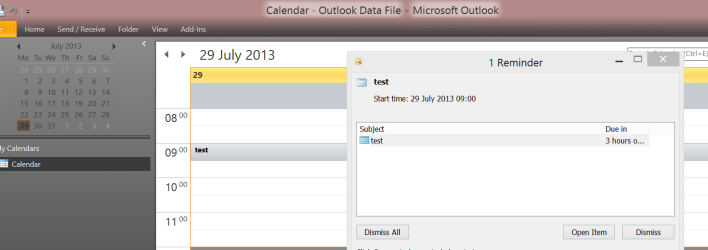
Just tested -- Calendar functions just fine for me.


Cheers
jimbo

 

Attachments

  • officelog.png
    officelog.png
    28 KB · Views: 8
  • kal.png
    kal.png
    28.7 KB · Views: 5
Last edited:

My Computer My Computer

At a glance

Linux CENTOS 7 / various Windows OS'es and se...Intel i7 Intel i58GB, 16GBOn Motherboard
Computer type
PC/Desktop
Computer Manufacturer/Model Number
Custom built, several laptops HP/ASUS
OS
Linux CENTOS 7 / various Windows OS'es and servers
CPU
Intel i7 Intel i5
Memory
8GB, 16GB
Graphics Card(s)
On Motherboard
Sound Card
Realtek HD audio
Monitor(s) Displays
Apple Cinema display, Samsung LCD
Screen Resolution
1920 X 1080
Hard Drives
4 X 1TB SATA
Mouse
Toshiba wireless laser
Internet Speed
> 20MB up

My Computer My Computer

At a glance

Win7-64Intel i7-3770S16GBnVidia GT630
Computer type
PC/Desktop
Computer Manufacturer/Model Number
Custom built
OS
Win7-64
CPU
Intel i7-3770S
Motherboard
ASUS P8Z77-M
Memory
16GB
Graphics Card(s)
nVidia GT630
Sound Card
onboard
Monitor(s) Displays
dual
Screen Resolution
1920x1200 (primary) 1050x1680 (secondary)
Hard Drives
128GB SSD (boot)
64GB SSD (Temp/My Documents)
500GB (photos/videos)
1TB (rendered video, backups)
PSU
650W
Case
Thermaltake A30
Cooling
Thermaltake
Keyboard
Logitech Lighted
Mouse
Kensington Expert Mouse (trackball)
Internet Speed
FIOS 35/35
Antivirus
MS Security Essentials
Browser
Chrome (beta)

My Computer My Computer

At a glance

Windows 7 Pro 32/64 bit and Windows 10 Pro 32...4gigsAMD Radeon HD and Nvidia
Computer type
PC/Desktop
Computer Manufacturer/Model Number
Dell Computers
OS
Windows 7 Pro 32/64 bit and Windows 10 Pro 32 Bit/64bit
Memory
4gigs
Graphics Card(s)
AMD Radeon HD and Nvidia
Monitor(s) Displays
Samsung 24". INC 19". Dell 22 ". Dell 17" & 19"
Hi there
I'd suggest if you have more than one computer to update use the download facility then you only have to download ONCE. Quite a lot of people have Office installed on more than one machine (for example Use at Home, Educational institutional use if you are a student, and the Student and Teacher editions --allowed on 3 computers).

Remember also that this SP2 package doesn't include updates for VISIO and PROJECT if you have also installed these - so download the SP2 updates for those separately as well.

In answer to the OP's question -- no problem whatsoever on the 32 bit versions -- all my EXCEL plugins / addins still worked too. (My OS's are 64 bit but I stayed with the 32 bit version of Ms hu
jimbo

did you check event viewer to see if you have this problem? it seems it only happens when you open outlook


Hi there
I never use the Calendar feature so perhaps I'm guilty of not doing a total 100% complete test of Office.

Actually a Calendar feature for me is totally useless anyway since I work often in different timezones and locations -- so I would tend to use a Mobile phone for reminders etc -- and my motto on this stuff is "If I can't remember it --then it's not important enough anyway" -- but I'm always a bit cynical with "Corporate and Consultant -ese" in any case.

The rest of the update works just fine so I'm not bothering to back it off.

I don't actually get any messages when opening outlook itself and I don't have that message in the event LOG.

I'm running windows 8 Enterprise (X-64) with OFFICE 2010 x-32 -- not sure whether the VL / KMS version of Office is different from retail but here's my latest event log from last time I opened outlook.

Just tested -- Calendar functions just fine for me.


Cheers
jimbo
Maybe because your version is a bit different from the. Norm, but if you go on Windows different forums you will see everyone who installed the sp2 stand alone or through windows update has the same problem
The biggest problem is that every time you open outlook or try to do a calendar entry or even open the calendar, it spits out hundreds of these error mags in event viewer, which after a few days makes event viewer quite large and if you do not realize this because you are a average user it goes into the gigs of space which is not a good thing, also one has no idea what the problem is in outlook because of the sp2, and what else it is going to break over time
Why did not Microsoft test this prior to sending it out since almost everyone has this problem, it is not an isolated few.
 

My Computer My Computer

At a glance

Windows 7 Pro 32/64 bit and Windows 10 Pro 32...4gigsAMD Radeon HD and Nvidia
Computer type
PC/Desktop
Computer Manufacturer/Model Number
Dell Computers
OS
Windows 7 Pro 32/64 bit and Windows 10 Pro 32 Bit/64bit
Memory
4gigs
Graphics Card(s)
AMD Radeon HD and Nvidia
Monitor(s) Displays
Samsung 24". INC 19". Dell 22 ". Dell 17" & 19"
Hi there
The only other thing I did that might be different from standard was that I downloaded the SP2 update and installed it manually rather than using Windows update. I've had success with this on 2 Windows 8 machines, a Windows 7 virtual machine, an W2003 server virtual machine and an XP virtual machine -- no problems on any of them.

(The Ms office version though is the VL / KMS version that is normally supplied to businesses though) and I'm not using anybody's EXCHANGE email server. My email (Outlook) is also set to IMAP so it might be something to do if your email client uses someone else's EXCHANGE server.

Cheers
jimbo
 

My Computer My Computer

At a glance

Linux CENTOS 7 / various Windows OS'es and se...Intel i7 Intel i58GB, 16GBOn Motherboard
Computer type
PC/Desktop
Computer Manufacturer/Model Number
Custom built, several laptops HP/ASUS
OS
Linux CENTOS 7 / various Windows OS'es and servers
CPU
Intel i7 Intel i5
Memory
8GB, 16GB
Graphics Card(s)
On Motherboard
Sound Card
Realtek HD audio
Monitor(s) Displays
Apple Cinema display, Samsung LCD
Screen Resolution
1920 X 1080
Hard Drives
4 X 1TB SATA
Mouse
Toshiba wireless laser
Internet Speed
> 20MB up
I am not using an exchange server either, neither are any of my clients, everything is on a pop account, and most who posted on the windows forum they also were not using exchange accounts
 

My Computer My Computer

At a glance

Windows 7 Pro 32/64 bit and Windows 10 Pro 32...4gigsAMD Radeon HD and Nvidia
Computer type
PC/Desktop
Computer Manufacturer/Model Number
Dell Computers
OS
Windows 7 Pro 32/64 bit and Windows 10 Pro 32 Bit/64bit
Memory
4gigs
Graphics Card(s)
AMD Radeon HD and Nvidia
Monitor(s) Displays
Samsung 24". INC 19". Dell 22 ". Dell 17" & 19"
if i get a chance maybe i will re install it as a stand alone, and see what happens
you happen to have the link for it please?
 

My Computer My Computer

At a glance

Windows 7 Pro 32/64 bit and Windows 10 Pro 32...4gigsAMD Radeon HD and Nvidia
Computer type
PC/Desktop
Computer Manufacturer/Model Number
Dell Computers
OS
Windows 7 Pro 32/64 bit and Windows 10 Pro 32 Bit/64bit
Memory
4gigs
Graphics Card(s)
AMD Radeon HD and Nvidia
Monitor(s) Displays
Samsung 24". INC 19". Dell 22 ". Dell 17" & 19"
ok I went to the website and picked up service pack 2 (32bit) and after the install same error msgs

but i did notice something when outlook loads, it puts in a Microsoft exchange add on as it is loading up
I am wondering if this has anything to do with the problem.

I uninstalled the service pack- error msg gone when opening outlook

I am not using an exhange account but by default MS puts this add on in
 

My Computer My Computer

At a glance

Windows 7 Pro 32/64 bit and Windows 10 Pro 32...4gigsAMD Radeon HD and Nvidia
Computer type
PC/Desktop
Computer Manufacturer/Model Number
Dell Computers
OS
Windows 7 Pro 32/64 bit and Windows 10 Pro 32 Bit/64bit
Memory
4gigs
Graphics Card(s)
AMD Radeon HD and Nvidia
Monitor(s) Displays
Samsung 24". INC 19". Dell 22 ". Dell 17" & 19"
this is what installs when it opens

Outlook loaded the following add-in(s):
 
Name: Microsoft Exchange Add-in
Description: Exchange support for Unified Messaging, e-mail permission rules, and calendar availability.
ProgID: UmOutlookAddin.FormRegionAddin
GUID: {F959DBBB-3867-41F2-8E5F-3B8BEFAA81B3}
Load Behavior: 03
HKLM: 1
Location: C:\Program Files (x86)\Microsoft Office\Office14\ADDINS\UmOutlookAddin.dll
Boot Time (Milliseconds): 62
Name: Outlook Change Notifier
Description: Detects changes to contacts and calendars
ProgID: OutlookChangeNotifier.Connect
GUID: {12E6A993-AE52-4F99-8B89-41F985E6C952}
Load Behavior: 03
HKLM: 1

I am wondering if this is causing the problem since it does put this add in
robin
 

My Computer My Computer

At a glance

Windows 7 Pro 32/64 bit and Windows 10 Pro 32...4gigsAMD Radeon HD and Nvidia
Computer type
PC/Desktop
Computer Manufacturer/Model Number
Dell Computers
OS
Windows 7 Pro 32/64 bit and Windows 10 Pro 32 Bit/64bit
Memory
4gigs
Graphics Card(s)
AMD Radeon HD and Nvidia
Monitor(s) Displays
Samsung 24". INC 19". Dell 22 ". Dell 17" & 19"
Hi there
I've checked ALL the computers I've installed my update on -- I don't get the error on any of the other machines either.

The only other difference I can see is that all my OUTLOOK email accounts were configured with IMAP and not POP3 so that could be another issue (although why I've no idea).

(Incidentally you are better off using IMAP if you have email on a number of machines as it's much easier to keep the emails in sync on all the computers rather than have to mess around downloading / deleting email from the server(s) via POP3).

Sorry on this one then -- can't help you any more -- maybe I've just been lucky.

Cheers
jimbo
 

My Computer My Computer

At a glance

Linux CENTOS 7 / various Windows OS'es and se...Intel i7 Intel i58GB, 16GBOn Motherboard
Computer type
PC/Desktop
Computer Manufacturer/Model Number
Custom built, several laptops HP/ASUS
OS
Linux CENTOS 7 / various Windows OS'es and servers
CPU
Intel i7 Intel i5
Memory
8GB, 16GB
Graphics Card(s)
On Motherboard
Sound Card
Realtek HD audio
Monitor(s) Displays
Apple Cinema display, Samsung LCD
Screen Resolution
1920 X 1080
Hard Drives
4 X 1TB SATA
Mouse
Toshiba wireless laser
Internet Speed
> 20MB up
I think you are lucky because one of my accounts are imap, 2 pop and I went on one of my clients who have this problem and they only have imap accounts, but it was an interesting thought
 

My Computer My Computer

At a glance

Windows 7 Pro 32/64 bit and Windows 10 Pro 32...4gigsAMD Radeon HD and Nvidia
Computer type
PC/Desktop
Computer Manufacturer/Model Number
Dell Computers
OS
Windows 7 Pro 32/64 bit and Windows 10 Pro 32 Bit/64bit
Memory
4gigs
Graphics Card(s)
AMD Radeon HD and Nvidia
Monitor(s) Displays
Samsung 24". INC 19". Dell 22 ". Dell 17" & 19"
Close - but no cigar!

Apparently my problem has to do with a missing MSOCACHE folder. I deleted this to save space on my SSD drive. There are no formal instructions on how to get it back, but after some searching I found this:

Copy all files from ProPlus.WW map in Office 2010 Pro CD/ISO and paste into C\MSOCache\All Users\{90140000-0011-0000-1000-0000000FF1CE}-C. If this map don't exist, create one and paste.

Run update (SP2) from downloaded .exe file (with Office 2010 Pro CD in computer).


So I did that and ran the SP@ installer again. It got farther - actually went through installing files - but then asked for the Office 2010 Pro CD (which I have.) It said it was looking for file ProPlusrWW.MSI which I found in the ProPlysr.WW directory on the CD. So I pointed to this and then got the inevitable "Installation Failed" message.

I found these lines in the SP2 installer log file:

MSI (s) (B0:5C) [15:44:49:586]: Windows Installer installed an update. Product Name: Microsoft Office Professional Plus 2010. Product Version: 14.0.7015.1000. Product Language: 0. Manufacturer: Microsoft Corporation. Update Name: Service Pack 2 for Microsoft Office 2010 (KB2687455) 64-Bit Edition. Installation success or error status: 1603.

MSI (s) (B0:5C) [15:44:49:586]: Note: 1: 1729
MSI (s) (B0:5C) [15:44:49:586]: Product: Microsoft Office Professional Plus 2010 -- Configuration failed.

MSI (s) (B0:5C) [15:44:49:586]: Windows Installer reconfigured the product. Product Name: Microsoft Office Professional Plus 2010. Product Version: 14.0.7015.1000. Product Language: 0. Manufacturer: Microsoft Corporation. Reconfiguration success or error status: 1603.

Stuck again.
 

My Computer My Computer

At a glance

Win7-64Intel i7-3770S16GBnVidia GT630
Computer type
PC/Desktop
Computer Manufacturer/Model Number
Custom built
OS
Win7-64
CPU
Intel i7-3770S
Motherboard
ASUS P8Z77-M
Memory
16GB
Graphics Card(s)
nVidia GT630
Sound Card
onboard
Monitor(s) Displays
dual
Screen Resolution
1920x1200 (primary) 1050x1680 (secondary)
Hard Drives
128GB SSD (boot)
64GB SSD (Temp/My Documents)
500GB (photos/videos)
1TB (rendered video, backups)
PSU
650W
Case
Thermaltake A30
Cooling
Thermaltake
Keyboard
Logitech Lighted
Mouse
Kensington Expert Mouse (trackball)
Internet Speed
FIOS 35/35
Antivirus
MS Security Essentials
Browser
Chrome (beta)
LOL just installed Office 365, check for updates and see there's a SP2 update for 2010.

Anyway did he update as I've still got 2010 temp installed. Haven't notice any issues, though I'm currently using 365.
 

My Computer My Computer

At a glance

Windows 10 ProIntel Core i7-4770K (3.5Ghz)32 gig Corsair Dominator Platinum (4x8Gig)Sapphire Tri-X R9 Fury
Computer type
PC/Desktop
Computer Manufacturer/Model Number
Custom built by me.
OS
Windows 10 Pro
CPU
Intel Core i7-4770K (3.5Ghz)
Motherboard
Gigabyte G1 Sniper 5 (F10 Bios)
Memory
32 gig Corsair Dominator Platinum (4x8Gig)
Graphics Card(s)
Sapphire Tri-X R9 Fury
Sound Card
Soundblaster ZXR
Monitor(s) Displays
NEC PA242W 24" LCD Monitor
Screen Resolution
1920 x 1200
Hard Drives
Primary - Samsung 850 Pro (512gig), Samsung 840 Pro (256gig), 2TB WD Caviar Black.
PSU
EVGA Supernova 1000 G2
Case
Cooler Master HAF X
Cooling
Corsair H100i with Corsair Air Series SP120 Quiet Fans
Keyboard
Logitech Wireless Wave
Mouse
Logitech Performance MX
Internet Speed
High Speed Cable
Antivirus
Norton Security
Browser
IE11
Other Info
Memory Timings - 1866MHz @ 9-9-9-27-1T @ 1.5 volts
I need to install this service pack on multiple computers. So, I downloaded the file and installed it on one of the machine in question. The 'problem' is that MS Update is still indicating that the service pack needs to be installed. How do I fix this problem?

Thanks!
 

My Computer My Computer

At a glance

Windows 7 x64 ProCore i7 860 @ 3.8 GHz16 GB F3-12800CL7D (DDR3 1600 7-7-7-24)Sapphire Vapor-X 100283VXL Radeon HD 5770
Computer type
PC/Desktop
OS
Windows 7 x64 Pro
CPU
Core i7 860 @ 3.8 GHz
Motherboard
MSI P55-GD80
Memory
16 GB F3-12800CL7D (DDR3 1600 7-7-7-24)
Graphics Card(s)
Sapphire Vapor-X 100283VXL Radeon HD 5770
Monitor(s) Displays
NEC LCD3090WQXi-BK
maybe you should wait till microsoft fixes it, they are aware of problems with it and stated they are working on a fix, I uninstalled it and am awaiting for this fix too because I also have to put it on mutiple client computers
 

My Computer My Computer

At a glance

Windows 7 Pro 32/64 bit and Windows 10 Pro 32...4gigsAMD Radeon HD and Nvidia
Computer type
PC/Desktop
Computer Manufacturer/Model Number
Dell Computers
OS
Windows 7 Pro 32/64 bit and Windows 10 Pro 32 Bit/64bit
Memory
4gigs
Graphics Card(s)
AMD Radeon HD and Nvidia
Monitor(s) Displays
Samsung 24". INC 19". Dell 22 ". Dell 17" & 19"
Hi there
I've also tested the update with Windows 8.1 Enterprise and the Office 2010 was fine -- I just can't replicate your error on any machine -- tried XP, Windows 2003 server, Windows 7 Enterprise, Windows 8 Enterprise and Windows 8.1 preview Enterprise.

Running Office 2010 32 bit version -- not sure if that has anything to do with it. We've got too many EXCEL addins etc to use the 64 bit version of office - where these addins won't work --I've already tried those so we are staying with the 32 bit version.

Anyway it's obviously a problem --just shows how DIFFICULT fixing anything to do with computers is --sometimes what works perfectly on one set of machines fails on another even if it's the SAME software. !!!

Sorry I can't help anymore on this one.

Cheers
jimbo
 

My Computer My Computer

At a glance

Linux CENTOS 7 / various Windows OS'es and se...Intel i7 Intel i58GB, 16GBOn Motherboard
Computer type
PC/Desktop
Computer Manufacturer/Model Number
Custom built, several laptops HP/ASUS
OS
Linux CENTOS 7 / various Windows OS'es and servers
CPU
Intel i7 Intel i5
Memory
8GB, 16GB
Graphics Card(s)
On Motherboard
Sound Card
Realtek HD audio
Monitor(s) Displays
Apple Cinema display, Samsung LCD
Screen Resolution
1920 X 1080
Hard Drives
4 X 1TB SATA
Mouse
Toshiba wireless laser
Internet Speed
> 20MB up
Weird, Microsoft is aware of the problem as they posted on their office forums and is working on a fix, btw I have office 2010 running 32 bit too, so I am waiting for the hot fix before I reinstall it
 

My Computer My Computer

At a glance

Windows 7 Pro 32/64 bit and Windows 10 Pro 32...4gigsAMD Radeon HD and Nvidia
Computer type
PC/Desktop
Computer Manufacturer/Model Number
Dell Computers
OS
Windows 7 Pro 32/64 bit and Windows 10 Pro 32 Bit/64bit
Memory
4gigs
Graphics Card(s)
AMD Radeon HD and Nvidia
Monitor(s) Displays
Samsung 24". INC 19". Dell 22 ". Dell 17" & 19"
Back
Top