Office 2013 - Activate

How to Activate Office 2013

   Information
Office 2013 doesn't ask you to enter the product key during installation like it does in Office 2010.

This tutorial will show you how to activate Office 2013 after it has been installed in Windows 7 or Windows 8.

For more information about Office 2013 activation, see also: Activate Office programs - support - Office.com

   Note
For phone activation of Office 2013, see: How to contact a Microsoft Product Activation Center by telephone
  • Microsoft Office activation (United States only): (888) 652-2342
  • TTY number: (800) 718-1599
For volume activation of Office 2013, please see this link below from Microsoft instead.

Volume activation of Office 2013


Here's How:

1. When Office 2013 is finished installing, run Word 2013 or any of the other Office 2013 programs.

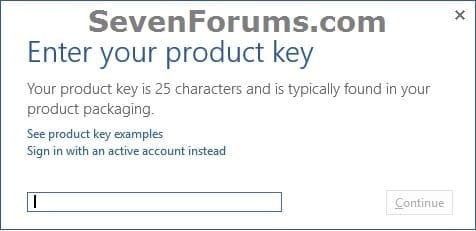
2. Click/tap on the Enter a product key instead link. (see screenshots below) Activate_Office-2013-1.jpg
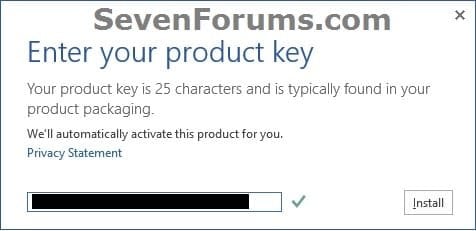
3. Enter your 25 character product key for Office 2013, and click/tap on Install. (see screenshots below) Activate_Office-2013-2.jpgActivate_Office-2013-3.jpg
   Tip
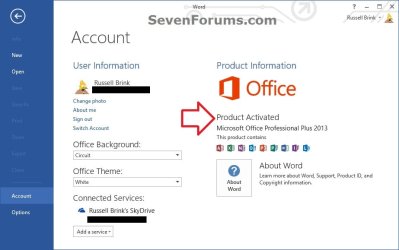
To Verify Office 2013 Activation

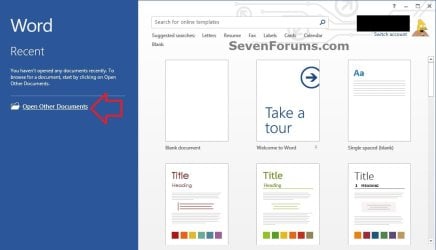
1. In Word 2013, or other Office 2013 program you opened, click/tap on the Open Other...... link on the left side. (see screenshot below) Activate_Office-2013-4.jpg
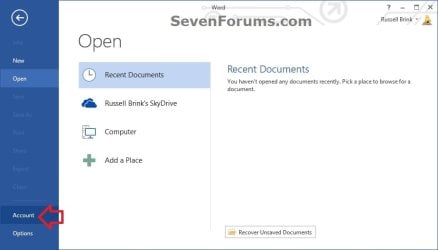
2. Click/tap on Account on the left side. (see screenshot below) Activate_Office-2013-5.jpg
3. On the right side under Product Information, you will see Product Activated if Office 2013 was successfully activated. Activate_Office-2013-6.jpg


That's it,
Shawn


Last edited:
After installing my download version I logged in. Now my product key shows an error if I try to register it. I don't really know if this is a problem. Does that mean I have to be online for my Office suite to work? Ideally I'd just like to register like the good old days (i.e. MSO 2010 style).
 

My Computer

OS
Windows 7 64
Hello Kolardins,

What was the full error message that you got?

You will need to be online to activate, but afterwards you don't need to be.
 

My Computer

Computer type
PC/Desktop
Computer Manufacturer/Model Number
Self built custom
OS
64-bit Windows 11 Pro for Workstations
CPU
Intel i7-8700K OC'd to 5 GHz
Motherboard
ASUS ROG Maximus XI Formula Z390
Memory
64 GB (4x16GB) G.SKILL TridentZ RGB DDR4 3600 MHz
Graphics Card(s)
ASUS ROG-STRIX-GTX1080TI-O11G-GAMING
Sound Card
Integrated
Monitor(s) Displays
2 x Samsung Odyssey G7 27"
Screen Resolution
2560x1440
Hard Drives
1TB Samsung 990 PRO M.2,
4TB Samsung 990 PRO PRO M.2,
TerraMaster F8 SSD Plus NAS
PSU
Seasonic Prime Titanium 850W
Case
Thermaltake Core P3
Cooling
Corsair Hydro H115i
Keyboard
Logitech wireless K800
Mouse
Logitech MX Master 4
Internet Speed
2 Gb/s Download and 100 Mb/s Upload
Antivirus
Malwarebyte Anti-Malware Premium
Browser
Google Chrome
Other Info
Logitech Z625 speaker system,
Logitech BRIO 4K Pro webcam,
HP Color LaserJet Pro MFP M477fdn,
APC SMART-UPS RT 1000 XL - SURT1000XLI,
Galaxy S23 Plus phone
Thanks Brink.

"This product key isn't a valid Microsoft Office 2013 product key. Check that you've entered it correctly."

It's the key copied from my purchase email when bought online. I can log into my account within Word but it still shows as "This product is unlicensed. Contact your etc"
 

My Computer

OS
Windows 7 64
Hi there
I actually had this problem too --even with a TECHNET downloaded copy and with a TechNet key.

I've in any case abandoned office 2013 for the moment - preferring to remain with 2010 until various issues are solved.

Not sure what the problem is as Office 2013 is definitely released for public download.

seems that on W8 there isn't currently a way to activate it even with a VL (Volume license) version. (These version usually needs a KMS server for activation).

On W7 I couldn't activate either --I'm on W7 x-64 Ultimate.

I don't think for the moment though it will suddenly stop working.

@Brink -- how did you activate yours -- you seem to be the only one who got it to work on W8.


Cheers
jimbo
 

My Computer

Computer type
PC/Desktop
Computer Manufacturer/Model Number
Custom built, several laptops HP/ASUS
OS
Linux CENTOS 7 / various Windows OS'es and servers
CPU
Intel i7 Intel i5
Memory
8GB, 16GB
Graphics Card(s)
On Motherboard
Sound Card
Realtek HD audio
Monitor(s) Displays
Apple Cinema display, Samsung LCD
Screen Resolution
1920 X 1080
Hard Drives
4 X 1TB SATA
Mouse
Toshiba wireless laser
Internet Speed
> 20MB up
Combine the issues I had with downloading the product I paid for and the issues with activation and this has to be the worst program realease I've ever experienced. I've had to deal with eLicenser, iLok, Challenge response authorization form tens of companies but this is mind boggling. It almost seems like they don't want me to use it after paying.:confused:

Thanks for the help though. Hopefully it will get worked out.
 

My Computer

OS
Windows 7 64
@Jimbo,

I activated it using the same method in the tutorial. Mine is a TechNet copy.

@Kolardins,

Double check that you have entered the key correctly. Those 0 (number) and o (letter), 6 (number) and G (letter), etc... type characters can easily be mistaken.
 

My Computer

Computer type
PC/Desktop
Computer Manufacturer/Model Number
Self built custom
OS
64-bit Windows 11 Pro for Workstations
CPU
Intel i7-8700K OC'd to 5 GHz
Motherboard
ASUS ROG Maximus XI Formula Z390
Memory
64 GB (4x16GB) G.SKILL TridentZ RGB DDR4 3600 MHz
Graphics Card(s)
ASUS ROG-STRIX-GTX1080TI-O11G-GAMING
Sound Card
Integrated
Monitor(s) Displays
2 x Samsung Odyssey G7 27"
Screen Resolution
2560x1440
Hard Drives
1TB Samsung 990 PRO M.2,
4TB Samsung 990 PRO PRO M.2,
TerraMaster F8 SSD Plus NAS
PSU
Seasonic Prime Titanium 850W
Case
Thermaltake Core P3
Cooling
Corsair Hydro H115i
Keyboard
Logitech wireless K800
Mouse
Logitech MX Master 4
Internet Speed
2 Gb/s Download and 100 Mb/s Upload
Antivirus
Malwarebyte Anti-Malware Premium
Browser
Google Chrome
Other Info
Logitech Z625 speaker system,
Logitech BRIO 4K Pro webcam,
HP Color LaserJet Pro MFP M477fdn,
APC SMART-UPS RT 1000 XL - SURT1000XLI,
Galaxy S23 Plus phone
Yep, easy to make mistakes. But when it's a copy and paste job highly unlikely. I've been through this 3 times now though and the same outcome each time.
 

My Computer

OS
Windows 7 64
Kolardins,

In that case, you might try to phone activate Office 2013 using the information in the blue note box at the top of the tutorial.
 

My Computer

Computer type
PC/Desktop
Computer Manufacturer/Model Number
Self built custom
OS
64-bit Windows 11 Pro for Workstations
CPU
Intel i7-8700K OC'd to 5 GHz
Motherboard
ASUS ROG Maximus XI Formula Z390
Memory
64 GB (4x16GB) G.SKILL TridentZ RGB DDR4 3600 MHz
Graphics Card(s)
ASUS ROG-STRIX-GTX1080TI-O11G-GAMING
Sound Card
Integrated
Monitor(s) Displays
2 x Samsung Odyssey G7 27"
Screen Resolution
2560x1440
Hard Drives
1TB Samsung 990 PRO M.2,
4TB Samsung 990 PRO PRO M.2,
TerraMaster F8 SSD Plus NAS
PSU
Seasonic Prime Titanium 850W
Case
Thermaltake Core P3
Cooling
Corsair Hydro H115i
Keyboard
Logitech wireless K800
Mouse
Logitech MX Master 4
Internet Speed
2 Gb/s Download and 100 Mb/s Upload
Antivirus
Malwarebyte Anti-Malware Premium
Browser
Google Chrome
Other Info
Logitech Z625 speaker system,
Logitech BRIO 4K Pro webcam,
HP Color LaserJet Pro MFP M477fdn,
APC SMART-UPS RT 1000 XL - SURT1000XLI,
Galaxy S23 Plus phone
It should be sorted soon. Thanks for the help. I was online with several different people but eventually got a download link for the actual installer. Hopefully that will work when I get the chance to download it.
 

My Computer

OS
Windows 7 64
Hi there
@Brink -- Seems to work now on W7 x-64 ultimate -- maybe I mis-typed something but still fails on W8 Enterprise (X-64) . Office version also x-64.

Cheers
jimbo
 

My Computer

Computer type
PC/Desktop
Computer Manufacturer/Model Number
Custom built, several laptops HP/ASUS
OS
Linux CENTOS 7 / various Windows OS'es and servers
CPU
Intel i7 Intel i5
Memory
8GB, 16GB
Graphics Card(s)
On Motherboard
Sound Card
Realtek HD audio
Monitor(s) Displays
Apple Cinema display, Samsung LCD
Screen Resolution
1920 X 1080
Hard Drives
4 X 1TB SATA
Mouse
Toshiba wireless laser
Internet Speed
> 20MB up
Hello Jimbo,

Nar, my Office 2013 is installed and activated on 64-bit Windows 8 Enterprise.

You might try to phone activate Office 2013 using the information in the blue note box at the top of the tutorial.
 

My Computer

Computer type
PC/Desktop
Computer Manufacturer/Model Number
Self built custom
OS
64-bit Windows 11 Pro for Workstations
CPU
Intel i7-8700K OC'd to 5 GHz
Motherboard
ASUS ROG Maximus XI Formula Z390
Memory
64 GB (4x16GB) G.SKILL TridentZ RGB DDR4 3600 MHz
Graphics Card(s)
ASUS ROG-STRIX-GTX1080TI-O11G-GAMING
Sound Card
Integrated
Monitor(s) Displays
2 x Samsung Odyssey G7 27"
Screen Resolution
2560x1440
Hard Drives
1TB Samsung 990 PRO M.2,
4TB Samsung 990 PRO PRO M.2,
TerraMaster F8 SSD Plus NAS
PSU
Seasonic Prime Titanium 850W
Case
Thermaltake Core P3
Cooling
Corsair Hydro H115i
Keyboard
Logitech wireless K800
Mouse
Logitech MX Master 4
Internet Speed
2 Gb/s Download and 100 Mb/s Upload
Antivirus
Malwarebyte Anti-Malware Premium
Browser
Google Chrome
Other Info
Logitech Z625 speaker system,
Logitech BRIO 4K Pro webcam,
HP Color LaserJet Pro MFP M477fdn,
APC SMART-UPS RT 1000 XL - SURT1000XLI,
Galaxy S23 Plus phone
I cannot access the activation screen on MS Office 2013. I get a screen saying we are having temporary server issues. try again later. Will it has been five days since I bought the program and the same error is there. I cannot activate the program and I began classes in two days. Please help
 

My Computer

Computer type
PC/Desktop
Computer Manufacturer/Model Number
Acer
OS
win 7
CPU
Pentium(R) Dual core CPU E5700 @ 3.00 GHz
Memory
6.00 GB
Antivirus
Norton's 360 Premium
Hello Hound, and welcome to Seven Forums.

You might see if you may be able to activate Office 2013 by phone instead.


Activate Office 2013 programs - support - Office.com

How to activate a Microsoft product by using Microsoft Product Activation Center

Microsoft Office 2013

To start the Product Activation Wizard, follow these steps:
  1. Open any Office program. For example, open Microsoft Word 2013.
  2. Click the File tab.
  3. Click Account, then click Activate Product.
  4. In the Microsoft Office Activation Wizard, choose I want to activate the software by telephone, then click Next.
  5. Click the drop-down menu, and then select the country or region in which you're located.
  6. The Product Activation Center telephone number appears under Step 1.


Hope this helps, :)
Shawn
 

My Computer

Computer type
PC/Desktop
Computer Manufacturer/Model Number
Self built custom
OS
64-bit Windows 11 Pro for Workstations
CPU
Intel i7-8700K OC'd to 5 GHz
Motherboard
ASUS ROG Maximus XI Formula Z390
Memory
64 GB (4x16GB) G.SKILL TridentZ RGB DDR4 3600 MHz
Graphics Card(s)
ASUS ROG-STRIX-GTX1080TI-O11G-GAMING
Sound Card
Integrated
Monitor(s) Displays
2 x Samsung Odyssey G7 27"
Screen Resolution
2560x1440
Hard Drives
1TB Samsung 990 PRO M.2,
4TB Samsung 990 PRO PRO M.2,
TerraMaster F8 SSD Plus NAS
PSU
Seasonic Prime Titanium 850W
Case
Thermaltake Core P3
Cooling
Corsair Hydro H115i
Keyboard
Logitech wireless K800
Mouse
Logitech MX Master 4
Internet Speed
2 Gb/s Download and 100 Mb/s Upload
Antivirus
Malwarebyte Anti-Malware Premium
Browser
Google Chrome
Other Info
Logitech Z625 speaker system,
Logitech BRIO 4K Pro webcam,
HP Color LaserJet Pro MFP M477fdn,
APC SMART-UPS RT 1000 XL - SURT1000XLI,
Galaxy S23 Plus phone
Shawn,

Thanks for replying. I cannot get the activation screen to display. Still getting temporary server issues message. I tried to activate by phone but they don't say Office 2013 on it and I end up getting cut off. If I could just get to the activation screen I will be satisfied but I can't get to it.
 

My Computer

Computer type
PC/Desktop
Computer Manufacturer/Model Number
Acer
OS
win 7
CPU
Pentium(R) Dual core CPU E5700 @ 3.00 GHz
Memory
6.00 GB
Antivirus
Norton's 360 Premium
Does it have an option to talk with a person?
 

My Computer

Computer type
PC/Desktop
Computer Manufacturer/Model Number
Self built custom
OS
64-bit Windows 11 Pro for Workstations
CPU
Intel i7-8700K OC'd to 5 GHz
Motherboard
ASUS ROG Maximus XI Formula Z390
Memory
64 GB (4x16GB) G.SKILL TridentZ RGB DDR4 3600 MHz
Graphics Card(s)
ASUS ROG-STRIX-GTX1080TI-O11G-GAMING
Sound Card
Integrated
Monitor(s) Displays
2 x Samsung Odyssey G7 27"
Screen Resolution
2560x1440
Hard Drives
1TB Samsung 990 PRO M.2,
4TB Samsung 990 PRO PRO M.2,
TerraMaster F8 SSD Plus NAS
PSU
Seasonic Prime Titanium 850W
Case
Thermaltake Core P3
Cooling
Corsair Hydro H115i
Keyboard
Logitech wireless K800
Mouse
Logitech MX Master 4
Internet Speed
2 Gb/s Download and 100 Mb/s Upload
Antivirus
Malwarebyte Anti-Malware Premium
Browser
Google Chrome
Other Info
Logitech Z625 speaker system,
Logitech BRIO 4K Pro webcam,
HP Color LaserJet Pro MFP M477fdn,
APC SMART-UPS RT 1000 XL - SURT1000XLI,
Galaxy S23 Plus phone
Back
Top