
Office 2013 and Office 365 installations and transferability

Brink

Administrator
Staff member
Local time
8:02 AM
Messages
74,898
Location
Oklahoma
A few weeks ago, we announced the new Office for consumers, including the all new Office 365 Home Premium, Office 365 University for college and university students, and traditional Office suites: Office Home and Student 2013, Office Home and Business 2013 and Office Professional 2013.

Since then we've received questions about the number of installations people get with the traditional Office suites, transferability, and how they compare to Office 2010. With that in mind, we want to offer some clarity on the matter, to help customers make the best purchasing decision.

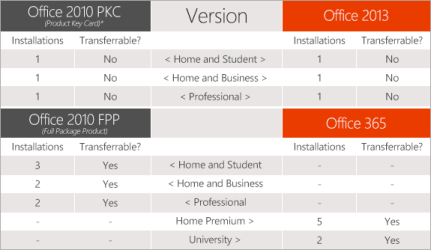
Here's how our Office 2010 and Office 2013 licenses compare:

5618_LicensesCompare_png-575x0.png

*An exception is granted when the software is on a PC that is replaced under warranty.


It is important to note that Office 2013 suites have consistent rights and restrictions regarding transferability as the equivalent Office 2010 PKC, which was chosen by a majority of Office 2010 customers worldwide.

We think this new lineup offers unmatched choice and value for students, families and everyone in between.

  • For those looking to use Office on multiple devices - Office 365 Home Premium works across up to 5 devices (Windows tablets, PCs or Macs) and can be activated and deactivated across devices.
  • For those who only require Office on one device - The Office 2013 software is licensed to one computer for the life of that computer and is non-transferable (consistent with the rights and restrictions of Office 2010 PKC). In the event that a customer buys the Office 2013 software and installs it on a PC that fails under warranty, the customer can contact support to receive an exemption to activate the Office 2013 software on the replacement PC.
  • For college and university students - Office 365 University works across 2 devices (Windows tablets, PCs or Macs) and can be activated and deactivated across devices.
Source:
Office News - Office 2013 and Office 365 installations and transferability
 

My Computer My Computer

At a glance

64-bit Windows 11 Pro for WorkstationsIntel i7-8700K OC'd to 5 GHz64 GB (4x16GB) G.SKILL TridentZ RGB DDR4 3600...ASUS ROG-STRIX-GTX1080TI-O11G-GAMING
Computer type
PC/Desktop
Computer Manufacturer/Model Number
Self built custom
OS
64-bit Windows 11 Pro for Workstations
CPU
Intel i7-8700K OC'd to 5 GHz
Motherboard
ASUS ROG Maximus XI Formula Z390
Memory
64 GB (4x16GB) G.SKILL TridentZ RGB DDR4 3600 MHz
Graphics Card(s)
ASUS ROG-STRIX-GTX1080TI-O11G-GAMING
Sound Card
Integrated
Monitor(s) Displays
2 x Samsung Odyssey G7 27"
Screen Resolution
2560x1440
Hard Drives
1TB Samsung 990 PRO M.2,
4TB Samsung 990 PRO PRO M.2,
TerraMaster F8 SSD Plus NAS
PSU
Seasonic Prime Titanium 850W
Case
Thermaltake Core P3
Cooling
Corsair Hydro H115i
Keyboard
Logitech wireless K800
Mouse
Logitech MX Master 4
Internet Speed
2 Gb/s Download and 100 Mb/s Upload
Antivirus
Malwarebyte Anti-Malware Premium
Browser
Google Chrome
Other Info
Logitech Z625 speaker system,
Logitech BRIO 4K Pro webcam,
HP Color LaserJet Pro MFP M477fdn,
APC SMART-UPS RT 1000 XL - SURT1000XLI,
Galaxy S23 Plus phone
I originally replaced my copy of Office 2007 (which I gave to the student son of someone I know since it was what his school used) with Office 2010 so I would have a decent set of programs through the end of Win 7's life cycle since I didn't like what I had been reading about Office 2013. Now that it is coming out that M$ is screwing people with the non-transferrable one installation nonsense (at the same price as the earlier three installations!), I'm really glad I got 2010. If M$ doesn't wake up and clean up its act before 01/01/2020 (assuming it's still around), I don't know what I'll do but, whatever I decide on, it won't be to buy more M$ products; I'll go to MAC first (Hackintosh?).
 

My Computer My Computer

At a glance

Win 7 Ultimate 64 bitIntel i7-3930KKingston HyperX Genesis 32GB Kit (8x4GB Modul...MSI R7850 Twin Frozr 2GD5/OC Radeon HD 7850 2...
Computer type
PC/Desktop
Computer Manufacturer/Model Number
Custom Build
OS
Win 7 Ultimate 64 bit
CPU
Intel i7-3930K
Motherboard
ASUS P9X79 WS
Memory
Kingston HyperX Genesis 32GB Kit (8x4GB Modules) 1600MHz DDR
Graphics Card(s)
MSI R7850 Twin Frozr 2GD5/OC Radeon HD 7850 2GB 256-bit GDDR
Sound Card
Asus Xonar Essence STX
Monitor(s) Displays
3x Asus VG248QE 24", Vizio 32" TV
Screen Resolution
1920 x 1080, ?
Hard Drives
Samsung 128GB 840 Pro SSD (1),
Samsung 4TB 850 EVO SSDs (4)
Samsung 4TB 850 EVO SSDs (16) external backup drives used in 2.5" hot swap bays in the computer.
PSU
Corsair HX750w
Case
Antec Two Hundred v2 (modified)
Cooling
Cooler Master GeminII S524 120mm (fan replaced with a 140mm)
Keyboard
Logitech G510s
Mouse
Logitech M525 (two in use)
Internet Speed
=< 32Mbps down, 8Mbps up
Antivirus
AVAST!, MBAM, SAS, Spybot S&D (all but MBAM free) Glary Util
Browser
IE11
Other Info
LSI 9211-8i HBA card (8 SATA III ports), 2.5" & 3.5" Hot Swap Bays, HooToo HT-CR001 PCI-E to USB 3.0 Internal Hub + 6 Slot Card Reader, and LG Model CH12LS28 BD-ROM Optical Drive. Also, ScanSnap S1500 ADF duplexing scanner, Canon 9000F flat bed scanner, Corsair SP2500 2.1 speakers, Samsung CLP 415nw laser color printer, Cyberpower PP2200SW UPS
I don't use any MS Office software, but I found this work around for those who might be interested.

The activation code is transmitted to Microsoft and checked during each attempt to re-install Office 2013. If the machine changes, the new activation code won’t match the one that Microsoft has, and the installation will fail.

But here is the secret: if you can erase Microsoft’s record of that activation code, then your copy of Office 2013 is not “assigned” to any computer; it’s as if Office has never been installed. You can install it on a new or modified PC. There are two ways to accomplish this erasure (without any hacking skills).

Call tech support, explain that you have replaced or modified your PC, and beg the support rep to delete your activation code. That may or may not work, depending on the rep’s training or mood. (Hint: ask nicely.) The second method is to go to the Office 2013 Web site, log in to the account you created during your online purchase or registration, and erase your activation code yourself. See that “download/install” button in the lower-right part of the screen? After activation, it switches to something like “deactivate your license.” Click that button, follow instructions, and you’re free to install Office 2013 on a new PC.
 

My Computer My Computer

At a glance

Windows 7 Home Premium 64biti3-5308 Gbonboard
Computer Manufacturer/Model Number
HP p6370t
OS
Windows 7 Home Premium 64bit
CPU
i3-530
Motherboard
MSI - IONA
Memory
8 Gb
Graphics Card(s)
onboard
Sound Card
onboard
Monitor(s) Displays
Dell ST2400
Screen Resolution
1920x1080
Hard Drives
Intell 520 SSD 120Gb, WD6400AAKS, 640Gb & WD USB MyBook 1Tb
Internet Speed
1.5 Mmbps, Hughes Satellite
Bumpkin, now Microsoft can close that loop hole.. :)

Rich
 

My Computer My Computer

At a glance

Windows 7 Pro x64 SP1Intel Core I716 GigsNVIDIA GeForce GTX 670M
Computer type
Laptop
Computer Manufacturer/Model Number
Toshiba Laptop Qosimo X870
OS
Windows 7 Pro x64 SP1
CPU
Intel Core I7
Motherboard
Toshiba Qosmio
Memory
16 Gigs
Graphics Card(s)
NVIDIA GeForce GTX 670M
Monitor(s) Displays
17.7" laptop
Screen Resolution
1600 x 900
Hard Drives
256 Gig SanDisk SSD for C
256 Gig Intel SSD for D
Internet Speed
50/25 FIOS
Antivirus
Vipre (all you can eat for 10 machines)
Browser
IE and FF
Other Info
I have dos 6.22, wfwg 3.11, win98, 2000 and xp VHD's available for testing. MS's Virtual PC works great.

My Computer My Computer

At a glance

Windows 7 Home Premium 64biti3-5308 Gbonboard
Computer Manufacturer/Model Number
HP p6370t
OS
Windows 7 Home Premium 64bit
CPU
i3-530
Motherboard
MSI - IONA
Memory
8 Gb
Graphics Card(s)
onboard
Sound Card
onboard
Monitor(s) Displays
Dell ST2400
Screen Resolution
1920x1080
Hard Drives
Intell 520 SSD 120Gb, WD6400AAKS, 640Gb & WD USB MyBook 1Tb
Internet Speed
1.5 Mmbps, Hughes Satellite
^this.
 

My Computer My Computer

At a glance

windows 7 professional 64-bitAMD A8-64104 G
Computer type
Laptop
Computer Manufacturer/Model Number
HP 355 G2 laptop
OS
windows 7 professional 64-bit
CPU
AMD A8-6410
Memory
4 G
Hard Drives
320 gig 7200 RPM
Other Info
Wireless adapter: Atheros AR9285 802.11 b/g/n
Back
Top