Office 2013 can't connect to Office.com

JohnM

New member
Local time
6:08 AM
Messages
4
I've been using Microsoft Office Home and Student 2013, 15.0.4631.1004 for the last six months, with no real problems.

Specifically, while using Excel 2013; I can press F1 or click the ? icon, and use the online Help... Until now

:cry:

I'm working on something in Excel, I try to access Help, and get
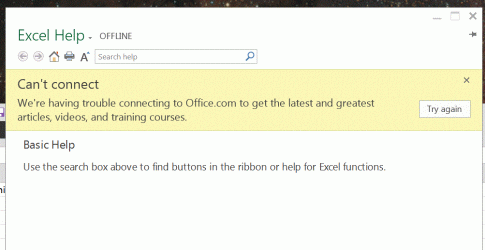
Cantconnect.GIF

This condition then persists until I reboot the computer; the same/similar message appears for the other Office components.

Please note: other programs do not have any problem connecting to the Internet. I'm experiencing the problem even as I type this in IE. Office is the only one having trouble with connecting... I have some URLs in a spreadsheet, and they still work fine
My computer has a wired connection to my modem-router on a simple home network. I am using Microsoft Security Essentials, Malwarebytes and Microsoft Firewall. All Windows Updates have been installed. Turning off the firewall does not help.

A few weeks ago I had a problem with a malicious toolbar. Malwarbytes quarantined a number of files having to do with Linkey, and MySearchDial, and the problem seemed to be solved.

Any help with Help would be appreciated...
 

My Computer My Computer

At a glance

Microsoft Windows 7 Professional 64-bit 7601 ...Intel(R) Core(TM)2 Duo CPU E6550 @ 2.33GHz4.00 GBIntel(R) Q35 Express Chipset Family
Computer type
PC/Desktop
Computer Manufacturer/Model Number
Compag
OS
Microsoft Windows 7 Professional 64-bit 7601 Multiprocessor Free Service Pack 1
CPU
Intel(R) Core(TM)2 Duo CPU E6550 @ 2.33GHz
Motherboard
Hewlett-Packard 0AA8h
Memory
4.00 GB
Graphics Card(s)
Intel(R) Q35 Express Chipset Family
Sound Card
SoundMAX Integrated Digital HD Audio
Screen Resolution
1920 x 1080 x 32 bits (4294967296 colors) @ 60 Hz
Hard Drives
(1) Hitachi HDS721010KLA330 ATA Device (2) Lexar JumpDrive USB Device
Antivirus
Windows Security Essentials
Browser
IE 11
Welcome Windows Seven Forums.

Have you tried an Office repair. To do that open Control Panel, select Programs & Features, scroll down to Microsoft Office 2013, Right Click on it & select Change. This will open a panel with a couple of repair options to try.
 

My Computer My Computer

At a glance

Windows 7 Home Premium 64 bit sp1Intel i5 3570 3.4Ghz Ivy Bridge SKT 1155 quad...G-Skill Rip Jaws 16Gb (8x2) DDR3 -1600 PC3 12...Gigabyte NVIDIA GT610 1Gb DDR3 810/1200 PCI-E...
Computer type
PC/Desktop
Computer Manufacturer/Model Number
Self built using existing case
OS
Windows 7 Home Premium 64 bit sp1
CPU
Intel i5 3570 3.4Ghz Ivy Bridge SKT 1155 quad core
Motherboard
Gigabyte Z77-HD3 SKT 1155 2xSata 3, 4x USB 3.0
Memory
G-Skill Rip Jaws 16Gb (8x2) DDR3 -1600 PC3 12800 CL 10 red
Graphics Card(s)
Gigabyte NVIDIA GT610 1Gb DDR3 810/1200 PCI-E 2.0 Silent
Sound Card
NVIDIA High Definition & Realtech High Definition Audio
Monitor(s) Displays
2 x Philips 226V4L 16:9 aspect ratio
Screen Resolution
1920 x 1080 HD
Hard Drives
Samsung 840 Pro 256gb SSD, SATA 3.
Hitachi Touro Portable 1tb, USB 3.0 HDD used for image b/ups.
PSU
Corsair VS450
Case
Codeng
Cooling
PSU fan & CPU fan
Keyboard
Logitech
Mouse
Logitech Wireless trackball M570
Internet Speed
Wireless 3G. 3mg down & 550kb up.
Antivirus
Bitdefender Internet Security 2020
Browser
Opera (Current Version) & Firefox
Other Info
MS Office 2013 Pro. Davis weather station software. MGE Nova 600 avr UPS.
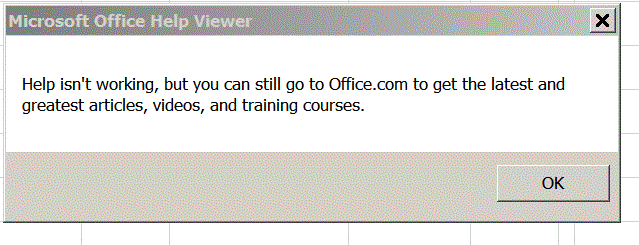
Ranger4: Thanks for the reply... Tried the Office Repair idea. Turns out that this caused a total re-download of Office 2013. I'm now being nagged for my 25-character authorization code. Excel looks different, since all my options from the last six months have been reset. And now even the offline help has disappeared. The new error message I get when I press F1, or the ? icon is now:

HelpNo.GIF

and this appears even when pressing the ? icon on any Wizard in Excel.

Any efforts to get this fixed failed because, of course, the program couldn't connect.

Actually talked to someone at Microsoft Support. Their position was that I should fire up IE and go on-line to get all the videos and tutorials I could ever want.
 

My Computer My Computer

At a glance

Microsoft Windows 7 Professional 64-bit 7601 ...Intel(R) Core(TM)2 Duo CPU E6550 @ 2.33GHz4.00 GBIntel(R) Q35 Express Chipset Family
Computer type
PC/Desktop
Computer Manufacturer/Model Number
Compag
OS
Microsoft Windows 7 Professional 64-bit 7601 Multiprocessor Free Service Pack 1
CPU
Intel(R) Core(TM)2 Duo CPU E6550 @ 2.33GHz
Motherboard
Hewlett-Packard 0AA8h
Memory
4.00 GB
Graphics Card(s)
Intel(R) Q35 Express Chipset Family
Sound Card
SoundMAX Integrated Digital HD Audio
Screen Resolution
1920 x 1080 x 32 bits (4294967296 colors) @ 60 Hz
Hard Drives
(1) Hitachi HDS721010KLA330 ATA Device (2) Lexar JumpDrive USB Device
Antivirus
Windows Security Essentials
Browser
IE 11

My Computer My Computer

At a glance

Windows 7 Home Premium 64 bit sp1Intel i5 3570 3.4Ghz Ivy Bridge SKT 1155 quad...G-Skill Rip Jaws 16Gb (8x2) DDR3 -1600 PC3 12...Gigabyte NVIDIA GT610 1Gb DDR3 810/1200 PCI-E...
Computer type
PC/Desktop
Computer Manufacturer/Model Number
Self built using existing case
OS
Windows 7 Home Premium 64 bit sp1
CPU
Intel i5 3570 3.4Ghz Ivy Bridge SKT 1155 quad core
Motherboard
Gigabyte Z77-HD3 SKT 1155 2xSata 3, 4x USB 3.0
Memory
G-Skill Rip Jaws 16Gb (8x2) DDR3 -1600 PC3 12800 CL 10 red
Graphics Card(s)
Gigabyte NVIDIA GT610 1Gb DDR3 810/1200 PCI-E 2.0 Silent
Sound Card
NVIDIA High Definition & Realtech High Definition Audio
Monitor(s) Displays
2 x Philips 226V4L 16:9 aspect ratio
Screen Resolution
1920 x 1080 HD
Hard Drives
Samsung 840 Pro 256gb SSD, SATA 3.
Hitachi Touro Portable 1tb, USB 3.0 HDD used for image b/ups.
PSU
Corsair VS450
Case
Codeng
Cooling
PSU fan & CPU fan
Keyboard
Logitech
Mouse
Logitech Wireless trackball M570
Internet Speed
Wireless 3G. 3mg down & 550kb up.
Antivirus
Bitdefender Internet Security 2020
Browser
Opera (Current Version) & Firefox
Other Info
MS Office 2013 Pro. Davis weather station software. MGE Nova 600 avr UPS.
Ranger4: Thanks; I saw that article, but, as I mentioned, turning off Microsoft Firewall didn't help...

In any event, as above, the situation has escalated to no Help of any type, on-line or off-line, when I press F1 in Excel 2013; just the cheery advice in the image in my Message #3 above...
 

My Computer My Computer

At a glance

Microsoft Windows 7 Professional 64-bit 7601 ...Intel(R) Core(TM)2 Duo CPU E6550 @ 2.33GHz4.00 GBIntel(R) Q35 Express Chipset Family
Computer type
PC/Desktop
Computer Manufacturer/Model Number
Compag
OS
Microsoft Windows 7 Professional 64-bit 7601 Multiprocessor Free Service Pack 1
CPU
Intel(R) Core(TM)2 Duo CPU E6550 @ 2.33GHz
Motherboard
Hewlett-Packard 0AA8h
Memory
4.00 GB
Graphics Card(s)
Intel(R) Q35 Express Chipset Family
Sound Card
SoundMAX Integrated Digital HD Audio
Screen Resolution
1920 x 1080 x 32 bits (4294967296 colors) @ 60 Hz
Hard Drives
(1) Hitachi HDS721010KLA330 ATA Device (2) Lexar JumpDrive USB Device
Antivirus
Windows Security Essentials
Browser
IE 11
Back
Top