Official Seven Forums Overclock Leader boards

Status
Not open for further replies.
Too hot to be Ocing right now i'll give it a go soon when the ac is on

I have been enjoying the Intel experience ;)

Won't be long til winter now mate, then the proper overclocking can begin!

Here's a snip of the temps I get for the first few mins of switching the PC on in the cabin in the winter. It's so cold in there and stays that way for a good 30 mins until my little heater finally starts to warm it through.

0C is 32F. We have that in Florida.

Look at his core temp picks in that post, it reads 0*C

http://www.sevenforums.com/pc-custo...s-overclock-leader-boards-96.html#post2521852

He's in a cabin outside without the heat on in that picture. I'd have to do it by remote desktop.


Earlier I posted some winsat scores of 31,000+ on the i5-4670K Haswell, 16GB GSkill which then dropped to under 28,000.
The system has transmogrified to a i7-4770K on an ASUS Z87-WS, work station board with a new set of the same RAM. These scores are even more shi**y, any ideas my friends?

View attachment 284654 View attachment 284653

View attachment 284655 View attachment 284656

Gary, best I can do for the moment Haswell Overclocking Thread [With Statistics] The discussions will teach a lot, but is a long read. Haswell seems to be quite different than Sandy/Ivy. Those 'rules' do not apply to Haswell. Right now, I think overclocking and BIOS settings is a work in progress, as with any new technology.
 
Last edited:

My Computers My Computers

  • At a glance

    Windows 11 ProRyzen 9 5900X32GB G Skill DDR4-3600EVGA RTX 3080 FTW 3 Ultra
    Computer type
    PC/Desktop
    Computer Manufacturer/Model Number
    ALWAYS UNDER CONSTRUCTION
    OS
    Windows 11 Pro
    CPU
    Ryzen 9 5900X
    Motherboard
    Asus X570 Crosshair Viii Hero
    Memory
    32GB G Skill DDR4-3600
    Graphics Card(s)
    EVGA RTX 3080 FTW 3 Ultra
    Sound Card
    On Board/Sennheiser PC37X Headset
    Monitor(s) Displays
    3 X Asus 27"
    Screen Resolution
    2560x1440
    Hard Drives
    2 X 1 TB NVME drives
    PSU
    EVGA 850
    Case
    Phanteks Eclipse P400A
    Cooling
    EVGA 280 AIO
    Keyboard
    Logitech G510s/ Logitech G13
    Mouse
    Logitech G502
    Internet Speed
    24/1
    Antivirus
    ESET/MBAM Pro/SAS Pro
    Browser
    Chrome/ Firefox/ Edge
  • At a glance

    Windows 11 ProIntel Ultra 9 288V32 GB LPDDR5X 8533
    Computer type
    Laptop
    System Manufacturer/Model Number
    Dell 16 Plus
    OS
    Windows 11 Pro
    CPU
    Intel Ultra 9 288V
    Memory
    32 GB LPDDR5X 8533
    Monitor(s) Displays
    16" Mini-LED HDR600 Touch 90 Hz
    Screen Resolution
    2560X1600
    Hard Drives
    1 TB NVME
What is the exact ram you are using Gary?
Sorry, I thought I put it in there.
Newegg.com - G.SKILL Sniper Series 16GB (2 x 8GB) 240-Pin DDR3 SDRAM DDR3 2400 (PC3 19200) Desktop Memory Model F3-2400C11D-16GSR
Gary, best I can do for the moment Haswell Overclocking Thread [With Statistics] The discussions will teach a lot, but is a long read. Haswell seems to be quite different than Sandy/Ivy. Those 'rules' do not apply to Haswell. Right now, I think overclocking and BIOS settings is a work in progress, as with any new technology.
Thanks Steve, I'll try to read it, but every time I open a OCN page the damn page locks up...all/any of them.
 

My Computer My Computer

At a glance

Windows 7 Ultimate X64 SP1Intel i5-2550K, Differing ~4.4-4.8GHz No buil...16GB G.Skill Sniper 1866MHz @ 2133MHz 2x8GBASUS GTX650TIB-DC2OC-2GD5, (650TI Boost)
Computer type
PC/Desktop
Computer Manufacturer/Model Number
Home Built Desktop By DataTech
OS
Windows 7 Ultimate X64 SP1
CPU
Intel i5-2550K, Differing ~4.4-4.8GHz No built in GPU
Motherboard
ASUS P8Z68-V PRO/GEN3
Memory
16GB G.Skill Sniper 1866MHz @ 2133MHz 2x8GB
Graphics Card(s)
ASUS GTX650TIB-DC2OC-2GD5, (650TI Boost)
Sound Card
Onboard Realtek 5-1
Monitor(s) Displays
Samsung P2570HD
Screen Resolution
1920x1080
Hard Drives
Samsung 840 Pro 256GB SSD for OS, 500GB Seagate Constellation (Enterprise drive) for Data
PSU
Corsair HX650W
Case
Inwin Dragon Rider
Cooling
Hyper 212 EVO w/two Noctua fans, push-pull, @1300 RPM
Keyboard
E-Z Eyes, bright yellow keys with large characters
Mouse
steelseries SENSEI Laser Pro Gaming
Internet Speed
48-51Mbs Mbs down, 11 Mbs up Xfinity Cable
Antivirus
Norton Internet Security 2013
Browser
IE 10, Opera, Pale Moon if needed
Other Info
4 case fans, LG BluRay-RE, ASUS DVD-RW, Mr. Fusion power supply, 1.21 gigawatts.
Right:

My problems with OC'ing using the built in OC profiles are as follows:

I am repeatedly getting BSOD's when OC'ing above 4.4 GHz. All or most of them seem to indicate that VCore is too low, or that VTT/QPI need to be increased. I have these values set at the defaults applied by the profile. CPU VCore is set by the profile to a fixed value for each OC stage, but I am considering shifting to Offset Mode.

Now my questions are:

1) At 4.4GHz, the automatically applied VCore is 1.168V, and AIDA shows the idle VID as 1.2560V. When running IBT (this is the highest speed I can get it to run at without crashing, currently), VID rises to 1.2660V max (range under load 1.2510-1.2660).
--- What is my Offset and how do I calculate it.

2) What value should I set for VTT/QPI? This board has two values for VTT (VTTCPU1 and VTTCPU2), which may or may not relate to the 2 RAM Channels.

3) What should I set my LLC value to?

BTW, these are the BSOD codes for Ivy Bridge:

BSOD Codes for LGA 1155 Ivy Bridge
0x101 = increase vcore
0x124 = increase/decrease vcore or QPI/VTT... have to test to see which one it is
0x0A = unstable RAM/IMC, increase QPI first, if that doesn't work increase vcore
0x1E = increase vcore
0x3B = increase vcore
0x3D = increase vcore
0xD1 = QPI/VTT, increase/decrease as necessary, can also be unstable Ram, raise Ram voltage
0x9C = QPI/VTT most likely, but increasing vcore has helped in some instances
0x50 = RAM timings/Frequency or uncore multi unstable, increase RAM voltage or adjust QPI/VTT, or lower uncore if you're higher than 2x
0x109 = Not enough or too Much memory voltage
0x116 = Low IOH (NB) voltage, GPU issue (most common when running multi-GPU/overclocking GPU)
0x7E = Corrupted OS file, possibly from overclocking. Run sfc /scannow and chkdsk /r
 

My Computers My Computers

  • At a glance

    Windows 10 Professional 64-BitIntel Core i7 8700KG.Skill TridentZ RGB DDR4 4000 F4-4000C18D-16...Zotac GeForce GTX-1660 Ti AMP 6GB
    Computer type
    Laptop
    Computer Manufacturer/Model Number
    Custom
    OS
    Windows 10 Professional 64-Bit
    CPU
    Intel Core i7 8700K
    Motherboard
    Asus Maximus X Code
    Memory
    G.Skill TridentZ RGB DDR4 4000 F4-4000C18D-16GTZR
    Graphics Card(s)
    Zotac GeForce GTX-1660 Ti AMP 6GB
    Sound Card
    ROG SupremeFX S1220 (Onboard)
    Monitor(s) Displays
    Dell UP2716D
    Screen Resolution
    2560x1440
    Hard Drives
    Samsung 980 Pro PCIe NVMe 500GB
    Samsung 970 Evo PCIe NVMe 250GB
    Samsung 860 Evo SATA III 2TB
    WD Black WD2003FZEX 2TB x 3
    ODD - GH24NSC0
    PSU
    Coolermaster V1000
    Case
    Corsair Obsidian 450D
    Cooling
    Corsair H115i - Corsair SP140 Red x 2
    Keyboard
    Logitech G213
    Mouse
    Logitech G102
    Internet Speed
    100 Mbps (Supposedly) - Asianet India FTTH
    Antivirus
    Avast Free!
    Browser
    Maxthon Cloud Browser 5.xx
    Other Info
    Asus FX-553VD (960 Evo, 860 Evo, 16GB)
    Samsung Galaxy C9 Pro
    Canon EOS 70D
  • At a glance

    Windows 10 Pro x64Intel Core i7 7700HQ2 x 8GB Samsung DDR4 2400GTX 1050
    Computer type
    Laptop
    System Manufacturer/Model Number
    Asus FX503VD
    OS
    Windows 10 Pro x64
    CPU
    Intel Core i7 7700HQ
    Memory
    2 x 8GB Samsung DDR4 2400
    Graphics Card(s)
    GTX 1050
    Screen Resolution
    1920 x 1080
    Hard Drives
    Samsung 960 Evo PCIe NVMe 250GB Boot
    Samsung 840 Pro Series 256 GB SSD (MZ-7PD256BW);
Pillainp Im on my phone so its hard to browse the thread but Kelly posted a great explanation to calculate offset. Steve did too so go back through this threaadd and the post your oc one and you should find it.
 

My Computer My Computer

At a glance

Windows 10 Pro X64Intel(R) Core(TM) i5-3570K CPU OC@ 4.5GHZ Turbo8.00 GB DDR3 1600MhzMSI Gaming X GTX 1070
Computer type
PC/Desktop
Computer Manufacturer/Model Number
Dude Build
OS
Windows 10 Pro X64
CPU
Intel(R) Core(TM) i5-3570K CPU OC@ 4.5GHZ Turbo
Motherboard
MSI Z77A-G45 Gaming
Memory
8.00 GB DDR3 1600Mhz
Graphics Card(s)
MSI Gaming X GTX 1070
Sound Card
Realtek High Definition
Monitor(s) Displays
Dell S23O9W, HP L1710
Screen Resolution
DELL-1920 x 1080 HP-1280 x1024
Hard Drives
Crucial m4 256 SSD, WD 7200RPM 500GB WD 1TB
PSU
Seasonic X650 GOLD
Case
Zalman Z12
Cooling
Antec Kuhler 920
Keyboard
Logitech
Mouse
MSI DS100 Interceptor
Internet Speed
50 down and 5 up
Antivirus
MSE
Browser
Chrome, IE 11
Other Info
Logitech X-620 Speakers
pillainp, This is the guide Dude was refering to. It is for Asus motherboards, but the principals are the same. No matter what board, the CPU works the same, just different boards have different termonology for the same thing (which is rediculous). But, a lot of the terms and the options in bios are explained. Ivy Bridge Overclocking Guide#

Also, it is generally a bad idea to use the software overclocking. Most overclockers will agree to that. Do it manually, and you will know and be able to learn the bios and the effect each setting has. Software, which are the built in profiles, are usually just good guesses at what it will take, and are usually wrong as you have found out. Plus, you have no idea what was changed or what it was changed to.
 

My Computers My Computers

  • At a glance

    Windows 11 ProRyzen 9 5900X32GB G Skill DDR4-3600EVGA RTX 3080 FTW 3 Ultra
    Computer type
    PC/Desktop
    Computer Manufacturer/Model Number
    ALWAYS UNDER CONSTRUCTION
    OS
    Windows 11 Pro
    CPU
    Ryzen 9 5900X
    Motherboard
    Asus X570 Crosshair Viii Hero
    Memory
    32GB G Skill DDR4-3600
    Graphics Card(s)
    EVGA RTX 3080 FTW 3 Ultra
    Sound Card
    On Board/Sennheiser PC37X Headset
    Monitor(s) Displays
    3 X Asus 27"
    Screen Resolution
    2560x1440
    Hard Drives
    2 X 1 TB NVME drives
    PSU
    EVGA 850
    Case
    Phanteks Eclipse P400A
    Cooling
    EVGA 280 AIO
    Keyboard
    Logitech G510s/ Logitech G13
    Mouse
    Logitech G502
    Internet Speed
    24/1
    Antivirus
    ESET/MBAM Pro/SAS Pro
    Browser
    Chrome/ Firefox/ Edge
  • At a glance

    Windows 11 ProIntel Ultra 9 288V32 GB LPDDR5X 8533
    Computer type
    Laptop
    System Manufacturer/Model Number
    Dell 16 Plus
    OS
    Windows 11 Pro
    CPU
    Intel Ultra 9 288V
    Memory
    32 GB LPDDR5X 8533
    Monitor(s) Displays
    16" Mini-LED HDR600 Touch 90 Hz
    Screen Resolution
    2560X1600
    Hard Drives
    1 TB NVME
Earlier I posted some winsat scores of 31,000+ on the i5-4670K Haswell, 16GB GSkill which then dropped to under 28,000.
The system has transmogrified to a i7-4770K on an ASUS Z87-WS, work station board with a new set of the same RAM. These scores are even more shi**y, any ideas my friends?

View attachment 284654 View attachment 284653

View attachment 284655 View attachment 284656

With all the issues you have been having I am glad I went the other way :shock:

Maybe Haswell is a bust I don't know but I had my share of issues but now there gone

Can't imagine what is going on the settings are totally different
 

My Computer My Computer

At a glance

Windows 10 Home Premium 64bit sp1Intel I7-6700K @ 4.6 Ghz 1.344 volts everyday OC32GB G-Skill TridentZ 3200mhz 16-18-18-38 DDR4Sli Gigabyte Windforce GTX 980 G1
Computer type
PC/Desktop
Computer Manufacturer/Model Number
CoreI7-6700K MrFingerIII Special Builds
OS
Windows 10 Home Premium 64bit sp1
CPU
Intel I7-6700K @ 4.6 Ghz 1.344 volts everyday OC
Motherboard
Asrock Fatality K6 Z170 Socket 1151
Memory
32GB G-Skill TridentZ 3200mhz 16-18-18-38 DDR4
Graphics Card(s)
Sli Gigabyte Windforce GTX 980 G1
Sound Card
AC97 Creative Rage Tactic 3D Headphones Bluetooth
Monitor(s) Displays
27" Asus ROG Swift PG278Q G-Sync 48" Vizio Smart HD TV
Screen Resolution
2560x1440p 27"- 48" Currently Gaming at 2560x1440p Res 2K
Hard Drives
250GB Samsung Evo840SSD Seagate baracuda 500 GB WD Mybook 500Gb 1TB Seagate Barracuda
PSU
HX1050w Corsair Silver 80plus certified crosfire/sli
Case
Enthod Pro Full Tower
Cooling
Corsair H110i GT 280 mm High Performance WaterBlock
Keyboard
Logitech wireless keyboard
Mouse
Logitech wireless mouse
Internet Speed
Cox Cable 100+ mb
Antivirus
WebRoot Spysweeper with Antivirus
Browser
IE-10, Chrome, Opera
Other Info
My Other Rig is a AMD FX8320E @4.6Ghz 16GB Ballistic Sport Ram
Mobo Asrock Fatality 990FX 120GB OCZ SSD 1TB Seagate Barracuda Corsair H75 Cooling PSU Corsair CX750
GPU GTX Gigabyte 970G1
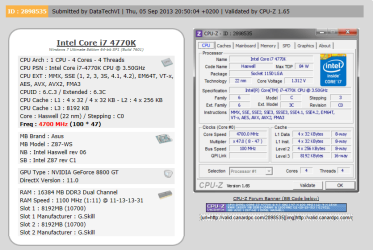
Best the i7 4770K can do for me. HT is disabled, is that what most of you guys do?

4700 i7.PNG

I tend to agree Tommy, the do keep issuing updated UEFI/BIOS for Haswell boards.
 
Last edited:

My Computer My Computer

At a glance

Windows 7 Ultimate X64 SP1Intel i5-2550K, Differing ~4.4-4.8GHz No buil...16GB G.Skill Sniper 1866MHz @ 2133MHz 2x8GBASUS GTX650TIB-DC2OC-2GD5, (650TI Boost)
Computer type
PC/Desktop
Computer Manufacturer/Model Number
Home Built Desktop By DataTech
OS
Windows 7 Ultimate X64 SP1
CPU
Intel i5-2550K, Differing ~4.4-4.8GHz No built in GPU
Motherboard
ASUS P8Z68-V PRO/GEN3
Memory
16GB G.Skill Sniper 1866MHz @ 2133MHz 2x8GB
Graphics Card(s)
ASUS GTX650TIB-DC2OC-2GD5, (650TI Boost)
Sound Card
Onboard Realtek 5-1
Monitor(s) Displays
Samsung P2570HD
Screen Resolution
1920x1080
Hard Drives
Samsung 840 Pro 256GB SSD for OS, 500GB Seagate Constellation (Enterprise drive) for Data
PSU
Corsair HX650W
Case
Inwin Dragon Rider
Cooling
Hyper 212 EVO w/two Noctua fans, push-pull, @1300 RPM
Keyboard
E-Z Eyes, bright yellow keys with large characters
Mouse
steelseries SENSEI Laser Pro Gaming
Internet Speed
48-51Mbs Mbs down, 11 Mbs up Xfinity Cable
Antivirus
Norton Internet Security 2013
Browser
IE 10, Opera, Pale Moon if needed
Other Info
4 case fans, LG BluRay-RE, ASUS DVD-RW, Mr. Fusion power supply, 1.21 gigawatts.
I don't disable hyper threading. I do think Paul did on his latest run, but am not sure.
 

My Computers My Computers

  • At a glance

    Windows 11 ProRyzen 9 5900X32GB G Skill DDR4-3600EVGA RTX 3080 FTW 3 Ultra
    Computer type
    PC/Desktop
    Computer Manufacturer/Model Number
    ALWAYS UNDER CONSTRUCTION
    OS
    Windows 11 Pro
    CPU
    Ryzen 9 5900X
    Motherboard
    Asus X570 Crosshair Viii Hero
    Memory
    32GB G Skill DDR4-3600
    Graphics Card(s)
    EVGA RTX 3080 FTW 3 Ultra
    Sound Card
    On Board/Sennheiser PC37X Headset
    Monitor(s) Displays
    3 X Asus 27"
    Screen Resolution
    2560x1440
    Hard Drives
    2 X 1 TB NVME drives
    PSU
    EVGA 850
    Case
    Phanteks Eclipse P400A
    Cooling
    EVGA 280 AIO
    Keyboard
    Logitech G510s/ Logitech G13
    Mouse
    Logitech G502
    Internet Speed
    24/1
    Antivirus
    ESET/MBAM Pro/SAS Pro
    Browser
    Chrome/ Firefox/ Edge
  • At a glance

    Windows 11 ProIntel Ultra 9 288V32 GB LPDDR5X 8533
    Computer type
    Laptop
    System Manufacturer/Model Number
    Dell 16 Plus
    OS
    Windows 11 Pro
    CPU
    Intel Ultra 9 288V
    Memory
    32 GB LPDDR5X 8533
    Monitor(s) Displays
    16" Mini-LED HDR600 Touch 90 Hz
    Screen Resolution
    2560X1600
    Hard Drives
    1 TB NVME
Yeah anything over 5GHz I disabled hyperthreading iirc.
 

My Computer My Computer

At a glance

Windows 7 Professional 64 bit
OS
Windows 7 Professional 64 bit
Best the i7 4770K can do for me. HT is disabled, is that what most of you guys do?

View attachment 284738

I tend to agree Tommy, the do keep issuing updated UEFI/BIOS for Haswell boards.

That is actually very good Gary, I must admit I wasn't sure if most Haswells would go that high.

You are getting through cpu's like I have hot dinners, you are taking over the leaderboards lol.

Updated.


My Computer My Computer

At a glance

Windows 7 Professional 64 bit
OS
Windows 7 Professional 64 bit
Looks like you got a winner Gary!
 

My Computer My Computer

At a glance

Windows 7 Professional 64bit SP1Intel Core i5-3570K @ 4.5GHzCorsair Vengeance 16GB (4x4) @1866MHz CL 9-9-...EVGA GTX 750 Ti FTW
Computer type
PC/Desktop
Computer Manufacturer/Model Number
Custom Built
OS
Windows 7 Professional 64bit SP1
CPU
Intel Core i5-3570K @ 4.5GHz
Motherboard
Asus Sabertooth Z77
Memory
Corsair Vengeance 16GB (4x4) @1866MHz CL 9-9-9-24 1T
Graphics Card(s)
EVGA GTX 750 Ti FTW
Sound Card
Onboard Audio
Monitor(s) Displays
Dell S2309W
Screen Resolution
1920x1080
Hard Drives
Samsung 830 128GB SSD - OS
(4) Seagate 5TB HDD
(1) Seagate 2TB HDD
PSU
Seasonic X750 80+ Gold Full Modular
Case
Antec Eleven Hundred Super Mid Tower
Cooling
Intel Liquid Cooler
Keyboard
Max Nighthawk X8 Mechanical keyboard
Mouse
Mionix Naos 7000
Internet Speed
50 Mbps Down / 10 Mbps Up
Antivirus
Microsoft Security Essentials/Malwarebytes Anti-Malware
Browser
Chrome/Firefox
Other Info
Klipsch ProMedia 2.1's
Asus RT-N66R Wireless Router
Best the i7 4770K can do for me. HT is disabled, is that what most of you guys do?

View attachment 284738

I tend to agree Tommy, the do keep issuing updated UEFI/BIOS for Haswell boards.


I never did it is suggested it stays on but like paul said anything over 5 ghz it should be taken off
 

My Computer My Computer

At a glance

Windows 10 Home Premium 64bit sp1Intel I7-6700K @ 4.6 Ghz 1.344 volts everyday OC32GB G-Skill TridentZ 3200mhz 16-18-18-38 DDR4Sli Gigabyte Windforce GTX 980 G1
Computer type
PC/Desktop
Computer Manufacturer/Model Number
CoreI7-6700K MrFingerIII Special Builds
OS
Windows 10 Home Premium 64bit sp1
CPU
Intel I7-6700K @ 4.6 Ghz 1.344 volts everyday OC
Motherboard
Asrock Fatality K6 Z170 Socket 1151
Memory
32GB G-Skill TridentZ 3200mhz 16-18-18-38 DDR4
Graphics Card(s)
Sli Gigabyte Windforce GTX 980 G1
Sound Card
AC97 Creative Rage Tactic 3D Headphones Bluetooth
Monitor(s) Displays
27" Asus ROG Swift PG278Q G-Sync 48" Vizio Smart HD TV
Screen Resolution
2560x1440p 27"- 48" Currently Gaming at 2560x1440p Res 2K
Hard Drives
250GB Samsung Evo840SSD Seagate baracuda 500 GB WD Mybook 500Gb 1TB Seagate Barracuda
PSU
HX1050w Corsair Silver 80plus certified crosfire/sli
Case
Enthod Pro Full Tower
Cooling
Corsair H110i GT 280 mm High Performance WaterBlock
Keyboard
Logitech wireless keyboard
Mouse
Logitech wireless mouse
Internet Speed
Cox Cable 100+ mb
Antivirus
WebRoot Spysweeper with Antivirus
Browser
IE-10, Chrome, Opera
Other Info
My Other Rig is a AMD FX8320E @4.6Ghz 16GB Ballistic Sport Ram
Mobo Asrock Fatality 990FX 120GB OCZ SSD 1TB Seagate Barracuda Corsair H75 Cooling PSU Corsair CX750
GPU GTX Gigabyte 970G1
Thanks guys for the advice. Well, my damn ASUS Z87-WS took a dump now! :mad:
I was running Furmark and the GPU LED lit up as bright as the sun and smoked. Board won't even post, the BIOS Flashback light keeps blinking even without pushing it.

I think it's time to try Ivy out, suggestions welcome, lol.
 

My Computer My Computer

At a glance

Windows 7 Ultimate X64 SP1Intel i5-2550K, Differing ~4.4-4.8GHz No buil...16GB G.Skill Sniper 1866MHz @ 2133MHz 2x8GBASUS GTX650TIB-DC2OC-2GD5, (650TI Boost)
Computer type
PC/Desktop
Computer Manufacturer/Model Number
Home Built Desktop By DataTech
OS
Windows 7 Ultimate X64 SP1
CPU
Intel i5-2550K, Differing ~4.4-4.8GHz No built in GPU
Motherboard
ASUS P8Z68-V PRO/GEN3
Memory
16GB G.Skill Sniper 1866MHz @ 2133MHz 2x8GB
Graphics Card(s)
ASUS GTX650TIB-DC2OC-2GD5, (650TI Boost)
Sound Card
Onboard Realtek 5-1
Monitor(s) Displays
Samsung P2570HD
Screen Resolution
1920x1080
Hard Drives
Samsung 840 Pro 256GB SSD for OS, 500GB Seagate Constellation (Enterprise drive) for Data
PSU
Corsair HX650W
Case
Inwin Dragon Rider
Cooling
Hyper 212 EVO w/two Noctua fans, push-pull, @1300 RPM
Keyboard
E-Z Eyes, bright yellow keys with large characters
Mouse
steelseries SENSEI Laser Pro Gaming
Internet Speed
48-51Mbs Mbs down, 11 Mbs up Xfinity Cable
Antivirus
Norton Internet Security 2013
Browser
IE 10, Opera, Pale Moon if needed
Other Info
4 case fans, LG BluRay-RE, ASUS DVD-RW, Mr. Fusion power supply, 1.21 gigawatts.
Thanks guys for the advice. Well, my damn ASUS Z87-WS took a dump now! :mad:
I was running Furmark and the GPU LED lit up as bright as the sun and smoked. Board won't even post, the BIOS Flashback light keeps blinking even without pushing it.

I think it's time to try Ivy out, suggestions welcome, lol.


I think it's time to get your money back and run Ivy Haswell seems to be a major issue
 

My Computer My Computer

At a glance

Windows 10 Home Premium 64bit sp1Intel I7-6700K @ 4.6 Ghz 1.344 volts everyday OC32GB G-Skill TridentZ 3200mhz 16-18-18-38 DDR4Sli Gigabyte Windforce GTX 980 G1
Computer type
PC/Desktop
Computer Manufacturer/Model Number
CoreI7-6700K MrFingerIII Special Builds
OS
Windows 10 Home Premium 64bit sp1
CPU
Intel I7-6700K @ 4.6 Ghz 1.344 volts everyday OC
Motherboard
Asrock Fatality K6 Z170 Socket 1151
Memory
32GB G-Skill TridentZ 3200mhz 16-18-18-38 DDR4
Graphics Card(s)
Sli Gigabyte Windforce GTX 980 G1
Sound Card
AC97 Creative Rage Tactic 3D Headphones Bluetooth
Monitor(s) Displays
27" Asus ROG Swift PG278Q G-Sync 48" Vizio Smart HD TV
Screen Resolution
2560x1440p 27"- 48" Currently Gaming at 2560x1440p Res 2K
Hard Drives
250GB Samsung Evo840SSD Seagate baracuda 500 GB WD Mybook 500Gb 1TB Seagate Barracuda
PSU
HX1050w Corsair Silver 80plus certified crosfire/sli
Case
Enthod Pro Full Tower
Cooling
Corsair H110i GT 280 mm High Performance WaterBlock
Keyboard
Logitech wireless keyboard
Mouse
Logitech wireless mouse
Internet Speed
Cox Cable 100+ mb
Antivirus
WebRoot Spysweeper with Antivirus
Browser
IE-10, Chrome, Opera
Other Info
My Other Rig is a AMD FX8320E @4.6Ghz 16GB Ballistic Sport Ram
Mobo Asrock Fatality 990FX 120GB OCZ SSD 1TB Seagate Barracuda Corsair H75 Cooling PSU Corsair CX750
GPU GTX Gigabyte 970G1
Right:

My problems with OC'ing using the built in OC profiles are as follows:

I am repeatedly getting BSOD's when OC'ing above 4.4 GHz. All or most of them seem to indicate that VCore is too low, or that VTT/QPI need to be increased. I have these values set at the defaults applied by the profile. CPU VCore is set by the profile to a fixed value for each OC stage, but I am considering shifting to Offset Mode.

Now my questions are:

1) At 4.4GHz, the automatically applied VCore is 1.168V, and AIDA shows the idle VID as 1.2560V. When running IBT (this is the highest speed I can get it to run at without crashing, currently), VID rises to 1.2660V max (range under load 1.2510-1.2660).
--- What is my Offset and how do I calculate it.

2) What value should I set for VTT/QPI? This board has two values for VTT (VTTCPU1 and VTTCPU2), which may or may not relate to the 2 RAM Channels.

3) What should I set my LLC value to?

BTW, these are the BSOD codes for Ivy Bridge:

BSOD Codes for LGA 1155 Ivy Bridge
0x101 = increase vcore
0x124 = increase/decrease vcore or QPI/VTT... have to test to see which one it is
0x0A = unstable RAM/IMC, increase QPI first, if that doesn't work increase vcore
0x1E = increase vcore
0x3B = increase vcore
0x3D = increase vcore
0xD1 = QPI/VTT, increase/decrease as necessary, can also be unstable Ram, raise Ram voltage
0x9C = QPI/VTT most likely, but increasing vcore has helped in some instances
0x50 = RAM timings/Frequency or uncore multi unstable, increase RAM voltage or adjust QPI/VTT, or lower uncore if you're higher than 2x
0x109 = Not enough or too Much memory voltage
0x116 = Low IOH (NB) voltage, GPU issue (most common when running multi-GPU/overclocking GPU)
0x7E = Corrupted OS file, possibly from overclocking. Run sfc /scannow and chkdsk /r


I've got a bit of the same problem...:sarc:

But i'm using "GPU Boost" with lucidlogix virtu MVP (iGpu + dGpu) , so i've to set aswell the iGpu load-line calibration to "high" for not getting Blue Screens and those warning "WHEA-Logger" eventID 19.

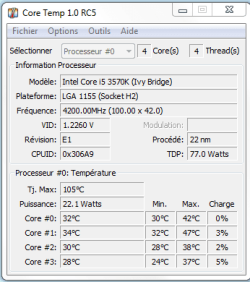
I'm now using Offset Mode (-) Cpu Offset voltage (0.020) at 4.2GHz, and the VCore CPU-Z is now 1.152V, CoreTemp shows VID 1.2260V.

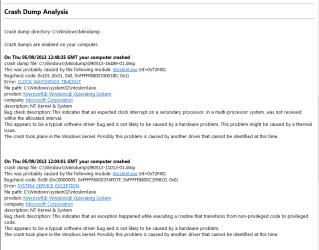
Those value seems normal to me as it looks by the crash dump codes in screenshot, i was too low with Vcore.

The machine seems far more stable than when i didn't set the iGpu Load-line calibration to "High" => 110%, which increased the Vcore from 0.816V to 1.168V at 4.2MHz (Offset Mode (-) & Cpu Offset Voltage (0.005)).

I have now set at (0.020). i'll increase this value to 0.025, 0.030, 0.035....til it works stable.

I've no choices unless i get rid off multiple display in bios to low Vcore.:(

That's mean if i go above 4.2MHz, my Vcore will jump high and watts either than average but at least it doesn't crash! (i mean til the board will handle the load)
 

Attachments

  • Capture.PNG
    Capture.PNG
    24.3 KB · Views: 3
  • Capture1.PNG
    Capture1.PNG
    9.4 KB · Views: 10

My Computer My Computer

At a glance

Windows 7 Professional SP1 - x64 [Non-UEFI Boot]Ivy Bridge Core i5 3570K (Delidded)G.Skill "Ares" DDR3 PC3-12800 - 1600MHz (16Gb)Asus Dual-RX480-O4G
Computer type
PC/Desktop
Computer Manufacturer/Model Number
Custom Build
OS
Windows 7 Professional SP1 - x64 [Non-UEFI Boot]
CPU
Ivy Bridge Core i5 3570K (Delidded)
Motherboard
Asus P8Z77-V LE PLUS
Memory
G.Skill "Ares" DDR3 PC3-12800 - 1600MHz (16Gb)
Graphics Card(s)
Asus Dual-RX480-O4G
Sound Card
Creative Sound Blaster Z w/5.1 sound system
Monitor(s) Displays
Asus IPS 23"
Screen Resolution
16/9
Hard Drives
Internal:
500Go Sata 6Gb/s (x2)
500Go Sata 3Gb/s (x2)
SSD 60Go Sata 6Gb/s
PSU
In Win C 900W Series 80+ Platinum
Case
Thermaltake Chaser A71
Cooling
Custom Water Cooling Loop
Keyboard
Cooler Master QuickFire XTi
Mouse
Razer Imperator 2012 (4G)
Antivirus
MSE
Browser
IE 11.0.xxx Rtm
Other Info
"Raid0" with Intel Smart Response Technology (HDD/SSD)
Thanks guys for the advice. Well, my damn ASUS Z87-WS took a dump now! :mad:
I was running Furmark and the GPU LED lit up as bright as the sun and smoked. Board won't even post, the BIOS Flashback light keeps blinking even without pushing it.

I think it's time to try Ivy out, suggestions welcome, lol.

Wow, sorry to hear that Gary :cry: Your Ivy rub=n will go smooth for you:geek:
 

My Computer My Computer

At a glance

Windows 10 Pro X64Intel(R) Core(TM) i5-3570K CPU OC@ 4.5GHZ Turbo8.00 GB DDR3 1600MhzMSI Gaming X GTX 1070
Computer type
PC/Desktop
Computer Manufacturer/Model Number
Dude Build
OS
Windows 10 Pro X64
CPU
Intel(R) Core(TM) i5-3570K CPU OC@ 4.5GHZ Turbo
Motherboard
MSI Z77A-G45 Gaming
Memory
8.00 GB DDR3 1600Mhz
Graphics Card(s)
MSI Gaming X GTX 1070
Sound Card
Realtek High Definition
Monitor(s) Displays
Dell S23O9W, HP L1710
Screen Resolution
DELL-1920 x 1080 HP-1280 x1024
Hard Drives
Crucial m4 256 SSD, WD 7200RPM 500GB WD 1TB
PSU
Seasonic X650 GOLD
Case
Zalman Z12
Cooling
Antec Kuhler 920
Keyboard
Logitech
Mouse
MSI DS100 Interceptor
Internet Speed
50 down and 5 up
Antivirus
MSE
Browser
Chrome, IE 11
Other Info
Logitech X-620 Speakers
NoN, you mentioned WHEA Errors. Some people don't worry about them, others do. But if you would like to get an alert when you get one, this is a very good way to do it. Basically to get out of the WHEA errors, raise the Vcore. But to set up the alert, this is an excellent way to know when you get them, it will automatically put an alert on your screen.
WHEA Error Alert Guide (or "How I got out of WHEAville")
 

My Computers My Computers

  • At a glance

    Windows 11 ProRyzen 9 5900X32GB G Skill DDR4-3600EVGA RTX 3080 FTW 3 Ultra
    Computer type
    PC/Desktop
    Computer Manufacturer/Model Number
    ALWAYS UNDER CONSTRUCTION
    OS
    Windows 11 Pro
    CPU
    Ryzen 9 5900X
    Motherboard
    Asus X570 Crosshair Viii Hero
    Memory
    32GB G Skill DDR4-3600
    Graphics Card(s)
    EVGA RTX 3080 FTW 3 Ultra
    Sound Card
    On Board/Sennheiser PC37X Headset
    Monitor(s) Displays
    3 X Asus 27"
    Screen Resolution
    2560x1440
    Hard Drives
    2 X 1 TB NVME drives
    PSU
    EVGA 850
    Case
    Phanteks Eclipse P400A
    Cooling
    EVGA 280 AIO
    Keyboard
    Logitech G510s/ Logitech G13
    Mouse
    Logitech G502
    Internet Speed
    24/1
    Antivirus
    ESET/MBAM Pro/SAS Pro
    Browser
    Chrome/ Firefox/ Edge
  • At a glance

    Windows 11 ProIntel Ultra 9 288V32 GB LPDDR5X 8533
    Computer type
    Laptop
    System Manufacturer/Model Number
    Dell 16 Plus
    OS
    Windows 11 Pro
    CPU
    Intel Ultra 9 288V
    Memory
    32 GB LPDDR5X 8533
    Monitor(s) Displays
    16" Mini-LED HDR600 Touch 90 Hz
    Screen Resolution
    2560X1600
    Hard Drives
    1 TB NVME
Thanks guys for the advice. Well, my damn ASUS Z87-WS took a dump now! :mad:
I was running Furmark and the GPU LED lit up as bright as the sun and smoked. Board won't even post, the BIOS Flashback light keeps blinking even without pushing it.

I think it's time to try Ivy out, suggestions welcome, lol.


Sorry to hear that Gary :(

What happened to the Sabertooth? I didn't think you were changing that in the end.

You could try Ivy, obviously it would be the 3770k and a nice mobo, but if I was you then personally I would hold off just a few more days and try out the Ivy-E i7-4820K which is supposed to have a retail price of around $310 and a nice X79 board to go with it. (I know, I can hear you saying well they ain't out yet and it might be bad as they have not been tested, but with the luck you have been having it can't get any worse! And you might just like it).

Paul.
 

My Computer My Computer

At a glance

Windows 7 Professional 64 bit
OS
Windows 7 Professional 64 bit
Gary, did all 3 Haswell motherboards go bad?
 

My Computer My Computer

At a glance

Windows 7 Professional 64bit SP1Intel Core i5-3570K @ 4.5GHzCorsair Vengeance 16GB (4x4) @1866MHz CL 9-9-...EVGA GTX 750 Ti FTW
Computer type
PC/Desktop
Computer Manufacturer/Model Number
Custom Built
OS
Windows 7 Professional 64bit SP1
CPU
Intel Core i5-3570K @ 4.5GHz
Motherboard
Asus Sabertooth Z77
Memory
Corsair Vengeance 16GB (4x4) @1866MHz CL 9-9-9-24 1T
Graphics Card(s)
EVGA GTX 750 Ti FTW
Sound Card
Onboard Audio
Monitor(s) Displays
Dell S2309W
Screen Resolution
1920x1080
Hard Drives
Samsung 830 128GB SSD - OS
(4) Seagate 5TB HDD
(1) Seagate 2TB HDD
PSU
Seasonic X750 80+ Gold Full Modular
Case
Antec Eleven Hundred Super Mid Tower
Cooling
Intel Liquid Cooler
Keyboard
Max Nighthawk X8 Mechanical keyboard
Mouse
Mionix Naos 7000
Internet Speed
50 Mbps Down / 10 Mbps Up
Antivirus
Microsoft Security Essentials/Malwarebytes Anti-Malware
Browser
Chrome/Firefox
Other Info
Klipsch ProMedia 2.1's
Asus RT-N66R Wireless Router
Well the Z87 Deluxe, Z87 Saber Tooth, and Z87-WS all went bad or didn't work right from the beginning, all returned with the CPUs.
I've went ahead and ordered a Z77 Saber Tooth and i7-3770K and I hope I have as much luck as you all have had with that combo.
 

My Computer My Computer

At a glance

Windows 7 Ultimate X64 SP1Intel i5-2550K, Differing ~4.4-4.8GHz No buil...16GB G.Skill Sniper 1866MHz @ 2133MHz 2x8GBASUS GTX650TIB-DC2OC-2GD5, (650TI Boost)
Computer type
PC/Desktop
Computer Manufacturer/Model Number
Home Built Desktop By DataTech
OS
Windows 7 Ultimate X64 SP1
CPU
Intel i5-2550K, Differing ~4.4-4.8GHz No built in GPU
Motherboard
ASUS P8Z68-V PRO/GEN3
Memory
16GB G.Skill Sniper 1866MHz @ 2133MHz 2x8GB
Graphics Card(s)
ASUS GTX650TIB-DC2OC-2GD5, (650TI Boost)
Sound Card
Onboard Realtek 5-1
Monitor(s) Displays
Samsung P2570HD
Screen Resolution
1920x1080
Hard Drives
Samsung 840 Pro 256GB SSD for OS, 500GB Seagate Constellation (Enterprise drive) for Data
PSU
Corsair HX650W
Case
Inwin Dragon Rider
Cooling
Hyper 212 EVO w/two Noctua fans, push-pull, @1300 RPM
Keyboard
E-Z Eyes, bright yellow keys with large characters
Mouse
steelseries SENSEI Laser Pro Gaming
Internet Speed
48-51Mbs Mbs down, 11 Mbs up Xfinity Cable
Antivirus
Norton Internet Security 2013
Browser
IE 10, Opera, Pale Moon if needed
Other Info
4 case fans, LG BluRay-RE, ASUS DVD-RW, Mr. Fusion power supply, 1.21 gigawatts.
Status
Not open for further replies.
Back
Top