
Offline Files - Enable or Disable the Use Of

Enable or Disable the Use Of Offline Files in Windows 7 and Windows 8

   Information
If you work with files on a network, you can make the files available offline so you can access them even when your computer is not connected to the network. This is especially useful if you use a laptop to connect to a workplace network.

When you make a network file, or all files in a network folder, available offline, Windows creates a copy of the file or folder on your computer. This is called an offline file. The next time you disconnect from the network, you'll still be able to open, modify, and save the file the same way you would if you were still connected. And when you do connect to the network again, Windows will automatically sync the offline file on your computer with the corresponding file on the network to update it.

This tutorial will show you how to enable or disable the use of offline files for all users on the computer in Windows 7 and Windows 8.

You must be logged in as an administrator to be able to do the steps in this tutorial.

   Note
In Windows 7, offline files is only available in the Windows 7 Professional, Ultimate, and Enterprise editions.

In Windows 8, offline files is only available in the Windows 8 Pro and Windows 8 Enterprise editions.


Here's How:
1. Open the Control Panel (icons view) in Windows 7 or Windows 8, and click/tap on the Sync Center icon.

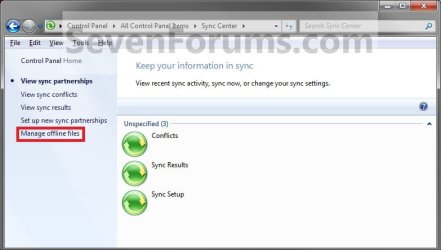
2. In the left pane, click/tap on the Manage offline files link. (see screenshot below)
Step1.jpg
3. To Enable the Use of Offline Files
NOTE: This is the default setting.
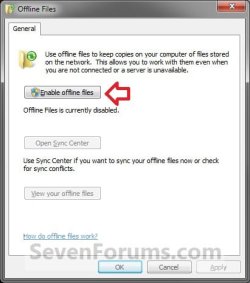
A) Click/tap on the Enable offline files button. (see screenshot below)
Enable1.jpg
B) If prompted by UAC, then click/tap on Yes.

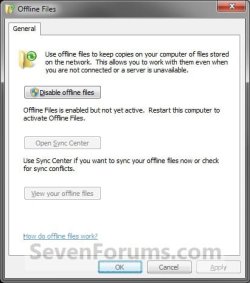
C) Click/tap on OK. (see screenshot below)
Enable2.jpg
D) Go to step 5.
4. To Disable the Use of Offline Files
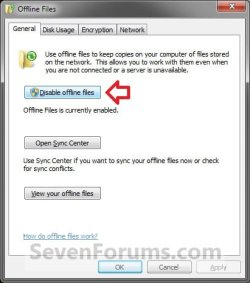
A) Click/tap on the Disable offline files button. (see screenshot below)
Disable1.jpg
B) If prompted by UAC, then click/tap on Yes.

C) Click/tap on OK. (see screenshot below)
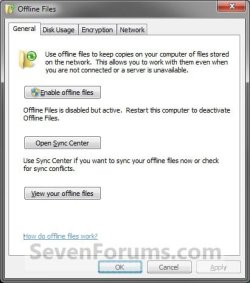
Disable2.jpg
5. Click/tap on Yes to restart the computer. (see screenshot below)
WARNING: This will restart the computer immediately. Be sure to save anything that you have open first.

Restart.jpg
6. If you enabled Offline Files, then all you need to do now is to make the network files or network folders you want to be always available offline.
That's it,
Shawn


Last edited:
does this work in home edition or is the function disabled ??
 

My Computer

OS
Vista
Hello Busaboy, and welcome to Seven Forums.

Offline Files is not a included feature in Windows 7 Home Premium edition, so it will not even be an available option for you. It's only available in the Windows 7 Professional, Ultimate, and Enterprise editions. :(
 

My Computer

Computer type
PC/Desktop
Computer Manufacturer/Model Number
Self built custom
OS
64-bit Windows 11 Pro for Workstations
CPU
Intel i7-8700K OC'd to 5 GHz
Motherboard
ASUS ROG Maximus XI Formula Z390
Memory
64 GB (4x16GB) G.SKILL TridentZ RGB DDR4 3600 MHz
Graphics Card(s)
ASUS ROG-STRIX-GTX1080TI-O11G-GAMING
Sound Card
Integrated
Monitor(s) Displays
2 x Samsung Odyssey G7 27"
Screen Resolution
2560x1440
Hard Drives
1TB Samsung 990 PRO M.2,
4TB Samsung 990 PRO PRO M.2,
TerraMaster F8 SSD Plus NAS
PSU
Seasonic Prime Titanium 850W
Case
Thermaltake Core P3
Cooling
Corsair Hydro H115i
Keyboard
Logitech wireless K800
Mouse
Logitech MX Master 4
Internet Speed
2 Gb/s Download and 100 Mb/s Upload
Antivirus
Malwarebyte Anti-Malware Premium
Browser
Google Chrome
Other Info
Logitech Z625 speaker system,
Logitech BRIO 4K Pro webcam,
HP Color LaserJet Pro MFP M477fdn,
APC SMART-UPS RT 1000 XL - SURT1000XLI,
Galaxy S23 Plus phone
OK Brink:confused:

Looks like an upgrade then:cry::sarc:

Thanks for your reply:D:D

Andy
 

My Computer

OS
Vista
You're welcome Andy. Sorry you will have to upgrade. :(
 

My Computer

Computer type
PC/Desktop
Computer Manufacturer/Model Number
Self built custom
OS
64-bit Windows 11 Pro for Workstations
CPU
Intel i7-8700K OC'd to 5 GHz
Motherboard
ASUS ROG Maximus XI Formula Z390
Memory
64 GB (4x16GB) G.SKILL TridentZ RGB DDR4 3600 MHz
Graphics Card(s)
ASUS ROG-STRIX-GTX1080TI-O11G-GAMING
Sound Card
Integrated
Monitor(s) Displays
2 x Samsung Odyssey G7 27"
Screen Resolution
2560x1440
Hard Drives
1TB Samsung 990 PRO M.2,
4TB Samsung 990 PRO PRO M.2,
TerraMaster F8 SSD Plus NAS
PSU
Seasonic Prime Titanium 850W
Case
Thermaltake Core P3
Cooling
Corsair Hydro H115i
Keyboard
Logitech wireless K800
Mouse
Logitech MX Master 4
Internet Speed
2 Gb/s Download and 100 Mb/s Upload
Antivirus
Malwarebyte Anti-Malware Premium
Browser
Google Chrome
Other Info
Logitech Z625 speaker system,
Logitech BRIO 4K Pro webcam,
HP Color LaserJet Pro MFP M477fdn,
APC SMART-UPS RT 1000 XL - SURT1000XLI,
Galaxy S23 Plus phone
That's great news Andy. I'm happy to hear that you got it sorted. :)
 

My Computer

Computer type
PC/Desktop
Computer Manufacturer/Model Number
Self built custom
OS
64-bit Windows 11 Pro for Workstations
CPU
Intel i7-8700K OC'd to 5 GHz
Motherboard
ASUS ROG Maximus XI Formula Z390
Memory
64 GB (4x16GB) G.SKILL TridentZ RGB DDR4 3600 MHz
Graphics Card(s)
ASUS ROG-STRIX-GTX1080TI-O11G-GAMING
Sound Card
Integrated
Monitor(s) Displays
2 x Samsung Odyssey G7 27"
Screen Resolution
2560x1440
Hard Drives
1TB Samsung 990 PRO M.2,
4TB Samsung 990 PRO PRO M.2,
TerraMaster F8 SSD Plus NAS
PSU
Seasonic Prime Titanium 850W
Case
Thermaltake Core P3
Cooling
Corsair Hydro H115i
Keyboard
Logitech wireless K800
Mouse
Logitech MX Master 4
Internet Speed
2 Gb/s Download and 100 Mb/s Upload
Antivirus
Malwarebyte Anti-Malware Premium
Browser
Google Chrome
Other Info
Logitech Z625 speaker system,
Logitech BRIO 4K Pro webcam,
HP Color LaserJet Pro MFP M477fdn,
APC SMART-UPS RT 1000 XL - SURT1000XLI,
Galaxy S23 Plus phone
Thank you so much for this Brink. I have been through every blooming tutorial I could find to get rid of my unwanted sync files, then I came across this post,

Thank you so much .
 

My Computer

Computer type
PC/Desktop
Computer Manufacturer/Model Number
Custom Build
OS
Windows 7 Ultimate x64 SP1
CPU
AMD Athlon II X4 645 quad core
Memory
6gig DDR3
Graphics Card(s)
Nvidia geforce GT 630
Sound Card
On Board
Monitor(s) Displays
Samsung LED 19"
Screen Resolution
ULTRA HD 1080p 1920 x 1080
Hard Drives
5 x 2tb
ATA Devices x 2
USB x 5
PSU
850 watt something or other forgot name
Case
Custom Build
Cooling
6 fan in out system with cold air blown through the in
Keyboard
Steelseries
Mouse
GM.M6800 optical mouse 5 button model
Internet Speed
80 gig on a good day 60 to 80 on a bad
Antivirus
not disclosed
Browser
not disclosed
Other Info
My Desktop is in a custom built airflow casing over the case. I still have the power button available etc . but the rest is cool controlled cold air going through the in and theoretically hot air out of the out. But it never gets hot enough for hot air to come out :-P
You're most welcome Mick, and welcome to Seven Forums. :)
 

My Computer

Computer type
PC/Desktop
Computer Manufacturer/Model Number
Self built custom
OS
64-bit Windows 11 Pro for Workstations
CPU
Intel i7-8700K OC'd to 5 GHz
Motherboard
ASUS ROG Maximus XI Formula Z390
Memory
64 GB (4x16GB) G.SKILL TridentZ RGB DDR4 3600 MHz
Graphics Card(s)
ASUS ROG-STRIX-GTX1080TI-O11G-GAMING
Sound Card
Integrated
Monitor(s) Displays
2 x Samsung Odyssey G7 27"
Screen Resolution
2560x1440
Hard Drives
1TB Samsung 990 PRO M.2,
4TB Samsung 990 PRO PRO M.2,
TerraMaster F8 SSD Plus NAS
PSU
Seasonic Prime Titanium 850W
Case
Thermaltake Core P3
Cooling
Corsair Hydro H115i
Keyboard
Logitech wireless K800
Mouse
Logitech MX Master 4
Internet Speed
2 Gb/s Download and 100 Mb/s Upload
Antivirus
Malwarebyte Anti-Malware Premium
Browser
Google Chrome
Other Info
Logitech Z625 speaker system,
Logitech BRIO 4K Pro webcam,
HP Color LaserJet Pro MFP M477fdn,
APC SMART-UPS RT 1000 XL - SURT1000XLI,
Galaxy S23 Plus phone
Thank you Brink :)
 

My Computer

Computer type
PC/Desktop
Computer Manufacturer/Model Number
Custom Build
OS
Windows 7 Ultimate x64 SP1
CPU
AMD Athlon II X4 645 quad core
Memory
6gig DDR3
Graphics Card(s)
Nvidia geforce GT 630
Sound Card
On Board
Monitor(s) Displays
Samsung LED 19"
Screen Resolution
ULTRA HD 1080p 1920 x 1080
Hard Drives
5 x 2tb
ATA Devices x 2
USB x 5
PSU
850 watt something or other forgot name
Case
Custom Build
Cooling
6 fan in out system with cold air blown through the in
Keyboard
Steelseries
Mouse
GM.M6800 optical mouse 5 button model
Internet Speed
80 gig on a good day 60 to 80 on a bad
Antivirus
not disclosed
Browser
not disclosed
Other Info
My Desktop is in a custom built airflow casing over the case. I still have the power button available etc . but the rest is cool controlled cold air going through the in and theoretically hot air out of the out. But it never gets hot enough for hot air to come out :-P
thanks Brink, I was looking for this little annoyance:dinesh:
 

My Computer

Computer type
PC/Desktop
Computer Manufacturer/Model Number
Home Built Desktop By DataTech
OS
Windows 7 Ultimate X64 SP1
CPU
Intel i5-2550K, Differing ~4.4-4.8GHz No built in GPU
Motherboard
ASUS P8Z68-V PRO/GEN3
Memory
16GB G.Skill Sniper 1866MHz @ 2133MHz 2x8GB
Graphics Card(s)
ASUS GTX650TIB-DC2OC-2GD5, (650TI Boost)
Sound Card
Onboard Realtek 5-1
Monitor(s) Displays
Samsung P2570HD
Screen Resolution
1920x1080
Hard Drives
Samsung 840 Pro 256GB SSD for OS, 500GB Seagate Constellation (Enterprise drive) for Data
PSU
Corsair HX650W
Case
Inwin Dragon Rider
Cooling
Hyper 212 EVO w/two Noctua fans, push-pull, @1300 RPM
Keyboard
E-Z Eyes, bright yellow keys with large characters
Mouse
steelseries SENSEI Laser Pro Gaming
Internet Speed
48-51Mbs Mbs down, 11 Mbs up Xfinity Cable
Antivirus
Norton Internet Security 2013
Browser
IE 10, Opera, Pale Moon if needed
Other Info
4 case fans, LG BluRay-RE, ASUS DVD-RW, Mr. Fusion power supply, 1.21 gigawatts.
You're most welcome Gary. :)
 

My Computer

Computer type
PC/Desktop
Computer Manufacturer/Model Number
Self built custom
OS
64-bit Windows 11 Pro for Workstations
CPU
Intel i7-8700K OC'd to 5 GHz
Motherboard
ASUS ROG Maximus XI Formula Z390
Memory
64 GB (4x16GB) G.SKILL TridentZ RGB DDR4 3600 MHz
Graphics Card(s)
ASUS ROG-STRIX-GTX1080TI-O11G-GAMING
Sound Card
Integrated
Monitor(s) Displays
2 x Samsung Odyssey G7 27"
Screen Resolution
2560x1440
Hard Drives
1TB Samsung 990 PRO M.2,
4TB Samsung 990 PRO PRO M.2,
TerraMaster F8 SSD Plus NAS
PSU
Seasonic Prime Titanium 850W
Case
Thermaltake Core P3
Cooling
Corsair Hydro H115i
Keyboard
Logitech wireless K800
Mouse
Logitech MX Master 4
Internet Speed
2 Gb/s Download and 100 Mb/s Upload
Antivirus
Malwarebyte Anti-Malware Premium
Browser
Google Chrome
Other Info
Logitech Z625 speaker system,
Logitech BRIO 4K Pro webcam,
HP Color LaserJet Pro MFP M477fdn,
APC SMART-UPS RT 1000 XL - SURT1000XLI,
Galaxy S23 Plus phone
Just an update

Sync works fine now with the upgrade but I have noticed that if there is a sync confliv=ct you are not automatically warned, you have to check the sync centre:sarc:
and you cannot sync shared files:sarc:
 

My Computer

OS
Vista
If you want to do this from the command line, from an elevated prompt, you can disable the "offline files" service:

sc config CscService start= disabled

note: I believe the space after '=' is required, and none before it.

I'm not sure, but you may have to stop the service first:

sc stop CscService

Disabling the service will show up as 'disabled' in the UI in the tutorial.

--peter
 

My Computer

Computer type
Laptop
Computer Manufacturer/Model Number
Lenovo T61p
OS
win 7 pro x64
CPU
T7700 Intel
Memory
4GB
Back
Top