
Ok..
I put the drives on another Pc with windows 7.
The less harmed one turned up fine!
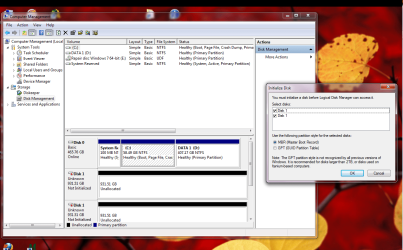
The other one gives me this:
Not accessible - file or directory is corrupted and unreadable.
What's the last resort for this? I really need to save any info there.
I'll buy a new sata drive today.
I put the drives on another Pc with windows 7.
The less harmed one turned up fine!
The other one gives me this:
Not accessible - file or directory is corrupted and unreadable.
What's the last resort for this? I really need to save any info there.
I'll buy a new sata drive today.
My Computer
At a glance
windows 7 ultimate x64Intel(R) Core(TM)2 Quad Q6600 @ 2.40GHz8 GBNvidia GEforce 8600 GT
- OS
- windows 7 ultimate x64
- CPU
- Intel(R) Core(TM)2 Quad Q6600 @ 2.40GHz
- Motherboard
- Gigabyte GA-P35-Ds3p
- Memory
- 8 GB
- Graphics Card(s)
- Nvidia GEforce 8600 GT
- Sound Card
- Realtec
- Monitor(s) Displays
- 1- MAG DVI 2- Samsung 2450 DVI-HDMI
- Screen Resolution
- 1- 1440x900 2- 19200x1080 HD

 )
)


 yes i expect that most of the free software will be limited but just say if you bought a file recoverer and that still did not work and it cost you i can see you getting mad i use external drives for important files so they are easily transferable just unplug the usb and put on another pc im sorry to say you have learnt a big lesson in using third party driver updaters