Old default location 'C:\Users\(existing user account)recreated again

Hadramawt

New member
Local time
11:06 PM
Messages
177
Hi,
I don't know if I came to the right forum section or not.

I have


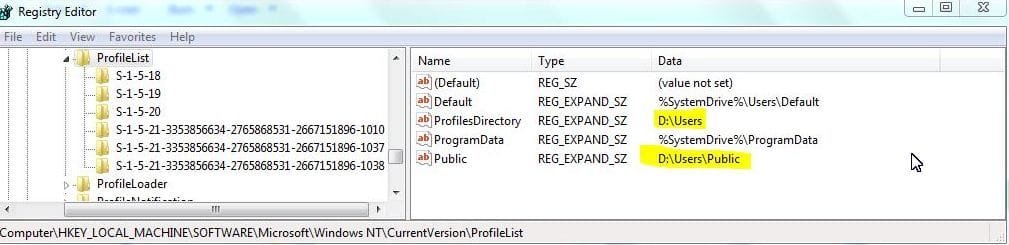
I moved all existing user account profile folder from the default location(C:\Users) into (D\:Users) in both the Windows explorer and in the registry. by following the Brink's explanation

As this screen shots below shows:


View Screen Capture


By following Brink's explanation,
I moved all newly created user account profile folder from the default location(C:\Users) into (D\:Users)

I moved public user account profile folder from the default location(C:\Users) into (D\:Users)

As this screen shot shows:


View Screen Capture


I did this six months ago, and everything is working well. The old default location(C:user) which no longer exists, it became unused by installing any programs or using any programs preinstalled with either a user account(existing user account, or public user account or newly user account). (E.e. the installed programs didn't save or look for any information in the old default location). The new default location for the current existing user account 'D:\Users\Mohammad' is only used and visible for all programs. And 'D:\Users\public' for Public user account.

However,
First: when I recently installed ' HP Support Assistant V(7.4.45.4)', I noticed that HP Support Assistant created file called 'RegistrationInfo' under the old default location which is 'C:\Users\.....', although the old default location of course no longer exists. The full path created by installing HP Support Assistant is "C:\Users\Mohammad\AppData\Local\Hewlett-Packard\HP Support Framework\Reg"

There is only one file called 'RegistrationInfo' created in the old default location above. However, it is still being edited with the date.

Second: when I installed the iSkysoft PDF Editor version 4.0.1, then it also re-used the old default location "C:\Users" for the current existing user account I am logged in to while installing the program. This is the full path recreated when I installed iSkysoft PDF Editor
C:\Users\Mohammad\AppData\Local\iSkysoft\ISHelper

However, when I open 'ISHelper' I found it empty and there is no data or information inside it.


Third:
When I installed the driver of Sharp printer, it recreated the old default location for the public user account:
This is the full path: C:\Users\Public\Documents\Printer Status Monitor

This is the content of this file generated by the Printer Status Monitor
Code:
# This file is generated by the Printer Status Monitor.
#
# When the IP address setting of print controller is changed,
# the dialog is often indicated as "No response. Make sure the
# specified IP address is correct."
# If you want to monitor the printer, exit the printer status
# monitor, do the operation from A to D as follows, and start the
# printer status monitor.
#
# A. Check the power of printer whether it is on or not.
# B. When the power is on, check the IP addresses.
#    If you don't know how to check the IP addresses, please see 
#    your printer's operation manual or contact your network 
#    administrator.
# C.  If you use LPR software or LPR port on NT, 
#    1. Double-click the icon "My Computer", and double-click the
#       "Printer" icon.
#    2. Right-click the icon of the printer, and select "Properties".
#    3. For the "port to print to" in the "Details" tab (When it is
#       NT, "Print to the following port(s)." in the "Ports".),
#       select the port that is the correct IP address.
# D.  For the "port to print to", when you use LPR software that does
#     not use the IP address, or print by way of a server, describe
#     the correct IP address by editing this file.
#     Please ensure that you remove the '#' at the start of the line
#     to enable the added configuration.
#
# Syntax:
# IP-Address Printer-Name-Shown-In-The-Explorer
#
#         Printer-Name-Shown-In-The-Explorer : (This must be the name
#         used in "Printers".)
#
# Example:
# 192.168.122.23 SHARP AR-507 PCL6
# 192.168.122.24 SHARP AL-1600 Series PCL6
# 192.168.122.25 SHARP AR-160/200 Series PCL6
# 192.168.122.26 SHARP DM-2000 Series PCL6
# 192.168.122.27 SHARP AR-235 PCL6
# 192.168.122.28 SHARP AR-P350 PCL6
# 192.168.122.29 SHARP AR-M350 PCL6

I have installed another program 'Screenshot Studio' after those three above programs, it was well installed, and it saved all its information into the new location which is "D:\Users\Mohammad........'. As this screen shoot shows:

View Screen Capture


My questions are as follows:
First: Why did only these three programs recreate and use the old default location for existing user account "C:\Users\Mohammad" and the old default location for the public user account 'C:\Users\Public", although these old locations definitely no longer exist?

Second: If I want to git rid of this bug, what should I do? I really opened all those three programs, but I didn't see any option of changing the path to be modified? I really checked out the settings of those program looking for if the programs are setup in their settings to still save their information into the old default location, but I didn't find anything.


Finally: I saw that all information saved in the old location "C:\Users\Mohammad.....", and "C:Users\Public....." was insignificant, since for HP Support Assistant only saved the information for 'RegistrationInfo'. However, the file generated by the Printer Status Monitor is only edited since it Sharp printer got installed, and the iSkysoft PDF Editor didn't save any information in that path(its empty)
 
Last edited:

My Computer My Computer

At a glance

Windows 7 Home Premium 64BitIntel Core i5, 2.3GHzDDR3- 6GBIntel Graphics Family, Radeon HD 6770M
Computer type
Laptop
Computer Manufacturer/Model Number
HP, Pavilion
OS
Windows 7 Home Premium 64Bit
CPU
Intel Core i5, 2.3GHz
Motherboard
Hewlett-Packard- Model 1657
Memory
DDR3- 6GB
Graphics Card(s)
Intel Graphics Family, Radeon HD 6770M
Hard Drives
Toshiba 700GB
Antivirus
Microsot Secuirty Eessentials
Browser
MS IE, Google Chrom, and FireFox
Not all programs can be redirected to install to another drive.

I would not install Programs anywhere except on C since they write keys to registry which integrate them into the OS until uninstalled and thus should remain on C. Likewise their Program data. Also on SSD's you lose the benefit of faster performance if Programs must be read from the slower drive.

The solution to this is not to move the User Profile but only the active User folders as in User Folders - Change Default Location

Is there another reason you wanted your OS profile on a non-OS drive?
 
Last edited:
Many programs leave configuration files in the profile folder and some of them might be hard coded to look for that folder on the OS drive. If that is so you won't be able to completely move the profiles folder. Doing so could have messed up those programs. My recommendation is to only move your documents, movies, music, etc to the other drive and leave the rest in the default location. I also agree about only installing programs on the OS drive.
 

My Computers My Computers

  • At a glance

    Windows 7 pro/Windows 10 ProIntel i7 860 Quad core 2.8 ghz8 gbATI Radeon HD 5770 1 gb ram
    Computer type
    PC/Desktop
    Computer Manufacturer/Model Number
    HP Pavillion Elite HPE-250f
    OS
    Windows 7 pro/Windows 10 Pro
    CPU
    Intel i7 860 Quad core 2.8 ghz
    Memory
    8 gb
    Graphics Card(s)
    ATI Radeon HD 5770 1 gb ram
    Monitor(s) Displays
    Alienware 25 AW2521HF & Viewsonic
    Screen Resolution
    1920 x1080 & 1680x1050
    Hard Drives
    WD blue 1 tb & 500 gb.
    Browser
    FF of course.
    Other Info
    https://www.bestbuy.com/site/hp-pavilion-elite-desktop-intel-core-i7-processor-8gb-memory-1tb-hard-drive/9921493.p?skuId=9921493
  • At a glance

    Windows 2012 R2 Data center/Linux Minti3 9100 3.6GHz, 8M cache, 4C/4T8GB 2666MT/s DDR4 ECC UDIMM
    Computer type
    PC/Desktop
    System Manufacturer/Model Number
    Dell Poweredge T140
    OS
    Windows 2012 R2 Data center/Linux Mint
    CPU
    i3 9100 3.6GHz, 8M cache, 4C/4T
    Memory
    8GB 2666MT/s DDR4 ECC UDIMM
    Monitor(s) Displays
    Viewsonic
    Screen Resolution
    1680x1050
    Hard Drives
    1 TB & 750 GB
    Other Info
    https://www.dell.com/en-us/work/shop/productdetailstxn/poweredge-t140?~ck=bt
Thank you both of you very much indeed,

I really did Not move the default location of installing programs, however, I have only moved the Default Location of a User Profile folder instead. If were not helpful, then why would Brink have discussed it at your forum
How to Change the Default Location of a User Profile in Vista and Windows 7'


The solution to this is not to move the User Profile but only the active User folders as in User Folders - Change Default Location
But if you have visited that link I provided in my very first post, you will be seeing that Brink discussed How to Change the Default Location of a User Profile in Vista and Windows 7' in which He said:
Warning
Some of the programs you have installed may not work properly after moving your user profile folder since they are still looking for their information in the user profile folder's original AppData folder location which of course no longer exists.
If you have this problem afterwards, then you may be able to uninstall and reinstall these programs, or use OPTION TWO in the tutorial to create a new user account and create new shortcuts for the programs to fix this.


-------------
I have moved the account profile folder six months ago without seeing any problem. But recentely I have installed three programs mentioned before, then this problem showed me.
I don't have any problems with the programs I have recently installed. They worked well after moving my user profile folder. However, the problem is only these programs are only saving saving their information in the user profile folder's original AppData folder location which of course no longer exists.

Only these three programs are saving their information the old location 'C:\Users' which was recreated by them since it no longer exists, the others are saving their information in the new location which is: C:\Users\.......

I hope I let my question clear.
 

My Computer My Computer

At a glance

Windows 7 Home Premium 64BitIntel Core i5, 2.3GHzDDR3- 6GBIntel Graphics Family, Radeon HD 6770M
Computer type
Laptop
Computer Manufacturer/Model Number
HP, Pavilion
OS
Windows 7 Home Premium 64Bit
CPU
Intel Core i5, 2.3GHz
Motherboard
Hewlett-Packard- Model 1657
Memory
DDR3- 6GB
Graphics Card(s)
Intel Graphics Family, Radeon HD 6770M
Hard Drives
Toshiba 700GB
Antivirus
Microsot Secuirty Eessentials
Browser
MS IE, Google Chrom, and FireFox
Some programs don't use the correct key when they look up a User's profile location and default to: %SystemDrive%\Users

Other programs default when something returns a "not found" condition.

I noticed in your screen shot that Default is set to
%SystemDrive%\Users\Default
38JxXZ.jpg

I don't recall that being an issue on any of my machines when I relocated my user profile(s), so it's just an observation at this point.

A few things you can check:
1) make sure your environment variables reference the D:\users location
(HOMEDRIVE one that might throw off a not-so-smart program)

2) See if the junctions still exist
Open a command prompt (your current directory should be your user profile folder)
Enter the following command
dir /s /aL > ListJunctions.txt
exit

Look in ListJunctions.txt for the special backward compatible folder names Myxxxx (Mydocuments, Mypictures, ...) and Application Data. I think there are a few others, but I never fixed that on this machine (no older programs). You might have to add the junctions back to your user profile using
mklink /J SymLinkName TargetFolderName
ex: mklink "Application Data" "D:\Users\Mohammad\Appdata"
Your current directory in a command prompt would be d:\users\Mohammad
I'm not sure of you need the fully qualified folder names, so check what you create
dir /aL

date time <JUNCTION> Application Data ["D:\Users\Mohammad\Appdata]
is what I would expect you to see.

Junctions might not be carried over in a move. I'll have to look on my Win7 machine to get a good list.

As you've noted the files that got created are not of any consequence, still it would be nice to not have to worry about where things are placed.

I ran into this issue a few times, but can't recall how I ended up resolving it (other than what I posted above).
You might export your registry and look for any instance of C:\User, \User, or %SystemDrive%\User

If I can think of anything else, I'll post it.

Bill
.
 

My Computer My Computer

At a glance

x64 (6.3.9600) Win8.1 Pro & soon dual boot x6...AMD A6-3420M APU with Radeon(tm) HD Graphics6.00 GBAMD Radeon(TM) HD 6520G
Computer type
Laptop
Computer Manufacturer/Model Number
HP Pavilion dv6-6c10us
OS
x64 (6.3.9600) Win8.1 Pro & soon dual boot x64 (6.1.7601) Win7_SP1 HomePrem
CPU
AMD A6-3420M APU with Radeon(tm) HD Graphics
Motherboard
Hewlett-Packard 1805
Memory
6.00 GB
Graphics Card(s)
AMD Radeon(TM) HD 6520G
Sound Card
(1) AMD High Definition Audio Device (2) IDT High Definiti
Monitor(s) Displays
HP W2072a 20" LCD (1600 x 900) @ 60 Hz
Screen Resolution
1366 x 768 x 32 bits (4294967296 colors) @ 60 Hz
Hard Drives
ST640LM0 00 HM641JI SATA Disk Device
Keyboard
Logitech k520 wireless KB
Mouse
Logitech m320 wireless mouse (bundled with KB)
Internet Speed
15/5 | 54 MB Wireless 'n'
Antivirus
Realtime: Defender or Avast | On-demand: Malwarebytes, ESET
Browser
IE 11 on Win8, IE 10 on win 7
Other Info
Media: [Gimp, Audacity, VLC] || Comm: [WEmail 2012, Skype] || Productivity: [OpenOffice,| Textpad] || Utils: [Sysinternals, cCleaner, Speccy, Defraggler]
Some programs don't use the correct key when they look up a User's profile location and default to: %SystemDrive%\Users

Other programs default when something returns a "not found" condition.

Thank you so much,
Although I don't understand what you meant with this point, I would be saying:
If some programs are still looking for their information in the old default location of a user account's profile folder I changed, then check from inside the program, and change the location to new location as well. In other words, if the old location of a user account's profile folder you changed is still used by some programs, you should change the location from inside the program to the new location as well.

In some programs such as: (Bluetooth, Revo installer) you can change the default location from inside them.


I noticed in your screen shot that Default is set to
%SystemDrive%\Users\DefaultI don't recall that being an issue on any of my machines when I relocated my user profile(s), so it's just an observation at this point.
Since I noticed no importance, significant problems from moving or even not moving the default user profile folder, I really didn't move it for this Windows installation.

However, in other Windows 7 installations, I've also tried changing the default user account's profile folder from its default location '%SystemDrive%\Users\Default' into another one .
I really have been still asking myself what benefits or features there are from this kind of user account.
If you have a close look at this screen shot below taken from inside the default user account's profile folder, you will see that the date of all sub-folders is 2009. (I am really very perplexed about this date which is even far too much earlier than the data when I purchase my machine, which is was 2011.
There are only one folder and two files highlighted got dated with a date later than 2009.


View Screen Capture


With respect to Junctions, I really didn't create any junction when moving all my accounts into another location(D:\Users\....)
I only have followed the steps supported by Brink.


As you've noted the files that got created are not of any consequence, still it would be nice to not have to worry about where things are placed.
I really don't see any consequences of these files being recreated. However, I really have deleted the main folder 'Users' inside C: once all the user account got moved into the new location. Then, I've always been monitoring the drive 'C' to check out if any program re-installed or just installed recreate the folder 'users' to save information of its. However, I have stayed for about six months without getting that folder recreated again. However, the three programs motioned in my very first post resulted in recreating that folder in the C:. I know these files are not user DATA which should be separated from the OS drive, however, I really would perfect solution of this issue. I think all programs should be installed where a user direct them while installing them. However, they should be saving their information according to where Existing user account's profile folder , Public user account's profile folder are.


I ran into this issue a few times, but can't recall how I ended up resolving it (other than what I posted above).

I was having this problem with some programs, such as ((Bluetooth, Revo installer), which were installed after moving all the accounts into another location which is D:\users\...', . However, when I installed them, they were still saving their information in the old default location 'C:\Users\Existing user account' which of course no longer exists.
For instance, I have installed Revo installer after moving all accounts from 'C:\uses' into 'D:\Users'.
However, when Revo got installed, and whenever I uninstalled any program with it, then I found that Revo recreated 'C:\users\Existing account ' since its settings are set up to the default location "C:\Users\Existing account"


View Screen Capture

What I have done to solve this issue is: I changed the default location from inside them.(I opened the settings of a program still saving its information in the old default location 'C:\Users'. Then, I changed it into new 'D:\users\existing account'


View Screen Capture


After that, Rev became saving its information to the new location 'D:\users\Existing user account'.


You might export your registry and look for any instance of C:\User, \User, or %SystemDrive%\User
To check out if the new default location of the newly created accounts, and public user account is "D:\Users\...", I think no entries which should be checked out at registry other than 'HKEY_LOCAL_MACHINE\SOFTWARE\Microsoft\Windows NT\CurrentVersion\ProfileList'

However, to check out if the new default location of the existing account is 'D:\Users\My Existing account", I think no entries which should be checked out at registry other than: HKEY_LOCAL_MACHINE\SOFTWARE\Microsoft\Windows NT\CurrentVersion\ProfileList\S-1-5-21 for my existing account"
 

My Computer My Computer

At a glance

Windows 7 Home Premium 64BitIntel Core i5, 2.3GHzDDR3- 6GBIntel Graphics Family, Radeon HD 6770M
Computer type
Laptop
Computer Manufacturer/Model Number
HP, Pavilion
OS
Windows 7 Home Premium 64Bit
CPU
Intel Core i5, 2.3GHz
Motherboard
Hewlett-Packard- Model 1657
Memory
DDR3- 6GB
Graphics Card(s)
Intel Graphics Family, Radeon HD 6770M
Hard Drives
Toshiba 700GB
Antivirus
Microsot Secuirty Eessentials
Browser
MS IE, Google Chrom, and FireFox
First of all, I've stopped advising users to use Revo after seeing it ruin several installs due to being overly aggressive. Meanwhile CCleaner has no documented case of ever messing up the registry with its less aggressive registry cleaner.

Enough issues have presented over the years with moving User Account that I don't advise it and the last time I asked Shawn he discouraged it, too. So you might want to address that with him in the tutorial Comments section to be sure. He may also be able to help you there with the issues you're having.

Meanwhile what does work well is moving the individual active User folders as I've already explained. On my devices I move the User folders into the OneDrive folder to synch them smoothly across all devices: Sync, Backup and Store your Files to the Cloud with OneDrive
 
Some programs get the locations from the wrong key in the registry (they make a wrong call to GETHISKEY or something- rookie mistake). The key itself states "DO NOT USE TIHS KEY TO GET ..... USE THIS KEY"
I forget the exact key name.

So there are or are not <JUNCTION> references under your D:\ profile?
The programs you installed might look for them and use a coded default (usually on c:\)
I don't know about every specific programs and don't see the merit in looking that deeply at the ones you installed.
This, as you know, is an artifact of moving a user profile.

How about those environment variables I asked about - anything still pointing back at C:\Users?

Did you get the chance to export the registry and look for C:\User, \User, or %SystemDrive%\User

I got lost in the Default user and Revo discussion - thanks for posting the information, but ...
I don't think you can change the destination for every program with Revo - only Revo settings would be affected - I could be wrong on that. Again, I didn't look that closely at your post. I'll go back and read it again.

Bill
.
 

My Computer My Computer

At a glance

x64 (6.3.9600) Win8.1 Pro & soon dual boot x6...AMD A6-3420M APU with Radeon(tm) HD Graphics6.00 GBAMD Radeon(TM) HD 6520G
Computer type
Laptop
Computer Manufacturer/Model Number
HP Pavilion dv6-6c10us
OS
x64 (6.3.9600) Win8.1 Pro & soon dual boot x64 (6.1.7601) Win7_SP1 HomePrem
CPU
AMD A6-3420M APU with Radeon(tm) HD Graphics
Motherboard
Hewlett-Packard 1805
Memory
6.00 GB
Graphics Card(s)
AMD Radeon(TM) HD 6520G
Sound Card
(1) AMD High Definition Audio Device (2) IDT High Definiti
Monitor(s) Displays
HP W2072a 20" LCD (1600 x 900) @ 60 Hz
Screen Resolution
1366 x 768 x 32 bits (4294967296 colors) @ 60 Hz
Hard Drives
ST640LM0 00 HM641JI SATA Disk Device
Keyboard
Logitech k520 wireless KB
Mouse
Logitech m320 wireless mouse (bundled with KB)
Internet Speed
15/5 | 54 MB Wireless 'n'
Antivirus
Realtime: Defender or Avast | On-demand: Malwarebytes, ESET
Browser
IE 11 on Win8, IE 10 on win 7
Other Info
Media: [Gimp, Audacity, VLC] || Comm: [WEmail 2012, Skype] || Productivity: [OpenOffice,| Textpad] || Utils: [Sysinternals, cCleaner, Speccy, Defraggler]
Thakns a lot, Slartybart, gregrocker.

So there are or are not <JUNCTION> references under your D:\ profile?
The programs you installed might look for them and use a coded default (usually on c:\)
I don't know about every specific programs and don't see the merit in looking that deeply at the ones you installed.
This, as you know, is an artifact of moving a user profile.
I just followed Brink's steps, and there is no junction mentioned at his thread.

I got lost in the Default user and Revo discussion - thanks for posting the information, but ...
I don't think you can change the destination for every program with Revo - only Revo settings would be affected - I could be wrong on that. Again, I didn't look that closely at your post. I'll go back and read it again.
With respect to what I said about Revo program, I meant that the default settings of installing Reov program is still 'C:users\existing user accont' even after moving the user accounts from 'C:users\existing user account' into 'D:users\exiting user account'. It mustn't have recognised the old location which of course no longer exists. Thus, whenever I open the Revo uninstaller, and uninstall a program with it, then Revo creates this folder 'VS Revo Group' in this old path 'C:\Users\User folder\AppData\local\'. And whenever a program was uninstalled by it, then Backup data of that program saved in this folder.the 'C:user"
However, I had to change it in the settings of Rev uninstaller into the the new location 'D:users', then Reov became saved in the new location.'D:users\....'

Yes, not all programs such Revo which can be configured from inside its settings. But I need a stable moving of the old default location into a new location of a user account's profile folder.
 

My Computer My Computer

At a glance

Windows 7 Home Premium 64BitIntel Core i5, 2.3GHzDDR3- 6GBIntel Graphics Family, Radeon HD 6770M
Computer type
Laptop
Computer Manufacturer/Model Number
HP, Pavilion
OS
Windows 7 Home Premium 64Bit
CPU
Intel Core i5, 2.3GHz
Motherboard
Hewlett-Packard- Model 1657
Memory
DDR3- 6GB
Graphics Card(s)
Intel Graphics Family, Radeon HD 6770M
Hard Drives
Toshiba 700GB
Antivirus
Microsot Secuirty Eessentials
Browser
MS IE, Google Chrom, and FireFox
Yes, ... that's what I thought, thanks.

I'd like to see if an environment variable still references the C:\Users\... location
and what junctions, if any, are under your d:\users\... profile

Open a standard Command Prompt and type:
set > listEnv.txt

dir /s /aL > listJunct.txt
exit​

Please attach both files created to your next post (use the paperclip icon on the post menu)
listEnv.txt
-- and --
ListJunct.txt​

The files are in your top level user profile folder.
 

My Computer My Computer

At a glance

x64 (6.3.9600) Win8.1 Pro & soon dual boot x6...AMD A6-3420M APU with Radeon(tm) HD Graphics6.00 GBAMD Radeon(TM) HD 6520G
Computer type
Laptop
Computer Manufacturer/Model Number
HP Pavilion dv6-6c10us
OS
x64 (6.3.9600) Win8.1 Pro & soon dual boot x64 (6.1.7601) Win7_SP1 HomePrem
CPU
AMD A6-3420M APU with Radeon(tm) HD Graphics
Motherboard
Hewlett-Packard 1805
Memory
6.00 GB
Graphics Card(s)
AMD Radeon(TM) HD 6520G
Sound Card
(1) AMD High Definition Audio Device (2) IDT High Definiti
Monitor(s) Displays
HP W2072a 20" LCD (1600 x 900) @ 60 Hz
Screen Resolution
1366 x 768 x 32 bits (4294967296 colors) @ 60 Hz
Hard Drives
ST640LM0 00 HM641JI SATA Disk Device
Keyboard
Logitech k520 wireless KB
Mouse
Logitech m320 wireless mouse (bundled with KB)
Internet Speed
15/5 | 54 MB Wireless 'n'
Antivirus
Realtime: Defender or Avast | On-demand: Malwarebytes, ESET
Browser
IE 11 on Win8, IE 10 on win 7
Other Info
Media: [Gimp, Audacity, VLC] || Comm: [WEmail 2012, Skype] || Productivity: [OpenOffice,| Textpad] || Utils: [Sysinternals, cCleaner, Speccy, Defraggler]
Thanks a lot,

make sure your environment variables reference the D:\users location'


How can I make sure about this?


Open a standard Command Prompt and type:
set > listEnv.txt

dir /s /aL > listJunct.txt
exit​
Please attach both files created to your next post (use the paperclip icon on the post menu)
listEnv.txt
-- and --
ListJunct.txt​
The files are in your top level user profile folder.
Should I run the command in order, set> listEnv.txt. Then, Dir/s /al >listJunct.tx' ?
Or no matter which one is applied first.
I run the ' Dir/s /al >listJunct.tx' then exit . After that, I run CMD again, then run ' set> listEnv.txt. '

With respect to 'listEnv.txt' and 'ListJunct.txt', I attached them.


By the way, you didn't answer me about what benefit there is from 'default user account' and why always its subfolders have dates with 2009, and only one folder has a date of 2014, and two files of which one is dated with 2014, and the other one is dated with '2011'(if you have seen my screen shot, you will understand me.)
 

Attachments

My Computer My Computer

At a glance

Windows 7 Home Premium 64BitIntel Core i5, 2.3GHzDDR3- 6GBIntel Graphics Family, Radeon HD 6770M
Computer type
Laptop
Computer Manufacturer/Model Number
HP, Pavilion
OS
Windows 7 Home Premium 64Bit
CPU
Intel Core i5, 2.3GHz
Motherboard
Hewlett-Packard- Model 1657
Memory
DDR3- 6GB
Graphics Card(s)
Intel Graphics Family, Radeon HD 6770M
Hard Drives
Toshiba 700GB
Antivirus
Microsot Secuirty Eessentials
Browser
MS IE, Google Chrom, and FireFox
Thanks Hadramawt,

The two reports look fine. Everything points to the correct locations.

Does the C:\Users\ profile still exist or did you already remove it?

Please provide a full listing of the C:\Users profile if there still is one.

Open a standard Command Prompt and type the following command
dir /a /s > ListCuser.txt​

Then attach %USERPROFILE%\ListCuser.txt to your next post.

If you already removed the C:\Users profile, don't worry about that. I'll try to think of something else

Did you export your registry and look for C:\Users ? It might not be as straightforward as that, the key might use a GUID to reference C:\Users - I'm not sure. I'm also not exactly sure what, if any, registry entry might cause the symptoms ... all I know is that it happened a few times on my machines (after reinstalls and moving the profiles). It is not detrimental, as you've seen there are inconsequential files placed in the 'old' location. I have the suspicion that the files are install or update related - once installed or updated, the files in the 'old' location are not longer needed. I'll know more if I can see a list of files.
 

My Computer My Computer

At a glance

x64 (6.3.9600) Win8.1 Pro & soon dual boot x6...AMD A6-3420M APU with Radeon(tm) HD Graphics6.00 GBAMD Radeon(TM) HD 6520G
Computer type
Laptop
Computer Manufacturer/Model Number
HP Pavilion dv6-6c10us
OS
x64 (6.3.9600) Win8.1 Pro & soon dual boot x64 (6.1.7601) Win7_SP1 HomePrem
CPU
AMD A6-3420M APU with Radeon(tm) HD Graphics
Motherboard
Hewlett-Packard 1805
Memory
6.00 GB
Graphics Card(s)
AMD Radeon(TM) HD 6520G
Sound Card
(1) AMD High Definition Audio Device (2) IDT High Definiti
Monitor(s) Displays
HP W2072a 20" LCD (1600 x 900) @ 60 Hz
Screen Resolution
1366 x 768 x 32 bits (4294967296 colors) @ 60 Hz
Hard Drives
ST640LM0 00 HM641JI SATA Disk Device
Keyboard
Logitech k520 wireless KB
Mouse
Logitech m320 wireless mouse (bundled with KB)
Internet Speed
15/5 | 54 MB Wireless 'n'
Antivirus
Realtime: Defender or Avast | On-demand: Malwarebytes, ESET
Browser
IE 11 on Win8, IE 10 on win 7
Other Info
Media: [Gimp, Audacity, VLC] || Comm: [WEmail 2012, Skype] || Productivity: [OpenOffice,| Textpad] || Utils: [Sysinternals, cCleaner, Speccy, Defraggler]
By the way, you didn't answer me about what benefit there is from 'default user account' and why always its subfolders have dates with 2009, and only one folder has a date of 2014, and two files of which one is dated with 2014, and the other one is dated with '2011'(if you have seen my screen shot, you will understand me.)
When you create a new profile, that Default user profile is copied to the new profile.

Maybe some app that was installed, uninstalled or updated made a change to the Links folder... thus, a new date on that folder.
 

My Computer My Computer

At a glance

W7 Pro SP1 64biti78GBIntel HD Graphics
Computer type
Laptop
Computer Manufacturer/Model Number
Employer provided Dell Latitude
OS
W7 Pro SP1 64bit
CPU
i7
Memory
8GB
Graphics Card(s)
Intel HD Graphics
Hard Drives
crappy SSD
Antivirus
Employer mandated Symantec Endpoint Protection
Browser
Pale Moon 64bit, IE11 64bit & Chrome 64bit
Thanks Hadramawt,

Does the C:\Users\ profile still exist or did you already remove it?

Please provide a full listing of the C:\Users profile if there still is one.

Open a standard Command Prompt and type the following command
dir /a /s > ListCuser.txt​
Then attach %USERPROFILE%\ListCuser.txt to your next post.

If you already removed the C:\Users profile, don't worry about that. I'll try to think of something else


Thanks a lot for continuing replying to me.

First of of all: With respect to 'ListCuser.txt:' I face an error uploading it since my file of 1.98 MB bytes exceeds the forum's limit of 1.00 MB for this filetype. Thus, I had to upload to my onedrive.

https://onedrive.live.com/redir?resid=9B92B6EA6794EB45!761&authkey=!ANVIXm8LJZC2lwk&ithint=file,txt.

I really don't know what difference is there between 'dir /a /s > ListCuser.txt' and 'dir /s /aL > listJunct.txt' since the resulted file seems as thought it contains the same contents.

IF you checked this file, you will see all information saved in the sub-folders saved in 'D:\users\Existing user account'.
But there are no entries like these ones below which are only in C:\the same path'
'D:\Users\Mohammad\AppData\Local\Hewlett-Packard\HP Support Framework\Reg"
'D:\Users\Mohammad\AppData\Local\iSkysoft\ISHelper'
----------------------------------------------------------------------------------------------------

As said before, when I moved all user accounts' profile folders about 8 months ago, and I then removed the entire old default locations, which are:
'C:\Users\ Existing accounts'
'C:\Users\Public.'

over the past eight months, there were no things inside 'C:\Users' aside from 'Default' which is hidden user account'

However, they are recreated when I recently installed HP support assistant, Sharp printer driver, iSkysoft PDF Editor, then the old default location recreated by those programs since they put some information of theirs in 'App' folder. Some others put their information in 'Public Document'. As a result, only 'App' folder inside the existing account recreated in 'C:users\existing account\.....'. Also, 'Documents' folder was only recreated in 'C:\Users\Public'
These are the details:

First: when I recently installed 'HP Assistant v(6.1.12.1)', then I updated it into 'V(7.4.45.4) , I noticed that HP Support Assistant created only a file called 'RegistrationInfo' under the old default location('C:\Users\.....') which of cousrs no longer exists The full path created by installing HP Support Assistant is "C:\Users\Mohammad\AppData\Local\Hewlett-Packard\HP Support Framework\Reg"

NOTE: The Registarationifor' only was created on '11/03/2014' once I updated or installed HP support assistant(I really don't recall very well if this file was created when I installed HP Support assistant or when I updated it since HPSA was installed first, then it was update into a new one vesion newer)
The file called 'RegistrationInfo' created in the old default location above is still being saved alone without any additional files saved in the same old location, and it is still dated with the the same date, although HP support assistant related to that file is always opened.


View Screen Capture


Second: when I installed the iSkysoft PDF Editor version 4.0.1, then it also re-used the old default location "C:\Users" for the current existing user account I am logged in to while installing the program. This is the full path recreated when I installed iSkysoft PDF Editor
C:\Users\Mohammad\AppData\Local\iSkysoft\ISHelper

However, when I open 'ISHelper' I found it empty and there is no data or information inside it.


View Screen Capture


Third:
Here is different When I installed the driver of Sharp printer, it recreated the old default location for the public user account, not for existing user account: And then 'Sharp printer' program created these files 'Printers' and 'Printers_sample' in: C:\Users\Public\Documents\Printer Status Monitor


View Screen Capture


Did you export your registry and look for C:\Users ? It might not be as straightforward as that, the key might use a GUID to reference C:\Users - I'm not sure. I'm also not exactly sure what, if any, registry entry might cause the symptoms ... all I know is that it happened a few times on my machines (after reinstalls and moving the profiles). It is not detrimental, as you've seen there are inconsequential files placed in the 'old' location. I have the suspicion that the files are install or update related - once installed or updated, the files in the 'old' location are not longer needed. I'll know more if I can see a list of files.
In which entries do you want me to export my registry and look for 'C:\Users'.
I only checked these etnries:

  1. 'HKEY_LOCAL_MACHINE\SOFTWARE\Microsoft\Windows NT\CurrentVersion\ProfileList
  2. 'HKEY_LOCAL_MACHINE\SOFTWARE\Microsoft\Windows NT\CurrentVersion\ProfileList\S-1-5-21 for my existing account",
I checked out at registry and look up in the entry 'HKEY_LOCAL_MACHINE\SOFTWARE\Microsoft\Windows NT\CurrentVersion\ProfileList'
However, I found that profilesdrirctoy for the newly created accounts, and public user account is "D:\Users\..."

Also, at registry I look up in the entry 'HKEY_LOCAL_MACHINE\SOFTWARE\Microsoft\Windows NT\CurrentVersion\ProfileList\S-1-5-21 for my existing account", I found the new default location of the existing account is 'D:\Users\My Existing account".

Finally:
as I expect all those are inconsequential files placed in the 'old' location, can I delete them. Even if I had deleted them, hadn't faced problems with the programs, I wouldn't find a perfect stable moving of the old default location into a new one location for a user account's profile folder.
 
Last edited:

My Computer My Computer

At a glance

Windows 7 Home Premium 64BitIntel Core i5, 2.3GHzDDR3- 6GBIntel Graphics Family, Radeon HD 6770M
Computer type
Laptop
Computer Manufacturer/Model Number
HP, Pavilion
OS
Windows 7 Home Premium 64Bit
CPU
Intel Core i5, 2.3GHz
Motherboard
Hewlett-Packard- Model 1657
Memory
DDR3- 6GB
Graphics Card(s)
Intel Graphics Family, Radeon HD 6770M
Hard Drives
Toshiba 700GB
Antivirus
Microsot Secuirty Eessentials
Browser
MS IE, Google Chrom, and FireFox
By the way, you didn't answer me about what benefit there is from 'default user account' and why always its subfolders have dates with 2009, and only one folder has a date of 2014, and two files of which one is dated with 2014, and the other one is dated with '2011'(if you have seen my screen shot, you will understand me.)

When you create a new profile, that Default user profile is copied to the new profile.

Maybe some app that was installed, uninstalled or updated made a change to the Links folder... thus, a new date on that folder.


Thanks a lot,
This is good think. You mean that the default account which is always hidden file is the responsible for creating any newly account.
Wherever the Default user is located, then whenever I created a newly created user account in any location, then only the ten sub-folders of the default account will be copied into the newly created user account's profile folder to prepare my new account user's profile.

If so,
First: I would be saying that I have created a new user account, but I found the ten subfolders were dated with the time when they were created.

Second: I only found the ten sub-folders were copied to new account folder, however, the three files(screen shot below) were not copied.
TXQ9Dj.png


Also,
I really must now agree with you that When you create a new profile, that Default user profile is copied to the new profile' Since The default user account is the responsible for creating any newly account. I Copied the default user account's profile folder from its original location(systemDrive\ users) to the new location D:\users\default.' Then, I deleted the default user account's profile folder via the Windows explorer without changing the new location in the registry. As a result, I found this error below whenever creating any newly user account::

The User Profile Service failed the logon. User profile cannot be loaded.

Which means that When you create a new profile, that Default user profile is copied to the new profile.
So I think If you copied the default user account's profile folder from its original location, which is in system partition, to another location and then deleted the folder without changing the location [%SystemDrive%\Users\Default] to the new location in the registry, You will receive this above error whenever creating any newly account.


Conclusion:: Since the default's profile folder is now copied on new location, and deleted from the old location. However, the old location of the default account's profile folder is still in the registry. As a result, whenever a newly account was created, then that error would be shown since System wanted to copy Default user profile to the new account, but it didn't find the default's folder in the Windows explore, as opposed to its location in the registry.
 
Last edited:

My Computer My Computer

At a glance

Windows 7 Home Premium 64BitIntel Core i5, 2.3GHzDDR3- 6GBIntel Graphics Family, Radeon HD 6770M
Computer type
Laptop
Computer Manufacturer/Model Number
HP, Pavilion
OS
Windows 7 Home Premium 64Bit
CPU
Intel Core i5, 2.3GHz
Motherboard
Hewlett-Packard- Model 1657
Memory
DDR3- 6GB
Graphics Card(s)
Intel Graphics Family, Radeon HD 6770M
Hard Drives
Toshiba 700GB
Antivirus
Microsot Secuirty Eessentials
Browser
MS IE, Google Chrom, and FireFox
Regarding why some programs create parts of their data files to C:\Users\Your_Username\AppData instead of the current location of your user profile, please read this post: http://www.sevenforums.com/tutorial...ing-windows-7-installation-4.html#post1161672. Although explaining why some data is saved in C:\ProgramData even when the ProgramData folder is relocated to another drive, the same explanation applies to your situation.

In your case, those few programs use the absolute path C:\Users\Your_Username\AppData instead of the relative path %USERPROFILE%\AppData. In my opinion you should accept the fact and leave the C:\Users there, it will never grow to be big enough to really "eat the storage space" on C: as most of the stuff going to your user profile will use the current location instead.

Kari
 

My Computer My Computer

At a glance

Windows 10 Pro x64 EN-GB1.6 GHz Intel Core i7-720QM Processor6 GBATI Mobility Radeon HD 5850 Graphics
Computer type
Laptop
Computer Manufacturer/Model Number
HP ENVY 17-1150eg
OS
Windows 10 Pro x64 EN-GB
CPU
1.6 GHz Intel Core i7-720QM Processor
Memory
6 GB
Graphics Card(s)
ATI Mobility Radeon HD 5850 Graphics
Sound Card
Beats sound system with integrated subwoofer
Monitor(s) Displays
17" laptop display, 22" LED and 32" Full HD TV through HDMI
Screen Resolution
1600*900 (1), 1920*1080 (2&3)
Hard Drives
Internal: 2 x 500 GB SATA Hard Disk Drive 7200 rpm
External: 2TB for backups, 3TB USB3 network drive for media
Cooling
As Envy runs a bit warm, I have it on a Cooler Master pad
Keyboard
Logitech diNovo Media Desktop Laser (bluetooth)
Mouse
Logitech Performance Mouse MX
Internet Speed
50/10 Mbps VDSL
Antivirus
Windows Defender 4.3.9431.0
Browser
Maxthon 3.5.2., IE11
In your case, those few programs use the absolute path C:\Users\Your_Username\AppData instead of the relative path %USERPROFILE%\AppData. In my opinion you should accept the fact and leave the C:\Users there, it will never grow to be big enough to really "eat the storage space" on C: as most of the stuff going to your user profile will use the current location instead.

Kari

Exactly.
 

My Computers My Computers

  • At a glance

    Windows 7 pro/Windows 10 ProIntel i7 860 Quad core 2.8 ghz8 gbATI Radeon HD 5770 1 gb ram
    Computer type
    PC/Desktop
    Computer Manufacturer/Model Number
    HP Pavillion Elite HPE-250f
    OS
    Windows 7 pro/Windows 10 Pro
    CPU
    Intel i7 860 Quad core 2.8 ghz
    Memory
    8 gb
    Graphics Card(s)
    ATI Radeon HD 5770 1 gb ram
    Monitor(s) Displays
    Alienware 25 AW2521HF & Viewsonic
    Screen Resolution
    1920 x1080 & 1680x1050
    Hard Drives
    WD blue 1 tb & 500 gb.
    Browser
    FF of course.
    Other Info
    https://www.bestbuy.com/site/hp-pavilion-elite-desktop-intel-core-i7-processor-8gb-memory-1tb-hard-drive/9921493.p?skuId=9921493
  • At a glance

    Windows 2012 R2 Data center/Linux Minti3 9100 3.6GHz, 8M cache, 4C/4T8GB 2666MT/s DDR4 ECC UDIMM
    Computer type
    PC/Desktop
    System Manufacturer/Model Number
    Dell Poweredge T140
    OS
    Windows 2012 R2 Data center/Linux Mint
    CPU
    i3 9100 3.6GHz, 8M cache, 4C/4T
    Memory
    8GB 2666MT/s DDR4 ECC UDIMM
    Monitor(s) Displays
    Viewsonic
    Screen Resolution
    1680x1050
    Hard Drives
    1 TB & 750 GB
    Other Info
    https://www.dell.com/en-us/work/shop/productdetailstxn/poweredge-t140?~ck=bt
If so,
First: I would be saying that I have created a new user account, but I found the ten subfolders were dated with the time when they were created.

Second: I only found the ten sub-folders were copied to new account folder, however, the three files(screen shot below) were not copied.
TXQ9Dj.png
In my testing, the folder named Links (and any files/folders inside) was "copied*" to the new profile. It is not really a copy process. The folders are enumerated and recreated in the new profile - but with the correct NTFS permissions. This changes the date/time on some (perhaps all) of the folders.

Just as a test (using a virtual machine), I highlighted the Default folder and did a quick ctrl-c/ctrl-v (copy/paste)... thus, making a copy of the Default folder under the same c:\Users location. Looking at the date/time stamp of the various folders in Default - copy folder shows that some have new dates while others don't.

As far as the NTUSERDAT files:
Those are the registry and event log files. Some of those must be found before a new profile can be created.


*I used the word copied, but in reality, the process is more complicated than that. All of the folders (and their contents) can be removed from the Default profile and a new profile can still be created (as long as some of the more critical NTUSERDAT files are still in the Default profile). A minimal set of folders will be created in the new profile even when none were in the Default profile. Also, for what it is worth: non-standard folders can be added to the Default folder and they will be recreated for new profiles.
 

My Computer My Computer

At a glance

W7 Pro SP1 64biti78GBIntel HD Graphics
Computer type
Laptop
Computer Manufacturer/Model Number
Employer provided Dell Latitude
OS
W7 Pro SP1 64bit
CPU
i7
Memory
8GB
Graphics Card(s)
Intel HD Graphics
Hard Drives
crappy SSD
Antivirus
Employer mandated Symantec Endpoint Protection
Browser
Pale Moon 64bit, IE11 64bit & Chrome 64bit
As far as the NTUSERDAT files:
Those are the registry and event log files. Some of those must be found before a new profile can be created.

*I used the word copied, but in reality, the process is more complicated than that. All of the folders (and their contents) can be removed from the Default profile and a new profile can still be created (as long as some of the more critical NTUSERDAT files are still in the Default profile). A minimal set of folders will be created in the new profile even when none were in the Default profile. Also, for what it is worth: non-standard folders can be added to the Default folder and they will be recreated for new profiles.

Thank you all of you so much indeed.

As long as 'when I create a new profile, that Default user profile is copied to the new profile', do you think the number of NTUSER.DAT' indicates how many new users were created?
In my screen shot, there are three:
NTUSER.DAT
NTUSER.DAT.LOG1
NTUSER.DAT.LOG2
Each of them is dated with a different date.

Finally: You do think that it doesn't matter where 'default user' is located, in the default location or in a new one? No worries, no problems will be there if I moved the default user (IN BOTH WINDOWS EXPLORER AND IN THE REGISTRY) into another location other than default location
As said before that I really only Copied the default user account's profile folder from its original location(systemDrive\ users) to the new location D:\users\default.' Then, I deleted the default user account's profile folder via the Windows explorer without changing the new location in the registry. As a result, I found this error below whenever creating any newly user account::

The User Profile Service failed the logon. User profile cannot be loaded.
 

My Computer My Computer

At a glance

Windows 7 Home Premium 64BitIntel Core i5, 2.3GHzDDR3- 6GBIntel Graphics Family, Radeon HD 6770M
Computer type
Laptop
Computer Manufacturer/Model Number
HP, Pavilion
OS
Windows 7 Home Premium 64Bit
CPU
Intel Core i5, 2.3GHz
Motherboard
Hewlett-Packard- Model 1657
Memory
DDR3- 6GB
Graphics Card(s)
Intel Graphics Family, Radeon HD 6770M
Hard Drives
Toshiba 700GB
Antivirus
Microsot Secuirty Eessentials
Browser
MS IE, Google Chrom, and FireFox
I believe that it is the general consensus not to mess with these folders. The only files I would be willing to move would be personal videos, pics and docs and even that must be done with care. That is all that I would recommend for others to move or you could end up with system, program, or profile stability issues depending upon what is changed by the user. Most of the modern OSs have very few files that can be safely moved or changed. If you or anyone else wishes to proceed with these actions do so at your own risk.:sarc:
 

My Computers My Computers

  • At a glance

    Windows 7 pro/Windows 10 ProIntel i7 860 Quad core 2.8 ghz8 gbATI Radeon HD 5770 1 gb ram
    Computer type
    PC/Desktop
    Computer Manufacturer/Model Number
    HP Pavillion Elite HPE-250f
    OS
    Windows 7 pro/Windows 10 Pro
    CPU
    Intel i7 860 Quad core 2.8 ghz
    Memory
    8 gb
    Graphics Card(s)
    ATI Radeon HD 5770 1 gb ram
    Monitor(s) Displays
    Alienware 25 AW2521HF & Viewsonic
    Screen Resolution
    1920 x1080 & 1680x1050
    Hard Drives
    WD blue 1 tb & 500 gb.
    Browser
    FF of course.
    Other Info
    https://www.bestbuy.com/site/hp-pavilion-elite-desktop-intel-core-i7-processor-8gb-memory-1tb-hard-drive/9921493.p?skuId=9921493
  • At a glance

    Windows 2012 R2 Data center/Linux Minti3 9100 3.6GHz, 8M cache, 4C/4T8GB 2666MT/s DDR4 ECC UDIMM
    Computer type
    PC/Desktop
    System Manufacturer/Model Number
    Dell Poweredge T140
    OS
    Windows 2012 R2 Data center/Linux Mint
    CPU
    i3 9100 3.6GHz, 8M cache, 4C/4T
    Memory
    8GB 2666MT/s DDR4 ECC UDIMM
    Monitor(s) Displays
    Viewsonic
    Screen Resolution
    1680x1050
    Hard Drives
    1 TB & 750 GB
    Other Info
    https://www.dell.com/en-us/work/shop/productdetailstxn/poweredge-t140?~ck=bt
Back
Top