
livingem
New member
Hello
I purchased a DELL Windows 7 Home Premier PC with two 1 TB drives. After a while I noticed that the C Drive icon in My Computer was showing a solid red line, indicating that the drive was completely full. I opened Disk Management and saw that the C Drive was one of 3 partitions that the main 1 TB HDD had been divided into.
I disconnected the two 1 TB HDDs and installed one 1.5 TB drive. I used Acronis True Image bootable media to restore a backup of the primary drive that was disconnected, which included the C Drive partition, which was located on an external USB HDD named "Elements."
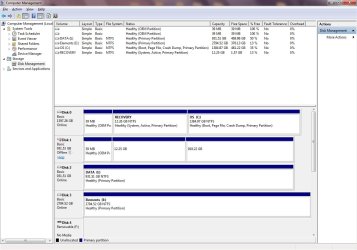
The restore was successful. I opened Disk Management and extended the old C partition to the remaining area on the 1.5 TB drive. This drive named "Disk 0," which includes a partition named "OS (C ," is now fully functional. This HDD appears in in Disk Management and in My Computer.
"Disk 1" appears in Disk Management, but is not recognized in My Computer. Windows would not let me mark it "active."
"Disk 2" appears in Disk Management and My Computer, named "DATA (I". "Data" was the name of the secondary 1 TB drive, but the only data on this drive is the True Image backup which was originally on the External drive. All of the original data is gone.
Attached are snapshots of Disk Management and My Computer.
Thank you.
Sheila
I purchased a DELL Windows 7 Home Premier PC with two 1 TB drives. After a while I noticed that the C Drive icon in My Computer was showing a solid red line, indicating that the drive was completely full. I opened Disk Management and saw that the C Drive was one of 3 partitions that the main 1 TB HDD had been divided into.
I disconnected the two 1 TB HDDs and installed one 1.5 TB drive. I used Acronis True Image bootable media to restore a backup of the primary drive that was disconnected, which included the C Drive partition, which was located on an external USB HDD named "Elements."
The restore was successful. I opened Disk Management and extended the old C partition to the remaining area on the 1.5 TB drive. This drive named "Disk 0," which includes a partition named "OS (C
," is now fully functional. This HDD appears in in Disk Management and in My Computer."Disk 1" appears in Disk Management, but is not recognized in My Computer. Windows would not let me mark it "active."
"Disk 2" appears in Disk Management and My Computer, named "DATA (I
". "Data" was the name of the secondary 1 TB drive, but the only data on this drive is the True Image backup which was originally on the External drive. All of the original data is gone.Attached are snapshots of Disk Management and My Computer.
Thank you.
Sheila
Attachments

My Computer
At a glance
7 pro 64 bitintel i516 gigs
- Computer Manufacturer/Model Number
- built to order
- OS
- 7 pro 64 bit
- CPU
- intel i5
- Motherboard
- asus
- Memory
- 16 gigs
- Monitor(s) Displays
- 2
- Hard Drives
- 3
- Keyboard
- usb
- Mouse
- usb