
Hi,
I am not sure if this Kodi can be used, but hope people here can help.
My main laptop is an Asus U46SV with the below specs:
Windows 7 Pro
NVIDIA® GeForce® GT 540M with 1GB DDR3 VRAM,
16 GB RAM
512 GB SSD
Since the laptop is only being used when I'm outstation, I rarely use it at home/office. I was wondering if Kodi is the solution to my problem. I still use the laptop, so I can't just wipe the content and make it a dedicated HTPC box.
Here is a picture of what I want to do: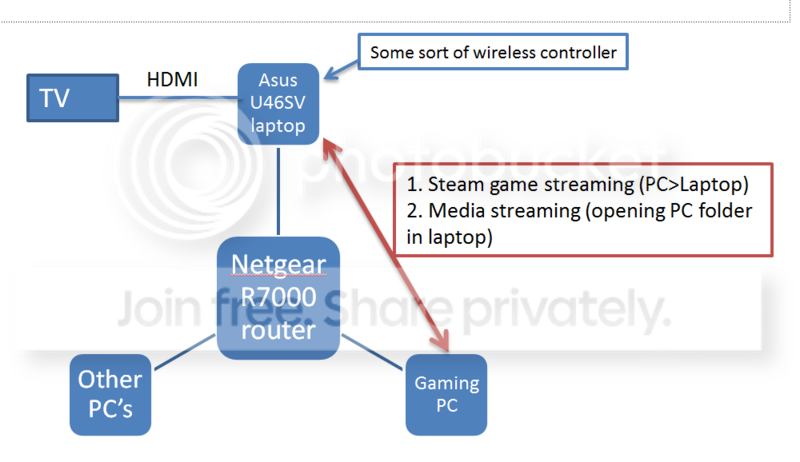
Basically I have a router which all pc's connect to. All the connections are wireless connection. I want to use the laptop as a media consumption device. The laptop has to be able to access folders from the gaming PC (or any PC) and play on the TV. It also has to be able to function standalone, say I want to open a youtube or some direct flash videos. I will connect the xbox controllers to the laptop and stream steam games from there. I think steam streaming works in this case? For the wireless controller to control the laptop, I was thinking of unified remote? I don't need or want to buy a keyboard. The laptop does support BT.
What do I need to make this kind of setup work? Any suggestions welcome.
I am not sure if this Kodi can be used, but hope people here can help.
My main laptop is an Asus U46SV with the below specs:
Windows 7 Pro
NVIDIA® GeForce® GT 540M with 1GB DDR3 VRAM,
16 GB RAM
512 GB SSD
Since the laptop is only being used when I'm outstation, I rarely use it at home/office. I was wondering if Kodi is the solution to my problem. I still use the laptop, so I can't just wipe the content and make it a dedicated HTPC box.
Here is a picture of what I want to do:

Basically I have a router which all pc's connect to. All the connections are wireless connection. I want to use the laptop as a media consumption device. The laptop has to be able to access folders from the gaming PC (or any PC) and play on the TV. It also has to be able to function standalone, say I want to open a youtube or some direct flash videos. I will connect the xbox controllers to the laptop and stream steam games from there. I think steam streaming works in this case? For the wireless controller to control the laptop, I was thinking of unified remote? I don't need or want to buy a keyboard. The laptop does support BT.
What do I need to make this kind of setup work? Any suggestions welcome.
My Computer
At a glance
Windows 7 64 bit Pro
- OS
- Windows 7 64 bit Pro
- Sound Card
- On board
- Monitor(s) Displays
- Dual Monitor: Dell U2311H 23" monitor, LG M227WD
- Screen Resolution
- 1920x1080x2 (landscape)
- Keyboard
- Microsoft Ergonomic Keyboard 4000
- Mouse
- Logitech M 705
- Internet Speed
- 25mb/1mb
- Other Info
- Printer: HP F4180
Speakers: Creative Gigaworks T20 Series II


