Solved Old Mouse - no Win 7 driver

EdPell

New member
Local time
5:40 AM
Messages
26
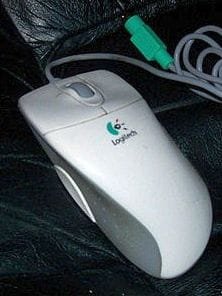
Using Win 7 x64 Home Premium, Dell XPS 8700, Logitech M-CW47 mouse, Microsoft HID-compliant mouse driver version 6.1.7600.16385 (6/21/2006)

The subject mouse has a side thumb button that I used as a double-click on my old XP machine. I now have a Win 7 machine, but Logitech does not have a Win 7 driver for this mouse. However, the side thumb button does have a function - it turns on autoscrolling (so does a wheel click). This function does not appear in the mouse Properties window.

Is there any possible way to change that side thumb button to a double-click?

Incidentally, because both the mouse and keyboard (old IBM behemoth) require PS/2 ports, I have to use a PS/2 to USB converter (Ziotek).

Thanks,
EdP
 

My Computer

Computer type
PC/Desktop
Computer Manufacturer/Model Number
Dell
OS
win 7 Home Premium
CPU
3.4GhZ
Motherboard
Dell 0KWVT8
Memory
8GB
Graphics Card(s)
NVIDIA GeForce GT 635
Monitor(s) Displays
Dell 2407
Hard Drives
ST1000DM003
Antivirus
Windows/SAS/MBAM
Browser
Firefox
Does the mouse have a Vista driver? That will work well in W7.

If not, try installing the Logitech XP driver in Compatibility Mode.
 

My Computer

Computer type
PC/Desktop
Computer Manufacturer/Model Number
Home Built - Jan 2013
OS
Windows 7 64 Bit Home Premium SP1
CPU
i7-3820
Motherboard
Asus P9X79-PRO - Bios 4608
Memory
GSkill F3-14900CL9Q - 16GB
Graphics Card(s)
EVGA GeForce GTX660 - Driver 352.86
Sound Card
On board Realtek ALC898
Monitor(s) Displays
Acer S271HL
Screen Resolution
1920 x 1080
Hard Drives
#1- Samsung 840 Pro Series
#2- Western Digital WD1002FAEX Sata3 Black
#3- Western Digital WD1002FAEX Sata3 Black
PSU
Corsair CMPSU-850TX-V2 - 850 watt (by Seasonic)
Case
Corsair Obsidian 550D
Cooling
Standard 3 120mm case fans, Cooler Master Hyper 212 EVO
Keyboard
MS KC-0405
Mouse
Intellimouse 5-button
Internet Speed
56 Mbits/Sec (on a good day)
Antivirus
Avast & Malwarebytes
Browser
Firefox
Other Info
Asus DVD - DRW-24B1ST 24X
Hi TV ...

Thanks for the response.

The mouse does not have a Vista driver.

The latest driver for the M-CW47 is Mouseware 9.80 which I downloaded. I set the executable to Win XP SP3 compatibility and to run as Administrator and invoked it. It installed without any error messages.

However, when I select Mouseware | Mouse Properties from the All Programs list (or from the Control Panel), the HID-compliant Mouse Properties window opens just as it did before I installed the Mouseware driver. This is not the MouseWare 9.80 Properties window and does not have its button options.

Because the thumb button does have a function (autoscrolling), then that information must be passed to Win 7 from somewhere. I wonder if that source can be changed or if there's another alternative other than dumping the CW47 mouse.

Thanks
EdP
 

My Computer

Computer type
PC/Desktop
Computer Manufacturer/Model Number
Dell
OS
win 7 Home Premium
CPU
3.4GhZ
Motherboard
Dell 0KWVT8
Memory
8GB
Graphics Card(s)
NVIDIA GeForce GT 635
Monitor(s) Displays
Dell 2407
Hard Drives
ST1000DM003
Antivirus
Windows/SAS/MBAM
Browser
Firefox
@EdPell.
I see you have already contacted Logitech & they replied saying there is no software available to update your mouse. I found this out by searching the web using your mouse details.

To save yourself a lot of trouble & possible corruption of your operating system I would suggest that you look around for a new mouse.

I am using a Logitech Trackball MS570 cordless mouse that I find very convenient & easy to use. You can read up on it by going to this Logitech website.

M570 Wireless Trackball - Logitech
 

My Computer

Computer type
PC/Desktop
Computer Manufacturer/Model Number
Self built using existing case
OS
Windows 7 Home Premium 64 bit sp1
CPU
Intel i5 3570 3.4Ghz Ivy Bridge SKT 1155 quad core
Motherboard
Gigabyte Z77-HD3 SKT 1155 2xSata 3, 4x USB 3.0
Memory
G-Skill Rip Jaws 16Gb (8x2) DDR3 -1600 PC3 12800 CL 10 red
Graphics Card(s)
Gigabyte NVIDIA GT610 1Gb DDR3 810/1200 PCI-E 2.0 Silent
Sound Card
NVIDIA High Definition & Realtech High Definition Audio
Monitor(s) Displays
2 x Philips 226V4L 16:9 aspect ratio
Screen Resolution
1920 x 1080 HD
Hard Drives
Samsung 840 Pro 256gb SSD, SATA 3.
Hitachi Touro Portable 1tb, USB 3.0 HDD used for image b/ups.
PSU
Corsair VS450
Case
Codeng
Cooling
PSU fan & CPU fan
Keyboard
Logitech
Mouse
Logitech Wireless trackball M570
Internet Speed
Wireless 3G. 3mg down & 550kb up.
Antivirus
Bitdefender Internet Security 2020
Browser
Opera (Current Version) & Firefox
Other Info
MS Office 2013 Pro. Davis weather station software. MGE Nova 600 avr UPS.
I agree with Ranger. Since a Logitech Control Panel is not installing it seems you are running on the generic Windows mouse driver. If you can't get the driver to install properly and there is no current driver for it then your best bet is to start shopping new mice.
 

My Computer

Computer type
PC/Desktop
Computer Manufacturer/Model Number
Home Built - Jan 2013
OS
Windows 7 64 Bit Home Premium SP1
CPU
i7-3820
Motherboard
Asus P9X79-PRO - Bios 4608
Memory
GSkill F3-14900CL9Q - 16GB
Graphics Card(s)
EVGA GeForce GTX660 - Driver 352.86
Sound Card
On board Realtek ALC898
Monitor(s) Displays
Acer S271HL
Screen Resolution
1920 x 1080
Hard Drives
#1- Samsung 840 Pro Series
#2- Western Digital WD1002FAEX Sata3 Black
#3- Western Digital WD1002FAEX Sata3 Black
PSU
Corsair CMPSU-850TX-V2 - 850 watt (by Seasonic)
Case
Corsair Obsidian 550D
Cooling
Standard 3 120mm case fans, Cooler Master Hyper 212 EVO
Keyboard
MS KC-0405
Mouse
Intellimouse 5-button
Internet Speed
56 Mbits/Sec (on a good day)
Antivirus
Avast & Malwarebytes
Browser
Firefox
Other Info
Asus DVD - DRW-24B1ST 24X
Right now, I have a Microsoft Intellimouse 3000 with a side button. It's normally used for Magnifier control, but all the buttons can be reassigned... and one of the assignments is Double-Click.
Here's an updated model: Computer Mouse: Comfort Mouse 4500 | Microsoft Hardware
 

My Computer

Computer type
PC/Desktop
Computer Manufacturer/Model Number
Self-Built
OS
Win10 Pro 64-bit
CPU
AMD Ryzen 7 3800X
Motherboard
Gigabyte X570 UD
Memory
32 GB Kingston DDR4-2666
Graphics Card(s)
MSI nVidia GT 710 (2GB)
Sound Card
Creative Audigy FX 5.1
Monitor(s) Displays
ViewSonic VG2439Smh 24"
Screen Resolution
1920x1080
Hard Drives
3xWD1TB; 1xSeagate 1TB... all spinning rust
PSU
EVGA 100-W1-0500-KR (500w)
Case
SilverStone PS10 (modified)
Cooling
CPU:AMD Wraith Prism. Case:3x Noctua 120mm
Keyboard
Compaq Professional PS/2
Mouse
Microsoft Basic Optical Mouse 2.0
Internet Speed
Fiber 1Gbit/sec down/up
Antivirus
Avast Free
Browser
FF, Chrome
Other Info
2x LG GH24NSC0 DVD burners, Mackie CR3 monitor speakers
Thanks all for chiming in.

Actually, I did purchase a new mouse two months ago, but I overwhelmingly prefer my CW47. It fits my hand perfectly and I've become accustomed to the side button location. Naturally, I did everything I could to find a way to continue using it the way I've been using it for several years.

I suppose an old dog can learn new tricks, but that doesn't mean he'll like it. :)
 

Attachments

  • CW47.jpg
    CW47.jpg
    12.1 KB · Views: 18

My Computer

Computer type
PC/Desktop
Computer Manufacturer/Model Number
Dell
OS
win 7 Home Premium
CPU
3.4GhZ
Motherboard
Dell 0KWVT8
Memory
8GB
Graphics Card(s)
NVIDIA GeForce GT 635
Monitor(s) Displays
Dell 2407
Hard Drives
ST1000DM003
Antivirus
Windows/SAS/MBAM
Browser
Firefox
Just in case someone in a similar situation comes across this thread while googling for a solution ...

I installed X-Mouse which allowed me to customize the thumb button to be a double-click. I had to set both Middle Button and Mouse Button 5 to Double Click to get it to work.

It's been working for a few days, however there's no telling what Win 7 (or other) updates might do to it.

It's here http://www.highrez.co.uk/downloads/XMouseButtonControl.htm

EdP, pleased. :D
 

My Computer

Computer type
PC/Desktop
Computer Manufacturer/Model Number
Dell
OS
win 7 Home Premium
CPU
3.4GhZ
Motherboard
Dell 0KWVT8
Memory
8GB
Graphics Card(s)
NVIDIA GeForce GT 635
Monitor(s) Displays
Dell 2407
Hard Drives
ST1000DM003
Antivirus
Windows/SAS/MBAM
Browser
Firefox
Nice find!
I suggest you turn off Automatic Updates and install the Windows updates manually when they show up. That way you can uncheck and hide any mouse driver updates before they screw up a good thing.
 

My Computer

Computer type
PC/Desktop
Computer Manufacturer/Model Number
Home Built - Jan 2013
OS
Windows 7 64 Bit Home Premium SP1
CPU
i7-3820
Motherboard
Asus P9X79-PRO - Bios 4608
Memory
GSkill F3-14900CL9Q - 16GB
Graphics Card(s)
EVGA GeForce GTX660 - Driver 352.86
Sound Card
On board Realtek ALC898
Monitor(s) Displays
Acer S271HL
Screen Resolution
1920 x 1080
Hard Drives
#1- Samsung 840 Pro Series
#2- Western Digital WD1002FAEX Sata3 Black
#3- Western Digital WD1002FAEX Sata3 Black
PSU
Corsair CMPSU-850TX-V2 - 850 watt (by Seasonic)
Case
Corsair Obsidian 550D
Cooling
Standard 3 120mm case fans, Cooler Master Hyper 212 EVO
Keyboard
MS KC-0405
Mouse
Intellimouse 5-button
Internet Speed
56 Mbits/Sec (on a good day)
Antivirus
Avast & Malwarebytes
Browser
Firefox
Other Info
Asus DVD - DRW-24B1ST 24X
Back
Top