Old PC Questions

windude99

Windows 7 Guy
Guru
VIP
Local time
6:54 PM
Messages
1,517
Location
USA
I have an old Dell Dimension 2100 and I want to throw in a GPU so it will browse the internet a bit better, as well as actually scale up to my monitors native resolution. It can't handle 1680x1050. It has the old Intel 810 series chipset. This system has a 145 watt PSU, 1.1ghz Celeron, and 256mb of RAM. I know it isn't a gaming machine and won't be able to do stuff like that well. I am just wondering if there is any GPU that can scale up to my monitor's native resolution and can run without a PSU replacement? Or, could you suggest a way to force the integrated GPU to scale up to this resolution? Thanks!
 

My Computer

Computer type
PC/Desktop
Computer Manufacturer/Model Number
HP Pavilion P7-1010
OS
Windows 7 Professional x64 Service Pack 1
CPU
AMD Athlon X4 645
Motherboard
Foxxcon N-Alvorix RS880
Memory
6GB DDR3 1066
Graphics Card(s)
Sapphire Radeon HD 5670 512MB GDDR5
Sound Card
Realtek Integrated Audio
Monitor(s) Displays
HP 2011x
Screen Resolution
1600x900
Hard Drives
1. Crucial M4 128GB SSD
2. 1TB Seagate Barracuda 7200.12 RPM
3. 1TB Western Digital Caviar Green 5400RPM
PSU
Seasonic S12 II Bronze 380 Watt
Case
HP OEM
Cooling
Coolermaster Heatsink, AVC Case Fan
Keyboard
HP OEM- Made by Chicony
Mouse
HP OEM- Made by Logitech
Internet Speed
20MBit Down/4 Up
Antivirus
Microsoft Security Essentials
Browser
Internet Explorer 10
Dell sold this model as an "entry level" PC. 512MB Memory max, PIII, etc.

It does have a PCI bus and a low power PCI video card MAY work. The manual states you have to remove the power supply to install any PCI cards.
Product Support | Dell US


From the manual:
Expansion Bus
Bus types PCI (version 2.2)
Bus speed PCI: 33 MHz
PCI connectors supports four three-quarter–length cards
PCI connector size 120 pins
PCI connector data width
(maximum)

32 bits

Newegg lists some PCI cards, I suspect you need a "low Profile" type, along with a low power card.
 

My Computer

Computer type
PC/Desktop
Computer Manufacturer/Model Number
My Own Build
OS
Windows 10 64 bit
CPU
Intel i7 6700K
Motherboard
ASUS ROG Maximus VIII Hero
Memory
16GB Corsair Dominator
Graphics Card(s)
Intel CPU Graphics
Sound Card
RealTek
Monitor(s) Displays
27" Dell S2719dgf
Screen Resolution
2560X1440
Hard Drives
1 TB Samsung 850 EVO SSD for Win 10 Pro
500GB Samsung 850 EVO SSD for Win 10 Insider
2 TB drive for backup
PSU
EVGA Supernova 750G2
Case
BeQuiet Silent Base 600
Cooling
Deepcool Captain 120EX
Keyboard
Microsoft Wireless 2000
Mouse
Microsoft wireless
Internet Speed
100 MB/sec (Cable)
Antivirus
Microsoft Defender and Malwarebytes
Browser
Edge/Firefox
Other Info
Cakewalk (Sonar) by BandLab and Studio One 4.1 Pro recording studio software. MOTU 896Mk3 Hybrid recording interface, Frontier Tranzport wireless control unit, Behringer X-Touch Control Surface.
Five USB connected optical drives for CD Audio production using Nero BurningROM
What OS are you actually running on this machine. Given the very reduced hardware I would run Linux Mint Mate 17. It will be as fast as such a small system can be and maybe it even resolves your screen resolution problem.

Here are some tutorials on how to setup Mint Mate. Be aware that the initial installation of Mint is only a bootstrap installation. Double click on the installation CD icon on that bootstrap screen to complete the installation.

Here is a video of Mint Mate that I made. It shows you how a setup system looks like. This happens to be a version that runs from a stick but a native installation would be exactly the same.
 

My Computer

Computer Manufacturer/Model Number
HP, Dell, Gateway, Toshiba - 4 laptops and 2 desktops
OS
Vista, Windows7, Mint Mate, Zorin, Windows 8
CPU
from 1.6GHz Duo to i7
Monitor(s) Displays
2x HP w2207
Hard Drives
5x HDD, 7x SSD, 12x Externals
Keyboard
with trackball - no mices
Mouse
Trackball mice
Internet Speed
DSL 6000
What OS are you actually running on this machine. Given the very reduced hardware I would run Linux Mint Mate 17. It will be as fast as such a small system can be and maybe it even resolves your screen resolution problem.

Here are some tutorials on how to setup Mint Mate. Be aware that the initial installation of Mint is only a bootstrap installation. Double click on the installation CD icon on that bootstrap screen to complete the installation.

Here is a video of Mint Mate that I made. It shows you how a setup system looks like. This happens to be a version that runs from a stick but a native installation would be exactly the same.
I'm running Windows XP, 2000, and ME in a triple boot. Will Mint Mate run on 256mb of ram adequately?
 

My Computer

Computer type
PC/Desktop
Computer Manufacturer/Model Number
HP Pavilion P7-1010
OS
Windows 7 Professional x64 Service Pack 1
CPU
AMD Athlon X4 645
Motherboard
Foxxcon N-Alvorix RS880
Memory
6GB DDR3 1066
Graphics Card(s)
Sapphire Radeon HD 5670 512MB GDDR5
Sound Card
Realtek Integrated Audio
Monitor(s) Displays
HP 2011x
Screen Resolution
1600x900
Hard Drives
1. Crucial M4 128GB SSD
2. 1TB Seagate Barracuda 7200.12 RPM
3. 1TB Western Digital Caviar Green 5400RPM
PSU
Seasonic S12 II Bronze 380 Watt
Case
HP OEM
Cooling
Coolermaster Heatsink, AVC Case Fan
Keyboard
HP OEM- Made by Chicony
Mouse
HP OEM- Made by Logitech
Internet Speed
20MBit Down/4 Up
Antivirus
Microsoft Security Essentials
Browser
Internet Explorer 10
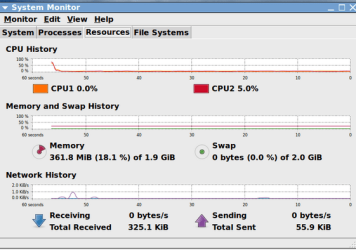
Mint Mate will run much better in 256MB than any Windows. Even in my 2GB system it uses only 361MB.
 

Attachments

  • 2014-08-17_2259.png
    2014-08-17_2259.png
    34 KB · Views: 332

My Computer

Computer Manufacturer/Model Number
HP, Dell, Gateway, Toshiba - 4 laptops and 2 desktops
OS
Vista, Windows7, Mint Mate, Zorin, Windows 8
CPU
from 1.6GHz Duo to i7
Monitor(s) Displays
2x HP w2207
Hard Drives
5x HDD, 7x SSD, 12x Externals
Keyboard
with trackball - no mices
Mouse
Trackball mice
Internet Speed
DSL 6000
Mint Mate will run much better in 256MB than any Windows. Even in my 2GB system it uses only 361MB.

Ok. I may give that a try. Thanks! Does anybody have any suggestions of a gpu that can scale up to my display well and works on a 145 watt psu?
 

My Computer

Computer type
PC/Desktop
Computer Manufacturer/Model Number
HP Pavilion P7-1010
OS
Windows 7 Professional x64 Service Pack 1
CPU
AMD Athlon X4 645
Motherboard
Foxxcon N-Alvorix RS880
Memory
6GB DDR3 1066
Graphics Card(s)
Sapphire Radeon HD 5670 512MB GDDR5
Sound Card
Realtek Integrated Audio
Monitor(s) Displays
HP 2011x
Screen Resolution
1600x900
Hard Drives
1. Crucial M4 128GB SSD
2. 1TB Seagate Barracuda 7200.12 RPM
3. 1TB Western Digital Caviar Green 5400RPM
PSU
Seasonic S12 II Bronze 380 Watt
Case
HP OEM
Cooling
Coolermaster Heatsink, AVC Case Fan
Keyboard
HP OEM- Made by Chicony
Mouse
HP OEM- Made by Logitech
Internet Speed
20MBit Down/4 Up
Antivirus
Microsoft Security Essentials
Browser
Internet Explorer 10
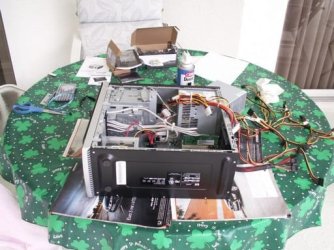
I don't think you will have any luck finding a GPU for 145 Watts. But replacing a PSU is not a big deal. Have a look:
 

Attachments

  • PICT0091.jpg
    PICT0091.jpg
    103.6 KB · Views: 239

My Computer

Computer Manufacturer/Model Number
HP, Dell, Gateway, Toshiba - 4 laptops and 2 desktops
OS
Vista, Windows7, Mint Mate, Zorin, Windows 8
CPU
from 1.6GHz Duo to i7
Monitor(s) Displays
2x HP w2207
Hard Drives
5x HDD, 7x SSD, 12x Externals
Keyboard
with trackball - no mices
Mouse
Trackball mice
Internet Speed
DSL 6000
I don't think you will have any luck finding a GPU for 145 Watts. But replacing a PSU is not a big deal. Have a look:

I have done a couple of PSU swaps before. I don't want to buy another psu for this system though. Plus, Dell may have used proprietary connectors, but I am not sure about that.
 

My Computer

Computer type
PC/Desktop
Computer Manufacturer/Model Number
HP Pavilion P7-1010
OS
Windows 7 Professional x64 Service Pack 1
CPU
AMD Athlon X4 645
Motherboard
Foxxcon N-Alvorix RS880
Memory
6GB DDR3 1066
Graphics Card(s)
Sapphire Radeon HD 5670 512MB GDDR5
Sound Card
Realtek Integrated Audio
Monitor(s) Displays
HP 2011x
Screen Resolution
1600x900
Hard Drives
1. Crucial M4 128GB SSD
2. 1TB Seagate Barracuda 7200.12 RPM
3. 1TB Western Digital Caviar Green 5400RPM
PSU
Seasonic S12 II Bronze 380 Watt
Case
HP OEM
Cooling
Coolermaster Heatsink, AVC Case Fan
Keyboard
HP OEM- Made by Chicony
Mouse
HP OEM- Made by Logitech
Internet Speed
20MBit Down/4 Up
Antivirus
Microsoft Security Essentials
Browser
Internet Explorer 10
Back
Top