
Old Selfbuild switching off under pressure

Cameraman

New member
Local time
12:32 PM
Messages
13
Hi everyone. I know it's an old system but at 72 I'm not about to change it soon. It has been 100% since 2009 but last week I had to change the Bios battery and I'm not certain It's back to how it should be.
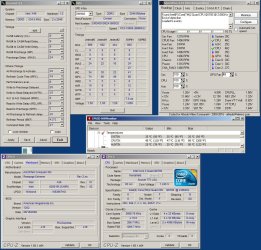
Please look at the readings on the enclosed Jpeg and tell me if you see anything WRONG.
Be gentle... I have little or no knowledge about things these days. The symptoms are it can run for days then if I look at a film or play Flight Sim it will suddenly shut down (no blue screen) and then it re-boots in to windows. somtimes, it hangs so I have to go through Bios (f2) but I change nothing, exit and go back into windows no problem.Thank you.
 

Attachments
  • Extreme pc settings2.jpg
    Extreme pc settings2.jpg
    191.1 KB · Views: 10

My Computer My Computer

Computer Manufacturer/Model Number
SelfBuild
OS
XP Pro & W7
CPU
Q6700
Motherboard
Rampage Extreme
Memory
Crucial 1333 4Gb
Graphics Card(s)
ATI 4850
Sound Card
SB HiFi X
Monitor(s) Displays
2 x 19" Ilyama
Hard Drives
2 x Sata 160Gb Raptor
PSU
Antec 850w
Case
Antec 910
Cooling
Thermalite 120

My Computer My Computer

Computer type
PC/Desktop
Computer Manufacturer/Model Number
Custom
OS
10 Pro x64
CPU
Ryzen 9 3900X
Motherboard
Asrock x370 Tachi
Memory
64GB(4x16GB) DDR4
Graphics Card(s)
EVGA 1080ti FTW3
Sound Card
ASUS Xonar Essence STX (V4 Bursons), ODAC rev B, NFB-11, O2
Monitor(s) Displays
3xASUS PB278Q/R, Optoma HD142X
Screen Resolution
3x1440p, 1080p
Hard Drives
512GB 850 EVO(OS, Programs)
4TB (Movies)
3TB (Downloads)
3TB (Programs)
1TB HDD (Games)
2x6TB R1 (videos)
PSU
AX760
Case
Fractal Define R5
Cooling
NH-D15S
Keyboard
Massdrop Ctrl with Box Navy's
Mouse
G903, Alioth XXL Mat
Internet Speed
280/40
Antivirus
MBAM, ESET
Browser
Canary 64 Bit
Other Info
I also own a Thinkpad P50 Xeon 4K, X220T, X1C5
A couple of questions:

1. Does the GPU have a fan? It's running awfully hot at idle and the fan may not be spinning fast enough if it has one.
2. How good is your case cooling? Do you have any fans blowing air into and out of the case?
3. Your RAM is set to clock lower than it's capabilities. Did you set it lower because of an instability? Or is it just set to auto?

rvcjew is right about he high CPU temps. Any high load going to that temperature will likely cause the PC to shut down or reboot in order to cool off the CPU. That's why it does it playing Flight Simulator. Anything CPU intensive that drives the CPU temp up that high is going to cause you problems until we can get your temps under control.
 

My Computer My Computer

Computer type
PC/Desktop
Computer Manufacturer/Model Number
Mellon Labs (custom build)
OS
Win 7 Pro x64/Win 10 Pro x64 dual boot
CPU
AMD FX 8350 Vishera @ 4200
Motherboard
ASUS M5A97 R2.0
Memory
16 GB Mushkin Blackline DDR3-2400 @ 1866 (9-10-10-10-31)
Graphics Card(s)
XFX Radeon R9 280 Double D Black Edition
Sound Card
Realtek HD Audio on MB. Sounds great.
Monitor(s) Displays
Acer 24", Acer 22"
Screen Resolution
3840 x 1080
Hard Drives
1 x Mushkin Chronos 120 GB SSD (Win 10)
1 x Samsung 850 EVO 250 GB SSD (Win 7)
1 x WD 1TB SATA Blue
1 x WD 1TB SATA Green
PSU
Corsair TX-750
Case
CoolerMaster HAF 912+
Cooling
Coolermaster Seidon 240M Liquid AIO. 6 case fans
Keyboard
Logitech G710+
Mouse
Logitech G500s
Internet Speed
Much better since I got fiber, but still way overpriced.
Antivirus
MSE, Malware Bytes for scanning
Browser
Firefox
Other Info
Corsair VOID USB headphones.

A Mellon Labs X-1 - LCD Smartie driven system status display.

Brought to you by the letter E
Thank you for your replies here are some answers.
1. Does the GPU have a fan? Yes, Speedfan is running on auto at about 50%
2. How good is your case cooling? There are 3 case fans and on big one on the CPU
3. Your RAM is set to clock lower than it's capabilities. Did you set it lower because of an instability? Or is it just set to auto? Its just set to auto as it never was stable at 1600

I would first run furmark on it I will run this tomorrow thank you.
might be time for some new TIM do you know what TIM is on it at the moment? in 16 years I have never heard of TIM. What is it please ?
Thank you for your help
 

My Computer My Computer

Computer Manufacturer/Model Number
SelfBuild
OS
XP Pro & W7
CPU
Q6700
Motherboard
Rampage Extreme
Memory
Crucial 1333 4Gb
Graphics Card(s)
ATI 4850
Sound Card
SB HiFi X
Monitor(s) Displays
2 x 19" Ilyama
Hard Drives
2 x Sata 160Gb Raptor
PSU
Antec 850w
Case
Antec 910
Cooling
Thermalite 120
TIM is "Thermal Interface Material" or Thermal Paste. To apply a fresh layer of paste you would need to remove the CPU fan and clean the old paste from the fan and CPU and apply and spread a thin layer on the CPU then reattach the fan.
 

My Computer My Computer

Computer type
PC/Desktop
Computer Manufacturer/Model Number
Custom Built By Me.
OS
Windows 10 Pro 64 bit
CPU
AMD FX 9590 8 Core Black Edition
Motherboard
MSI 990FXA GAMING (MS-7893)
Memory
Corsair Vengeance 16GB DDR3
Graphics Card(s)
AMD Radeon (TM) R9 380 Gaming Series
Sound Card
AMD High Definition
Monitor(s) Displays
Samsung 32" 60Hz 4ms Curved PLS LED
Screen Resolution
1920 X 1080
Hard Drives
C: 223 GB SSD = E: 465 GB HDD = F: 931 GB HDD = G: 149 GB HDD = H: 931 GB HDD
PSU
EVGA Supernova NEX750B 750W ATX EPS12V 80PLUS Bronze
Case
Cool Master
Cooling
Noctua NH-D15 Premium Cooler with 2x NF-A15 PWM 140mm Fan
Internet Speed
Fiber Optic: Download 332.7 Mbps / Upload 331.5 Mbps
Antivirus
Windows Defender
Browser
Slimjet (64bit)
Thank you for your replies here are some answers.
1. Does the GPU have a fan? Yes, Speedfan is running on auto at about 50%
2. How good is your case cooling? There are 3 case fans and on big one on the CPU
3. Your RAM is set to clock lower than it's capabilities. Did you set it lower because of an instability? Or is it just set to auto? Its just set to auto as it never was stable at 1600

I would first run furmark on it I will run this tomorrow thank you.
might be time for some new TIM do you know what TIM is on it at the moment? in 16 years I have never heard of TIM. What is it please ?
Thank you for your help

As Lance1 has said you would remove your heatsink (fan will probably stay on the heatsink depending on the type) then clean off old paste and reapply with new paste (I recommend Geild GC Extreme myself). Since you said your cpu has a big fan I take it is not the stock intel cooler for that generation of cpu's that looks like this?
EDIT: Have you already tried blowing out your cpu fan and heatsink with a can of air?
98960764_original-intel-core-2-quad-heatsink-fan-for-q6600-q6700-.jpg
 

My Computer My Computer

Computer type
PC/Desktop
Computer Manufacturer/Model Number
Custom
OS
10 Pro x64
CPU
Ryzen 9 3900X
Motherboard
Asrock x370 Tachi
Memory
64GB(4x16GB) DDR4
Graphics Card(s)
EVGA 1080ti FTW3
Sound Card
ASUS Xonar Essence STX (V4 Bursons), ODAC rev B, NFB-11, O2
Monitor(s) Displays
3xASUS PB278Q/R, Optoma HD142X
Screen Resolution
3x1440p, 1080p
Hard Drives
512GB 850 EVO(OS, Programs)
4TB (Movies)
3TB (Downloads)
3TB (Programs)
1TB HDD (Games)
2x6TB R1 (videos)
PSU
AX760
Case
Fractal Define R5
Cooling
NH-D15S
Keyboard
Massdrop Ctrl with Box Navy's
Mouse
G903, Alioth XXL Mat
Internet Speed
280/40
Antivirus
MBAM, ESET
Browser
Canary 64 Bit
Other Info
I also own a Thinkpad P50 Xeon 4K, X220T, X1C5
Thank you for all your help. (the cpu cooler a Cooler Master Hyper TX2) and some of the paste was missing.
In the meantime my brother was chucking out his old Q9550 and 8Gb of DDR3 1333 RAM so I swapped mine for his and the temp seem much better and all is stable again.

I dont know if 8GB or soso memory is better or worse than 4GB of Corsair 1666 Dominator because the pc feels about the same in responses but is cooler and stable.

Thank you to this forum, as always agreat source of help and kindness you should be proud.
If you have any other comment (over the change) I shall keep a watch out.

In the meantime I will dream on that .....one day an i7......hohum
 

My Computer My Computer

Computer Manufacturer/Model Number
SelfBuild
OS
XP Pro & W7
CPU
Q6700
Motherboard
Rampage Extreme
Memory
Crucial 1333 4Gb
Graphics Card(s)
ATI 4850
Sound Card
SB HiFi X
Monitor(s) Displays
2 x 19" Ilyama
Hard Drives
2 x Sata 160Gb Raptor
PSU
Antec 850w
Case
Antec 910
Cooling
Thermalite 120
Back
Top