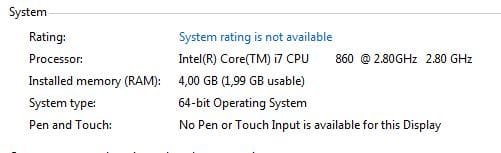
Solved On Windows 7 64bit only 1.99 of usable ram?

dadooo

New member
Local time
2:16 PM
Messages
19
Hi,
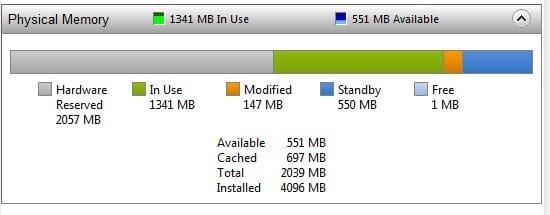
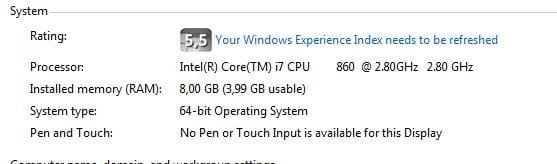
I've just installed Windows 7 Professional today (64bit) and I noticed that it only shows and uses 1.99 GB of ram, it used to show that too in 32 bit which I've been using until today, but I wanted to have a little bit more of useful ram, but nothing.. What should I do, because you can see that it's recognized but not used?:mad:


Thank you very much.
 

Attachments

  • ram1.JPG
    ram1.JPG
    18 KB · Views: 28
  • ram2.JPG
    ram2.JPG
    21.1 KB · Views: 50
  • ram3.jpg
    ram3.jpg
    728.3 KB · Views: 49

My Computer My Computer

At a glance

Windows 7 Professional 64bitRadeon HD5000 Series
OS
Windows 7 Professional 64bit
Graphics Card(s)
Radeon HD5000 Series
Hi,
I've just installed Windows 7 Professional today (64bit) and I noticed that it only shows and uses 1.99 GB of ram, it used to show that too in 32 bit which I've been using until today, but I wanted to have a little bit more of useful ram, but nothing.. What should I do, because you can see that it's recognized but not used?:mad:


Thank you very much.

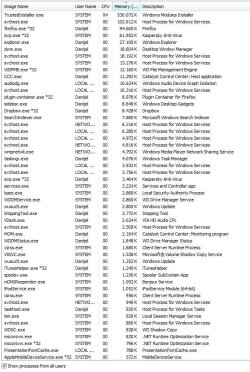
The hardware/reserved is probably shared video memory, or some other process. We need an itemized list like the process tab sorted by memory in task manager.
 

My Computer My Computer

At a glance

Win 8 Release candidate 8400[email protected]4 gigsNvidia 9600M
Computer Manufacturer/Model Number
HP Pavillion dv-7 1005 Tx
OS
Win 8 Release candidate 8400
CPU
[email protected]
Memory
4 gigs
Graphics Card(s)
Nvidia 9600M
Sound Card
HD built-in
Monitor(s) Displays
17" Wxga
Screen Resolution
1440x900
Cooling
none
Internet Speed
45Mb down 5Mb up
Ok but what hardware needs 2GB of ram, afaik my graphics card has it's own ram? That's ridiculous.
Did you mean that (I am currently installing updates)?
 

Attachments

  • Capture.JPG
    Capture.JPG
    125.6 KB · Views: 103

My Computer My Computer

At a glance

Windows 7 Professional 64bitRadeon HD5000 Series
OS
Windows 7 Professional 64bit
Graphics Card(s)
Radeon HD5000 Series
I agree - it's ridiculous for the BIOS to reserve 2GB, even with a beefy videocard (in terms of onboard RAM). (And remember, it's not the actual RAM the BIOS is reserving, just the address range which is always below the 4GB limit. In this case, the second 2GB RAM could/should be mapped into an address space above 4GB, say, from 4GB to 6GB.)

More to the point, 64-bit Windows should be able to use all the memory regardless. I can only guess there's something related to memory options in the BIOS itself, but I'm not sure what.
 

My Computer My Computer

At a glance

Windows 7 Professional SP1 32-bitIntel Core 2 Duo E6600 2.4GHz4GB DDR2-667 (4x1GB in dual-channel config)nVidia GeForce 9800 GT
Computer type
PC/Desktop
Computer Manufacturer/Model Number
Custom-built
OS
Windows 7 Professional SP1 32-bit
CPU
Intel Core 2 Duo E6600 2.4GHz
Motherboard
Asus PL5D2
Memory
4GB DDR2-667 (4x1GB in dual-channel config)
Graphics Card(s)
nVidia GeForce 9800 GT
Sound Card
Creative X-Fi XtremeMusic
Monitor(s) Displays
Acer P236H
Screen Resolution
1920x1200 (DVI)
Hard Drives
OCZ SSD Vertex Plus 60GB SATA (Firmware 3.55), 64MB cache
Hitachi HD321KJ SATA, 320GB, 7200rpm, 16MB cache
PSU
Antec TruePower 2.0
Case
Cooler Master Centurion
Cooling
Too many fans
Keyboard
Standard
Mouse
Microsoft wireless optical mouse
Internet Speed
AT&T U-verse (18mbit/sec)
Antivirus
Microsoft Security Essentials
Browser
Firefox
Other Info
Other devices:
Compaq CQ-60 laptop
Google Nexus 7 (2012) tablet
Nvidia SHIELD tablet (US/LTE)
Hardkernel ODROID-XU single-board computer (Samsung Exynos 5420)
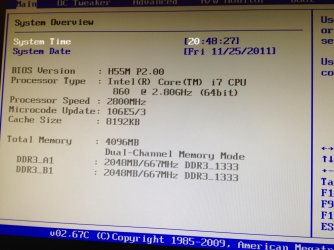
Yes, but what? I checked all bios but couldn't find anything related to memory. I've read something about memory remap but my bios doesn't support it (asrock h55m is the motherboard). This is really really bugging me :/
 

My Computer My Computer

At a glance

Windows 7 Professional 64bitRadeon HD5000 Series
OS
Windows 7 Professional 64bit
Graphics Card(s)
Radeon HD5000 Series
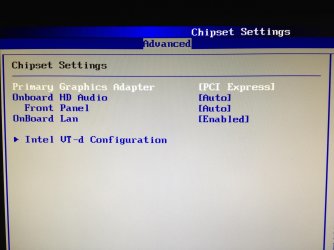
I just had a peek at the manual for your motherboard and looked at BIOS settings. Apparently you can set shared video memory to use up to 1792MB, which when you add the default 256MB allocated as dedicated video RAM (for onboard video, that is) adds up to 2GB.

Maybe you can do something here by setting shared video RAM manually to the lowest value it will allow you. I found the settings under Chipset Configuration in the Advanced menu.

But other than that, the specifications claim that Windows x64 will see/use the full amount of RAM present, up to 8GB maximum supported.
 

My Computer My Computer

At a glance

Windows 7 Professional SP1 32-bitIntel Core 2 Duo E6600 2.4GHz4GB DDR2-667 (4x1GB in dual-channel config)nVidia GeForce 9800 GT
Computer type
PC/Desktop
Computer Manufacturer/Model Number
Custom-built
OS
Windows 7 Professional SP1 32-bit
CPU
Intel Core 2 Duo E6600 2.4GHz
Motherboard
Asus PL5D2
Memory
4GB DDR2-667 (4x1GB in dual-channel config)
Graphics Card(s)
nVidia GeForce 9800 GT
Sound Card
Creative X-Fi XtremeMusic
Monitor(s) Displays
Acer P236H
Screen Resolution
1920x1200 (DVI)
Hard Drives
OCZ SSD Vertex Plus 60GB SATA (Firmware 3.55), 64MB cache
Hitachi HD321KJ SATA, 320GB, 7200rpm, 16MB cache
PSU
Antec TruePower 2.0
Case
Cooler Master Centurion
Cooling
Too many fans
Keyboard
Standard
Mouse
Microsoft wireless optical mouse
Internet Speed
AT&T U-verse (18mbit/sec)
Antivirus
Microsoft Security Essentials
Browser
Firefox
Other Info
Other devices:
Compaq CQ-60 laptop
Google Nexus 7 (2012) tablet
Nvidia SHIELD tablet (US/LTE)
Hardkernel ODROID-XU single-board computer (Samsung Exynos 5420)
Thank you for your effort, but I don't have that available in my bios ;/.
 

Attachments

  • Photo Nov 26, 12 41 16.jpg
    Photo Nov 26, 12 41 16.jpg
    683.7 KB · Views: 24

My Computer My Computer

At a glance

Windows 7 Professional 64bitRadeon HD5000 Series
OS
Windows 7 Professional 64bit
Graphics Card(s)
Radeon HD5000 Series
Mmm, yeah, I see...your board already disabled onboard video altogether since you have a PCI-E card installed.

Sorry, I'm at wit's end here. :( It's really baffling to see that a Windows x64 version can't use all the RAM. I can't explain it...
Have you considered contacting ASRock support?
 

My Computer My Computer

At a glance

Windows 7 Professional SP1 32-bitIntel Core 2 Duo E6600 2.4GHz4GB DDR2-667 (4x1GB in dual-channel config)nVidia GeForce 9800 GT
Computer type
PC/Desktop
Computer Manufacturer/Model Number
Custom-built
OS
Windows 7 Professional SP1 32-bit
CPU
Intel Core 2 Duo E6600 2.4GHz
Motherboard
Asus PL5D2
Memory
4GB DDR2-667 (4x1GB in dual-channel config)
Graphics Card(s)
nVidia GeForce 9800 GT
Sound Card
Creative X-Fi XtremeMusic
Monitor(s) Displays
Acer P236H
Screen Resolution
1920x1200 (DVI)
Hard Drives
OCZ SSD Vertex Plus 60GB SATA (Firmware 3.55), 64MB cache
Hitachi HD321KJ SATA, 320GB, 7200rpm, 16MB cache
PSU
Antec TruePower 2.0
Case
Cooler Master Centurion
Cooling
Too many fans
Keyboard
Standard
Mouse
Microsoft wireless optical mouse
Internet Speed
AT&T U-verse (18mbit/sec)
Antivirus
Microsoft Security Essentials
Browser
Firefox
Other Info
Other devices:
Compaq CQ-60 laptop
Google Nexus 7 (2012) tablet
Nvidia SHIELD tablet (US/LTE)
Hardkernel ODROID-XU single-board computer (Samsung Exynos 5420)
I've had enough and bought 2x 4GB sticks and it's the same:(:( HELP :(
 

Attachments

  • Capture.JPG
    Capture.JPG
    20.5 KB · Views: 46

My Computer My Computer

At a glance

Windows 7 Professional 64bitRadeon HD5000 Series
OS
Windows 7 Professional 64bit
Graphics Card(s)
Radeon HD5000 Series
Have you tried Check the advanced boot options.
1. Go to Start, in the search bar type msconfig and press enter.
2. System Configuration window will open on the screen.
3. Click on tab named "boot".
4. Click on "Advanced Options" and uncheck the box for "Maximum Memory".
 

My Computer My Computer

At a glance

Windows 7 Ultimate x64 sp1Intel i5 4590 Haswell refresh 3.30GHz(3.7GHz ...G.Skill Ripjaws F3-12800CL9D-8GBRL 16GB (4x4G...Gigabyte GeForce GT 740 4GB
Computer type
PC/Desktop
Computer Manufacturer/Model Number
Custom 2014 Upgrade.
OS
Windows 7 Ultimate x64 sp1
CPU
Intel i5 4590 Haswell refresh 3.30GHz(3.7GHz Turbo) Quad.
Motherboard
Gigabyte GA-H97-HD3 LGA 1150
Memory
G.Skill Ripjaws F3-12800CL9D-8GBRL 16GB (4x4GB) (1600MHz)
Graphics Card(s)
Gigabyte GeForce GT 740 4GB
Sound Card
Onboard. Realtek High Definition Audio
Monitor(s) Displays
Asus VW266H x 2
Screen Resolution
1920x1200 @ 60Hz
Hard Drives
Samsung 840 EVO 120GB SSD /
Samsung 850 Pro Series 1TB SSD x 2 /
Western Digital WD Black 1TB /
Western Digital VelociRaptor 150 GB.
PSU
Corsair 650 hx modular
Case
Cooler Master
Cooling
3x fans
Keyboard
Logitech Media Keyboard 600
Mouse
Logitech Performance Mouse MX
Internet Speed
Cable Broadband 100mbs/D, 2mbs/U
Antivirus
MSE, Malwarebytes, AdwCleaner, SUPERAntiSpyware
Browser
Mozilla Firefox, Google Chrome
Other Info
1GB DataRam
It already was unchecked.
 

My Computer My Computer

At a glance

Windows 7 Professional 64bitRadeon HD5000 Series
OS
Windows 7 Professional 64bit
Graphics Card(s)
Radeon HD5000 Series
What happens if you check it.?? does give max of 8gb?

2 things you could try.
1. tick max memory and reboot then untick max memory and reboot.

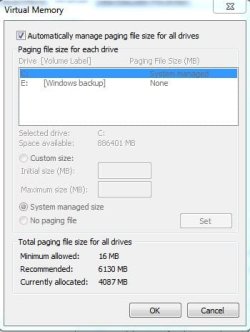
2. set the page file to 4gb and reboot.

good luck.
 

My Computer My Computer

At a glance

Windows 7 Ultimate x64 sp1Intel i5 4590 Haswell refresh 3.30GHz(3.7GHz ...G.Skill Ripjaws F3-12800CL9D-8GBRL 16GB (4x4G...Gigabyte GeForce GT 740 4GB
Computer type
PC/Desktop
Computer Manufacturer/Model Number
Custom 2014 Upgrade.
OS
Windows 7 Ultimate x64 sp1
CPU
Intel i5 4590 Haswell refresh 3.30GHz(3.7GHz Turbo) Quad.
Motherboard
Gigabyte GA-H97-HD3 LGA 1150
Memory
G.Skill Ripjaws F3-12800CL9D-8GBRL 16GB (4x4GB) (1600MHz)
Graphics Card(s)
Gigabyte GeForce GT 740 4GB
Sound Card
Onboard. Realtek High Definition Audio
Monitor(s) Displays
Asus VW266H x 2
Screen Resolution
1920x1200 @ 60Hz
Hard Drives
Samsung 840 EVO 120GB SSD /
Samsung 850 Pro Series 1TB SSD x 2 /
Western Digital WD Black 1TB /
Western Digital VelociRaptor 150 GB.
PSU
Corsair 650 hx modular
Case
Cooler Master
Cooling
3x fans
Keyboard
Logitech Media Keyboard 600
Mouse
Logitech Performance Mouse MX
Internet Speed
Cable Broadband 100mbs/D, 2mbs/U
Antivirus
MSE, Malwarebytes, AdwCleaner, SUPERAntiSpyware
Browser
Mozilla Firefox, Google Chrome
Other Info
1GB DataRam
1. It's the same. :(
2. I guess that's already done (pic. below)

Thank you very very much!
 

Attachments

  • Capture3.JPG
    Capture3.JPG
    28.1 KB · Views: 42

My Computer My Computer

At a glance

Windows 7 Professional 64bitRadeon HD5000 Series
OS
Windows 7 Professional 64bit
Graphics Card(s)
Radeon HD5000 Series
This can be an easy, or a very difficult problem to solve. Suggest you read this thread here.

Your board should support 4GB out of the box, even with the BIOS version you have. They've updated the BIOS two more times from the one you have, but no mention of memory upgrades for it but they don't always document everything either. Have you ever flashed a BIOS?
 

My Computer My Computer

At a glance

Windows 10 Pro 64 bitCore i7 6700K Skylake 4.0GHzCorsair Vengeance LPX DDR4 32GB 3000MHzAsus Radeon RX480 Strix 8GB
Computer type
PC/Desktop
Computer Manufacturer/Model Number
Wordsworth 5000
OS
Windows 10 Pro 64 bit
CPU
Core i7 6700K Skylake 4.0GHz
Motherboard
Asus Z170 Pro
Memory
Corsair Vengeance LPX DDR4 32GB 3000MHz
Graphics Card(s)
Asus Radeon RX480 Strix 8GB
Sound Card
Asus Xonar DSX
Monitor(s) Displays
HP 2709m
Screen Resolution
1920x1080
Hard Drives
Intel 600p M.2 PCIe NVMe SSD 512GB; Intel 335 SSD 240GB ;Western Digital Caviar Black 1TB
PSU
Thermaltake Toughpower Grand Platinum 850W
Case
Lian Li PC-B70
Cooling
CPU-Noctua NH D15, GPU-Stock, Case-Noctua 2x140, 2x120
Keyboard
Microsoft Natural Ergo 4000
Mouse
Microsoft Wireless Optical 1000
Internet Speed
Cable
Other Info
HP bd 340,
HP bd 240,
Klipsch Promedia 5.1 THX
I finally managed to solve it! Turns out, that some of the pins on cpu caught on termal paste (I don't know how), I've cleaned it and it works for now:)
dela.jpg
 

My Computer My Computer

At a glance

Windows 7 Professional 64bitRadeon HD5000 Series
OS
Windows 7 Professional 64bit
Graphics Card(s)
Radeon HD5000 Series
Great! Glad yours turned out to be one of the easy fixes.
 

My Computer My Computer

At a glance

Windows 10 Pro 64 bitCore i7 6700K Skylake 4.0GHzCorsair Vengeance LPX DDR4 32GB 3000MHzAsus Radeon RX480 Strix 8GB
Computer type
PC/Desktop
Computer Manufacturer/Model Number
Wordsworth 5000
OS
Windows 10 Pro 64 bit
CPU
Core i7 6700K Skylake 4.0GHz
Motherboard
Asus Z170 Pro
Memory
Corsair Vengeance LPX DDR4 32GB 3000MHz
Graphics Card(s)
Asus Radeon RX480 Strix 8GB
Sound Card
Asus Xonar DSX
Monitor(s) Displays
HP 2709m
Screen Resolution
1920x1080
Hard Drives
Intel 600p M.2 PCIe NVMe SSD 512GB; Intel 335 SSD 240GB ;Western Digital Caviar Black 1TB
PSU
Thermaltake Toughpower Grand Platinum 850W
Case
Lian Li PC-B70
Cooling
CPU-Noctua NH D15, GPU-Stock, Case-Noctua 2x140, 2x120
Keyboard
Microsoft Natural Ergo 4000
Mouse
Microsoft Wireless Optical 1000
Internet Speed
Cable
Other Info
HP bd 340,
HP bd 240,
Klipsch Promedia 5.1 THX
Thank you all very much again :)
 

My Computer My Computer

At a glance

Windows 7 Professional 64bitRadeon HD5000 Series
OS
Windows 7 Professional 64bit
Graphics Card(s)
Radeon HD5000 Series
WOW...thermal paste on the CPU pins? No wonder...it must have blocked part of the memory controller's data path somehow. Quite a unique cause! I'm glad you discovered the problem and solved it. Who would've ever thought of this! :)
 

My Computer My Computer

At a glance

Windows 7 Professional SP1 32-bitIntel Core 2 Duo E6600 2.4GHz4GB DDR2-667 (4x1GB in dual-channel config)nVidia GeForce 9800 GT
Computer type
PC/Desktop
Computer Manufacturer/Model Number
Custom-built
OS
Windows 7 Professional SP1 32-bit
CPU
Intel Core 2 Duo E6600 2.4GHz
Motherboard
Asus PL5D2
Memory
4GB DDR2-667 (4x1GB in dual-channel config)
Graphics Card(s)
nVidia GeForce 9800 GT
Sound Card
Creative X-Fi XtremeMusic
Monitor(s) Displays
Acer P236H
Screen Resolution
1920x1200 (DVI)
Hard Drives
OCZ SSD Vertex Plus 60GB SATA (Firmware 3.55), 64MB cache
Hitachi HD321KJ SATA, 320GB, 7200rpm, 16MB cache
PSU
Antec TruePower 2.0
Case
Cooler Master Centurion
Cooling
Too many fans
Keyboard
Standard
Mouse
Microsoft wireless optical mouse
Internet Speed
AT&T U-verse (18mbit/sec)
Antivirus
Microsoft Security Essentials
Browser
Firefox
Other Info
Other devices:
Compaq CQ-60 laptop
Google Nexus 7 (2012) tablet
Nvidia SHIELD tablet (US/LTE)
Hardkernel ODROID-XU single-board computer (Samsung Exynos 5420)
My computer does that too.

1GB RAM, 94MB unusable.
 

My Computer My Computer

At a glance

Windows 7 Ultimate x64Intel Core i5 2500K Processor2x4GB DDR3 1333Mhz MemoryNovatech Radeon 6770 1GB Graphics Card
Computer Manufacturer/Model Number
iRush Pro
OS
Windows 7 Ultimate x64
CPU
Intel Core i5 2500K Processor
Motherboard
Intel H67 Chipset Motherboard (Micro ATX)
Memory
2x4GB DDR3 1333Mhz Memory
Graphics Card(s)
Novatech Radeon 6770 1GB Graphics Card
Hard Drives
1TB
PSU
Novatech 500W
Case
Novatech ATX Gaming Case
Cooling
-
Keyboard
Novatech Wired Keyboard
Mouse
Novatech Wired Mouse
Internet Speed
VirginMedia 10MB/s
Back
Top