System Properties Not Showing Usable Ram

hstein

New member
Local time
8:49 AM
Messages
4
Windows 7 Professional, SP1, 3GB Physical RAM, 64-bit. System Properties has a label such as this on *OTHER* systems:

Installed Memory (RAM): 4.00 GB (3.85GB usable)

And you will see this "usable RAM" item in many Windows systems. However, there are some systems where it simply does not show the item in parentheses AT ALL such as mine:

Installed Memory (RAM): 3.00 GB

I have a company that requires seeing this "usable" RAM and I can't Google anything anywhere how to make this show up or what prevents it from showing up or how to make a WMI call to make it show up.

It is a Dell E5500 with the latest BIOS (A19) and chipset and video driver.

+Resource Manager and msinfo32 show there really is only a scant 45MB being used for video RAM (hardware) thus if the value ever showed up it would say 2.93 or some such.and company would be happy my PC passes their certification.

+tried setting msconfig Boot|Advanced Max Mem to 3072 KB and did not impact anything (nor does unchecking and saying 0)

+looked at msinfo32 -- nothing useful

+Googled "usable ram" etc. and all everyone talks about is situations when the usable *IS* *IS* displayed and is less than expected. That does not apply here.

+Ran memory diagnostics; reseated RAM -- forced apps to go well past 2GB and no problem.

I know 2.93 GB is usable because I know how to interpret the usable RAM from other values (resource Monitor Memory) but the company doing the certification insists on seeing this "usable" and if not there, they incorrectly use the currently available RAM which of course is varying/dynamic and nothing at all to do with "usable" shown in system properties. "Usable" is a static value gleaned from physical RAM minus RAM dedicated to video hardware -- but why on earth it does or does not display in System Properties is the mystery here. Obviously, few complain about this because "out of sight, out of mind" -- people seem to endlessly post when the usable RAM *IS* shown and is significantly less than physical.

Are there WMI issues here? Is it a BIOS/CPU-mfgr that stops something from being calculated under the hood here? Why doesn't anyone (Dell, Microsoft) have an explanation?

What's in your wallet? (i.e., does yours show nothing there and if so, any ideas why)?

Thanks,
 

My Computer

Computer type
PC/Desktop
OS
all versions

My Computer

Computer type
PC/Desktop
Computer Manufacturer/Model Number
Home made Desktop
OS
Windows 10 Pro. 64/ version 1709 Windows 7 Pro/64
CPU
Intel i7-6800K @ 4.3
Motherboard
ASUS X-99 Deluxe II
Memory
Corsair Platinum 16 gig @2400
Graphics Card(s)
EVGA GTX 1070 OC
Monitor(s) Displays
Asus 27" LED LCD/VE278Q
Screen Resolution
1920-1080 or 1280-720 HDMI
Hard Drives
INTEL SSD 730-240 Gb Sata 3.0/
PSU
EVGA Platium 1200W
Case
Phanteks Luxe Tempered Glass 8 fans/ one radiator
Cooling
XSPC/ Water Cooled CPU
Keyboard
Das 4 Professional
Mouse
Logitech M705/MX Anywhere 2-S
Internet Speed
100 mbits
Antivirus
Microsoft Security Essentials/ Malwarebytes Premium 3.0/ SAS
Browser
I.E. 11 default/Firefox/ ISP Time Warner Cable/Spectrum
Other Info
LG BluRay Burner/
Sound system-KLipsch-THX/
Icy Dock ssd Hot Swap bays.
You'll have to take me at my word when I said MSCONFIG started out with the max memory unchecked (there are 1000s of posts about this "basic" and of course that was looked at and confirmed as unchecked). Then there are 100s of post suggesting setting that box be checked and the value set to 3072. That has been done.

I am sorry for sounding ornery but I am a skilled professional and have tried all those and am seeking answers from people who have experienced this or can look in their own system and see there not being a usable amount shown in System properties and have also, like me done the basics. If you must have the basics, the msconfig looks exactly like yours and I stated as such in my post. Later, I changed it to checked and 3072.

The Resorurce monitor confirms things are okay. It shows the hardware is using 45MB and then it shows the *CURRENTL:Y* used RAM and the amount allocated for Cache and we all know how subtly complicated explaining that is which is precisel;y why I said I was focused on the WMI value for "usable" or whatever it is that the static value in System properties is showing.
 

My Computer

Computer type
PC/Desktop
OS
all versions
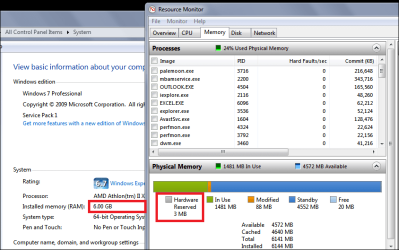
The system i'm on now has 6 GB RAM and 3 MB Hardware Reserved.
Is has a GPU Video card, and the IGP is disabled in BIOS.
It doesn't display Usable on the System Properties window.

I'm just guessing here, Windows may not display Usable if it is "close" to the full Installed RAM.
If you can allocate more RAM in BIOS to your IGP (or anything), then maybe it will display Usable on the System Properties.
Can you allocate more RAM in BIOS to test it?

Memory_01.PNG
 
Last edited:

My Computer

Computer type
PC/Desktop
Computer Manufacturer/Model Number
home built
OS
Multi-Boot W7_Pro_x64 W8.1_Pro_x64 W10_Pro_x64 +Linux_VMs +Chromium_VM
CPU
AMD Athlon II x4 620
Motherboard
Gigabyte GA-MA785G-UD3H
Memory
6GB GSkill DDR2 800
Graphics Card(s)
AMD 4670 GPU + AMD 4200 IGP
Sound Card
on board Realtek ALC889A
Monitor(s) Displays
RCA 40" LCD TV, Insignia 32" LCD TV, HP 15" LCD monitor
Screen Resolution
1680 x 1050
Hard Drives
OCZ Vertex 3 120GB,
Samsung F3 1TB (3),
Several others - WD, Seagate, Hitachi, ...
PSU
Corsair 500 W
Case
Rosewill mid tower
Cooling
CM 90mm rifle
Keyboard
Gyration wireless, Logitech wireless, Dell USB wired
Mouse
Gyration wireless, Logitech wireless, V7 USB wired
Internet Speed
Spectrum - 100Mbps D / 10Mbps U
Antivirus
Avast, MBAM3, EMET, WinPatrol
Browser
Pale Moon, Firefox, IE
Other Info
2 multi-boot PC's
Mainly HTPC/Office/Gen purpose (no gaming).
Trendnet USB KVM.
LG DVD burner/Blue Ray Player.
Tray system for removable SATA backup drives.

Not currently OCd, under-volted.
I use Hybrid sleep, rarely re-boot or shutdown.

Hauppauge HD-PVR, Avermedia PCIe TV Tuner, Hauppauge PCI TV Tuner.
hstein we have no idea what your skill level is. You have only 2 post. Your boot Advance option should stay the way my picture indicates. It's your system and your problem so pick what you want to do.
If and when you see fit to post the pictures I requested please do so.

It might help.
 

My Computer

Computer type
PC/Desktop
Computer Manufacturer/Model Number
Home made Desktop
OS
Windows 10 Pro. 64/ version 1709 Windows 7 Pro/64
CPU
Intel i7-6800K @ 4.3
Motherboard
ASUS X-99 Deluxe II
Memory
Corsair Platinum 16 gig @2400
Graphics Card(s)
EVGA GTX 1070 OC
Monitor(s) Displays
Asus 27" LED LCD/VE278Q
Screen Resolution
1920-1080 or 1280-720 HDMI
Hard Drives
INTEL SSD 730-240 Gb Sata 3.0/
PSU
EVGA Platium 1200W
Case
Phanteks Luxe Tempered Glass 8 fans/ one radiator
Cooling
XSPC/ Water Cooled CPU
Keyboard
Das 4 Professional
Mouse
Logitech M705/MX Anywhere 2-S
Internet Speed
100 mbits
Antivirus
Microsoft Security Essentials/ Malwarebytes Premium 3.0/ SAS
Browser
I.E. 11 default/Firefox/ ISP Time Warner Cable/Spectrum
Other Info
LG BluRay Burner/
Sound system-KLipsch-THX/
Icy Dock ssd Hot Swap bays.
What's in your wallet? (i.e., does yours show nothing there and if so, any ideas why)?
Well, I have two machines and one shows "usable" and the other one doesn't.

RP9SOX.jpg


iyHK9I.jpg


Both are Win7 Pro 64-bit SP1 with all Windows Updates applied, both are retail Win7 (i.e. not OEM). One is an ASUS motherboard home-build, and the other is a Lenovo W530 laptop (which I reinstalled Win7 from scratch on when upgrading to SSD).

No explanation for the difference in presentation.
 

My Computer

Computer type
PC/Desktop
Computer Manufacturer/Model Number
Home-built, two systems (1) and (2)
OS
Windows 7 Pro x64 (1), Win7 Pro X64 (2)
CPU
i5-3350p 3.1Ghz/6MB-cache (1); E8400 3.0Ghz/6MB-cache (2)
Motherboard
ASUS P8Z77-V Pro (1); ASUS P5Q3 (2)
Memory
8GB PC3-12800 DDR3 (1); 4GB PC3-10600 DDR3 (2)
Graphics Card(s)
ATI HD7750 (1), (see TV cards); ATI R7 250 (2)
Sound Card
Realtek ALC892 HD Audio (1); Realtek ALC1200 HD Audio (2)
Monitor(s) Displays
Eizo HD2441W LCD, Eizo S2433W (1); Eizo 24" S2433W (2)
Screen Resolution
1920x1200, 1920x1200 (1); 1920x1200 (2)
Hard Drives
(1) 1TB SATA-II (7200RPM), 2x2TB SATA-III (7200RPM), 250GB SATA-III (10000RPM) for OS; 2x2TB external USB 3.0

(2) 320GB SATA-II (7200RPM), 750GB SATA-II (7200RPM), 150GB SATA-II (10000RPM) for OS; 2TB external USB 3.0
PSU
Nesteq ECS-6001 600W (1); Nesteq ECS-5001 500W (2)
Case
Acousti-Case 360 (1) and (2)
Cooling
Noctua NH-U12P SE2 for CPU, 2x120mm case fans (1) and (2)
Keyboard
IBM PS/2 (1) and (2)
Mouse
Logitech MX Revolution wireless (1); Microsoft wired (2)
Internet Speed
100mbps down / 10mbps up
Antivirus
Microsoft Security Essentials; Malwarebyte Anti-Malware Pro
Browser
Firefox
Other Info
Ceton InfiniTV 4-tuner cablecard-enabled TV card as well as Hauppauge HVR-2250 OTA/ATSC 2-tuner TV card in (1), running under Win7 WMC
My guess is that usable memory is only shown when the difference from installed is significant. In a 64 bit OS it very often is not. I doubt there is any way to control this. If this information is needed it will have to be obtained by other means. Resource Monitor shows this information.
 

My Computer

Computer type
PC/Desktop
Computer Manufacturer/Model Number
HP
OS
Windows 7 Pro 64 bit
CPU
Xeon W3520
Memory
8 GB
Graphics Card(s)
Nvidia Geforce 210
I have never seen the display show usable different from total unless usable memory differed by more than 3% of total (so if it was 3.88GB, it doesn't show, but 3.87GB or less and it does). I don't know if that's the cutoff, but I've seen 3.85GB usable many times - but never higher.
 

My Computer

Computer type
PC/Desktop
Computer Manufacturer/Model Number
Custom
OS
Windows 10 Pro x64
CPU
Intel Core i7 4790K @ 4.5GHz
Motherboard
Asus Maximus Hero VII
Memory
32GB DDR3
Graphics Card(s)
Nvidia GeForce GTX970
Sound Card
Realtek HD Audio
Screen Resolution
1920x1200
Hard Drives
1x Samsung 250GB SSD
4x WD RE 2TB (RAIDZ)
PSU
Corsair AX760i
Case
Fractal Design Define R4
Cooling
Noctua NH-D15
Layback Bear: -- so sorry about how i came across. The others who replied are seeing the same issue which is a relief and posting images. They are making some great empirical guesses and observations about the N% threshold/cutoff *and* that it's hard to tell what is going on, that you can infer it indirectly from Resource Monitor, etc.

Shame on Microsoft for being inconsistent and not documenting this anywhere that I can see. I like the idea of tweaking the video RAM in the BIOS but unfortunately my BIOS (latest/last one released for this machine) does not permit that. The resource monitor says 45MB reserved for hardware which means 97.6 usable. Others have seen 3.88/4.00 or 97%.

http://support.microsoft.com/kb/978610/ confirms "usable" is physical minus "hardware reserved" memory.

Anyway, can anyone else with this issue can tweak their video RAM up past the 3% threshold to see if it shows up. WARNING: be careful. Thank you all and this remains unsolved for the time being.
 

My Computer

Computer type
PC/Desktop
OS
all versions
Try setting msconfig Boot|Advanced Max Mem to 3000 (so it is less than your installed memory of 3072).
Reboot
You should see an increase in the Resource Monitor Hardware Reserved memory.
If that is enough of a change, you should see Usable on System Properties.
 

My Computer

Computer type
PC/Desktop
Computer Manufacturer/Model Number
home built
OS
Multi-Boot W7_Pro_x64 W8.1_Pro_x64 W10_Pro_x64 +Linux_VMs +Chromium_VM
CPU
AMD Athlon II x4 620
Motherboard
Gigabyte GA-MA785G-UD3H
Memory
6GB GSkill DDR2 800
Graphics Card(s)
AMD 4670 GPU + AMD 4200 IGP
Sound Card
on board Realtek ALC889A
Monitor(s) Displays
RCA 40" LCD TV, Insignia 32" LCD TV, HP 15" LCD monitor
Screen Resolution
1680 x 1050
Hard Drives
OCZ Vertex 3 120GB,
Samsung F3 1TB (3),
Several others - WD, Seagate, Hitachi, ...
PSU
Corsair 500 W
Case
Rosewill mid tower
Cooling
CM 90mm rifle
Keyboard
Gyration wireless, Logitech wireless, Dell USB wired
Mouse
Gyration wireless, Logitech wireless, V7 USB wired
Internet Speed
Spectrum - 100Mbps D / 10Mbps U
Antivirus
Avast, MBAM3, EMET, WinPatrol
Browser
Pale Moon, Firefox, IE
Other Info
2 multi-boot PC's
Mainly HTPC/Office/Gen purpose (no gaming).
Trendnet USB KVM.
LG DVD burner/Blue Ray Player.
Tray system for removable SATA backup drives.

Not currently OCd, under-volted.
I use Hybrid sleep, rarely re-boot or shutdown.

Hauppauge HD-PVR, Avermedia PCIe TV Tuner, Hauppauge PCI TV Tuner.
David, very brilliant idea. 3000 didn't work but 2970 is the largest value that forced "usable" to indeed display. That makes you a genius. You certainly describe what Microsoft does not (or will not or cares not to) for unknown reasons - and they should as this will and does cause people to lament and seek precision of understanding. They should either always show something or never show anything or explain why they do choose to do both. Anything else is, in a word, sad.

Again, thank you for your suggestion.

I tried many values (feeling stupid and foolish doing so but knowing there was no other way to glean additional breadcrumbs of knowledge) and recorded what was said in System Properties and what was said by Resource Monitor for Hardware (I refer to this as "ResMonHW"). Note the BIOS always said:

BIOS always says 3072 MB physical RAM
BIOS always says 3027 MB available (matching System Resource Mon claim for 45GB needed by hardware).
BIOS always says Video RAM uses 32MB.

The first two lines shown for ResMonHW values are revealing since they do not trend as the remaining trials do. We can all I'm sure draw interesting conclusions from the givens -- I defer to others and choose to publish the data expediently. I am reminded that there is arbitrariness to mucking with the msconfig MaxMemory value -- we simply guess how it behaves because it's exact behavior is not properly documented. We have to guess here as well.

We shouldn't even need to touch this msconfig value but we are forced to do so when we are puzzled about the value for 'usable' in System Properties (which Microsoft nicely explains all the possibilities which can cause that) or in a few anal cases like mine, are puzzled why it sometimes doesn't even show at all (forced by a client to hand them off a PC stating a value they can vet -- they have zero interest in hearing the juju about how memory management works, how hardware needs RAM, etc.). Like Cuba Gooding Jr, they say "Show me the Usable".

I'd like to keep this open until someone can put a nail in this coffin. Maybe I'll stir Mark Russinovich's Inbox. You will note I never offered to run Procmon and filter and draw conclusions from that when Mark has source code and can tell us all in the blink of an eye. Procmon has become intractable and an art form -- even viruses perform 100s of thousands of 'fake' operations to files and the registry to keep good guys busy and render useful for only certain things (it remains amazing nevertheless).

MSMAX SystemProperties ............ Pct .. ResMonHW(MB)
3072 3.00GB ------------- 3072/3072=100.0 45
3000 3.00GB ------------- 3000/3072= 97.6 73
2976 3.00GB ------------- 2976/3072= 96.88 97
2974 3.00GB ------------- 2974/3072= 96.80 99
2972 3.00GB ------------- 2972/3072= 96.74 101
2970 3.00GB (2.90 usable) 2970/3072= 96.67 103
2950 3.00GB (2.88 usable) 2946/3072= 96.02 123
2948 3.00GB (2.88 usable) 2948/3072= 95.96 125
2946 3.00GB (2.88 usable) 2946/3072= 95.89 127
2944 3.00GB (2.87 usable) 2944/3072= 95.83 129
2940 3.00GB (2.87 usable) 2940/3072= 95.70 133


Regards,

Harry
 

My Computer

Computer type
PC/Desktop
OS
all versions
You're welcome, and glad to hear this helps.

I can't comment on why MS doesn't always show the Usable amount on the System Properties.
If you do ask Mark Russinovich and get an answer, post back, would be interesting.

I've never heard of a need to see this value before, so i never paid much attention to it other than on systems where it is significantly less than installed.
Then I try to tweak bios to get more usable RAM.

I don't know why the company requires seeing the Usable RAM, but with the testing you did, I think it shows a problem with their certification requirements.
It's up to you if you want to try and explain it to them, so they would understand if Usable isn't displayed it means "most" RAM is usable.

Good job testing with different values and posting your results :thumbsup:
 

My Computer

Computer type
PC/Desktop
Computer Manufacturer/Model Number
home built
OS
Multi-Boot W7_Pro_x64 W8.1_Pro_x64 W10_Pro_x64 +Linux_VMs +Chromium_VM
CPU
AMD Athlon II x4 620
Motherboard
Gigabyte GA-MA785G-UD3H
Memory
6GB GSkill DDR2 800
Graphics Card(s)
AMD 4670 GPU + AMD 4200 IGP
Sound Card
on board Realtek ALC889A
Monitor(s) Displays
RCA 40" LCD TV, Insignia 32" LCD TV, HP 15" LCD monitor
Screen Resolution
1680 x 1050
Hard Drives
OCZ Vertex 3 120GB,
Samsung F3 1TB (3),
Several others - WD, Seagate, Hitachi, ...
PSU
Corsair 500 W
Case
Rosewill mid tower
Cooling
CM 90mm rifle
Keyboard
Gyration wireless, Logitech wireless, Dell USB wired
Mouse
Gyration wireless, Logitech wireless, V7 USB wired
Internet Speed
Spectrum - 100Mbps D / 10Mbps U
Antivirus
Avast, MBAM3, EMET, WinPatrol
Browser
Pale Moon, Firefox, IE
Other Info
2 multi-boot PC's
Mainly HTPC/Office/Gen purpose (no gaming).
Trendnet USB KVM.
LG DVD burner/Blue Ray Player.
Tray system for removable SATA backup drives.

Not currently OCd, under-volted.
I use Hybrid sleep, rarely re-boot or shutdown.

Hauppauge HD-PVR, Avermedia PCIe TV Tuner, Hauppauge PCI TV Tuner.
David, very brilliant idea. 3000 didn't work but 2970 is the largest value that forced "usable" to indeed display. That makes you a genius. You certainly describe what Microsoft does not (or will not or cares not to) for unknown reasons - and they should as this will and does cause people to lament and seek precision of understanding. They should either always show something or never show anything or explain why they do choose to do both. Anything else is, in a word, sad.

Again, thank you for your suggestion.

I tried many values (feeling stupid and foolish doing so but knowing there was no other way to glean additional breadcrumbs of knowledge) and recorded what was said in System Properties and what was said by Resource Monitor for Hardware (I refer to this as "ResMonHW"). Note the BIOS always said:

BIOS always says 3072 MB physical RAM
BIOS always says 3027 MB available (matching System Resource Mon claim for 45GB needed by hardware).
BIOS always says Video RAM uses 32MB.

The first two lines shown for ResMonHW values are revealing since they do not trend as the remaining trials do. We can all I'm sure draw interesting conclusions from the givens -- I defer to others and choose to publish the data expediently. I am reminded that there is arbitrariness to mucking with the msconfig MaxMemory value -- we simply guess how it behaves because it's exact behavior is not properly documented. We have to guess here as well.

We shouldn't even need to touch this msconfig value but we are forced to do so when we are puzzled about the value for 'usable' in System Properties (which Microsoft nicely explains all the possibilities which can cause that) or in a few anal cases like mine, are puzzled why it sometimes doesn't even show at all (forced by a client to hand them off a PC stating a value they can vet -- they have zero interest in hearing the juju about how memory management works, how hardware needs RAM, etc.). Like Cuba Gooding Jr, they say "Show me the Usable".

I'd like to keep this open until someone can put a nail in this coffin. Maybe I'll stir Mark Russinovich's Inbox. You will note I never offered to run Procmon and filter and draw conclusions from that when Mark has source code and can tell us all in the blink of an eye. Procmon has become intractable and an art form -- even viruses perform 100s of thousands of 'fake' operations to files and the registry to keep good guys busy and render useful for only certain things (it remains amazing nevertheless).

MSMAX SystemProperties ............ Pct .. ResMonHW(MB)
3072 3.00GB ------------- 3072/3072=100.0 45
3000 3.00GB ------------- 3000/3072= 97.6 73
2976 3.00GB ------------- 2976/3072= 96.88 97
2974 3.00GB ------------- 2974/3072= 96.80 99
2972 3.00GB ------------- 2972/3072= 96.74 101
2970 3.00GB (2.90 usable) 2970/3072= 96.67 103
2950 3.00GB (2.88 usable) 2946/3072= 96.02 123
2948 3.00GB (2.88 usable) 2948/3072= 95.96 125
2946 3.00GB (2.88 usable) 2946/3072= 95.89 127
2944 3.00GB (2.87 usable) 2944/3072= 95.83 129
2940 3.00GB (2.87 usable) 2940/3072= 95.70 133


Regards,

Harry

This all seems like a lot of work for little purpose.
I expect that the memory is displayed as it is so as not to bother non technical users (the large majority) with minor differences they neither understand nor care about. I find it hard to disagree. Anyone needing to know usable memory can obtain this information more accurately from either Task Manager or Resource Monitor.
 

My Computer

Computer type
PC/Desktop
Computer Manufacturer/Model Number
HP
OS
Windows 7 Pro 64 bit
CPU
Xeon W3520
Memory
8 GB
Graphics Card(s)
Nvidia Geforce 210
This all seems like a lot of work for little purpose.
I think the answer to that is how important is it to the OP that the PC passes the Company Certification process.

i.e.
If I needed to tweak my PC to get a job to suit their Certification, that's important ...
If I needed to tweak PCs to sell PCs to the "company" to suit their Certification, that's important ...

From post #1
I have a company that requires seeing this "usable" RAM and I can't Google anything anywhere how to make this show up or what prevents it from showing up or how to make a WMI call to make it show up.
Isn't that what we're trying to do, answer that question for help on how to show Usable RAM ... ?

;)
 

My Computer

Computer type
PC/Desktop
Computer Manufacturer/Model Number
home built
OS
Multi-Boot W7_Pro_x64 W8.1_Pro_x64 W10_Pro_x64 +Linux_VMs +Chromium_VM
CPU
AMD Athlon II x4 620
Motherboard
Gigabyte GA-MA785G-UD3H
Memory
6GB GSkill DDR2 800
Graphics Card(s)
AMD 4670 GPU + AMD 4200 IGP
Sound Card
on board Realtek ALC889A
Monitor(s) Displays
RCA 40" LCD TV, Insignia 32" LCD TV, HP 15" LCD monitor
Screen Resolution
1680 x 1050
Hard Drives
OCZ Vertex 3 120GB,
Samsung F3 1TB (3),
Several others - WD, Seagate, Hitachi, ...
PSU
Corsair 500 W
Case
Rosewill mid tower
Cooling
CM 90mm rifle
Keyboard
Gyration wireless, Logitech wireless, Dell USB wired
Mouse
Gyration wireless, Logitech wireless, V7 USB wired
Internet Speed
Spectrum - 100Mbps D / 10Mbps U
Antivirus
Avast, MBAM3, EMET, WinPatrol
Browser
Pale Moon, Firefox, IE
Other Info
2 multi-boot PC's
Mainly HTPC/Office/Gen purpose (no gaming).
Trendnet USB KVM.
LG DVD burner/Blue Ray Player.
Tray system for removable SATA backup drives.

Not currently OCd, under-volted.
I use Hybrid sleep, rarely re-boot or shutdown.

Hauppauge HD-PVR, Avermedia PCIe TV Tuner, Hauppauge PCI TV Tuner.
I have no doubt that the information is important. But the best way to obtain it is by using Task Manager or Resource Monitor. Use the right tool for the job.
 

My Computer

Computer type
PC/Desktop
Computer Manufacturer/Model Number
HP
OS
Windows 7 Pro 64 bit
CPU
Xeon W3520
Memory
8 GB
Graphics Card(s)
Nvidia Geforce 210
I agree with you, but I'm not sure the OP has any control over what tool(s) are used.
Quote from post #11
We shouldn't even need to touch this msconfig value but we are forced to do so when we are puzzled about the value for 'usable' in System Properties (which Microsoft nicely explains all the possibilities which can cause that) or in a few anal cases like mine, are puzzled why it sometimes doesn't even show at all (forced by a client to hand them off a PC stating a value they can vet -- they have zero interest in hearing the juju about how memory management works, how hardware needs RAM, etc.). Like Cuba Gooding Jr, they say "Show me the Usable".
If the "customer" has certification requirements that are "faulty", should hstein do what is possible to meet certification
, or tell the customer "nope, goodbye" ?

You, I, hstein, and anyone else may agree that using different tools is the best/right thing to do ...
But if the Customer is not willing or capable of using different tools, what to do ???
 

My Computer

Computer type
PC/Desktop
Computer Manufacturer/Model Number
home built
OS
Multi-Boot W7_Pro_x64 W8.1_Pro_x64 W10_Pro_x64 +Linux_VMs +Chromium_VM
CPU
AMD Athlon II x4 620
Motherboard
Gigabyte GA-MA785G-UD3H
Memory
6GB GSkill DDR2 800
Graphics Card(s)
AMD 4670 GPU + AMD 4200 IGP
Sound Card
on board Realtek ALC889A
Monitor(s) Displays
RCA 40" LCD TV, Insignia 32" LCD TV, HP 15" LCD monitor
Screen Resolution
1680 x 1050
Hard Drives
OCZ Vertex 3 120GB,
Samsung F3 1TB (3),
Several others - WD, Seagate, Hitachi, ...
PSU
Corsair 500 W
Case
Rosewill mid tower
Cooling
CM 90mm rifle
Keyboard
Gyration wireless, Logitech wireless, Dell USB wired
Mouse
Gyration wireless, Logitech wireless, V7 USB wired
Internet Speed
Spectrum - 100Mbps D / 10Mbps U
Antivirus
Avast, MBAM3, EMET, WinPatrol
Browser
Pale Moon, Firefox, IE
Other Info
2 multi-boot PC's
Mainly HTPC/Office/Gen purpose (no gaming).
Trendnet USB KVM.
LG DVD burner/Blue Ray Player.
Tray system for removable SATA backup drives.

Not currently OCd, under-volted.
I use Hybrid sleep, rarely re-boot or shutdown.

Hauppauge HD-PVR, Avermedia PCIe TV Tuner, Hauppauge PCI TV Tuner.
If a company or customer want more information on memory on a computer other than what normal Windows 7 methods then they should offer the programs they want used to gather such information.

The only reason I can think of why a company would want more information of this type is to see if someone is jacking the system around to play games rather than do the work the company is interested in.

If would make more sense to me if a company or customer required system specs. Knowing the system specs should give the company and or customer the needed information to judge if the computer has the proper computing capabilities for the job it needs to do.

The company could want to know whether this computer is use for a work computer or a work and play computer.

Companies are not interested in how well someone can play games.

Job=work=work computer.

I would bet that John and or Shawn don't play games on the servers that is use to keep this forum up and running.
It's a work server not a work and play server.

If the work computer needs more and better hardware then one gets more and better hardware rather than doing a bunch of XP tweaks.
 

My Computer

Computer type
PC/Desktop
Computer Manufacturer/Model Number
Home made Desktop
OS
Windows 10 Pro. 64/ version 1709 Windows 7 Pro/64
CPU
Intel i7-6800K @ 4.3
Motherboard
ASUS X-99 Deluxe II
Memory
Corsair Platinum 16 gig @2400
Graphics Card(s)
EVGA GTX 1070 OC
Monitor(s) Displays
Asus 27" LED LCD/VE278Q
Screen Resolution
1920-1080 or 1280-720 HDMI
Hard Drives
INTEL SSD 730-240 Gb Sata 3.0/
PSU
EVGA Platium 1200W
Case
Phanteks Luxe Tempered Glass 8 fans/ one radiator
Cooling
XSPC/ Water Cooled CPU
Keyboard
Das 4 Professional
Mouse
Logitech M705/MX Anywhere 2-S
Internet Speed
100 mbits
Antivirus
Microsoft Security Essentials/ Malwarebytes Premium 3.0/ SAS
Browser
I.E. 11 default/Firefox/ ISP Time Warner Cable/Spectrum
Other Info
LG BluRay Burner/
Sound system-KLipsch-THX/
Icy Dock ssd Hot Swap bays.
Back
Top