Online audio links don't work

drnrd

New member
Local time
2:25 AM
Messages
6
My computer's sound system works great, but when I click on an audio link online it stays quiet. I've tried several links and none will play. I've tried updating the driver and checking all the sound settings that I know about.

I have a Hewlett-Packard HPE-590t with Realtek High Definition Audio. Does anyone have any idea?
 

My Computer My Computer

Computer type
PC/Desktop
OS
California
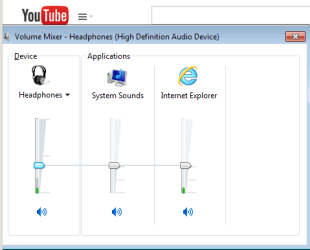
Can you post a screenshot of the basic Windows mixer while a browser is supposed to be playing a sound?

mixer.PNG
 

My Computer My Computer

Computer type
Laptop
Computer Manufacturer/Model Number
Employer provided Dell Latitude
OS
W7 Pro SP1 64bit
CPU
i7
Memory
8GB
Graphics Card(s)
Intel HD Graphics
Hard Drives
crappy SSD
Antivirus
Employer mandated Symantec Endpoint Protection
Browser
Pale Moon 64bit, IE11 64bit & Chrome 64bit
What browser are you using?

If using Internet Explorer:
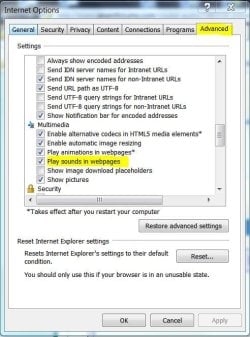
Click on Tools > Internet Options > Advanced Tab

Scroll down to the Multimedia group and click the box for Play sounds in webpages. Click Apply then click OK.
 

Attachments

  • Web Page Sounds.JPG
    Web Page Sounds.JPG
    62.1 KB · Views: 12

My Computer My Computer

Computer type
PC/Desktop
Computer Manufacturer/Model Number
Built 2/11/2011
OS
Windows 7 Pro-x64
CPU
i7-2600 3.4GHz - 3.8GHz Turbo
Motherboard
Intel DH67BL-B3
Memory
8Gb - 2x4GB, Muskin 991770 PC3-1333
Graphics Card(s)
Integrated Intel HD 2000
Sound Card
Integrated Intel 10.1 HD, RealTek ALC892
Monitor(s) Displays
Asus LCD VH222H, Haier HL24XSL2a
Screen Resolution
1920x1080, 1920x1080
Hard Drives
Crucial SSD C300-128Gb,
Western Digital WD5002AALX - 500Gb,
Western Digital WD7501AALS - 750Gb
PSU
Seasonic 650W 80+ Gold Modular
Case
Rosewill Defender
Cooling
Stock CPU, Four 120mm case fans, PCH fan added
Keyboard
Logitech EX100 Y-RBH94 Wireless
Mouse
Logitech EX100 M-RCE95 Wireless
Internet Speed
3.0/1.5 Mbs
Antivirus
Microsoft Security Essentials
Browser
Microsoft Internet Explorer 11
Other Info
Antec Veris Premier-Multimedia IR Station,
Cyber Accoustics-3602 Speakers,
AFT XM-5U Card Reader,
Hauppauge TV-HVR-2250,
Sony LX300 USB Turntable
Thank you both for helping me. First, to add a few details...I can play iTunes, Youtube, and audio links in the application "Destinos" all fine. Also, I neglected to tell you upfront that I'm using Chrome, not IE.

Regardless, I found an Internet Options box like the one you showed me, carwiz. It had the option "Play sounds in web pages" already checked.

And UsernameIssues, I attached a screen shot of the Mixer while Chrome is supposed to be playing a sound. "reportaje..." is an example program in which I clicked on an audio link. While it's supposed to be playing, no bars show color, neither is there any motion.
 

Attachments

  • mixer.jpg
    mixer.jpg
    37.2 KB · Views: 9

My Computer My Computer

Computer type
PC/Desktop
OS
California
Thanks for the info.
So, no audio from Chrome.
Does sound work for you in IE?
 

My Computer My Computer

Computer type
Laptop
Computer Manufacturer/Model Number
Employer provided Dell Latitude
OS
W7 Pro SP1 64bit
CPU
i7
Memory
8GB
Graphics Card(s)
Intel HD Graphics
Hard Drives
crappy SSD
Antivirus
Employer mandated Symantec Endpoint Protection
Browser
Pale Moon 64bit, IE11 64bit & Chrome 64bit
No, I tried it just now and nothing. I checked the Play sound in web pages option and that was checked.
 

My Computer My Computer

Computer type
PC/Desktop
OS
California
While I doubt it will help, please try a complete reset of IE using these steps...
http://www.sevenforums.com/tutorials/1222-internet-explorer-reset.html
...including step 5.


You might also look for a reset button in the Realtek High Definition Audio interface. If you don't see that, maybe uninstall that software via Programs and Features, restart the computer and re-install Realtek High Definition Audio again.
 
Last edited:

My Computer My Computer

Computer type
Laptop
Computer Manufacturer/Model Number
Employer provided Dell Latitude
OS
W7 Pro SP1 64bit
CPU
i7
Memory
8GB
Graphics Card(s)
Intel HD Graphics
Hard Drives
crappy SSD
Antivirus
Employer mandated Symantec Endpoint Protection
Browser
Pale Moon 64bit, IE11 64bit & Chrome 64bit
Back
Top