- Local time
- 9:08 AM
- Messages
- 46
Hi friends!
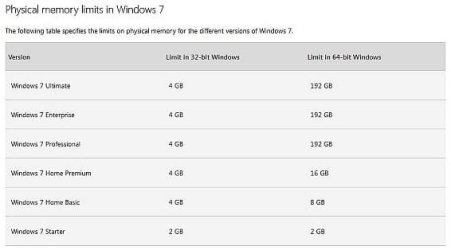
I am running Windows 7 Home Basic 64 bit (fully update with a paid anti-virus and firewall software) on one of my PCs. The motherboard on this PC is Gigabyte H61M-S.
GA-H61M-S (rev. 1.0) Specification | Motherboard - GIGABYTE India
I have just tried to increase my RAM by trying RAMs of different brands. All of them are DDR3 only as my motherboard supports DDR3 only. The total capacity of RAM support is 16GB. But sometimes when I installed RAMs of two different reputed brands or even the same brand, Windows says the only a certain amount of RAM is usable even if the total RAM installed is more than that. Why so? Both the RAM slots are fine. Please help me out. Thanks.
Corsair 4GB Kingston 8GB (shown as unknown)
Album — Postimages
Kingston 4GB Kingston 8GB (shown as unknown)
Album — Postimages
Kingston 8GB (shown as unknown) Transcend 4GB
Album — Postimages
Kingston 8GB (shown as unknown) Zion 4GB (shown as unknown)
Album — Postimages
I am running Windows 7 Home Basic 64 bit (fully update with a paid anti-virus and firewall software) on one of my PCs. The motherboard on this PC is Gigabyte H61M-S.
GA-H61M-S (rev. 1.0) Specification | Motherboard - GIGABYTE India
I have just tried to increase my RAM by trying RAMs of different brands. All of them are DDR3 only as my motherboard supports DDR3 only. The total capacity of RAM support is 16GB. But sometimes when I installed RAMs of two different reputed brands or even the same brand, Windows says the only a certain amount of RAM is usable even if the total RAM installed is more than that. Why so? Both the RAM slots are fine. Please help me out. Thanks.
Corsair 4GB Kingston 8GB (shown as unknown)
Album — Postimages
Kingston 4GB Kingston 8GB (shown as unknown)
Album — Postimages
Kingston 8GB (shown as unknown) Transcend 4GB
Album — Postimages
Kingston 8GB (shown as unknown) Zion 4GB (shown as unknown)
Album — Postimages
Last edited:
My Computer
At a glance
Windows 7 Home Basic 64 bit
- Computer type
- PC/Desktop
- OS
- Windows 7 Home Basic 64 bit