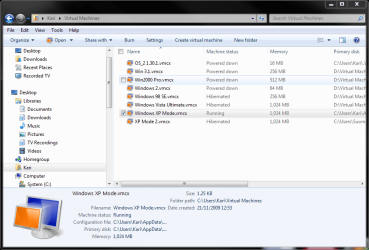
I am running Windows 7 ultimate edition 64-bit
I easily downloaded Windows XP mode and virtual machine and set up one working virtual machine. Because of some problems with it which I thought related to installation of certain applications I intended to create a second machine to start from scratch. This machine would not boot because it would not find a hard drive. The reason is that Integration Features are grayed out and permanently off. Making certain that the first machine created is off-or even deleting this machine-does not correct the problem.
I uninstalled XP virtual mode and intended to reinstall it. The Windows webpage would not allow me to download it again. Under step two it forced me to run the application to confirm that my hardware would work in virtual mode. After this the drop-down lists to choose my operating system and my language were no longer grayed out. However clicking on either of the two file buttons states that I have not completed the steps above. This is an endless loop.
Fortunately I located the two files that I had downloaded previously. I was able to reinstall and then to set up a new first virtual machine but subsequently created machines also would not operate because Integration Features were grayed out. Is this related to number of download and number of virtual machine limitations related to owning a single window 7 license? Are there ways I should be able to create more than one virtual XP machine if I wanted to?
Thank you in advance
Kevin
I easily downloaded Windows XP mode and virtual machine and set up one working virtual machine. Because of some problems with it which I thought related to installation of certain applications I intended to create a second machine to start from scratch. This machine would not boot because it would not find a hard drive. The reason is that Integration Features are grayed out and permanently off. Making certain that the first machine created is off-or even deleting this machine-does not correct the problem.
I uninstalled XP virtual mode and intended to reinstall it. The Windows webpage would not allow me to download it again. Under step two it forced me to run the application to confirm that my hardware would work in virtual mode. After this the drop-down lists to choose my operating system and my language were no longer grayed out. However clicking on either of the two file buttons states that I have not completed the steps above. This is an endless loop.
Fortunately I located the two files that I had downloaded previously. I was able to reinstall and then to set up a new first virtual machine but subsequently created machines also would not operate because Integration Features were grayed out. Is this related to number of download and number of virtual machine limitations related to owning a single window 7 license? Are there ways I should be able to create more than one virtual XP machine if I wanted to?
Thank you in advance
Kevin
My Computer
- OS
- windows 7