Opening a Back Up file

gordon99

New member
Local time
1:17 PM
Messages
38
I guess this question has been asked and answered a thousand times but please bear with me. My wife backs up all her files, which include many photos, onto an external hard drive using Windows 7 back up facility. She thinks she has lost some photos but would simply like to view some of those on the external hard drive. They are all on compressed files I believe. Would someone be good enough to tell me what one does to uncompress and open a backed up file to see what's in it, particularly if it's a photo. The word RESTORE seems to be mention a lot but, to me, that seems to involve putting a backed up file back onto the computer from where it was backed up which is not what is required. Any help please?
 

My Computer My Computer

Computer Manufacturer/Model Number
compaq presario CQ56
OS
Windows 7 Home Premium 64bit

My Computer My Computer

Computer type
Laptop
Computer Manufacturer/Model Number
Sager NP9170
OS
Win 7 Pro x64 / Win 10 Pro
CPU
Intel(R) Core(TM) i7-3630QM CPU @ 2.40GHz
Motherboard
CLEVO P170EM
Memory
12 GB
Graphics Card(s)
(1) Intel(R) HD Graphics 4000 (2) NVIDIA GeForce GTX 675M
Sound Card
(1) Realtek High Definition Audio (2) Intel(R) Display Aud
Monitor(s) Displays
17.3
Screen Resolution
1920x1080
Hard Drives
(1) Samsung 860 EVO 500GB(OS) (1) Samsung 860 EVO 500GB(Data)
Keyboard
Backlite
Antivirus
MSE, Malwarebytes Pro
Browser
Firefox
Other Info
DESKTOP: Custom-built.
OS: Win 10 Pro x64.
CASE: Rosewill R5.
CPU: Intel I5 4670K CPU @ 3.40GHz.
CPU COOLER: Cool Master Hyper 212 EVO.
MOTHERBOARD: Asus Z87-A.
MEMORY: Kingston HyperX 2x4 GB.
GPU: Nvidia Geforce 650 TI.
PSU: Corsair TX750.
DRIVES: (1) Samsung 840 120 GB SSD (2) Western Digital blue 500 GB 7200 RPM.
Thanks Jerry for your speedy answer to my question. I will give Option 1 a try first and see how I get on. I don't understand why Microsoft have not incorporated a straight forward unzip facility in their back up program; but perhaps there are very good reasons for this ommission.

Gordon
 

My Computer My Computer

Computer Manufacturer/Model Number
compaq presario CQ56
OS
Windows 7 Home Premium 64bit
Here two tutorials, select the correct one depending on have you used normal backup or created a system image:

I noticed the first one of those tutorials is a bit outdated, here are additional instructions on how to easily and fast extract individual files or folders from Windows Backup. Screenshots from Windows 8 but it works and looks exactly like that on 7, too:
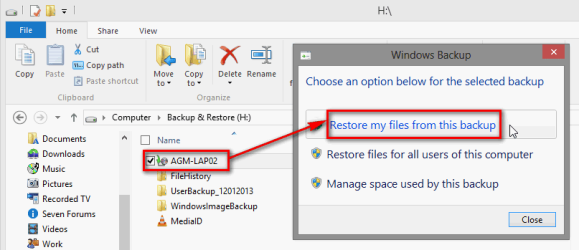
  1. Backup folder has the same than your PC. Browse to it and double click to open dialog. Select Restore my files from this backup:
    .
    2013-01-18_053643.png
    .
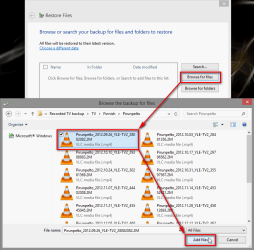
  2. Click Browse for files, add file(s) you want to restore, click Add Files:
    .
    2013-01-18_060043.png
    .
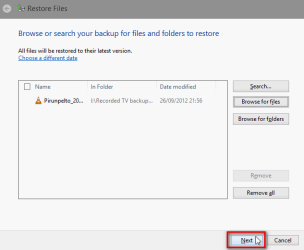
  3. Click Next:
    .
    2013-01-18_060141.png
    .
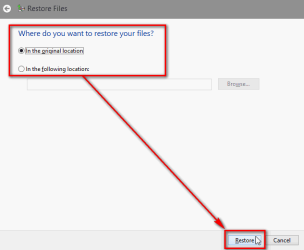
  4. Select location where you want to restore selected files, click Restore:
    .
    2013-01-18_060239.png
    .
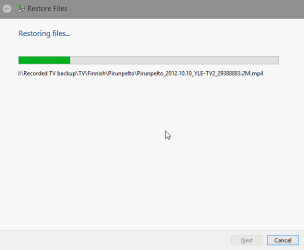
  5. You will see the progress:
    .
    2013-01-18_063754.png
    .
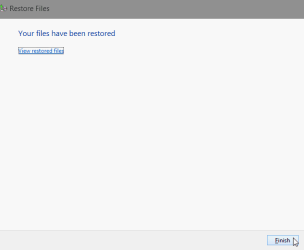
  6. That's it:
    .
    2013-01-18_063815.png

Kari
 

My Computer My Computer

Computer type
Laptop
Computer Manufacturer/Model Number
HP ENVY 17-1150eg
OS
Windows 10 Pro x64 EN-GB
CPU
1.6 GHz Intel Core i7-720QM Processor
Memory
6 GB
Graphics Card(s)
ATI Mobility Radeon HD 5850 Graphics
Sound Card
Beats sound system with integrated subwoofer
Monitor(s) Displays
17" laptop display, 22" LED and 32" Full HD TV through HDMI
Screen Resolution
1600*900 (1), 1920*1080 (2&3)
Hard Drives
Internal: 2 x 500 GB SATA Hard Disk Drive 7200 rpm
External: 2TB for backups, 3TB USB3 network drive for media
Cooling
As Envy runs a bit warm, I have it on a Cooler Master pad
Keyboard
Logitech diNovo Media Desktop Laser (bluetooth)
Mouse
Logitech Performance Mouse MX
Internet Speed
50/10 Mbps VDSL
Antivirus
Windows Defender 4.3.9431.0
Browser
Maxthon 3.5.2., IE11
Hello Gordon, and welcome to Seven Forums.

In addition, you might try using the tutorial first for the recommended method to browse through the files in a Windows Backup.

http://www.sevenforums.com/tutorials/648-restore-backup-user-system-files.html

The other methods posted above are fine, but should only be used if you can't restore files using this method since they are a bit more involved.

Hope this helps, :)
Shawn
 

My Computer My Computer

Computer type
PC/Desktop
Computer Manufacturer/Model Number
Self built custom
OS
64-bit Windows 11 Pro for Workstations
CPU
Intel i7-8700K OC'd to 5 GHz
Motherboard
ASUS ROG Maximus XI Formula Z390
Memory
64 GB (4x16GB) G.SKILL TridentZ RGB DDR4 3600 MHz
Graphics Card(s)
ASUS ROG-STRIX-GTX1080TI-O11G-GAMING
Sound Card
Integrated
Monitor(s) Displays
2 x Samsung Odyssey G7 27"
Screen Resolution
2560x1440
Hard Drives
1TB Samsung 990 PRO M.2,
4TB Samsung 990 PRO PRO M.2,
TerraMaster F8 SSD Plus NAS
PSU
Seasonic Prime Titanium 850W
Case
Thermaltake Core P3
Cooling
Corsair Hydro H115i
Keyboard
Logitech wireless K800
Mouse
Logitech MX Master 4
Internet Speed
2 Gb/s Download and 100 Mb/s Upload
Antivirus
Malwarebyte Anti-Malware Premium
Browser
Google Chrome
Other Info
Logitech Z625 speaker system,
Logitech BRIO 4K Pro webcam,
HP Color LaserJet Pro MFP M477fdn,
APC SMART-UPS RT 1000 XL - SURT1000XLI,
Galaxy S23 Plus phone
Back
Top