Opera Neon new concept browser is born

Brink

Administrator
Staff member
Local time
5:50 AM
Messages
74,834
Location
Oklahoma
A year ago, we set out to explore what web browsers might look like in years to come. Now, you can try Opera Neon – a concept browser that gives you a glimpse into the future of desktop browsers.


Today’s web browsers are not as fresh as they used to be

At Opera, we have been building web browsers for more than 20 years. We are very aware that some parts of the web browsers we know today are nothing more than tributes to the last millennium – a time when the web was mostly made up of documents and pages. But the web is changing fast, and so are people’s expectations for how apps and web pages should behave.


Opera Neon is born

To bring our vision to life, we put together a team of talented developers and designers to work on a unique prototype browser. We created thousands of concepts, drawings, iterations, versions and interface designs.

Today, we can finally show you Opera Neon. It is a concept browser – an experimental browser that envisions the future of web browsers similar to the way concept cars predict the future of automobiles. Like the Opera browser, Opera Neon is built on top of the Blink engine, but unlike any other browser, Opera Neon has been built from scratch to bring you cool effects and animations without slowing down your experience.

What’s fun and fresh in Opera Neon?

Opera Neon is packed with fun ways to interact with web content, including the ability to drag and push things around, and to even pop content out of the web and save it.

Here are some new features you won’t have seen in a browser before:

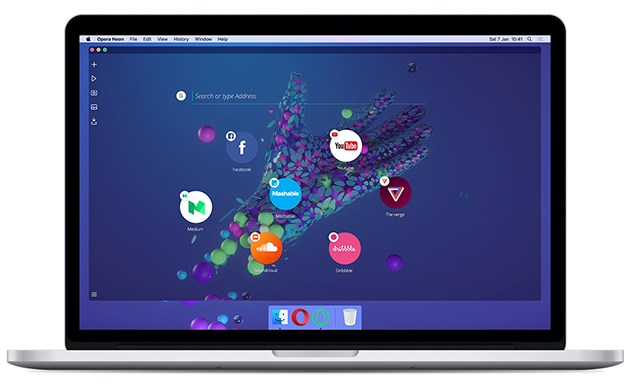
  • A new start page that uses your desktop wallpaper as its background.
  • A sidebar with its own video player, image gallery and download manager.
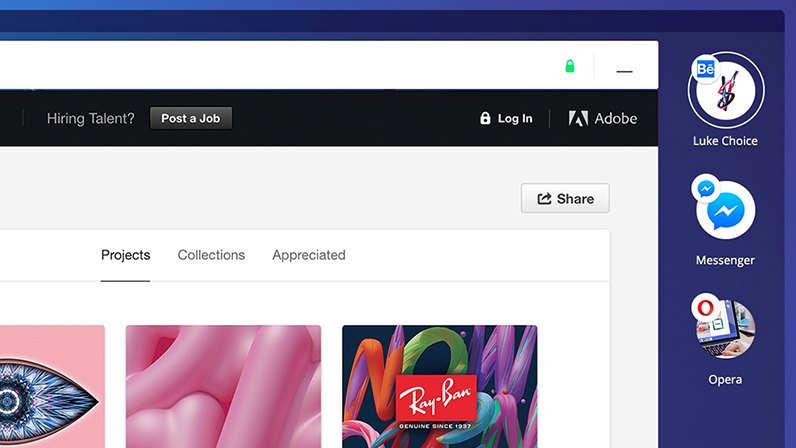
  • A vertical, visual tab bar on the right side of the browser window that makes it easier to distinguish between tabs.


  • An intelligent system that automatically manages your tabs. Like gravity, frequently used tabs will float to the top, while less important tabs will sink to the bottom.
  • A completely new omnibox that supports top search engines and open search.
We’ve also added new ways to enjoy web content:

  • Video pop-out, which lets you play videos while you browse other web pages.


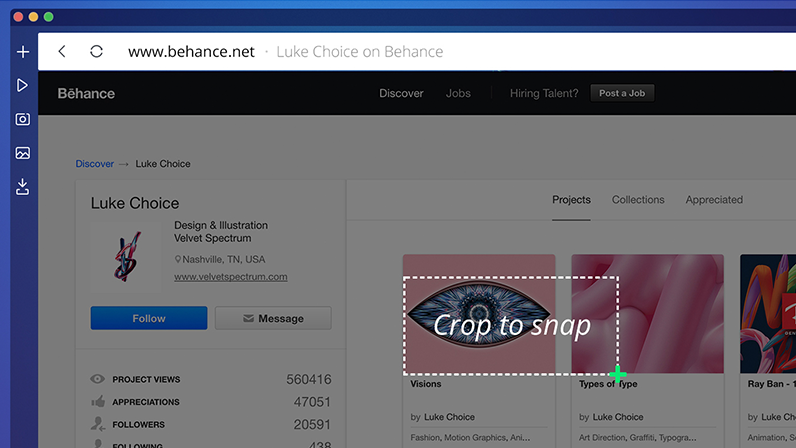
  • Snap-to-gallery lets you snapshot and crop any part of a web page and save it to the gallery for later.


  • Split screen mode lets you seamlessly view and interact with two pages at once.


It’s beautiful and it’s smart

Here’s how to manage bubble tabs:

  • To open a new tab, click the plus icon on the left sidebar (the open tab will be highlighted).
  • To add a favorite site to your tab bar, drag and drop the bubble there.
  • To minimize a tab, click on the bubble or click the plus icon on the left sidebar.
  • To close a tab, click on the x icon next to the bubble.
You’ll find several other icons on the left sidebar; one of these is the player icon. This gathers together tabs that are currently playing music and videos.

The camera icon on the left sidebar lets you to take a snapshot of the page, which then lands in your gallery under the landscape icon. You’ll find all your snaps there.

While Opera Neon has lots of new features – and many of the Opera browser features you know and love – there are some key features we have not included, such as our native ad-blocker, VPN and the ability to add extensions. The reason for this is simply that Opera Neon is a concept browser, built for experimentation and play.

A little something extra

Opera Neon wipes away your desktop clutter by bringing your computer’s wallpaper into the browser. Or, if you want to go full-Neon, we’ve collaborated with top graphic artist Luke Choice to create two free Neon-inspired wallpapers.

The future will be here sooner than you expect

Opera Neon is a concept browser – a vision of what browsers could become. It is not designed to replace the current Opera desktop browser. However, we do plan to incorporate some of its best new features into Opera for computers as early as spring 2017.

Jump in and play, then let us know what you think of Opera Neon!

Download Opera Neon

Opera Neon is now available for Mac and Windows. www.opera.com/neon

Source: Say hello to Opera Neon, our new concept browser - Opera Desktop
 

My Computer My Computer

Computer type
PC/Desktop
Computer Manufacturer/Model Number
Self built custom
OS
64-bit Windows 11 Pro for Workstations
CPU
Intel i7-8700K OC'd to 5 GHz
Motherboard
ASUS ROG Maximus XI Formula Z390
Memory
64 GB (4x16GB) G.SKILL TridentZ RGB DDR4 3600 MHz
Graphics Card(s)
ASUS ROG-STRIX-GTX1080TI-O11G-GAMING
Sound Card
Integrated
Monitor(s) Displays
2 x Samsung Odyssey G7 27"
Screen Resolution
2560x1440
Hard Drives
1TB Samsung 990 PRO M.2,
4TB Samsung 990 PRO PRO M.2,
TerraMaster F8 SSD Plus NAS
PSU
Seasonic Prime Titanium 850W
Case
Thermaltake Core P3
Cooling
Corsair Hydro H115i
Keyboard
Logitech wireless K800
Mouse
Logitech MX Master 4
Internet Speed
2 Gb/s Download and 100 Mb/s Upload
Antivirus
Malwarebyte Anti-Malware Premium
Browser
Google Chrome
Other Info
Logitech Z625 speaker system,
Logitech BRIO 4K Pro webcam,
HP Color LaserJet Pro MFP M477fdn,
APC SMART-UPS RT 1000 XL - SURT1000XLI,
Galaxy S23 Plus phone
I like it, nice look.
 

My Computer My Computer

Computer type
PC/Desktop
Computer Manufacturer/Model Number
Acer
OS
Android OS
I had a look at it, but I prefer the current version of Opera which I have been using for years.
 

My Computer My Computer

Computer type
PC/Desktop
Computer Manufacturer/Model Number
Self built using existing case
OS
Windows 7 Home Premium 64 bit sp1
CPU
Intel i5 3570 3.4Ghz Ivy Bridge SKT 1155 quad core
Motherboard
Gigabyte Z77-HD3 SKT 1155 2xSata 3, 4x USB 3.0
Memory
G-Skill Rip Jaws 16Gb (8x2) DDR3 -1600 PC3 12800 CL 10 red
Graphics Card(s)
Gigabyte NVIDIA GT610 1Gb DDR3 810/1200 PCI-E 2.0 Silent
Sound Card
NVIDIA High Definition & Realtech High Definition Audio
Monitor(s) Displays
2 x Philips 226V4L 16:9 aspect ratio
Screen Resolution
1920 x 1080 HD
Hard Drives
Samsung 840 Pro 256gb SSD, SATA 3.
Hitachi Touro Portable 1tb, USB 3.0 HDD used for image b/ups.
PSU
Corsair VS450
Case
Codeng
Cooling
PSU fan & CPU fan
Keyboard
Logitech
Mouse
Logitech Wireless trackball M570
Internet Speed
Wireless 3G. 3mg down & 550kb up.
Antivirus
Bitdefender Internet Security 2020
Browser
Opera (Current Version) & Firefox
Other Info
MS Office 2013 Pro. Davis weather station software. MGE Nova 600 avr UPS.
The first impression I got was (Clutter).
Things jumping around all over.

Jack
 

My Computer My Computer

Computer type
PC/Desktop
Computer Manufacturer/Model Number
Home made Desktop
OS
Windows 10 Pro. 64/ version 1709 Windows 7 Pro/64
CPU
Intel i7-6800K @ 4.3
Motherboard
ASUS X-99 Deluxe II
Memory
Corsair Platinum 16 gig @2400
Graphics Card(s)
EVGA GTX 1070 OC
Monitor(s) Displays
Asus 27" LED LCD/VE278Q
Screen Resolution
1920-1080 or 1280-720 HDMI
Hard Drives
INTEL SSD 730-240 Gb Sata 3.0/
PSU
EVGA Platium 1200W
Case
Phanteks Luxe Tempered Glass 8 fans/ one radiator
Cooling
XSPC/ Water Cooled CPU
Keyboard
Das 4 Professional
Mouse
Logitech M705/MX Anywhere 2-S
Internet Speed
100 mbits
Antivirus
Microsoft Security Essentials/ Malwarebytes Premium 3.0/ SAS
Browser
I.E. 11 default/Firefox/ ISP Time Warner Cable/Spectrum
Other Info
LG BluRay Burner/
Sound system-KLipsch-THX/
Icy Dock ssd Hot Swap bays.
:confused: I quit Opera when I lost temperament as the Chromium omnibox kept asking me permission for my location, or adding "are you a robot" Captcha between my webpage fetches.

I am pleased to hear that this new concept browser is supported by windows 7, so I might well give it a go.
 

My Computer My Computer

Computer type
PC/Desktop
OS
Windows 7 x64, Vista x64, 8.1 smartphone
CPU
Intel E8400 65W 64-bit
Motherboard
Gigabyte EP45-UD3LR
Memory
DDR2 2 x 2GB, 1GB x 2
Graphics Card(s)
XFX Radeon HD5750
Sound Card
AMD High Definition Audio; Realtek High Definition Audio
Monitor(s) Displays
iiyama prolite X2377HDS
Screen Resolution
1920 x 1080
Hard Drives
500GB 7200 rpm Seagate ST3500413AS 16MB, 500GB 5400 rpm Toshiba MQ02ABF050H 32MB, 200GB 7200 rpm Seagate ST3200820AS 8MB, 2TB 7200 rpm Western Digital WD20EZRX 64MB
PSU
Enermax Liberty Modular
Case
Antec P193 Midi Tower
Keyboard
Mionix ZIBAL 60
Mouse
Razer USB 2.0 Diamondback Mouse or Huion Graphics Tablet
Browser
Internet Explorer, Lunascape, Firefox, Opera, Avast Safezone
With the condition my head is in this looks just a bit confusing. . .:confused:. . .Will stay with Firefox at least I know how it works. . .:)
 

My Computer My Computer

Computer Manufacturer/Model Number
HP Pavilion a4302f
OS
Win 7 Pro x64, VM Win XP, Win7 Pro Sandbox, Kubuntu 11
CPU
AMD Athlon(tm) II X4 640 @ 3.0 Gbz
Memory
12GB 1066MHz DDR3 SDRAM - 2x4GB, 2x2GB
Graphics Card(s)
ATI Radeon HD 4350 HD Graphics/Audio with 512MB
Sound Card
Realtek High Definition Audio
Monitor(s) Displays
1. Dell 23" SP2307, 2. Mitsublishi 40" HDTV, Hannspree 25"
Screen Resolution
1. 2048x1152, 2. 1920-1080, 3. 1920x1200
Hard Drives
Int: 1 120 Gig SSD i
1 - 2.5" 500 USB External HDD
1 -1 Tb USB External HDD
Case
Mid Tower
Cooling
Standard Fans - 5 fans (very quiet)
Keyboard
Microsoft Wireless 2000
Mouse
Microsoft Wireless Mouse 5000
Internet Speed
10 Mbit (realistically 500 Kbit - 1.2 Mbit)
Other Info
Speakers - Bose Desktop (Excellent Sound)
1 external CD|DVD\Blue-ray Recorders/Players (Sony)
But the web is changing fast, and so are people’s marketers expectations for how apps and web pages should behave.
Fixed that for them. :(
 

My Computer My Computer

Computer type
PC/Desktop
Computer Manufacturer/Model Number
n/a
OS
W7 Ultimate SP1, LM19.2 MATE, W10 Home 1703, W10 Pro 1703 VM, #All 64 bit
CPU
AMD Phenom II x6 1100T, 3.3 GHz
Motherboard
ASUS M4A88T-M/USB3 (AM3)
Memory
12GB DDR3 1333 G-Skill (4GB x 2), G-Skill (2GB x 2)
Graphics Card(s)
NVIDIA GeForce GTX 660
Sound Card
Realtek?
Monitor(s) Displays
Samsung S23B350
Screen Resolution
1920x1080
Hard Drives
WD Green 2TB (SATA), WD Green 3TB (SATA), WD Blue 4TB (SATA), WD Blue 6TB (SATA)
PSU
Cooler Master
Case
Antec GX300 Tower
Cooling
3x Antec TRICOOL 120mm Fans
Mouse
Wired Optical
Internet Speed
DSL
Antivirus
Avast
Browser
Pale Moon (64 bit)
Other Info
2018-12-27 Upgraded HDDs
2015-12-10 Upgraded case, graphics card, storage
2015-08-15 Upgraded motherboard & RAM
2015-07-15 Upgraded LM17.1 to LM17.2
Trendy stuff for young people, like Win 7's Aero theme with dancing windows. I don't even like the newer Opera that now resembles Chrome. FireFox forever!
 

My Computer My Computer

Computer type
PC/Desktop
Computer Manufacturer/Model Number
HP p6-2020t
OS
Win 7 Ult 64-bit
CPU
G620 2.6GHZ Pentium R
Memory
6 GB
Monitor(s) Displays
25" HPLV2311
Screen Resolution
1920 x 1200
Hard Drives
1 SATA, 1 exterior SATA
Case
HP
Cooling
PSU
Antivirus
Glasswire
Browser
Waterfox; Firefox; Chrome for work
Other Info
Firewall--Glasswire
Similar specs in Gateway DX4200
Verizon FIOS Wired network

1 other Win7 computer-- has SSD
opera neon

Hello Everyone, I agree with Layback Bear, too much clutter, and to busy for someone like me. I like the
plain looking browsers, makes me think I must be getting older.:D
 

My Computer My Computer

Computer type
PC/Desktop
Computer Manufacturer/Model Number
ASUS A85XM-A custom build
OS
Windows 10 Pro 64 bit
CPU
AMD A4-5300 APU with Radeon(tm) HD Graphics
Motherboard
ASUSTeK COMPUTER INC. A85XM-A
Memory
8.00 GB
Graphics Card(s)
AMD Radeon HD 7480D
Sound Card
(1) High Definition Audio Device (2) Realtek High Definiti
Monitor(s) Displays
HP W2072a 20 inch Led Backlit Monitor
Screen Resolution
1600 x 900 x 32 bits (4294967296 colors) @ 60 Hz
Hard Drives
TOSHIBA DT01ACA100 SATA Disk Device
Keyboard
Acer
Mouse
Acer
Internet Speed
varies
Antivirus
Windows Defender Antivirus
Browser
Waterfox, Edge
Yep, more fixing what ain't broke!
 

My Computer My Computer

Computer type
PC/Desktop
Computer Manufacturer/Model Number
Custom Build
OS
W7 Ultimate 32-bit
Motherboard
ASUS M4N68T-M V2
PSU
Seasonic G-series 650W, can't afford the X,still Top/Line.
Case
Cooler Master Storm Scout 2, Ghost White version.
Cooling
5 fans....no liquid needed, everything under 100F
Keyboard
veteran PS2
Mouse
veteran PS2
Internet Speed
50Mps
Antivirus
AVG 2016 + TinyWall-to enhance Windows 7 firewall.
Browser
several
give me 10 good reasons why should i switch from chrome to neon

i installed just now have not seen any compelling reason to make a switch from chrome to neon
 

My Computer My Computer

Computer type
PC/Desktop
Computer Manufacturer/Model Number
Dell Vostro A860 laptop
OS
Win 7 home premium 32 bit
CPU
1.6 GHz dual core
Memory
3GB
Hard Drives
160GB
Internet Speed
4Mbps
Antivirus
AVG
Browser
chrome
Hello to the forum.
I downloaded Opera Neon,like the idea.Only problem for me is it will not use my desktop wallpaper. How can I get round this,is there a setting somewhere?

Thanks.
 

My Computer My Computer

Computer type
PC/Desktop
Computer Manufacturer/Model Number
Asus
OS
windows 7 pro 32bit
CPU
Intel E8400 O/C to 3600
Motherboard
Asus p5k-vm
Memory
Corsair Dominator 4Gb
Graphics Card(s)
sapphire 5450 HDMI
Sound Card
Onboard
Monitor(s) Displays
Acer 27" LED
Screen Resolution
1920x1080p
Hard Drives
C Hitachi HDP725032GLA360 62GB
D Maxtor 6V160E0 149GB
E ST3200827AS 235GB
Cooling
Corsair H50 Watercooler (Push/pull)
Keyboard
Saitek PZ08AV Gaming Full Blue backlit
Mouse
Daffodil Blue Gaming
Antivirus
Avast
Browser
Torch. Firefox. Maxthon Nitro. Opera Neon
Back
Top