Opinions about using a TV as monitor

I use our tv as a matter of convenience and for financial reasons , the money i saved by not purchasing a monitor (as we already had TV) was put into getting a better spec pc at the time. now i have more experience i would probably purchase a high resoloution hd monitor the bigger the better! i use it for gaming and movies also its good to be able to have several windows open at the same time and see them all .
also, ihave heard of screen burn ,ghosting etc refered to screen freeze. it does go in time and generally not permanent
 

My Computer My Computer

At a glance

Microsoft Windows 7 Home Premium 64-bit 7600IIx4 amd athelon 635 processor2x2gbati radeon HD 5450
Computer Manufacturer/Model Number
Hewlett packard/p6512uk
OS
Microsoft Windows 7 Home Premium 64-bit 7600
CPU
IIx4 amd athelon 635 processor
Motherboard
FOXCONN 2AA9
Memory
2x2gb
Graphics Card(s)
ati radeon HD 5450
Sound Card
(1) Realtek High Definition Audio (2) AMD High Definition
Monitor(s) Displays
samsung lcd tv 32"
Screen Resolution
1360x 768
Hard Drives
(1) WDC WD10 01FAES-60Z2A0 SATA Disk Device (2) Maxtor OneTouch USB Device (3) ST310003 33AS USB Device (4) WD My Book 1111 USB Device
PSU
?
Cooling
air!
Keyboard
wireless hp
Mouse
wireless Hp,optical
Internet Speed
1.10mb/s
Antivirus
MSE
Browser
Firefox
So are you saying that a 37 inch full HD 1080p 1920*1080 shouldnt have any problems as a monitor?
 

My Computer My Computer

At a glance

Windows 7 64-bitCore 2 Duo OC 4GHZ4MB DDR2GTX 460
OS
Windows 7 64-bit
CPU
Core 2 Duo OC 4GHZ
Motherboard
Asus P5Q SE Plus
Memory
4MB DDR2
Graphics Card(s)
GTX 460
Sound Card
Xonar D1
Monitor(s) Displays
LG 42 inch
Screen Resolution
1980x1020
No, it really shouldn't. One of my good friends bought a large HDTV simply to use AS a monitor.
 

My Computer My Computer

At a glance

W7 Professional x64AMD Athlon II X3 445 Rana 3.10 GHzPNY XLR DDR3 1600 4x2GBNVIDIA GeForce GTS 450 (fermi) 1GB GDDR5
Computer Manufacturer/Model Number
Pugh Technologies
OS
W7 Professional x64
CPU
AMD Athlon II X3 445 Rana 3.10 GHz
Motherboard
MSI 870A-G54
Memory
PNY XLR DDR3 1600 4x2GB
Graphics Card(s)
NVIDIA GeForce GTS 450 (fermi) 1GB GDDR5
Sound Card
Realtek ALC892 onboard
Monitor(s) Displays
ASUS VE205t, Viewsonic VX2035WM
Screen Resolution
1600x900, 1600x1050
Hard Drives
977GB Hitachi Hitachi HDS721010CLA332
244GB Western Digital WDC WD2500AAJS-65B4A0
488GB Western Digital WDC WD5000AAJS-00A8B0
488GB Western Digital WDC WD5000AAKS-00UU3A0
PSU
Antec EarthWatts EA650 650W
Case
ThermalTake Armor A90 Mid Tower
Cooling
3x 120mm in, 1x 120mm & 200mm out, self built hydro-cooler
Keyboard
Logitec 55
Mouse
Razer Deathadder
Internet Speed
20 Mbps D/L, 9 Mbps U/L
Depending on which room you use your computer in a TV can make a great multifunctional tool. A TV can be used with a cable box,vcr,blue ray/dvd player ect. plus your computer you just have to find a brand with enough inputs (mine has 5 HDMI + 2 others) and change inputs using the TV remote to the device required.
 

My Computer My Computer

At a glance

Windows 10 Pro x 2/Windows 11 HomeIntel i7 2600K @ 3.40 GHzCorsair Vengeance 16GB DDR3 1600MHz CL8 Dual ...EVGA GeForce RTX 3080 XC3 ULTRA GAMING 10GB G...
Computer type
PC/Desktop
Computer Manufacturer/Model Number
My own abomination, I call it the Money Pit
OS
Windows 10 Pro x 2/Windows 11 Home
CPU
Intel i7 2600K @ 3.40 GHz
Motherboard
ASUS Sabertooth P67
Memory
Corsair Vengeance 16GB DDR3 1600MHz CL8 Dual Channel Kit
Graphics Card(s)
EVGA GeForce RTX 3080 XC3 ULTRA GAMING 10GB GDDR6X
Sound Card
Onboard Realtek or Nvidia High Definition Audio (HDMI)
Monitor(s) Displays
Samsung JS7000 50" SUHD TV or Samsung 27" FHD 60Hz 8ms GTG V
Screen Resolution
1920 x 1080
Hard Drives
1 x Samsung 870 EVO 250 GB SSD (Windows 10 Pro), 1 x Samsung 850 EVO 250 GB SSD (Windows 10 Pro)
PSU
Corsair AX860 - 860W Modular Power Supply
Case
Phanteks Enthoo Luxe Full Tower Case - Black
Cooling
CORSAIR Hydro Series H150i PRO RGB 360mm Liquid CPU Cooler
Keyboard
Logitech K830 Illuminated Living-Room Keyboard
Mouse
Logitech MX Anywhere 2S Wireless Mouse
Internet Speed
100 Mbps
Antivirus
ESET Internet Security
Browser
Latest Version Of Firefox & Microsoft Edge Chromium Stable
Other Info
LG Super Multi Blue Internal Blu-ray Disk Rewriter - BH10LS30
6x2 HDMI Switcher (6 inputs, 2 outputs) so I can send the output of my Cable Box, Roku, or any my 4 computers to either my TV or Monitor separately or simultaneously.
Granted a convention center is the most extreme case.

I use several LCD panels at home we watch TV and are directly connected to computers (internet, video, movies, etc.) and I have never had any burn-in issues, and the average user probably never will. I stated all that because the post stated are immune (meaning they NEVER have) burn-in issues which is simply not true. I have seen it on all major panels produced again granted in a most extreme case. -WS

Thanks for pointing out that in extreme cases an LCD screen burn can occur. There is a lot of material on the web about this but this short one I think is a must-read for anyone concerned about it.

.......Thanks for that link, i appreciate you posting more pics of browsing aswell :D

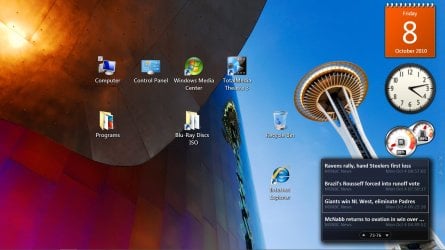
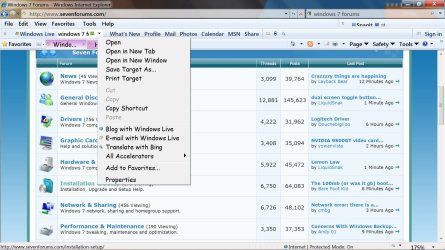
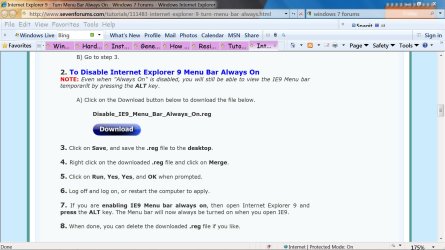
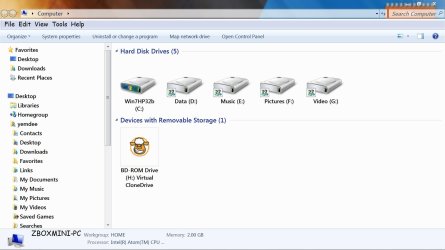
Here are some screenshots I made today on my LG LCD TV.

10-8-2010 4-13-13 PM.jpg

10-8-2010 4-30-56 PM.jpg

10-8-2010 4-38-07 PM.jpg

10-8-2010 4-40-25 PM.jpg
 

My Computer My Computer

At a glance

Windows 7 Ultimate 32bitAMD Phenom II X3 720 ProcessorTranscend DDR2 (PC2 6400) 4 X 1GBIntegrated + ATI Radeon 4550
Computer Manufacturer/Model Number
self-assembled
OS
Windows 7 Ultimate 32bit
CPU
AMD Phenom II X3 720 Processor
Motherboard
Gigabyte GA-MA78GM-S2H Revision 1.0
Memory
Transcend DDR2 (PC2 6400) 4 X 1GB
Graphics Card(s)
Integrated + ATI Radeon 4550
Sound Card
Integrated Realtek ALC 889A
Monitor(s) Displays
DELL 1704 FPT
Screen Resolution
1280 x 1024
Hard Drives
Western Digital Caviar SE16 250 GB x2 in RAID 0
PSU
Coolermaster 400 W
Case
Zebronics Cube
Cooling
stock
Keyboard
Microsoft - wired
Mouse
Microsoft - wired
Internet Speed
ADSL 256-512Kbps
Granted a convention center is the most extreme case.

I use several LCD panels at home we watch TV and are directly connected to computers (internet, video, movies, etc.) and I have never had any burn-in issues, and the average user probably never will. I stated all that because the post stated are immune (meaning they NEVER have) burn-in issues which is simply not true. I have seen it on all major panels produced again granted in a most extreme case. -WS

Thanks for pointing out that in extreme cases an LCD screen burn can occur. There is a lot of material on the web about this but this short one I think is a must-read for anyone concerned about it.

.......Thanks for that link, i appreciate you posting more pics of browsing aswell :D

Here are some screenshots I made today on my LG LCD TV.

View attachment 103076

View attachment 103077

View attachment 103078

View attachment 103079

Thank you! That is a good article. I was going to go down the road of changing the wording from “burn-in” to “video memory” but I did not want to get everyone confused, but this is exactly what I was talking about. Thanks!!! -WS
 

My Computer My Computer

At a glance

Windows 7 Enterprise (x64); Windows Server 20...16GB
Computer type
PC/Desktop
Computer Manufacturer/Model Number
Dell OP7010
OS
Windows 7 Enterprise (x64); Windows Server 2008 R2 (x64)
Memory
16GB
Monitor(s) Displays
4 Dell 24" LCD
Screen Resolution
1280x1024
Keyboard
Dell
Mouse
Dell Optical
Internet Speed
40meg
Granted a convention center is the most extreme case.

I use several LCD panels at home we watch TV and are directly connected to computers (internet, video, movies, etc.) and I have never had any burn-in issues, and the average user probably never will. I stated all that because the post stated are immune (meaning they NEVER have) burn-in issues which is simply not true. I have seen it on all major panels produced again granted in a most extreme case. -WS

Thanks for pointing out that in extreme cases an LCD screen burn can occur. There is a lot of material on the web about this but this short one I think is a must-read for anyone concerned about it.

.......Thanks for that link, i appreciate you posting more pics of browsing aswell :D

Here are some screenshots I made today on my LG LCD TV.

View attachment 103076

View attachment 103077

View attachment 103078

View attachment 103079

Thank you for the screenshots the text looks perfectly fine to me to be honest so it does boost my confidence :D.
 

My Computer My Computer

At a glance

Windows 7 64-bitCore 2 Duo OC 4GHZ4MB DDR2GTX 460
OS
Windows 7 64-bit
CPU
Core 2 Duo OC 4GHZ
Motherboard
Asus P5Q SE Plus
Memory
4MB DDR2
Graphics Card(s)
GTX 460
Sound Card
Xonar D1
Monitor(s) Displays
LG 42 inch
Screen Resolution
1980x1020
Thanks for everyone else sharing the info aswell as the "burn-in" vs “video memory” too because this got me confused too lol.
 

My Computer My Computer

At a glance

Windows 7 64-bitCore 2 Duo OC 4GHZ4MB DDR2GTX 460
OS
Windows 7 64-bit
CPU
Core 2 Duo OC 4GHZ
Motherboard
Asus P5Q SE Plus
Memory
4MB DDR2
Graphics Card(s)
GTX 460
Sound Card
Xonar D1
Monitor(s) Displays
LG 42 inch
Screen Resolution
1980x1020
Back
Top