
Solved Options for Full External Backup of 3 installed Hard Drives

VJBenz

New member
Local time
12:29 PM
Messages
8
I have the following Hard Drives:
Internal Main SATA Drive C: 2TB with Windows 7 Professional 64 bit (70 GB used)
Internal SATA slave drive G: 150GB (data) (35 GB used)
Internal SATA slave drive H: 185GB (music) (65 GB used)
External USB back-up drive I: 2TB WD My Book 1130 (120 GB used - old historical data)

What I think I want to do is put all my backups on the external USB drive.

I am leaning towards a full system image backup of the C Drive, and data file backups of the G and H drives, that I would like to be accessible as data files.

Q1: Is this a reasonable objective for backups?

Q2: Can I do this within the Windows 7 Backup utility, or should I consider another program?

Q3: Do in need to partition the I drive to reflect these three backup drives, thus limiting the potential of backups competing for space?

Q4: I was thinking of C system image backups weekly, and the G & H backups done incrementally after an initial full backup. What do you think/suggest?

Vic
 

My Computer My Computer

At a glance

Windows 7 Professional 64-bitintel i7-3820 CPU @ 3.60 GHz16.0 GB
OS
Windows 7 Professional 64-bit
CPU
intel i7-3820 CPU @ 3.60 GHz
Motherboard
ASUS P9X79
Memory
16.0 GB
Hard Drives
Internal Main Drive C: 2TB with Windows 7 Professional
Internal SATA slave drive G: 150GB
Internal SATA slave drive H: 185GB
External USB back-up drive I: 2TB WD My Book 1130

My Computer My Computer

At a glance

Microsoft Windows 7 Home Premium 64-bit Servi...Intel(R) Core(TM) i3 CPU M 330 @ 2.13GHz8 GB DDR3Intel(R) HD Graphics
Computer type
Laptop
Computer Manufacturer/Model Number
Hewlett-Packard/G62-107SA Notebook
OS
Microsoft Windows 7 Home Premium 64-bit Service Pack 1
CPU
Intel(R) Core(TM) i3 CPU M 330 @ 2.13GHz
Motherboard
Hewlett-Packard 1425
Memory
8 GB DDR3
Graphics Card(s)
Intel(R) HD Graphics
Sound Card
Realtek High Definition Audio
Monitor(s) Displays
Builtin
Screen Resolution
1366 x 768 x 32 bits (4294967296 colors) @ 60 Hz
Hard Drives
250 GB SATA Hard Disk Drive 7200 rpm
2TB Seagate GoFlex USB 2 Drive
1TB Iomega Prestige USB 2 Drive
1.5TB Iomega Prestige USB 2 Drive (Samsung)
2TB WD MyBook Live NAS.
Mouse
Logitech Anywhere MX
Internet Speed
152 Mbs download 10 Mbs upload
Antivirus
Norton 360
Browser
Chrome
I would use Win 7 Backup and Restore. With Task Scheduler you can schedule any task to run at your desired times.

WIN + F1 | type Backup and Recovery Strategies for IT Pros | click on Wbadmin command and Task Scheduler
 

My Computer My Computer

At a glance

MS Windows 7 Ultimate SP1 64-bitAMD A10-4600M6.00 GB Dual-Channel DDR3 @ 798MHz (11-11-12-28)AMD Radeon HD 7660G
Computer Manufacturer/Model Number
Toshiba Satellite S875D-S7239 laptop
OS
MS Windows 7 Ultimate SP1 64-bit
CPU
AMD A10-4600M
Motherboard
AMD Pumori (Socket FT1)
Memory
6.00 GB Dual-Channel DDR3 @ 798MHz (11-11-12-28)
Graphics Card(s)
AMD Radeon HD 7660G
Sound Card
High Definition Audio Device
Monitor(s) Displays
Generic PnP Monitor (1600x900@60Hz)
Screen Resolution
1600x900@60Hz
Hard Drives
SSD 119GB Corsair CSSD-V128GB2 ATA Device
Keyboard
Standard PS/2 Keyboard
Mouse
HP Wireless Optical Mobile Mouse Model FHA-3410
Internet Speed
What the local pub, local coffee shop offers.
Other Info
Optical Drive:MATSHITA BD-CMB UJ160B ATA Device


Also have an Asus ha1002xp netbook with Win 7 Ultimate installed.
If it was me I'd backup the data and music using something like FreeFileSync like Kado suggests. Why: I imagine this is fairly static information and I don't think imaging is a good approach. Incremental imaging is an option with a paid product but I think you increase your risks of problems recovering.

I'd certainly image the OS partition. Try both Windows inbuilt and free Macrium Reflect. I use both. If you haven't already, I would partition your 2TB main drive so that your OS and installed programs live on ~ 200GB partition. It's good to keep your images to ~50GB otherwise they take too long and you will tend to not make them as often as you should.
 

My Computer My Computer

At a glance

Windows 7x64 Home Premium SP1Intel i7 2600kG.Skill Ripjaws (DDR3-1600) 2x4GBNvidia GeForce GTS 450; Intel HD Graphics 300...
Computer type
PC/Desktop
Computer Manufacturer/Model Number
Own build
OS
Windows 7x64 Home Premium SP1
CPU
Intel i7 2600k
Motherboard
ASUS P8Z68 Deluxe
Memory
G.Skill Ripjaws (DDR3-1600) 2x4GB
Graphics Card(s)
Nvidia GeForce GTS 450; Intel HD Graphics 3000(GT2+)
Monitor(s) Displays
Dell Ultrasharp IPS panel U2311H, Samsung SyncMaster P2350
Screen Resolution
1920x1080
Hard Drives
Samsung 850 Pro SSD 256GB, Samsung SSD 840 120GB, Seagates 1TB Barracuda ST31000528AS x2
PSU
Seasonic M12II 520W
Case
Lian Li Lancool PC-K60
Cooling
Case: 1x120mm, 3x140mm CPU: Hyper 212+
Keyboard
Logitech MK520 (wireless)
Mouse
Logitech MK520
Internet Speed
6-7 Mbps
Antivirus
Norton Security Premium, Malwarebytes on 2 (MSE on 3rd PC)
Browser
FireFox
Other Info
Audio: Logitech Z523 2.1

My Computer My Computer

At a glance

MS Windows 7 Ultimate SP1 64-bitAMD A10-4600M6.00 GB Dual-Channel DDR3 @ 798MHz (11-11-12-28)AMD Radeon HD 7660G
Computer Manufacturer/Model Number
Toshiba Satellite S875D-S7239 laptop
OS
MS Windows 7 Ultimate SP1 64-bit
CPU
AMD A10-4600M
Motherboard
AMD Pumori (Socket FT1)
Memory
6.00 GB Dual-Channel DDR3 @ 798MHz (11-11-12-28)
Graphics Card(s)
AMD Radeon HD 7660G
Sound Card
High Definition Audio Device
Monitor(s) Displays
Generic PnP Monitor (1600x900@60Hz)
Screen Resolution
1600x900@60Hz
Hard Drives
SSD 119GB Corsair CSSD-V128GB2 ATA Device
Keyboard
Standard PS/2 Keyboard
Mouse
HP Wireless Optical Mobile Mouse Model FHA-3410
Internet Speed
What the local pub, local coffee shop offers.
Other Info
Optical Drive:MATSHITA BD-CMB UJ160B ATA Device


Also have an Asus ha1002xp netbook with Win 7 Ultimate installed.
Next Steps

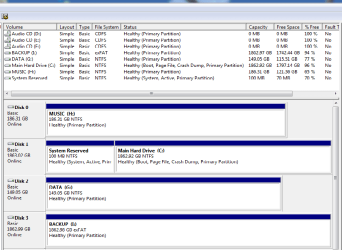
OK, So my plan seems to be OK, but there are a few suggestions. I presume the recommendation to partition the 2TB drive refers to my Main Drive C as shown in the attachment. I know it is a large drive, and I am not sure what I will eventually do with it, but partitioning for the OS and programs seems reasonable.

With respect to the attachment, I noticed one other thing. The USB external drive that I plan to use for the backups (Backup I), uses a file system of exFAT while all the others are NTFS. Is that a problem?

Vic
 

Attachments

  • 20120715 drives.png
    20120715 drives.png
    17.3 KB · Views: 13

My Computer My Computer

At a glance

Windows 7 Professional 64-bitintel i7-3820 CPU @ 3.60 GHz16.0 GB
OS
Windows 7 Professional 64-bit
CPU
intel i7-3820 CPU @ 3.60 GHz
Motherboard
ASUS P9X79
Memory
16.0 GB
Hard Drives
Internal Main Drive C: 2TB with Windows 7 Professional
Internal SATA slave drive G: 150GB
Internal SATA slave drive H: 185GB
External USB back-up drive I: 2TB WD My Book 1130
Yes. You will need to reformat the external as NTFS.

You will also want to keep you os and also your programs on the C:
My c: is 60 gb with more than 20 gb free.
 

My Computer My Computer

At a glance

MS Windows 7 Ultimate SP1 64-bitAMD A10-4600M6.00 GB Dual-Channel DDR3 @ 798MHz (11-11-12-28)AMD Radeon HD 7660G
Computer Manufacturer/Model Number
Toshiba Satellite S875D-S7239 laptop
OS
MS Windows 7 Ultimate SP1 64-bit
CPU
AMD A10-4600M
Motherboard
AMD Pumori (Socket FT1)
Memory
6.00 GB Dual-Channel DDR3 @ 798MHz (11-11-12-28)
Graphics Card(s)
AMD Radeon HD 7660G
Sound Card
High Definition Audio Device
Monitor(s) Displays
Generic PnP Monitor (1600x900@60Hz)
Screen Resolution
1600x900@60Hz
Hard Drives
SSD 119GB Corsair CSSD-V128GB2 ATA Device
Keyboard
Standard PS/2 Keyboard
Mouse
HP Wireless Optical Mobile Mouse Model FHA-3410
Internet Speed
What the local pub, local coffee shop offers.
Other Info
Optical Drive:MATSHITA BD-CMB UJ160B ATA Device


Also have an Asus ha1002xp netbook with Win 7 Ultimate installed.
OK... a couple of questions.

Q1: Do I have to reformat my I drive to NTFS or can I "convert" to NTFS from exFAT without formatting, and therefore losing the stuff I have on the I Drive?


Q2: Can I add partitions to my C Drive without reformatting it? What are the steps?

Vic
 

My Computer My Computer

At a glance

Windows 7 Professional 64-bitintel i7-3820 CPU @ 3.60 GHz16.0 GB
OS
Windows 7 Professional 64-bit
CPU
intel i7-3820 CPU @ 3.60 GHz
Motherboard
ASUS P9X79
Memory
16.0 GB
Hard Drives
Internal Main Drive C: 2TB with Windows 7 Professional
Internal SATA slave drive G: 150GB
Internal SATA slave drive H: 185GB
External USB back-up drive I: 2TB WD My Book 1130
vj,
see post #7.

You will be able to add partitions to C without reformatting C.
 

My Computer My Computer

At a glance

MS Windows 7 Ultimate SP1 64-bitAMD A10-4600M6.00 GB Dual-Channel DDR3 @ 798MHz (11-11-12-28)AMD Radeon HD 7660G
Computer Manufacturer/Model Number
Toshiba Satellite S875D-S7239 laptop
OS
MS Windows 7 Ultimate SP1 64-bit
CPU
AMD A10-4600M
Motherboard
AMD Pumori (Socket FT1)
Memory
6.00 GB Dual-Channel DDR3 @ 798MHz (11-11-12-28)
Graphics Card(s)
AMD Radeon HD 7660G
Sound Card
High Definition Audio Device
Monitor(s) Displays
Generic PnP Monitor (1600x900@60Hz)
Screen Resolution
1600x900@60Hz
Hard Drives
SSD 119GB Corsair CSSD-V128GB2 ATA Device
Keyboard
Standard PS/2 Keyboard
Mouse
HP Wireless Optical Mobile Mouse Model FHA-3410
Internet Speed
What the local pub, local coffee shop offers.
Other Info
Optical Drive:MATSHITA BD-CMB UJ160B ATA Device


Also have an Asus ha1002xp netbook with Win 7 Ultimate installed.
OK... a couple of questions.

Q1: Do I have to reformat my I drive to NTFS or can I "convert" to NTFS from exFAT without formatting, and therefore losing the stuff I have on the I Drive?


Q2: Can I add partitions to my C Drive without reformatting it? What are the steps?

Vic
Q2:
It's good to have the installed Partition Wizard Mini Tool AND the CD/DVD ISO. You make a bootable CD/DVD from the ISO using for example
The Official ImgBurn Website
Another good program to have.

For partition operations like yours I would recommend using the Boot CD.
To do the job you
1)highlight the partition (C)
2)drag the right handle to the left so that the OS occupies ~ 200GB
This will a large chunk of unallocated on C to the right
3) Select Apply
4) Select the unallocated
5) Use the obvious tools to format it NTFS, Primary - Apply the operations
6) Assign a letter - Apply

Q1:
Copy your data to your newly created partition and do an NTFS format (Primary) of your I drive. You can use Partition Wizard again if you want. I'd do a quick format as a full format will take a long time.
Copy your stuff back.
 

My Computer My Computer

At a glance

Windows 7x64 Home Premium SP1Intel i7 2600kG.Skill Ripjaws (DDR3-1600) 2x4GBNvidia GeForce GTS 450; Intel HD Graphics 300...
Computer type
PC/Desktop
Computer Manufacturer/Model Number
Own build
OS
Windows 7x64 Home Premium SP1
CPU
Intel i7 2600k
Motherboard
ASUS P8Z68 Deluxe
Memory
G.Skill Ripjaws (DDR3-1600) 2x4GB
Graphics Card(s)
Nvidia GeForce GTS 450; Intel HD Graphics 3000(GT2+)
Monitor(s) Displays
Dell Ultrasharp IPS panel U2311H, Samsung SyncMaster P2350
Screen Resolution
1920x1080
Hard Drives
Samsung 850 Pro SSD 256GB, Samsung SSD 840 120GB, Seagates 1TB Barracuda ST31000528AS x2
PSU
Seasonic M12II 520W
Case
Lian Li Lancool PC-K60
Cooling
Case: 1x120mm, 3x140mm CPU: Hyper 212+
Keyboard
Logitech MK520 (wireless)
Mouse
Logitech MK520
Internet Speed
6-7 Mbps
Antivirus
Norton Security Premium, Malwarebytes on 2 (MSE on 3rd PC)
Browser
FireFox
Other Info
Audio: Logitech Z523 2.1
Thanks karlsnooks and mjf. I'll do as you suggest.

Vic
 

My Computer My Computer

At a glance

Windows 7 Professional 64-bitintel i7-3820 CPU @ 3.60 GHz16.0 GB
OS
Windows 7 Professional 64-bit
CPU
intel i7-3820 CPU @ 3.60 GHz
Motherboard
ASUS P9X79
Memory
16.0 GB
Hard Drives
Internal Main Drive C: 2TB with Windows 7 Professional
Internal SATA slave drive G: 150GB
Internal SATA slave drive H: 185GB
External USB back-up drive I: 2TB WD My Book 1130
OK... a couple of questions.

Q1: Do I have to reformat my I drive to NTFS or can I "convert" to NTFS from exFAT without formatting, and therefore losing the stuff I have on the I Drive?


Q2: Can I add partitions to my C Drive without reformatting it? What are the steps?

Vic
Q2:
It's good to have the installed Partition Wizard Mini Tool AND the CD/DVD ISO. You make a bootable CD/DVD from the ISO using for example
The Official ImgBurn Website
Another good program to have.

For partition operations like yours I would recommend using the Boot CD.
To do the job you
1)highlight the partition (C)
2)drag the right handle to the left so that the OS occupies ~ 200GB
This will a large chunk of unallocated on C to the right
3) Select Apply
4) Select the unallocated
5) Use the obvious tools to format it NTFS, Primary - Apply the operations
6) Assign a letter - Apply

Q1:
Copy your data to your newly created partition and do an NTFS format (Primary) of your I drive. You can use Partition Wizard again if you want. I'd do a quick format as a full format will take a long time.
Copy your stuff back.

It is my understanding that Partition Wizard can convert the filesystem without loss of data but I have yet to try it myself.
 

My Computer My Computer

At a glance

Microsoft Windows 7 Home Premium 64-bit Servi...Intel(R) Core(TM) i3 CPU M 330 @ 2.13GHz8 GB DDR3Intel(R) HD Graphics
Computer type
Laptop
Computer Manufacturer/Model Number
Hewlett-Packard/G62-107SA Notebook
OS
Microsoft Windows 7 Home Premium 64-bit Service Pack 1
CPU
Intel(R) Core(TM) i3 CPU M 330 @ 2.13GHz
Motherboard
Hewlett-Packard 1425
Memory
8 GB DDR3
Graphics Card(s)
Intel(R) HD Graphics
Sound Card
Realtek High Definition Audio
Monitor(s) Displays
Builtin
Screen Resolution
1366 x 768 x 32 bits (4294967296 colors) @ 60 Hz
Hard Drives
250 GB SATA Hard Disk Drive 7200 rpm
2TB Seagate GoFlex USB 2 Drive
1TB Iomega Prestige USB 2 Drive
1.5TB Iomega Prestige USB 2 Drive (Samsung)
2TB WD MyBook Live NAS.
Mouse
Logitech Anywhere MX
Internet Speed
152 Mbs download 10 Mbs upload
Antivirus
Norton 360
Browser
Chrome
..........

It is my understanding that Partition Wizard can convert the filesystem without loss of data but I have yet to try it myself.
I don't know but I would have been surprised. I'd copy to be safe.
If you convert the filesystem let us know if the data stays in tact.
 

My Computer My Computer

At a glance

Windows 7x64 Home Premium SP1Intel i7 2600kG.Skill Ripjaws (DDR3-1600) 2x4GBNvidia GeForce GTS 450; Intel HD Graphics 300...
Computer type
PC/Desktop
Computer Manufacturer/Model Number
Own build
OS
Windows 7x64 Home Premium SP1
CPU
Intel i7 2600k
Motherboard
ASUS P8Z68 Deluxe
Memory
G.Skill Ripjaws (DDR3-1600) 2x4GB
Graphics Card(s)
Nvidia GeForce GTS 450; Intel HD Graphics 3000(GT2+)
Monitor(s) Displays
Dell Ultrasharp IPS panel U2311H, Samsung SyncMaster P2350
Screen Resolution
1920x1080
Hard Drives
Samsung 850 Pro SSD 256GB, Samsung SSD 840 120GB, Seagates 1TB Barracuda ST31000528AS x2
PSU
Seasonic M12II 520W
Case
Lian Li Lancool PC-K60
Cooling
Case: 1x120mm, 3x140mm CPU: Hyper 212+
Keyboard
Logitech MK520 (wireless)
Mouse
Logitech MK520
Internet Speed
6-7 Mbps
Antivirus
Norton Security Premium, Malwarebytes on 2 (MSE on 3rd PC)
Browser
FireFox
Other Info
Audio: Logitech Z523 2.1
I think that feature is only available in the paid version.
 

My Computer My Computer

At a glance

MS Windows 7 Ultimate SP1 64-bitAMD A10-4600M6.00 GB Dual-Channel DDR3 @ 798MHz (11-11-12-28)AMD Radeon HD 7660G
Computer Manufacturer/Model Number
Toshiba Satellite S875D-S7239 laptop
OS
MS Windows 7 Ultimate SP1 64-bit
CPU
AMD A10-4600M
Motherboard
AMD Pumori (Socket FT1)
Memory
6.00 GB Dual-Channel DDR3 @ 798MHz (11-11-12-28)
Graphics Card(s)
AMD Radeon HD 7660G
Sound Card
High Definition Audio Device
Monitor(s) Displays
Generic PnP Monitor (1600x900@60Hz)
Screen Resolution
1600x900@60Hz
Hard Drives
SSD 119GB Corsair CSSD-V128GB2 ATA Device
Keyboard
Standard PS/2 Keyboard
Mouse
HP Wireless Optical Mobile Mouse Model FHA-3410
Internet Speed
What the local pub, local coffee shop offers.
Other Info
Optical Drive:MATSHITA BD-CMB UJ160B ATA Device


Also have an Asus ha1002xp netbook with Win 7 Ultimate installed.
..........

It is my understanding that Partition Wizard can convert the filesystem without loss of data but I have yet to try it myself.
I don't know but I would have been surprised. I'd copy to be safe.
If you convert the filesystem let us know if the data stays in tact.

It's in the free version and I just tried a FAT32 to NTFS conversion in a VM and it works without loss of data.
 

My Computer My Computer

At a glance

Microsoft Windows 7 Home Premium 64-bit Servi...Intel(R) Core(TM) i3 CPU M 330 @ 2.13GHz8 GB DDR3Intel(R) HD Graphics
Computer type
Laptop
Computer Manufacturer/Model Number
Hewlett-Packard/G62-107SA Notebook
OS
Microsoft Windows 7 Home Premium 64-bit Service Pack 1
CPU
Intel(R) Core(TM) i3 CPU M 330 @ 2.13GHz
Motherboard
Hewlett-Packard 1425
Memory
8 GB DDR3
Graphics Card(s)
Intel(R) HD Graphics
Sound Card
Realtek High Definition Audio
Monitor(s) Displays
Builtin
Screen Resolution
1366 x 768 x 32 bits (4294967296 colors) @ 60 Hz
Hard Drives
250 GB SATA Hard Disk Drive 7200 rpm
2TB Seagate GoFlex USB 2 Drive
1TB Iomega Prestige USB 2 Drive
1.5TB Iomega Prestige USB 2 Drive (Samsung)
2TB WD MyBook Live NAS.
Mouse
Logitech Anywhere MX
Internet Speed
152 Mbs download 10 Mbs upload
Antivirus
Norton 360
Browser
Chrome
For years I've always just used the convert command within Windows to convert FAT or FAT32 to NTFS. It's always best to have the data copied somewhere else first, but the couple of dozen times I've used it I've never lost data.

It should be noted though, to ensure you realize the full performance benefits provided by NTFS you should always create a newly formatted NTFS, then place your files there. I'm not sure if third party software would do a better conversion (performance-wise) than Windows convert would.
 

My Computer My Computer

At a glance

Windows 7 Ultimate x64
OS
Windows 7 Ultimate x64
Before I undertake any partition operation, never mind a format change, I make sure I have the data backed up in some way in case things screw up. This includes images for the OS/installed programs and any type of file data backup that takes your fancy.
 

My Computer My Computer

At a glance

Windows 7x64 Home Premium SP1Intel i7 2600kG.Skill Ripjaws (DDR3-1600) 2x4GBNvidia GeForce GTS 450; Intel HD Graphics 300...
Computer type
PC/Desktop
Computer Manufacturer/Model Number
Own build
OS
Windows 7x64 Home Premium SP1
CPU
Intel i7 2600k
Motherboard
ASUS P8Z68 Deluxe
Memory
G.Skill Ripjaws (DDR3-1600) 2x4GB
Graphics Card(s)
Nvidia GeForce GTS 450; Intel HD Graphics 3000(GT2+)
Monitor(s) Displays
Dell Ultrasharp IPS panel U2311H, Samsung SyncMaster P2350
Screen Resolution
1920x1080
Hard Drives
Samsung 850 Pro SSD 256GB, Samsung SSD 840 120GB, Seagates 1TB Barracuda ST31000528AS x2
PSU
Seasonic M12II 520W
Case
Lian Li Lancool PC-K60
Cooling
Case: 1x120mm, 3x140mm CPU: Hyper 212+
Keyboard
Logitech MK520 (wireless)
Mouse
Logitech MK520
Internet Speed
6-7 Mbps
Antivirus
Norton Security Premium, Malwarebytes on 2 (MSE on 3rd PC)
Browser
FireFox
Other Info
Audio: Logitech Z523 2.1
I second that. You can never have too many backups.
 

My Computer My Computer

At a glance

Microsoft Windows 7 Home Premium 64-bit Servi...Intel(R) Core(TM) i3 CPU M 330 @ 2.13GHz8 GB DDR3Intel(R) HD Graphics
Computer type
Laptop
Computer Manufacturer/Model Number
Hewlett-Packard/G62-107SA Notebook
OS
Microsoft Windows 7 Home Premium 64-bit Service Pack 1
CPU
Intel(R) Core(TM) i3 CPU M 330 @ 2.13GHz
Motherboard
Hewlett-Packard 1425
Memory
8 GB DDR3
Graphics Card(s)
Intel(R) HD Graphics
Sound Card
Realtek High Definition Audio
Monitor(s) Displays
Builtin
Screen Resolution
1366 x 768 x 32 bits (4294967296 colors) @ 60 Hz
Hard Drives
250 GB SATA Hard Disk Drive 7200 rpm
2TB Seagate GoFlex USB 2 Drive
1TB Iomega Prestige USB 2 Drive
1.5TB Iomega Prestige USB 2 Drive (Samsung)
2TB WD MyBook Live NAS.
Mouse
Logitech Anywhere MX
Internet Speed
152 Mbs download 10 Mbs upload
Antivirus
Norton 360
Browser
Chrome
my mistake earlier. I thought the attempt was to convert dynamic to basic.
 

My Computer My Computer

At a glance

MS Windows 7 Ultimate SP1 64-bitAMD A10-4600M6.00 GB Dual-Channel DDR3 @ 798MHz (11-11-12-28)AMD Radeon HD 7660G
Computer Manufacturer/Model Number
Toshiba Satellite S875D-S7239 laptop
OS
MS Windows 7 Ultimate SP1 64-bit
CPU
AMD A10-4600M
Motherboard
AMD Pumori (Socket FT1)
Memory
6.00 GB Dual-Channel DDR3 @ 798MHz (11-11-12-28)
Graphics Card(s)
AMD Radeon HD 7660G
Sound Card
High Definition Audio Device
Monitor(s) Displays
Generic PnP Monitor (1600x900@60Hz)
Screen Resolution
1600x900@60Hz
Hard Drives
SSD 119GB Corsair CSSD-V128GB2 ATA Device
Keyboard
Standard PS/2 Keyboard
Mouse
HP Wireless Optical Mobile Mouse Model FHA-3410
Internet Speed
What the local pub, local coffee shop offers.
Other Info
Optical Drive:MATSHITA BD-CMB UJ160B ATA Device


Also have an Asus ha1002xp netbook with Win 7 Ultimate installed.
My mistake too. I was reading it as wanting to convert FAT to NTFS. Looking back at prior posts I see it's an exFAT partition. I don't think the convert command can handle exFAT, only FAT and FAT32.
 

My Computer My Computer

At a glance

Windows 7 Ultimate x64
OS
Windows 7 Ultimate x64
Back
Top