oracle vm

seven2

New member
Member
VIP
Local time
1:50 PM
Messages
267
Hello
When you create a vm like oracle box and then import an os to it like Win 8 or Ubuntu, if you decide to remove these, can you simply remove the vm and all is gone, or, are there remnants.
I ask because I am thinking of creating Win 8 in Oracle's vm but reflect back to my last vm experience. I usd Oracle's vm with used Ubuntu. After a while I decided to remove the vm thinking Ubuntu would be gone as it was part of it.
I found Ubuntu deeply entrenched within my host pc.

This is why I ask if I made an error before or should the guest remain even after the vm is removed?
Thank you
Peter
 

My Computer

Computer Manufacturer/Model Number
Dell
OS
Windows 7 Home premium 64 bit
CPU
Intel R i5 3.3Ghz
Motherboard
Dell 2.6
Memory
6 GB
Graphics Card(s)
Nvidea GT 420
Sound Card
Nvidea Hi Def
Monitor(s) Displays
Dell pnp
Hard Drives
Seagate 931 GB
PSU
Dell xps 8300
Case
Dell Balck
Cooling
unknown
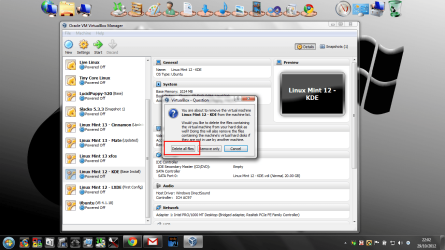
What do you mean by you found Ubuntu deeply entrenched? When you remove a VM from Virtualbox you are asked if you wish to delete the files. If you do so then it is gone usually. Sometimes the delete will fail and you have to do it manually.
 

My Computer

Computer type
Laptop
Computer Manufacturer/Model Number
Hewlett-Packard/G62-107SA Notebook
OS
Microsoft Windows 7 Home Premium 64-bit Service Pack 1
CPU
Intel(R) Core(TM) i3 CPU M 330 @ 2.13GHz
Motherboard
Hewlett-Packard 1425
Memory
8 GB DDR3
Graphics Card(s)
Intel(R) HD Graphics
Sound Card
Realtek High Definition Audio
Monitor(s) Displays
Builtin
Screen Resolution
1366 x 768 x 32 bits (4294967296 colors) @ 60 Hz
Hard Drives
250 GB SATA Hard Disk Drive 7200 rpm
2TB Seagate GoFlex USB 2 Drive
1TB Iomega Prestige USB 2 Drive
1.5TB Iomega Prestige USB 2 Drive (Samsung)
2TB WD MyBook Live NAS.
Mouse
Logitech Anywhere MX
Internet Speed
152 Mbs download 10 Mbs upload
Antivirus
Norton 360
Browser
Chrome
VM

It has been awhile and I only did it once because of the residual files.

I found Ubuntu in several places on my pc which prompted me to use Acronis to become stable again. I also found vm in different places.
I did not see any selection to remove files so apparently I did it wrong.
How do you remove the VM the proper way so you have a choice to remove everything?
I thought you could remove the VM or the guest but I did not know the proper way to do it so nothing was left over.
I did not want to randomly delete folders in case one was shared or a file was necesary.
I would like to use the Oracle VM with Win 8 as long as I could remove it all when I wanted.
If I knew how to remove a guest I could add them as I needed, to investigate.

Long short = how to remove guest and vm?
 

My Computer

Computer Manufacturer/Model Number
Dell
OS
Windows 7 Home premium 64 bit
CPU
Intel R i5 3.3Ghz
Motherboard
Dell 2.6
Memory
6 GB
Graphics Card(s)
Nvidea GT 420
Sound Card
Nvidea Hi Def
Monitor(s) Displays
Dell pnp
Hard Drives
Seagate 931 GB
PSU
Dell xps 8300
Case
Dell Balck
Cooling
unknown
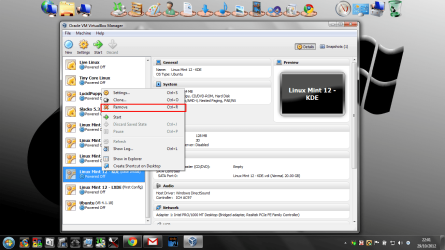
The correct way to do it is...

Right click and select remove.
screenshot224_2012-10-29.png

When asked press delete all files.
screenshot225_2012-10-29.png


This has improved in recent releases. It didn't work in windows 7 a while back but it does now.
 

My Computer

Computer type
Laptop
Computer Manufacturer/Model Number
Hewlett-Packard/G62-107SA Notebook
OS
Microsoft Windows 7 Home Premium 64-bit Service Pack 1
CPU
Intel(R) Core(TM) i3 CPU M 330 @ 2.13GHz
Motherboard
Hewlett-Packard 1425
Memory
8 GB DDR3
Graphics Card(s)
Intel(R) HD Graphics
Sound Card
Realtek High Definition Audio
Monitor(s) Displays
Builtin
Screen Resolution
1366 x 768 x 32 bits (4294967296 colors) @ 60 Hz
Hard Drives
250 GB SATA Hard Disk Drive 7200 rpm
2TB Seagate GoFlex USB 2 Drive
1TB Iomega Prestige USB 2 Drive
1.5TB Iomega Prestige USB 2 Drive (Samsung)
2TB WD MyBook Live NAS.
Mouse
Logitech Anywhere MX
Internet Speed
152 Mbs download 10 Mbs upload
Antivirus
Norton 360
Browser
Chrome
vm

So to remove the guest, right click the one you want, click remove and follow up with remove all the files.
If you remove all files will the guest and Oracle vm be removed or just the guest?
Or when you want to remove the Oracle vm, do you click on settings?
 

My Computer

Computer Manufacturer/Model Number
Dell
OS
Windows 7 Home premium 64 bit
CPU
Intel R i5 3.3Ghz
Motherboard
Dell 2.6
Memory
6 GB
Graphics Card(s)
Nvidea GT 420
Sound Card
Nvidea Hi Def
Monitor(s) Displays
Dell pnp
Hard Drives
Seagate 931 GB
PSU
Dell xps 8300
Case
Dell Balck
Cooling
unknown
No you just right click the vm name in the left hand pane.
 

My Computer

Computer type
Laptop
Computer Manufacturer/Model Number
Hewlett-Packard/G62-107SA Notebook
OS
Microsoft Windows 7 Home Premium 64-bit Service Pack 1
CPU
Intel(R) Core(TM) i3 CPU M 330 @ 2.13GHz
Motherboard
Hewlett-Packard 1425
Memory
8 GB DDR3
Graphics Card(s)
Intel(R) HD Graphics
Sound Card
Realtek High Definition Audio
Monitor(s) Displays
Builtin
Screen Resolution
1366 x 768 x 32 bits (4294967296 colors) @ 60 Hz
Hard Drives
250 GB SATA Hard Disk Drive 7200 rpm
2TB Seagate GoFlex USB 2 Drive
1TB Iomega Prestige USB 2 Drive
1.5TB Iomega Prestige USB 2 Drive (Samsung)
2TB WD MyBook Live NAS.
Mouse
Logitech Anywhere MX
Internet Speed
152 Mbs download 10 Mbs upload
Antivirus
Norton 360
Browser
Chrome
vm

I guess what I have to understand is what the vm is. I thought it was only Oracle and that you imorted guests into it.

I amend that comment.
All are vms and to completley rid the pc of the Linux Mint for example you right click, then click to remove all. That takes care of that particular Linux Mint vm but the Oracle remains. Then you remove each the same way. If you wish to remove the Oracle machime.... this is where I do not understand.
 

My Computer

Computer Manufacturer/Model Number
Dell
OS
Windows 7 Home premium 64 bit
CPU
Intel R i5 3.3Ghz
Motherboard
Dell 2.6
Memory
6 GB
Graphics Card(s)
Nvidea GT 420
Sound Card
Nvidea Hi Def
Monitor(s) Displays
Dell pnp
Hard Drives
Seagate 931 GB
PSU
Dell xps 8300
Case
Dell Balck
Cooling
unknown
Yes it can be confusing. A virtual Machine is just another way of describing a guest OS running under a host OS rather than directly on the hardware. Oracle VirtualBox is just the software that allows you to do that.
 

My Computer

Computer type
Laptop
Computer Manufacturer/Model Number
Hewlett-Packard/G62-107SA Notebook
OS
Microsoft Windows 7 Home Premium 64-bit Service Pack 1
CPU
Intel(R) Core(TM) i3 CPU M 330 @ 2.13GHz
Motherboard
Hewlett-Packard 1425
Memory
8 GB DDR3
Graphics Card(s)
Intel(R) HD Graphics
Sound Card
Realtek High Definition Audio
Monitor(s) Displays
Builtin
Screen Resolution
1366 x 768 x 32 bits (4294967296 colors) @ 60 Hz
Hard Drives
250 GB SATA Hard Disk Drive 7200 rpm
2TB Seagate GoFlex USB 2 Drive
1TB Iomega Prestige USB 2 Drive
1.5TB Iomega Prestige USB 2 Drive (Samsung)
2TB WD MyBook Live NAS.
Mouse
Logitech Anywhere MX
Internet Speed
152 Mbs download 10 Mbs upload
Antivirus
Norton 360
Browser
Chrome
As previously stated, you can remove the individual VMs by simply right-clicking and selecting Remove. If you want to remove the Oracle software, VirtualBox, you would do that from "Programs and Features" just like you would any other installed program.
 

My Computer

Computer type
PC/Desktop
Computer Manufacturer/Model Number
Home Built desktop, Dell G15 5511 Gaming laptop,MS Surface Pro 7 tablet
OS
W10 Pro desktop, W11 laptop, W11 Pro tablet (all 64-bit)
CPU
3.7Ghz 8700K i7, i7-11800H, i7-1065G7
Motherboard
ASUS TUF Z370-Pro Gaming in desktop
Memory
16G desktop, 16G laptop, 4G tablet
Graphics Card(s)
AMD Radeon RX580, RTX 3060, Intel Iris Plus
Sound Card
High Definition Audio (Built-in to mobo)
Monitor(s) Displays
Samsung U32J59 32" (2x), 15.6", 12"
Screen Resolution
3840x2160, 3840x2160, 1920x1080, 2160x1440
Hard Drives
500G SSD for OS; 2T, 10T & 15T HDDs for Data on Desktop, 1TB SSD laptop, 128G SSD tablet.
PSU
Corsair CX 750M
Case
Antec 100
Cooling
CM 212+
Keyboard
IBM Model M - used continuously since 1986
Mouse
Microsoft Pro IntelliMouse
Internet Speed
400M down 8M up
Antivirus
Windows Defender
Browser
FireFox
Other Info
Built my first computer (8Mhz 8088cpu, 640K RAM, 20MB HDD, 2 360K floppy drives) in 1985 and have been building them for myself, relatives and friends ever since.
vm

For example, if you had Win 7 , Oracle, Mint.

Is Mint the guest, Win 7 the host and Oracle the software but neither host nor guest.?
 

My Computer

Computer Manufacturer/Model Number
Dell
OS
Windows 7 Home premium 64 bit
CPU
Intel R i5 3.3Ghz
Motherboard
Dell 2.6
Memory
6 GB
Graphics Card(s)
Nvidea GT 420
Sound Card
Nvidea Hi Def
Monitor(s) Displays
Dell pnp
Hard Drives
Seagate 931 GB
PSU
Dell xps 8300
Case
Dell Balck
Cooling
unknown
Yes that is correct.
 

My Computer

Computer type
Laptop
Computer Manufacturer/Model Number
Hewlett-Packard/G62-107SA Notebook
OS
Microsoft Windows 7 Home Premium 64-bit Service Pack 1
CPU
Intel(R) Core(TM) i3 CPU M 330 @ 2.13GHz
Motherboard
Hewlett-Packard 1425
Memory
8 GB DDR3
Graphics Card(s)
Intel(R) HD Graphics
Sound Card
Realtek High Definition Audio
Monitor(s) Displays
Builtin
Screen Resolution
1366 x 768 x 32 bits (4294967296 colors) @ 60 Hz
Hard Drives
250 GB SATA Hard Disk Drive 7200 rpm
2TB Seagate GoFlex USB 2 Drive
1TB Iomega Prestige USB 2 Drive
1.5TB Iomega Prestige USB 2 Drive (Samsung)
2TB WD MyBook Live NAS.
Mouse
Logitech Anywhere MX
Internet Speed
152 Mbs download 10 Mbs upload
Antivirus
Norton 360
Browser
Chrome
programs and features

As previously stated, you can remove the individual VMs by simply right-clicking and selecting Remove. If you want to remove the Oracle software, VirtualBox, you would do that from "Programs and Features" just like you would any other installed program.


Being that you can remove the Oracle as you would any program, could you use Revo if you choose to?

I will answer that myself by saying yes. I now have a much better picture of what each is and how to do it. I thank you all for your time and patience.
 

My Computer

Computer Manufacturer/Model Number
Dell
OS
Windows 7 Home premium 64 bit
CPU
Intel R i5 3.3Ghz
Motherboard
Dell 2.6
Memory
6 GB
Graphics Card(s)
Nvidea GT 420
Sound Card
Nvidea Hi Def
Monitor(s) Displays
Dell pnp
Hard Drives
Seagate 931 GB
PSU
Dell xps 8300
Case
Dell Balck
Cooling
unknown
I guess you could, although I have never tried it. Uninstalling VirtualBox will not get rid of any VMs you have defined though. You would need to delete them manually afterwards.
 

My Computer

Computer type
Laptop
Computer Manufacturer/Model Number
Hewlett-Packard/G62-107SA Notebook
OS
Microsoft Windows 7 Home Premium 64-bit Service Pack 1
CPU
Intel(R) Core(TM) i3 CPU M 330 @ 2.13GHz
Motherboard
Hewlett-Packard 1425
Memory
8 GB DDR3
Graphics Card(s)
Intel(R) HD Graphics
Sound Card
Realtek High Definition Audio
Monitor(s) Displays
Builtin
Screen Resolution
1366 x 768 x 32 bits (4294967296 colors) @ 60 Hz
Hard Drives
250 GB SATA Hard Disk Drive 7200 rpm
2TB Seagate GoFlex USB 2 Drive
1TB Iomega Prestige USB 2 Drive
1.5TB Iomega Prestige USB 2 Drive (Samsung)
2TB WD MyBook Live NAS.
Mouse
Logitech Anywhere MX
Internet Speed
152 Mbs download 10 Mbs upload
Antivirus
Norton 360
Browser
Chrome
vm

I understand and thank you.

I wanted you to know thaat my problem was that I removed oracle with Ubuntu in it thinking all would be gone - wrong. I thought everything within oracle would go with it.
Each guest has to be completely removed before removing the Oracle box.
 

My Computer

Computer Manufacturer/Model Number
Dell
OS
Windows 7 Home premium 64 bit
CPU
Intel R i5 3.3Ghz
Motherboard
Dell 2.6
Memory
6 GB
Graphics Card(s)
Nvidea GT 420
Sound Card
Nvidea Hi Def
Monitor(s) Displays
Dell pnp
Hard Drives
Seagate 931 GB
PSU
Dell xps 8300
Case
Dell Balck
Cooling
unknown
You are welcome seven2.
 

My Computer

Computer type
Laptop
Computer Manufacturer/Model Number
Hewlett-Packard/G62-107SA Notebook
OS
Microsoft Windows 7 Home Premium 64-bit Service Pack 1
CPU
Intel(R) Core(TM) i3 CPU M 330 @ 2.13GHz
Motherboard
Hewlett-Packard 1425
Memory
8 GB DDR3
Graphics Card(s)
Intel(R) HD Graphics
Sound Card
Realtek High Definition Audio
Monitor(s) Displays
Builtin
Screen Resolution
1366 x 768 x 32 bits (4294967296 colors) @ 60 Hz
Hard Drives
250 GB SATA Hard Disk Drive 7200 rpm
2TB Seagate GoFlex USB 2 Drive
1TB Iomega Prestige USB 2 Drive
1.5TB Iomega Prestige USB 2 Drive (Samsung)
2TB WD MyBook Live NAS.
Mouse
Logitech Anywhere MX
Internet Speed
152 Mbs download 10 Mbs upload
Antivirus
Norton 360
Browser
Chrome
... Each guest has to be completely removed before removing the Oracle box.

I think you understand now but the above statement isn't necessarily correct. You don't have to remove the guests before removing Oracle VirtualBox. For instance, you could remove ONLY VirtualBox and leave the VM's which would allow you to re-install VirtualBox and have your VM's intact OR you could copy/move the VM's to another machine and import them into VirtualBox there.
 

My Computer

Computer type
PC/Desktop
Computer Manufacturer/Model Number
Home Built desktop, Dell G15 5511 Gaming laptop,MS Surface Pro 7 tablet
OS
W10 Pro desktop, W11 laptop, W11 Pro tablet (all 64-bit)
CPU
3.7Ghz 8700K i7, i7-11800H, i7-1065G7
Motherboard
ASUS TUF Z370-Pro Gaming in desktop
Memory
16G desktop, 16G laptop, 4G tablet
Graphics Card(s)
AMD Radeon RX580, RTX 3060, Intel Iris Plus
Sound Card
High Definition Audio (Built-in to mobo)
Monitor(s) Displays
Samsung U32J59 32" (2x), 15.6", 12"
Screen Resolution
3840x2160, 3840x2160, 1920x1080, 2160x1440
Hard Drives
500G SSD for OS; 2T, 10T & 15T HDDs for Data on Desktop, 1TB SSD laptop, 128G SSD tablet.
PSU
Corsair CX 750M
Case
Antec 100
Cooling
CM 212+
Keyboard
IBM Model M - used continuously since 1986
Mouse
Microsoft Pro IntelliMouse
Internet Speed
400M down 8M up
Antivirus
Windows Defender
Browser
FireFox
Other Info
Built my first computer (8Mhz 8088cpu, 640K RAM, 20MB HDD, 2 360K floppy drives) in 1985 and have been building them for myself, relatives and friends ever since.
Sorry. I missed that line. Strollin is correct. Just think of the VM as data that VirtualBox uses just like a spreadsheet that Excel uses. If you uninstall Excel the spreadsheet remains and can be opened by another installation of Excel.
 

My Computer

Computer type
Laptop
Computer Manufacturer/Model Number
Hewlett-Packard/G62-107SA Notebook
OS
Microsoft Windows 7 Home Premium 64-bit Service Pack 1
CPU
Intel(R) Core(TM) i3 CPU M 330 @ 2.13GHz
Motherboard
Hewlett-Packard 1425
Memory
8 GB DDR3
Graphics Card(s)
Intel(R) HD Graphics
Sound Card
Realtek High Definition Audio
Monitor(s) Displays
Builtin
Screen Resolution
1366 x 768 x 32 bits (4294967296 colors) @ 60 Hz
Hard Drives
250 GB SATA Hard Disk Drive 7200 rpm
2TB Seagate GoFlex USB 2 Drive
1TB Iomega Prestige USB 2 Drive
1.5TB Iomega Prestige USB 2 Drive (Samsung)
2TB WD MyBook Live NAS.
Mouse
Logitech Anywhere MX
Internet Speed
152 Mbs download 10 Mbs upload
Antivirus
Norton 360
Browser
Chrome
understand

To understand, I would like to ask just a bit more if I may.
Honestly, I have used neither a sreadsheet nor Excel so I am sorry but the analogy is beyond me but I'll bet an accurate one.

My question is,"If the Oracle box is removed without removing the guests like Ubuntu, where do the guests reside.

I alays thought one reason for virtualization was to keep material from being instaled in the C: drive, using Oracle in its place. Then you could add guests to this Oracle software upon which all rest, the host or Win 7.

If I approach the area of depair then wave the flag and I will thank you all and depart.
I have been conquering tasks like imaging etc and am determined to comquer this on eway or the other. I must first understand the basics and the terms involved.
 

My Computer

Computer Manufacturer/Model Number
Dell
OS
Windows 7 Home premium 64 bit
CPU
Intel R i5 3.3Ghz
Motherboard
Dell 2.6
Memory
6 GB
Graphics Card(s)
Nvidea GT 420
Sound Card
Nvidea Hi Def
Monitor(s) Displays
Dell pnp
Hard Drives
Seagate 931 GB
PSU
Dell xps 8300
Case
Dell Balck
Cooling
unknown
No problem seven2.

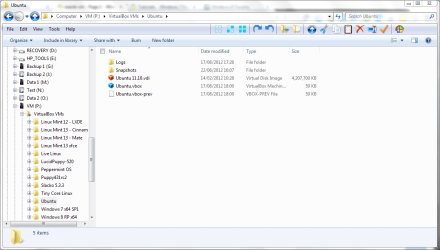
VBox creates a folder for each VM with two main files in it The first is a .vbox file which contains the settings for the VM. The second and much bigger file is a virtual disk, usually with the .vdi extension. This contains the installed guest and all its data. There are various other files and folders but those are the important ones. The folder by default resides in your documents folder although you can change that. I have moved mine onto an external disk as they are quite large. This is the folder for my Ubuntu VM.

screenshot226_2012-10-31.png
 

My Computer

Computer type
Laptop
Computer Manufacturer/Model Number
Hewlett-Packard/G62-107SA Notebook
OS
Microsoft Windows 7 Home Premium 64-bit Service Pack 1
CPU
Intel(R) Core(TM) i3 CPU M 330 @ 2.13GHz
Motherboard
Hewlett-Packard 1425
Memory
8 GB DDR3
Graphics Card(s)
Intel(R) HD Graphics
Sound Card
Realtek High Definition Audio
Monitor(s) Displays
Builtin
Screen Resolution
1366 x 768 x 32 bits (4294967296 colors) @ 60 Hz
Hard Drives
250 GB SATA Hard Disk Drive 7200 rpm
2TB Seagate GoFlex USB 2 Drive
1TB Iomega Prestige USB 2 Drive
1.5TB Iomega Prestige USB 2 Drive (Samsung)
2TB WD MyBook Live NAS.
Mouse
Logitech Anywhere MX
Internet Speed
152 Mbs download 10 Mbs upload
Antivirus
Norton 360
Browser
Chrome
avoid C:

As you can tell I am trying to avoid installing to the C: drive.
I wonder if you can use a usb drive - 8GB - to contain everything or do you still need to involve the C: drive?
I read about Lili and pen drive.
I was going to follow a tutorial from YouTube with the laptop to guide the desktop and use Oracle's box to install Win 8?

With a friend's advice, perhaps I need more pc experience before I get into virtualization. I shall continue to watch tutorials and read before messing up a good pc.

Thank you all for your support - I'll be back.
 

My Computer

Computer Manufacturer/Model Number
Dell
OS
Windows 7 Home premium 64 bit
CPU
Intel R i5 3.3Ghz
Motherboard
Dell 2.6
Memory
6 GB
Graphics Card(s)
Nvidea GT 420
Sound Card
Nvidea Hi Def
Monitor(s) Displays
Dell pnp
Hard Drives
Seagate 931 GB
PSU
Dell xps 8300
Case
Dell Balck
Cooling
unknown
Back
Top