OS and Data on separate drives

Hi, attached are the screenshots and some commentary.
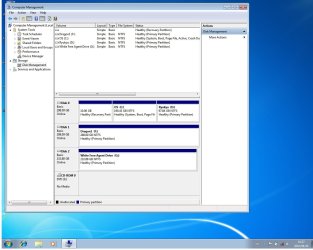
Disk Management.jpg This the disks and the setup.
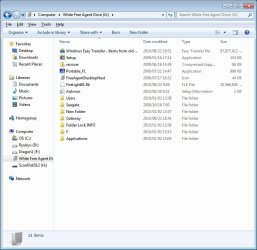
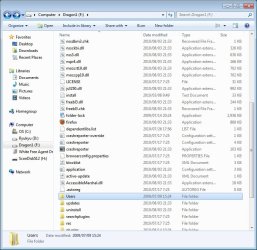
Drive Data 1.jpg This shows the drive where the data is located under users.
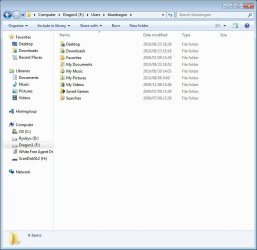
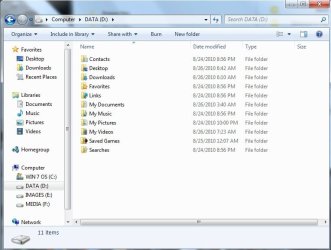
Folder on 2nd Drive.jpg These are the folders and the way i list them on the Separate data drive.

Since I already have the data in the folders on the second drive, all i need to do is change the location of Windows User folders, by following the info provided by the Tutorial: User Folders- Change Default Location! Right???
OR should i go ahead and make the folders in Win 7 and just transfer the docs, music, pictures etc. into those folders. I know this seems like i am complicating matters, but To some who know how to do this, it might seem easy, but iam not(or i don't consider myself) a tech guy, i am just a user!, so Might i suggest that is might be a good idea if someone consolidate the guidance provided into a step by step sticky for this issue. Thanks to all !! Regards, BD
 

Attachments
  • Drive Dat.jpg
    Drive Dat.jpg
    88.5 KB · Views: 12

My Computer My Computer

Computer Manufacturer/Model Number
Gateway P-7801u FX, Laptop
OS
Windows 7 Pro 64 bit, Vista home premium 64 bit, XP Pro 32 bit
CPU
Intel® Core™ 2 Duo Processor P8400
Motherboard
Intel PM45 chipset
Memory
4GB
Graphics Card(s)
NVIDA GeForce 9800M GTS
For Karlsnooks: You said "Use the power of Win 7 libraries to add the folders on your data drive to the appropriate library." Exactly what power are you referring too!! If i am in Libraries, can't i just right click and add another folder???
For Nahtimu, you said, "you may have to configure settings of other misc apps to point to your data drive / folders" can you be more specific.
Sorry but people assume that i know how to just zoom around within the OS!!

Regards, BD
 

My Computer My Computer

Computer Manufacturer/Model Number
Gateway P-7801u FX, Laptop
OS
Windows 7 Pro 64 bit, Vista home premium 64 bit, XP Pro 32 bit
CPU
Intel® Core™ 2 Duo Processor P8400
Motherboard
Intel PM45 chipset
Memory
4GB
Graphics Card(s)
NVIDA GeForce 9800M GTS

My Computer My Computer

Computer Manufacturer/Model Number
Toshiba Satellite S875D-S7239 laptop
OS
MS Windows 7 Ultimate SP1 64-bit
CPU
AMD A10-4600M
Motherboard
AMD Pumori (Socket FT1)
Memory
6.00 GB Dual-Channel DDR3 @ 798MHz (11-11-12-28)
Graphics Card(s)
AMD Radeon HD 7660G
Sound Card
High Definition Audio Device
Monitor(s) Displays
Generic PnP Monitor (1600x900@60Hz)
Screen Resolution
1600x900@60Hz
Hard Drives
SSD 119GB Corsair CSSD-V128GB2 ATA Device
Keyboard
Standard PS/2 Keyboard
Mouse
HP Wireless Optical Mobile Mouse Model FHA-3410
Internet Speed
What the local pub, local coffee shop offers.
Other Info
Optical Drive:MATSHITA BD-CMB UJ160B ATA Device


Also have an Asus ha1002xp netbook with Win 7 Ultimate installed.
BD

You are correct - follow the tutorial to relocate your user folders to the second Drive

Moving these folders using the locate feature will also move them in the default library set-up, you can then add additional folders to libraries if you need to

Libraries are great if you have data spread all over multiple drives / locations, which is what they are designed for. The more organised you are as the user to start with the less useful the libraries become.

Certain older apps may initially look for it's files in specific places which do not follow the win7 system, you may have to change settings in these apps to point to the win7 location
 

My Computers My Computers

System One System Two

  • Computer type
    PC/Desktop
    Computer Manufacturer/Model Number
    ChillBlast - Custom to my design
    OS
    Windows 11 Pro x64 [Latest Release and Release Preview]
    CPU
    Ryzen 9 5950X, 3.8 - 5.2 MHz
    Motherboard
    Asus Prime X570-Pro
    Memory
    64GB [2 x 32GB] DDR4 3200MHz
    Graphics Card(s)
    4GB NVIDIA GEFORCE GTX 1650 Ti
    Sound Card
    On-board SPDIF to 5.1 System + HDMI [5.1 system]
    Monitor(s) Displays
    32" UHD 32 Bit HDR Monitor + 43" UHD 4K 32Bit HDR TV
    Screen Resolution
    2 x 3840 x 2160 @60Hz
    Hard Drives
    1TB M2 SSD OS, 500GB Fast Access SSD, 2 x 8TB Data + Various Externals from 1TB to 4TB, 10TB NAS
    PSU
    NZXT C750 80 PLUS Gold 750W Modular PSU
    Case
    Workstation Case [Matt Black]
    Cooling
    NZXT Kraken X63 280mm CPU Cooler +2x Quiet Case fans
    Keyboard
    Logitech Wireless MX Keys & K400 + others
    Mouse
    Logitech Wireless MX Master 3S
    Internet Speed
    920 MB Down 50 MB Up
    Antivirus
    BitDefender Total Security Pro
    Browser
    Chrome (always run latest Non-Beta)
    Other Info
    Also run ...
    Laptop - Quad 8GB - Windows 10 Pro x64
    Nexus 7 Android tablet x2
    Samsung 10.2" tablet
    Blackview TAB 8 4G Android Tablet c/w Keyboard
    Wacom Intuos Pro Medium Pen Pad
    Wacom Intuos Pro Small Pen Pad
    Wacom Expresskeys Remote
    Loopdeck+ Graphics Controller
    Shuttle Pro v2 Control
  • Computer type
    Laptop
    System Manufacturer/Model Number
    Dell XPS 17 10750H
    OS
    Windows 11 Pro x64 Latest RP
    CPU
    Intel I7 10750H 5.0GHz
    Motherboard
    Dell XPS
    Memory
    32GB [2x16GB] DDR4 2933 MHz
    Graphics Card(s)
    nVidia GTX1650Ti 4 GB GDDR6
    Sound Card
    Stock [Realtek] 4 Speaker
    Monitor(s) Displays
    17" IPS UHD+ Infinity Edge Touchscreen
    Screen Resolution
    3840 x 2400
    Hard Drives
    2TB M2 NVMe, 4TB External + various 500GB & 1TB External NVMe (also have access to spinner HDD from
    PSU
    Stock
    Case
    Stock XPS Aluminium & Carbon Fibre
    Cooling
    Stock - Active Fan Control
    Keyboard
    Backlit + Various Logitech
    Mouse
    Stock Track Pad + Logitech MX Trackball
    Internet Speed
    72 MB Down 18MB Up
    Browser
    Chrome
    Other Info
    Also run ...
    Laptop - Quad 8GB - Windows 10 Pro x64
    Nexus 7 Android tablet x2
    10.2" tablet
    Sony Z3 Android Smartphone
    Wacom Intuos Pro Medium Pen Pad
    Wacom Intuos Pro Small Pen Pad
    Wacom Expresskeys Remote
    Loopdeck+ Graphics Controller
    Shuttle Pro v2 Control Pad
    10TB NAS
Hello again BD.


Once you have moved or made back-ups of anything on the "Disk 0" you want to keep, you can indeed us the method in this tutorial to do a "clean all" to the HDD for a clean slate to install to.

Surely you can understand our concern over the interchangeability of the term "drive" you used.


SSD / HDD : Optimize for Windows Reinstallation
 

My Computer My Computer

Computer Manufacturer/Model Number
* BFK Customs *
OS
W 7 64-bit Ultimate
CPU
Intel Q9550 Yorkfield
Motherboard
ASUS P5Q Pro
Memory
8GB Dominator 8500C5D
Graphics Card(s)
ATI : XFX 5870
Sound Card
Realtek HD Audio 7-1
Monitor(s) Displays
1x 47" LCD HDMI & 3x 26" LCD HDMI
Screen Resolution
1920x1080P & 1920x1200
Hard Drives
1x 80GB Intel X25-M G2 SSD : 1x 500GB & 1x 640GB WD Caviar Black(s)
PSU
Corsair 620HX
Case
Cooler Master RC-690
Cooling
Tuniq Tower 120, 2x 140mm and 3x 120mm case fans
Keyboard
Microsoft 500
Mouse
Razer Diamondback 3G
Internet Speed
14 Mb/s
Other Info
1x Koutech 3Gb/s SATA HDD Hot Swap Rack
Gentlemen, thanks for the help. Ok, I am still a little unsure about some of the exact meaning in some of the posts from some of the people here, but I am going to give it a shot. The worst that can happen is i start all over again.
For Barefoot Kid, I understand your concern, but that's the only term i know.
Regards, BD
 

My Computer My Computer

Computer Manufacturer/Model Number
Gateway P-7801u FX, Laptop
OS
Windows 7 Pro 64 bit, Vista home premium 64 bit, XP Pro 32 bit
CPU
Intel® Core™ 2 Duo Processor P8400
Motherboard
Intel PM45 chipset
Memory
4GB
Graphics Card(s)
NVIDA GeForce 9800M GTS
I am missing something, if you re-install the OS in one partition the data on the other partition will be fine. It the data is one a completely different drive, even better! Unplug it during the installation.
 

My Computers My Computers

System One System Two

  • Computer type
    PC/Desktop
    Computer Manufacturer/Model Number
    PowerSpec G164
    OS
    WIN10
    CPU
    AMD Ryzen 5 3600 6-Core Processor 3.59 GHz
    Memory
    16.0 GB
    Internet Speed
    VERY FAST>>>!!!
  • Antivirus
    ESET Security Premium
Once you finish the installation the folders like music and documents located under the C/User will have nothing.

Because the data is one your second drive!

If you want to change the path of the folder lets say Documents from its original location - C/Users/YourUserName/MY Documents.

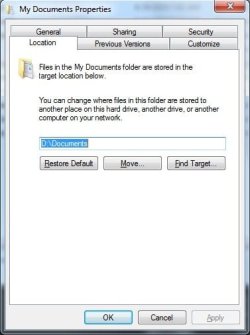
Right click on that folder, and go to the location tab click move folder and located the location you want to change to. In your case probably- Dragon1/Users/bluedragon/My Documents.

Do the same for all the folders you want to move.

Now when you save documents they will save to that new location by default.

Hope that cleared things up!
 

Attachments

  • data on a separate partition.jpg
    data on a separate partition.jpg
    55.2 KB · Views: 4
  • location tab.jpg
    location tab.jpg
    29.1 KB · Views: 4

My Computers My Computers

System One System Two

  • Computer type
    PC/Desktop
    Computer Manufacturer/Model Number
    PowerSpec G164
    OS
    WIN10
    CPU
    AMD Ryzen 5 3600 6-Core Processor 3.59 GHz
    Memory
    16.0 GB
    Internet Speed
    VERY FAST>>>!!!
  • Antivirus
    ESET Security Premium
Any luck?
 

My Computers My Computers

System One System Two

  • Computer type
    PC/Desktop
    Computer Manufacturer/Model Number
    PowerSpec G164
    OS
    WIN10
    CPU
    AMD Ryzen 5 3600 6-Core Processor 3.59 GHz
    Memory
    16.0 GB
    Internet Speed
    VERY FAST>>>!!!
  • Antivirus
    ESET Security Premium
Eldinv: I am in Japan and at work, I plan to try this, tonight. I will post the results when complete. Thanks. BD
 

My Computer My Computer

Computer Manufacturer/Model Number
Gateway P-7801u FX, Laptop
OS
Windows 7 Pro 64 bit, Vista home premium 64 bit, XP Pro 32 bit
CPU
Intel® Core™ 2 Duo Processor P8400
Motherboard
Intel PM45 chipset
Memory
4GB
Graphics Card(s)
NVIDA GeForce 9800M GTS
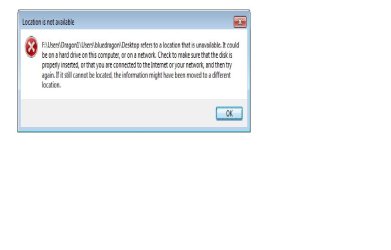
Eldinv: No luck, I screwed something up. I was able to transfer the My docs folder from C: to F:, but then I couldn't find the desktop folder and tried to create one in C: first, and the it went down hill from there. Here is a screen shot of the error message i got, I think i should restore to earlier time and start over. Also, I used back slash i.e. F:Dragon1\Users\ etc. vice your post using forward slash/. Don't think that's the problem though??
moz-screenshot-1.png

Screen shot.jpg


moz-screenshot.png
 

My Computer My Computer

Computer Manufacturer/Model Number
Gateway P-7801u FX, Laptop
OS
Windows 7 Pro 64 bit, Vista home premium 64 bit, XP Pro 32 bit
CPU
Intel® Core™ 2 Duo Processor P8400
Motherboard
Intel PM45 chipset
Memory
4GB
Graphics Card(s)
NVIDA GeForce 9800M GTS
Bd,

when looking for the Desktop folder on c: make sure you have hidden files and protected system files visible
 

My Computers My Computers

System One System Two

  • Computer type
    PC/Desktop
    Computer Manufacturer/Model Number
    ChillBlast - Custom to my design
    OS
    Windows 11 Pro x64 [Latest Release and Release Preview]
    CPU
    Ryzen 9 5950X, 3.8 - 5.2 MHz
    Motherboard
    Asus Prime X570-Pro
    Memory
    64GB [2 x 32GB] DDR4 3200MHz
    Graphics Card(s)
    4GB NVIDIA GEFORCE GTX 1650 Ti
    Sound Card
    On-board SPDIF to 5.1 System + HDMI [5.1 system]
    Monitor(s) Displays
    32" UHD 32 Bit HDR Monitor + 43" UHD 4K 32Bit HDR TV
    Screen Resolution
    2 x 3840 x 2160 @60Hz
    Hard Drives
    1TB M2 SSD OS, 500GB Fast Access SSD, 2 x 8TB Data + Various Externals from 1TB to 4TB, 10TB NAS
    PSU
    NZXT C750 80 PLUS Gold 750W Modular PSU
    Case
    Workstation Case [Matt Black]
    Cooling
    NZXT Kraken X63 280mm CPU Cooler +2x Quiet Case fans
    Keyboard
    Logitech Wireless MX Keys & K400 + others
    Mouse
    Logitech Wireless MX Master 3S
    Internet Speed
    920 MB Down 50 MB Up
    Antivirus
    BitDefender Total Security Pro
    Browser
    Chrome (always run latest Non-Beta)
    Other Info
    Also run ...
    Laptop - Quad 8GB - Windows 10 Pro x64
    Nexus 7 Android tablet x2
    Samsung 10.2" tablet
    Blackview TAB 8 4G Android Tablet c/w Keyboard
    Wacom Intuos Pro Medium Pen Pad
    Wacom Intuos Pro Small Pen Pad
    Wacom Expresskeys Remote
    Loopdeck+ Graphics Controller
    Shuttle Pro v2 Control
  • Computer type
    Laptop
    System Manufacturer/Model Number
    Dell XPS 17 10750H
    OS
    Windows 11 Pro x64 Latest RP
    CPU
    Intel I7 10750H 5.0GHz
    Motherboard
    Dell XPS
    Memory
    32GB [2x16GB] DDR4 2933 MHz
    Graphics Card(s)
    nVidia GTX1650Ti 4 GB GDDR6
    Sound Card
    Stock [Realtek] 4 Speaker
    Monitor(s) Displays
    17" IPS UHD+ Infinity Edge Touchscreen
    Screen Resolution
    3840 x 2400
    Hard Drives
    2TB M2 NVMe, 4TB External + various 500GB & 1TB External NVMe (also have access to spinner HDD from
    PSU
    Stock
    Case
    Stock XPS Aluminium & Carbon Fibre
    Cooling
    Stock - Active Fan Control
    Keyboard
    Backlit + Various Logitech
    Mouse
    Stock Track Pad + Logitech MX Trackball
    Internet Speed
    72 MB Down 18MB Up
    Browser
    Chrome
    Other Info
    Also run ...
    Laptop - Quad 8GB - Windows 10 Pro x64
    Nexus 7 Android tablet x2
    10.2" tablet
    Sony Z3 Android Smartphone
    Wacom Intuos Pro Medium Pen Pad
    Wacom Intuos Pro Small Pen Pad
    Wacom Expresskeys Remote
    Loopdeck+ Graphics Controller
    Shuttle Pro v2 Control Pad
    10TB NAS
For Nahtimu, you said, "you may have to configure settings of other misc apps to point to your data drive / folders" can you be more specific.
Sorry but people assume that i know how to just zoom around within the OS!!
Regards, BD
--------------------------------
Hi BD,

Sorry mate, what I meant is: You want all your data information stored on your data drive/disk (i.e. not the OS drive)...
You may have say a photo enhancing application and you want to save the files to your 'data drive'. Most applications have the option to set the default output or read folder - it is in that section you'd want to set the default folders to point to your data drive. This way when you are in that application, and you click Open, it will open the folders on your data drive. If you click Save it will save it on your data drive, etc.

Gee I hope I haven't confused matters further... Scrub all this if I have ;)

Cheers...
 
Last edited:

My Computer My Computer

OS
Windows 7 Professional 64Bit
CPU
Intel® Core i7-930 - 8M Cache, 2.80 GHz, 4.80 GT/s
Motherboard
ASROCK X58 Extreme 3
Memory
6Gb DDR3 1600MHz
Graphics Card(s)
Gigabyte GeForce GTX 470 1280MB - NVIDIA
Sound Card
On Board Realtek HD Audio
Monitor(s) Displays
HP L1950g LCD
Screen Resolution
1280x1024
Hard Drives
2 x SATAII C:500Gb D:1Tb
PSU
750W Antec TruePower
Case
ZALMAN
Cooling
air
Internet Speed
6 Mb/s
So you were able to do all the other folders like Pictures, Music, My Documents, My Videos, except the desktop folder.

It might be because that folder should be set in the root section of that partition. Try creating that Desktop folder in the following path:

K:\Desktop or K:Users\Desktop
 
Last edited:

My Computers My Computers

System One System Two

  • Computer type
    PC/Desktop
    Computer Manufacturer/Model Number
    PowerSpec G164
    OS
    WIN10
    CPU
    AMD Ryzen 5 3600 6-Core Processor 3.59 GHz
    Memory
    16.0 GB
    Internet Speed
    VERY FAST>>>!!!
  • Antivirus
    ESET Security Premium
Nahtimu, I think i understand. For example, i install MS Word and during the install it asks me which drive to install on i.e. C:, then i have to configure MS Word to save the data it generates to my other drive, right? What i don't know is how to make MS Word save that data (documents) to the other drive.?? Actually, i think documents go directly to the default My Documents folder. But not sure how to get my misc apps to do that.
For eldinv, I just reinstalled the OS, and formatted the 2nd Hdrive, so that i have a clean drive to move the folders too. I am thinking to try the tutorial that Brink layed out, but there are two options and reading through the comments in Option 1, there seem to be some problems!!. What i really need is one simple option. Your solution seems the simplest to implement, but my question is what path should i take to get to the folders location (1)If i go to start, then on the right is my user name, clicking on that then opens a box with the user folders. Or (2)should i go to my computer then C:drive, then user name. then the folders. Once i get to the folders i then change the folder location to my other drive. yes/no/maybe??Also, i tried to send you a private message but you have receipt turned off. Regards, BD
 

My Computer My Computer

Computer Manufacturer/Model Number
Gateway P-7801u FX, Laptop
OS
Windows 7 Pro 64 bit, Vista home premium 64 bit, XP Pro 32 bit
CPU
Intel® Core™ 2 Duo Processor P8400
Motherboard
Intel PM45 chipset
Memory
4GB
Graphics Card(s)
NVIDA GeForce 9800M GTS

My Computer My Computer

Computer Manufacturer/Model Number
* BFK Customs *
OS
W 7 64-bit Ultimate
CPU
Intel Q9550 Yorkfield
Motherboard
ASUS P5Q Pro
Memory
8GB Dominator 8500C5D
Graphics Card(s)
ATI : XFX 5870
Sound Card
Realtek HD Audio 7-1
Monitor(s) Displays
1x 47" LCD HDMI & 3x 26" LCD HDMI
Screen Resolution
1920x1080P & 1920x1200
Hard Drives
1x 80GB Intel X25-M G2 SSD : 1x 500GB & 1x 640GB WD Caviar Black(s)
PSU
Corsair 620HX
Case
Cooler Master RC-690
Cooling
Tuniq Tower 120, 2x 140mm and 3x 120mm case fans
Keyboard
Microsoft 500
Mouse
Razer Diamondback 3G
Internet Speed
14 Mb/s
Other Info
1x Koutech 3Gb/s SATA HDD Hot Swap Rack
(1)If i go to start, then on the right is my user name, clicking on that then opens a box with the user folders. Or (2)should i go to my computer then C:drive, then user name. then the folders. Once i get to the folders i then change the folder location to my other drive. yes/no/maybe??Also, i tried to send you a private message but you have receipt turned off. Regards, BD

Go to My Computer> C:\> Username> Folders. Right click each folder go to location tab and set new path as already directed.
 

My Computers My Computers

System One System Two

  • Computer type
    PC/Desktop
    Computer Manufacturer/Model Number
    PowerSpec G164
    OS
    WIN10
    CPU
    AMD Ryzen 5 3600 6-Core Processor 3.59 GHz
    Memory
    16.0 GB
    Internet Speed
    VERY FAST>>>!!!
  • Antivirus
    ESET Security Premium
Gentlemen, success!! I was able to move the folders. Thanks, much for you patience.
Regards, BD.
 

My Computer My Computer

Computer Manufacturer/Model Number
Gateway P-7801u FX, Laptop
OS
Windows 7 Pro 64 bit, Vista home premium 64 bit, XP Pro 32 bit
CPU
Intel® Core™ 2 Duo Processor P8400
Motherboard
Intel PM45 chipset
Memory
4GB
Graphics Card(s)
NVIDA GeForce 9800M GTS
No problem!!! Good job!
 

My Computers My Computers

System One System Two

  • Computer type
    PC/Desktop
    Computer Manufacturer/Model Number
    PowerSpec G164
    OS
    WIN10
    CPU
    AMD Ryzen 5 3600 6-Core Processor 3.59 GHz
    Memory
    16.0 GB
    Internet Speed
    VERY FAST>>>!!!
  • Antivirus
    ESET Security Premium
Hello again BD.


Glad to see you got it working and thanks for the update.
 

My Computer My Computer

Computer Manufacturer/Model Number
* BFK Customs *
OS
W 7 64-bit Ultimate
CPU
Intel Q9550 Yorkfield
Motherboard
ASUS P5Q Pro
Memory
8GB Dominator 8500C5D
Graphics Card(s)
ATI : XFX 5870
Sound Card
Realtek HD Audio 7-1
Monitor(s) Displays
1x 47" LCD HDMI & 3x 26" LCD HDMI
Screen Resolution
1920x1080P & 1920x1200
Hard Drives
1x 80GB Intel X25-M G2 SSD : 1x 500GB & 1x 640GB WD Caviar Black(s)
PSU
Corsair 620HX
Case
Cooler Master RC-690
Cooling
Tuniq Tower 120, 2x 140mm and 3x 120mm case fans
Keyboard
Microsoft 500
Mouse
Razer Diamondback 3G
Internet Speed
14 Mb/s
Other Info
1x Koutech 3Gb/s SATA HDD Hot Swap Rack
Back
Top