Solved OS (C:) space left changing almost every restart.

MalReynolds

New member
Local time
1:16 AM
Messages
12
Hello people of the forum, I have joined to seek advice on an issue that is currently just annoying, but may develop into something worse.

I am currently have a 456 gigabyte hard-drive. The problem I have is that almost every restart of my laptop the value changes from one value (currently 52.3 GB free as I type) to a completely different one (around 237 GB free). It is always either one value or the other, with both increasing or decreasing the exact same amount depending on what i've installed or uninstalled. I was wondering if there was a way to find out which was the correct value, how to solve the problem or to know if this may cause problems if I do have a large amount of space left but my laptop will not recognise it and refuse to let me install programs.

Any help is appreciated, with the research I have already done on the topic (mostly browsing the little forum posts there are) and the following solutions from the pages below have been tried with no success :

Hard disk space keeps changing randomly - Microsoft Community
Hard Drive space keeps fluctuating - Windows Vista
My harddrive space keeps changing? - Yahoo! Answers

All help is greatly appreciated.
 

My Computer My Computer

Computer type
Laptop
Computer Manufacturer/Model Number
Dell
OS
Windows 7 Home Premium 64bit
CPU
Intel(R) Core(TM) i7-3720QM
Memory
12.0 GB
Graphics Card(s)
Nvidia GeForce GTX 660M
Sound Card
Sound Blaster Recon3Di
Screen Resolution
1600x900
What method are you using to see your hard drive free space?

What else do you have plugged into the laptop?
 

My Computer My Computer

Computer type
PC/Desktop
Computer Manufacturer/Model Number
Home made Desktop
OS
Windows 10 Pro. 64/ version 1709 Windows 7 Pro/64
CPU
Intel i7-6800K @ 4.3
Motherboard
ASUS X-99 Deluxe II
Memory
Corsair Platinum 16 gig @2400
Graphics Card(s)
EVGA GTX 1070 OC
Monitor(s) Displays
Asus 27" LED LCD/VE278Q
Screen Resolution
1920-1080 or 1280-720 HDMI
Hard Drives
INTEL SSD 730-240 Gb Sata 3.0/
PSU
EVGA Platium 1200W
Case
Phanteks Luxe Tempered Glass 8 fans/ one radiator
Cooling
XSPC/ Water Cooled CPU
Keyboard
Das 4 Professional
Mouse
Logitech M705/MX Anywhere 2-S
Internet Speed
100 mbits
Antivirus
Microsoft Security Essentials/ Malwarebytes Premium 3.0/ SAS
Browser
I.E. 11 default/Firefox/ ISP Time Warner Cable/Spectrum
Other Info
LG BluRay Burner/
Sound system-KLipsch-THX/
Icy Dock ssd Hot Swap bays.
Thanks so much for replying, I was losing faith haha.

To see my hard drive space I am using Start->Computer then looking at my hard disk drives (of which there is one).

The only thing I have plugged into my laptop is the powery-wirey thing that goes in the back to charge it. I have the battery taken out of the laptop because it's plugged in, but the value still changes wether the battery is in or not.
 

My Computer My Computer

Computer type
Laptop
Computer Manufacturer/Model Number
Dell
OS
Windows 7 Home Premium 64bit
CPU
Intel(R) Core(TM) i7-3720QM
Memory
12.0 GB
Graphics Card(s)
Nvidia GeForce GTX 660M
Sound Card
Sound Blaster Recon3Di
Screen Resolution
1600x900

Attachments

  • Disk_Management_New_2tbHD.JPG
    Disk_Management_New_2tbHD.JPG
    108.7 KB · Views: 8

My Computer My Computer

Computer type
PC/Desktop
Computer Manufacturer/Model Number
Built them myself, Science Experiments !
OS
Win7 Enterprise, Win7 x86 (Ult 7600), Win7 x64 Ult 7600, TechNet RTM on AMD x64 (2.8Ghz)
CPU
AMD fx8350 4ghz, AMD-32 2400mhz, AMD-64 3200mhz, AMDx64 2.8G
Motherboard
SIS 755, ECS-K8M890M-M (Ult 7600), GigaByte & others
Memory
2gb, 4gb on the Ult 7600, 4gb on Technet RTM, 32gb on FX8350
Graphics Card(s)
Draw my own Graphics, several nVidia cards
Sound Card
on motherboard
Monitor(s) Displays
19" flat scr, 28" I-Inc widescr,22" Emprex Widescr, 23" Acer
Screen Resolution
1280 x 1024, 1440 x 900, 1920 x 1080
Hard Drives
6 pata Ide HD's & 2 Sata HD's
added 80gb external on Ult 7600 computer,
numerous extra 1tb, 2TB, 3Tb SATA HD's
A collection of ext HD Docks w/ HDs
PSU
430w, 550w, 600w, 700, 800, etc
Case
All Generic Full Towers
Cooling
Open Air & a few fans, some w/ colored LEDs
Keyboard
Compaq & Dell recycled from GoodWill
Mouse
Made in China Optical Wired Mouse
Internet Speed
Fast Cable InterNet
Antivirus
AVG Free on 24 different Desktops, NO Problems!
Browser
IE 8 is preferred, but use FireFox sometimes
Other Info
Linksys Routers, switches, & Hubs
Too Many USB Flash Drives to count, Biggest is 64GB !
Eight computers in my home network.
Sixteen computers at my business network.
Linked via TeamViewer !
Lots of old used spare computer parts everywhere!
After doing what Doc has suggested try this.
Start/Computer and right click on your drive and go to properties. It should give you you used and free space.
 

My Computer My Computer

Computer type
PC/Desktop
Computer Manufacturer/Model Number
Home made Desktop
OS
Windows 10 Pro. 64/ version 1709 Windows 7 Pro/64
CPU
Intel i7-6800K @ 4.3
Motherboard
ASUS X-99 Deluxe II
Memory
Corsair Platinum 16 gig @2400
Graphics Card(s)
EVGA GTX 1070 OC
Monitor(s) Displays
Asus 27" LED LCD/VE278Q
Screen Resolution
1920-1080 or 1280-720 HDMI
Hard Drives
INTEL SSD 730-240 Gb Sata 3.0/
PSU
EVGA Platium 1200W
Case
Phanteks Luxe Tempered Glass 8 fans/ one radiator
Cooling
XSPC/ Water Cooled CPU
Keyboard
Das 4 Professional
Mouse
Logitech M705/MX Anywhere 2-S
Internet Speed
100 mbits
Antivirus
Microsoft Security Essentials/ Malwarebytes Premium 3.0/ SAS
Browser
I.E. 11 default/Firefox/ ISP Time Warner Cable/Spectrum
Other Info
LG BluRay Burner/
Sound system-KLipsch-THX/
Icy Dock ssd Hot Swap bays.
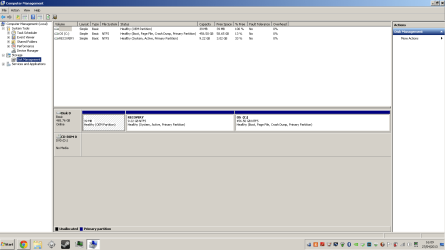
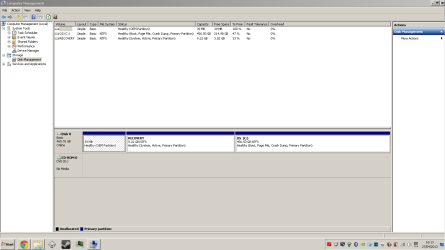
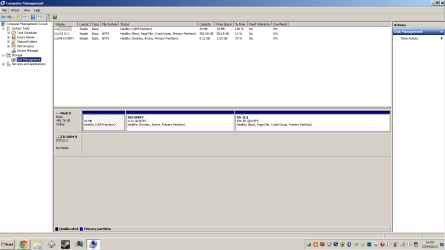
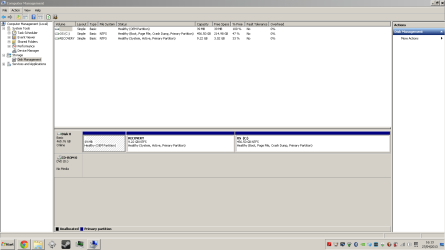
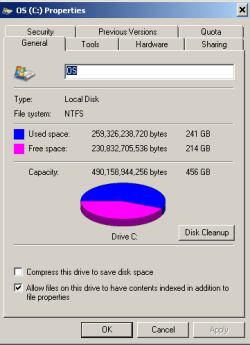
I have taken two snips, one when the computer thinks it has 58.6GB left and (after a restart) another when it thinks it has 214GB left
 

Attachments

  • Comp Management Screenshot 58.6.PNG
    Comp Management Screenshot 58.6.PNG
    25.1 KB · Views: 22
  • Comp Management Screenshot 214.98.PNG
    Comp Management Screenshot 214.98.PNG
    23.3 KB · Views: 18

My Computer My Computer

Computer type
Laptop
Computer Manufacturer/Model Number
Dell
OS
Windows 7 Home Premium 64bit
CPU
Intel(R) Core(TM) i7-3720QM
Memory
12.0 GB
Graphics Card(s)
Nvidia GeForce GTX 660M
Sound Card
Sound Blaster Recon3Di
Screen Resolution
1600x900
both again (by accident) with the thing Layback Bear asked for
 

Attachments

  • Comp Management Screenshot 58.6.PNG
    Comp Management Screenshot 58.6.PNG
    25.1 KB · Views: 12
  • Comp Management Screenshot 214.98.PNG
    Comp Management Screenshot 214.98.PNG
    23.3 KB · Views: 9
  • screencap.PNG
    screencap.PNG
    6.5 KB · Views: 10

My Computer My Computer

Computer type
Laptop
Computer Manufacturer/Model Number
Dell
OS
Windows 7 Home Premium 64bit
CPU
Intel(R) Core(TM) i7-3720QM
Memory
12.0 GB
Graphics Card(s)
Nvidia GeForce GTX 660M
Sound Card
Sound Blaster Recon3Di
Screen Resolution
1600x900
Welcome to Seven Forums MalReynolds. I see a Steam icon on the task bar. Does the hard drive space go down after gaming? Large multi map multi player game? Just thinking outside the box here.
 

My Computer My Computer

Computer type
PC/Desktop
Computer Manufacturer/Model Number
Bluethunder II
OS
Windows 7 x64 Ultimate and numerous virtual machines
CPU
AMD FX-8350 Vishera 32nm Technology @ 4.2 GHz default
Motherboard
ASUSTeK COMPUTER INC. SABERTOOTH 990FX R2.0 (Socket 942)
Memory
G Skill 32.0GB Dual-Channel DDR3 @ 1204MHz (11-13-13-31)
Graphics Card(s)
EVGA GeForce GTX 960 4GB Super SC ACX 2.0+ with Back Plate
Sound Card
Creative X-Fi Titanium HD Audiophile PCIe
Monitor(s) Displays
LG L227WTG x 3
Screen Resolution
1680 x 1050 16:10
Hard Drives
238GB Samsung850 PRO SATA Disk Device (SSD)
1863GB Seagate ST2000DM 001-1CH164 (SATA)
1397GB Seagate ST1500DL 003-9VT16L(SATA)
466GB Western Digital WDC WD50 03AZEX-00K1GA0 (SATA) x 2
932GB Seagate ST310005 28AS SATA Disk Device (SATA)
PSU
Enermax Revolution87+ 1000 Watts Gold Certified Power Supply
Case
Rocketfish Full Tower
Cooling
Cooler Master Hyper 212 EVO Push Pull 120mm Fans
Keyboard
Logitech K740
Mouse
Logitech G100S Laser LED + Logitech Gamepad F310
Internet Speed
500 mbs down and 30mbs up
Antivirus
Malwarebytes Pro & Avast and MSE on certain Virtual Machines
Browser
Firefox (Main) Chrome, Internet Explorer (Back Up)
Other Info
Logitech X 230 2.1 Stereo System and 5.1 Yamaha RX V2090
B&W DM6 Monitor Speakers + Center and Surround Speakers
Using Mouse Without Borders (Google it)
Just messed about in Primal Carnage for 5 mins, no change in the hard drive space.
 

My Computer My Computer

Computer type
Laptop
Computer Manufacturer/Model Number
Dell
OS
Windows 7 Home Premium 64bit
CPU
Intel(R) Core(TM) i7-3720QM
Memory
12.0 GB
Graphics Card(s)
Nvidia GeForce GTX 660M
Sound Card
Sound Blaster Recon3Di
Screen Resolution
1600x900

My Computer My Computer

Computer type
PC/Desktop
Computer Manufacturer/Model Number
Home made Desktop
OS
Windows 10 Pro. 64/ version 1709 Windows 7 Pro/64
CPU
Intel i7-6800K @ 4.3
Motherboard
ASUS X-99 Deluxe II
Memory
Corsair Platinum 16 gig @2400
Graphics Card(s)
EVGA GTX 1070 OC
Monitor(s) Displays
Asus 27" LED LCD/VE278Q
Screen Resolution
1920-1080 or 1280-720 HDMI
Hard Drives
INTEL SSD 730-240 Gb Sata 3.0/
PSU
EVGA Platium 1200W
Case
Phanteks Luxe Tempered Glass 8 fans/ one radiator
Cooling
XSPC/ Water Cooled CPU
Keyboard
Das 4 Professional
Mouse
Logitech M705/MX Anywhere 2-S
Internet Speed
100 mbits
Antivirus
Microsoft Security Essentials/ Malwarebytes Premium 3.0/ SAS
Browser
I.E. 11 default/Firefox/ ISP Time Warner Cable/Spectrum
Other Info
LG BluRay Burner/
Sound system-KLipsch-THX/
Icy Dock ssd Hot Swap bays.
I've tried deleting those "save points" that you can load up if your computer runs into a problem
I've deleted programs (of which there are few)

Its a bit late here and im too tired to fill my specs, I'll do it tommorow.

As for Anti-Virus I use McAfee Security Centre. If thats not the full title ill get that done tommorow as well.

I'll also take a look at 7 and 8 like you suggested.
 

My Computer My Computer

Computer type
Laptop
Computer Manufacturer/Model Number
Dell
OS
Windows 7 Home Premium 64bit
CPU
Intel(R) Core(TM) i7-3720QM
Memory
12.0 GB
Graphics Card(s)
Nvidia GeForce GTX 660M
Sound Card
Sound Blaster Recon3Di
Screen Resolution
1600x900
Local Time: 03:26 PM

McAfee can be causing that problem.
McAfee in my opinion is one of the worse things one can do to a computer.

Give this a try.
Remove McAfee using their online tool.
Then install this and see what happens.

Microsoft Security Essentials - Microsoft Windows
 

My Computer My Computer

Computer type
PC/Desktop
Computer Manufacturer/Model Number
Home made Desktop
OS
Windows 10 Pro. 64/ version 1709 Windows 7 Pro/64
CPU
Intel i7-6800K @ 4.3
Motherboard
ASUS X-99 Deluxe II
Memory
Corsair Platinum 16 gig @2400
Graphics Card(s)
EVGA GTX 1070 OC
Monitor(s) Displays
Asus 27" LED LCD/VE278Q
Screen Resolution
1920-1080 or 1280-720 HDMI
Hard Drives
INTEL SSD 730-240 Gb Sata 3.0/
PSU
EVGA Platium 1200W
Case
Phanteks Luxe Tempered Glass 8 fans/ one radiator
Cooling
XSPC/ Water Cooled CPU
Keyboard
Das 4 Professional
Mouse
Logitech M705/MX Anywhere 2-S
Internet Speed
100 mbits
Antivirus
Microsoft Security Essentials/ Malwarebytes Premium 3.0/ SAS
Browser
I.E. 11 default/Firefox/ ISP Time Warner Cable/Spectrum
Other Info
LG BluRay Burner/
Sound system-KLipsch-THX/
Icy Dock ssd Hot Swap bays.
I don't know what time the "local time" thing says for me, but it's wrong.

I don't mean to be rude but there is no way I am removing McAfee anytime soon, and I am sure it's not the problem. There are some things I have to do then I'll have a sit down and get you my specs and stuff.
 

My Computer My Computer

Computer type
Laptop
Computer Manufacturer/Model Number
Dell
OS
Windows 7 Home Premium 64bit
CPU
Intel(R) Core(TM) i7-3720QM
Memory
12.0 GB
Graphics Card(s)
Nvidia GeForce GTX 660M
Sound Card
Sound Blaster Recon3Di
Screen Resolution
1600x900
Try to avoid "mission creep" and stay focused on what is happening to the OS when it reports the two different free space values.

Firstly, determine which of the two is approximately correct. Take an inventory of what is on the hard drive. Pay particular attention to "Users". Whenever the values flip, does the value for "Users" also flip/change significantly? If portable programs are used, their folders sizes might be looked at.

Secondly, by process of elimination, determine if third-party programs (aside from McAfee) is causing the flip-flop. Which programs are running with which value?

Thirdly, if all roads lead to the OS, then a SFC (SystemFileCheck) or a malware scan may be appropriate.
 

My Computer My Computer

OS
Windows 7 Home Premium x64
I don't know what time the "local time" thing says for me, but it's wrong.

I don't mean to be rude but there is no way I am removing McAfee anytime soon, and I am sure it's not the problem. There are some things I have to do then I'll have a sit down and get you my specs and stuff.
It is a fact that McAfee is involved in many threads here with crashes, hangs, and BSODs. It would be a good idea to at least try something else, even as a science experiment.
 

My Computer My Computer

Computer type
PC/Desktop
Computer Manufacturer/Model Number
Home Built Desktop By DataTech
OS
Windows 7 Ultimate X64 SP1
CPU
Intel i5-2550K, Differing ~4.4-4.8GHz No built in GPU
Motherboard
ASUS P8Z68-V PRO/GEN3
Memory
16GB G.Skill Sniper 1866MHz @ 2133MHz 2x8GB
Graphics Card(s)
ASUS GTX650TIB-DC2OC-2GD5, (650TI Boost)
Sound Card
Onboard Realtek 5-1
Monitor(s) Displays
Samsung P2570HD
Screen Resolution
1920x1080
Hard Drives
Samsung 840 Pro 256GB SSD for OS, 500GB Seagate Constellation (Enterprise drive) for Data
PSU
Corsair HX650W
Case
Inwin Dragon Rider
Cooling
Hyper 212 EVO w/two Noctua fans, push-pull, @1300 RPM
Keyboard
E-Z Eyes, bright yellow keys with large characters
Mouse
steelseries SENSEI Laser Pro Gaming
Internet Speed
48-51Mbs Mbs down, 11 Mbs up Xfinity Cable
Antivirus
Norton Internet Security 2013
Browser
IE 10, Opera, Pale Moon if needed
Other Info
4 case fans, LG BluRay-RE, ASUS DVD-RW, Mr. Fusion power supply, 1.21 gigawatts.
@Britton30 I will try getting rid of McAfee when everything else has been tried and I have my reasons for doing so.

@gigagiggles I am almost 100% sure that my hard drive has 214GB left. I have looked at all the programs I have installed and many other things that could take up space and there is no way that it's only leaving me with 54GB.

How would I go about finding the value of "Users" and what are portable programs?

I'm sorry if it seems like im being difficult to work with
 

My Computer My Computer

Computer type
Laptop
Computer Manufacturer/Model Number
Dell
OS
Windows 7 Home Premium 64bit
CPU
Intel(R) Core(TM) i7-3720QM
Memory
12.0 GB
Graphics Card(s)
Nvidia GeForce GTX 660M
Sound Card
Sound Blaster Recon3Di
Screen Resolution
1600x900
I don't know what time the "local time" thing says for me, but it's wrong.

I don't mean to be rude but there is no way I am removing McAfee anytime soon, and I am sure it's not the problem. There are some things I have to do then I'll have a sit down and get you my specs and stuff.

How can this statement be true when you have come here seeking help for a problem you can't fix? If you know exactly what isn't the problem then surely you know what the problem is and can fix it yourself...
 

My Computer My Computer

OS
Windows 7 Professional 64bit
CPU
AMD Athlon II X3 440
Motherboard
ASUS M4A77TD
Memory
12.0 GB Dual-Channel DDR3 @ 669MHz
Graphics Card(s)
AMD Radeon HD 6850
Sound Card
AMD High Definition Audio Device
Monitor(s) Displays
Dell 317FP, Generic PnP Monitor
Screen Resolution
1920x1080
Hard Drives
112GB OCZ OCZ-AGIL ITY3 SATA Disk Device (SSD)
932GB Western Digital WDC WD10 01FALS-00E3A0 SATA Disk Device (SATA)
466GB Western Digital WDC WD50 01AALS-00L3B2 SATA Disk Device (SATA)
Case
ANTEC 300 ILLUSION
Cooling
CoolerMaster Hyper 212 plus
Other Info
I have two 4GB Corsair XMS3 modules and two 2GB Corsair XMS3 modules.
I know some things that aren't the problem, not everything that isn't the problem. It's like a list of possible problems and a few have been scored out, but because one is scored off doesn't mean they all are.


Edit :
I have updated my specs as best I can
 

My Computer My Computer

Computer type
Laptop
Computer Manufacturer/Model Number
Dell
OS
Windows 7 Home Premium 64bit
CPU
Intel(R) Core(TM) i7-3720QM
Memory
12.0 GB
Graphics Card(s)
Nvidia GeForce GTX 660M
Sound Card
Sound Blaster Recon3Di
Screen Resolution
1600x900
@Britton30 I will try getting rid of McAfee when everything else has been tried and I have my reasons for doing so.

@gigagiggles I am almost 100% sure that my hard drive has 214GB left. I have looked at all the programs I have installed and many other things that could take up space and there is no way that it's only leaving me with 54GB.

How would I go about finding the value of "Users" and what are portable programs?

I'm sorry if it seems like im being difficult to work with

To easily find the space consumed by "Users" I use the free utility "Folder Size". It may, also, provide some assistance in determining the discrepancy concerning your disk usage. It can be downloaded from the following site;

Folder Size - Freeware file size analysis. Check the directory sizes, folder sizes and file sizes on your computer with this freeware tree size analysis tool.

The suggestion to remove McAfee from your computer is something you should seriously consider. There are free alternatives which are superior. If you want to stubbornly keep the program on your system, you may spend quite a bit of time troubleshooting, which could be unnecessary. Of course, it's your computer and you can do what you want.
 

My Computer My Computer

Computer type
PC/Desktop
Computer Manufacturer/Model Number
Custom Built
OS
Windows 7 Professional x64
CPU
Intel i5 quad processor
Motherboard
DP67BG
Memory
16 GB
Graphics Card(s)
Radeon HD 5770
Sound Card
Realtek High Definition Audio
Monitor(s) Displays
Samsung SyncMaster
Screen Resolution
1920X1080
Hard Drives
WD 2TB (SATA Internal)
WD 1TB (USB External)
PSU
Corsair GS800
Case
Tower (Generic)
Cooling
3 Internal Fans
Keyboard
MS Wireless
Mouse
MS Optical Wired
Internet Speed
54 mbps
Antivirus
Emsisoft
Browser
IE-Version 9, Palemoon-Version 24.2.0
"How would I go about finding the value of "Users" and what are portable programs?"

Portable programs are not integrated into the operating system. They run from within their own folders, normally from a USB stick, but some users like the lack of integration and not leaving footprints.

When you open the C:\ drive, a dozen or so folders will show, including Windows, Users, Program Files, Program Files (x86), et al. Right-clicking a folder will bring up a context menu that includes Properties. Properties will denote the amount of hard drive space that folder takes up.

"Users" contains folders pertinent to installed programs and folders pertinent to individual users. such as "My Documents". Seeing that over 200GB is already used, most are probably media files within this file structure.

I only have one program that uses "My Documents", and I don't use Libraries. The one time I did use Libraries, I was spooked by it. With that said, Libraries may be implicated in the extra 150GB.
 

My Computer My Computer

OS
Windows 7 Home Premium x64
Back
Top