OS choice menu changes to "prevista OS" and windows svr 2008.

musteegee

New member
Local time
3:13 AM
Messages
1
OS choice menu changes to "prevista OS" and windows svr 2008.

i just installed windows server 2008 on my desktop that runs windows server 2003 and windows XP. the OS choice menu was "windows XP and Windows svr 2003 before". but when i installed the win2k8 svr it changed to "pre vista OS and win2k8" when u select pre vista u can now choose b/w xp and win2k3. I want the system to automatically load xp when it is turned on. I toyed around with the boot.ini file with no avail.:cry:
 

My Computer My Computer

At a glance

windows 7 home premium 64bit.
OS
windows 7 home premium 64bit.
As there are various boot entries there, you are to choose them in the boot menu. If you disable boot menu, you may be in problem in selecting the other OSs. But if you want XP as the default OS, you may do it using EasyBCD.

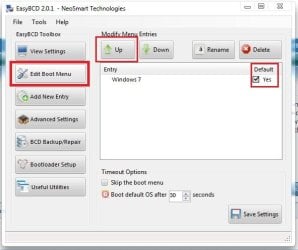
Doenload an older version (coz versions above 2.1 are paid) of EasyBCD from the links in the bottom right of the resulting page. Install it in either OS (to install in XP, you need .net framework 2 installed there). Run it. Click on "edit boot menu" in the right side pane. Select the XP entry. Move it up using the up arrow. Now, in the defaults column, check it as "yes" , and no/uncheck for the other entries. If you want, you may reduce the time , and then save the settings, close EasyBCD, and restart computer.

Capture.JPG

If you have installed the different OSs in different physical disks, thereis a chance of avoiding boot menu in boot time, and make XP as the default OS, without any waiting or selection keys.
 

My Computer My Computer

At a glance

Microsoft Windows 10 Pro Insider Preview 64-bitIntel(R) Core(TM) i3-4130 CPU @ 3.40GHzCorsair Vengence 4GB x2 (8.00GB Dual-Channel ...2047MB GeForce GTS 450 (ZOTAC International)
Computer type
PC/Desktop
Computer Manufacturer/Model Number
Self Assembled
OS
Microsoft Windows 10 Pro Insider Preview 64-bit
CPU
Intel(R) Core(TM) i3-4130 CPU @ 3.40GHz
Motherboard
Gigabyte Technology Co., Ltd. B85M-D3H
Memory
Corsair Vengence 4GB x2 (8.00GB Dual-Channel DDR3 @ 798MHz)
Graphics Card(s)
2047MB GeForce GTS 450 (ZOTAC International)
Sound Card
Onboard (Realtek High Definition Audio)
Monitor(s) Displays
LG Flatron E2040T
Screen Resolution
1600x900
Hard Drives
Western Digital 1 TB
Seagate 500 GB
PSU
Corsair VS550
Case
Cooler Master K380
Cooling
Cooler Master Seidon 120V Plus
Keyboard
Logitech MK260r
Mouse
Logitech MK260r
Internet Speed
PMPL Broadband
Antivirus
Windows Defender + MBAM
Browser
Firefox
Other Info
Dell Studio 15" Laptop

My Computer My Computer

At a glance

64-bit Windows 11 Pro for WorkstationsIntel i7-8700K OC'd to 5 GHz64 GB (4x16GB) G.SKILL TridentZ RGB DDR4 3600...ASUS ROG-STRIX-GTX1080TI-O11G-GAMING
Computer type
PC/Desktop
Computer Manufacturer/Model Number
Self built custom
OS
64-bit Windows 11 Pro for Workstations
CPU
Intel i7-8700K OC'd to 5 GHz
Motherboard
ASUS ROG Maximus XI Formula Z390
Memory
64 GB (4x16GB) G.SKILL TridentZ RGB DDR4 3600 MHz
Graphics Card(s)
ASUS ROG-STRIX-GTX1080TI-O11G-GAMING
Sound Card
Integrated
Monitor(s) Displays
2 x Samsung Odyssey G7 27"
Screen Resolution
2560x1440
Hard Drives
1TB Samsung 990 PRO M.2,
4TB Samsung 990 PRO PRO M.2,
TerraMaster F8 SSD Plus NAS
PSU
Seasonic Prime Titanium 850W
Case
Thermaltake Core P3
Cooling
Corsair Hydro H115i
Keyboard
Logitech wireless K800
Mouse
Logitech MX Master 4
Internet Speed
2 Gb/s Download and 100 Mb/s Upload
Antivirus
Malwarebyte Anti-Malware Premium
Browser
Google Chrome
Other Info
Logitech Z625 speaker system,
Logitech BRIO 4K Pro webcam,
HP Color LaserJet Pro MFP M477fdn,
APC SMART-UPS RT 1000 XL - SURT1000XLI,
Galaxy S23 Plus phone
Back
Top