OS fails to load when using new RAM

MycroftHolmes

New member
Member
Local time
4:22 PM
Messages
24
I am using Intel i3-530 on Intel DH55TC Motherboard. The motherboard supports RAM with highest frequency of 1333MHz. However, I was told that using a higher speed RAM wouldn't hurt the system. So, today I bought a Corsair Vengeance 4GB 1600MHz RAM. The RAM is detected in BIOS, but OSes fail to boot after that. Even Ubuntu throws Kernel panic error while booting. Could anyone help me with the BIOS settings required to run this memory stick?
 

My Computer My Computer

Computer type
PC/Desktop
Computer Manufacturer/Model Number
Custom Build
OS
Windows 7 Professional 32-Bit
CPU
Intel i3-530
Motherboard
Intel DH55TC
Memory
4GB DDR3
Graphics Card(s)
XFX Radeon 5770 1GB DDR5
Hard Drives
1TB WD Caviar Blue,
2TB WD Elements Portable USB3,
1TB WD Elements Portable USB3,
1TB WD My Passport USB3,
500GB WD Elements USB2,
1TB Seagate Expansion Portable
Antivirus
MS Security Essentials
Browser
Chrome, Mozilla Firefox, Opera
Hello Mycroft mate as a general rule running a higher frequency RAM stick in a machine that runs that only supports the lower one the frequency will revert to the frequency of the new stick will be maxed to what frequency your machine will support. So I think whoever told you could run a higher frequency RAM stick in the machine should have known better and to get you to check out the supported RAM speed before you went out and got the new RAM.
If possible I would get the supplier to change it for 1333 (there really isn't much to be gained from 1600) and the extra RAM will still make a difference to your machine simply because the system has more to use and therefore less bottle knecking :p - in other words the CPU can load more faster if it has more empty RAM available.

ie Tip a bucket of water through a 1 inch outlet funnel into another bucket and it fills quite nicely in say 5 minutes - now take a funnel with a 10 inch outlet and the second bucket fills in no time at all - the first bucket is the CPU and the second bucket the RAM the difference being there is more channels for the data to flow through even though it might be the slower speed RAM;)

You can see from this Intel® Desktop Board DH55TC the board only supports 1333 max - you can install a faster RAM stick but why bother?

So for example the 1600 you have put in should only run at 1333 if the machine specs say max 1333. The other problem could be that the new RAM stick is bad.

To see about RAM this might give you some idea of what it is all about https://en.wikipedia.org/wiki/DDR3_SDRAM

Just so you know I have a desktop that has 2400 RAM in it and fully clocked as opposed to the 1333 stock speed of the clockable board is in my mind a non goer - that machine runs faster because simply I have more RAM in it and not the speed of the RAM.

I think if you have 4GB in now give it another 4GB and you will be very surprised.

If you want more out of the machine check this out http://www.sevenforums.com/tutorials/11728-optimize-windows-7-a.html but only when you have the problem sorted.

 

My Computer My Computer

Computer type
PC/Desktop
Computer Manufacturer/Model Number
Own build (new) Desk1 / Asus ROG Win 7 / Desk2 1st build
OS
Desk1 7 Home Prem / Desk2 10 Pro / Main lap Asus ROG 10 Pro 2 laptop Toshiba 7 Pro Asus P2520 7 & 10
CPU
Desk1 i5 3750K / Laptop i7 GTX 860M / Desk2 i5 2500
Motherboard
Desk1 Asus P877-V / Desk2 Gigabyte H67 UD3H / Laptop ?
Memory
Desk1 8GB (1866) / Desk2 16GB (1333) / Laptop 8Gb DDR3
Graphics Card(s)
Desk 1& 2NVidia GTX 650 & Laptops on board Intel
Sound Card
Desk 1 & 2 -XONAR DG Realtek High Def audio Laptop
Monitor(s) Displays
Desk 1 Benq HD 2450 / Desk2 Philips 24" / Laptop 17.5"
Screen Resolution
1920x1080 D1 & D2 & Laptop 1
Hard Drives
Desk1 Samsung 120GB 830 SSD
Asus ROG 256GB 850 Pro SSD
Desk2 Samsung 840 256 SSD
Toshiba 120GB EVO
PSU
Desk 1 Corsair HX 1050/ Laptop ? / Desk 2 Corsair HX 650
Case
Desk 1 Cooler HAF XM ? Toshiba laptop / Desk2 Coolermaster
Cooling
Fans on all Desk1 -2 Desk2 - all Coolermasters 5 Laptop ?
Keyboard
Desk 1 MS Sidewinder X6 Desk 2 MS Sidewinder X 4
Mouse
Desk 1&2 - Gigabyte MS 900 gamer - laptop - Logitec wireless
Internet Speed
ADSL2+
Other Info
One other Desktop (tester) and spare Toshba laptop both with SSD's
Running Kaspersky 2016 ISS on all machines config'd identically
Logitec audio stereo systems on each machine (x3)
Canon MG5250MFC
Router/modem TP-Link running WPA2SK
Hello Mycroft mate as a general rule running a higher frequency RAM stick in a machine that runs that only supports the lower one the frequency will revert to the frequency of the new stick will be maxed to what frequency your machine will support. So I think whoever told you could run a higher frequency RAM stick in the machine should have known better and to get you to check out the supported RAM speed before you went out and got the new RAM.
If possible I would get the supplier to change it for 1333 (there really isn't much to be gained from 1600) and the extra RAM will still make a difference to your machine simply because the system has more to use and therefore less bottle knecking :p - in other words the CPU can load more faster if it has more empty RAM available.

ie Tip a bucket of water through a 1 inch outlet funnel into another bucket and it fills quite nicely in say 5 minutes - now take a funnel with a 10 inch outlet and the second bucket fills in no time at all - the first bucket is the CPU and the second bucket the RAM the difference being there is more channels for the data to flow through even though it might be the slower speed RAM;)

You can see from this Intel® Desktop Board DH55TC the board only supports 1333 max - you can install a faster RAM stick but why bother?

So for example the 1600 you have put in should only run at 1333 if the machine specs say max 1333. The other problem could be that the new RAM stick is bad.

To see about RAM this might give you some idea of what it is all about https://en.wikipedia.org/wiki/DDR3_SDRAM

Just so you know I have a desktop that has 2400 RAM in it and fully clocked as opposed to the 1333 stock speed of the clockable board is in my mind a non goer - that machine runs faster because simply I have more RAM in it and not the speed of the RAM.

I think if you have 4GB in now give it another 4GB and you will be very surprised.

If you want more out of the machine check this out http://www.sevenforums.com/tutorials/11728-optimize-windows-7-a.html but only when you have the problem sorted.

I understand the fact that my motherboard wont be able to exploit the topmost speed that the RAM offers. I thought it'd be downclocked to 1333MHz. But the problem is that, even though BIOS can detect the RAM, the OS cannot boot when the RAM is used.
 

My Computer My Computer

Computer type
PC/Desktop
Computer Manufacturer/Model Number
Custom Build
OS
Windows 7 Professional 32-Bit
CPU
Intel i3-530
Motherboard
Intel DH55TC
Memory
4GB DDR3
Graphics Card(s)
XFX Radeon 5770 1GB DDR5
Hard Drives
1TB WD Caviar Blue,
2TB WD Elements Portable USB3,
1TB WD Elements Portable USB3,
1TB WD My Passport USB3,
500GB WD Elements USB2,
1TB Seagate Expansion Portable
Antivirus
MS Security Essentials
Browser
Chrome, Mozilla Firefox, Opera
Ok sounds to me like you have some bad RAM stick there and what I would do is get a replacement for the one you bought and try that - as you say you have nothing to gain from the higher speed and it is probably your machine not being able to utilize it.

The other possibility is of course that the slot may be bad. I would try the original stick in the slot you were trying the 1600 in and see if it boots. If it doesn't then the slot may need cleaning or worse the board replacing.

SLOT CLEANING

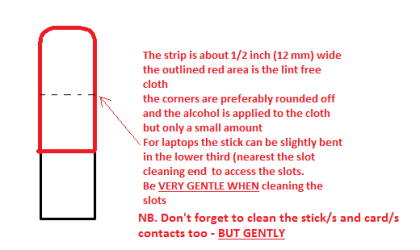
Now as for the slots to clean them usea strip of old credit card (or any card thin enough some are better than others) about 1/2 inch wide nip the corners off one end - preferablyround them offhold a piece of thin lint free clothover the end dab on some form of alcohol - isopropyl alcohol (what we swab theskin with before an injection) is good and GENTLYswipe along the slots. (See pic of stick for laptop slots)

This can also be done for the GPU slot/s and also thecontacts of the sticks or cards - not the stick but some lint free cloth ofcourse. See my pic for the sick but please be very gentle doing it if you arein any doubt - please ask before doing it but I use this all the time and haveyet to damage anything
 

Attachments

  • STICK CLEANER.PNG
    STICK CLEANER.PNG
    6.1 KB · Views: 6

My Computer My Computer

Computer type
PC/Desktop
Computer Manufacturer/Model Number
Own build (new) Desk1 / Asus ROG Win 7 / Desk2 1st build
OS
Desk1 7 Home Prem / Desk2 10 Pro / Main lap Asus ROG 10 Pro 2 laptop Toshiba 7 Pro Asus P2520 7 & 10
CPU
Desk1 i5 3750K / Laptop i7 GTX 860M / Desk2 i5 2500
Motherboard
Desk1 Asus P877-V / Desk2 Gigabyte H67 UD3H / Laptop ?
Memory
Desk1 8GB (1866) / Desk2 16GB (1333) / Laptop 8Gb DDR3
Graphics Card(s)
Desk 1& 2NVidia GTX 650 & Laptops on board Intel
Sound Card
Desk 1 & 2 -XONAR DG Realtek High Def audio Laptop
Monitor(s) Displays
Desk 1 Benq HD 2450 / Desk2 Philips 24" / Laptop 17.5"
Screen Resolution
1920x1080 D1 & D2 & Laptop 1
Hard Drives
Desk1 Samsung 120GB 830 SSD
Asus ROG 256GB 850 Pro SSD
Desk2 Samsung 840 256 SSD
Toshiba 120GB EVO
PSU
Desk 1 Corsair HX 1050/ Laptop ? / Desk 2 Corsair HX 650
Case
Desk 1 Cooler HAF XM ? Toshiba laptop / Desk2 Coolermaster
Cooling
Fans on all Desk1 -2 Desk2 - all Coolermasters 5 Laptop ?
Keyboard
Desk 1 MS Sidewinder X6 Desk 2 MS Sidewinder X 4
Mouse
Desk 1&2 - Gigabyte MS 900 gamer - laptop - Logitec wireless
Internet Speed
ADSL2+
Other Info
One other Desktop (tester) and spare Toshba laptop both with SSD's
Running Kaspersky 2016 ISS on all machines config'd identically
Logitec audio stereo systems on each machine (x3)
Canon MG5250MFC
Router/modem TP-Link running WPA2SK
Back
Top