OS Install On LITEON cx-8bxxx, 14 days-still no SSD showing

moilopol

New member
Local time
8:55 PM
Messages
14
OS Install On LITEON cx-8bxxx

Does not work. This forum was no help. Tried everything and SIW decided to tell me to do what i clearly posted i had already done.
Useless/

Delete this thread please
 
Last edited:

My Computer My Computer

At a glance

Windows 7 x64bit
Computer type
PC/Desktop
OS
Windows 7 x64bit
Browser
Chrome
NOTE2: the website: worldwideweb "mantis.es" SLASH noticias SLASH Win7SP1-Update-EN

...provides an iso that works.

That link lists the included drivers for you

You can place those in the DRIVERS\bootx64 and DRIVERS\installx64 folders.

MS nvme updates (KB2990941 and KB3087873) go in the UPDATES\bootx64 and UPDATES\installx64 folders

Update your Win 7 installation media.
 

My Computers My Computers

  • At a glance

    7 X64i5 84002x8gb 3200mhz
    Computer type
    PC/Desktop
    OS
    7 X64
    CPU
    i5 8400
    Motherboard
    gigabyte b365m ds3h
    Memory
    2x8gb 3200mhz
    Hard Drives
    various
    PSU
    pure power 11 400w cm
    Case
    Coolermaster
    Cooling
    cryorig m9i
  • At a glance

    7x64g54008gb ddr4 2400
    Computer type
    PC/Desktop
    OS
    7x64
    CPU
    g5400
    Motherboard
    ga b365m ds3h
    Memory
    8gb ddr4 2400
    PSU
    xfx pro 450w
Another possibility is to make your own media using Atak's tool.
Atak's takes a long time and produces gigantic installation media - and it doesn't exclude telemetry if you use it to integrate updates.
 

My Computers My Computers

  • At a glance

    7 X64i5 84002x8gb 3200mhz
    Computer type
    PC/Desktop
    OS
    7 X64
    CPU
    i5 8400
    Motherboard
    gigabyte b365m ds3h
    Memory
    2x8gb 3200mhz
    Hard Drives
    various
    PSU
    pure power 11 400w cm
    Case
    Coolermaster
    Cooling
    cryorig m9i
  • At a glance

    7x64g54008gb ddr4 2400
    Computer type
    PC/Desktop
    OS
    7x64
    CPU
    g5400
    Motherboard
    ga b365m ds3h
    Memory
    8gb ddr4 2400
    PSU
    xfx pro 450w
none of that u posted is helpful, the fact u recommended the updates i already clearly stated i have tried means u didn't read the post...
and the journey of yet another annoying derailed horrible experience begins on yet another forum

But thanks for your time
- unless users can offer me advanced solutions- pls dont tell me to do stuff i have already tried and please do not get angry and flame.


Either please offer a solution based on the info i provided or just don't post-
 
Last edited:

My Computer My Computer

At a glance

Windows 7 x64bit
Computer type
PC/Desktop
OS
Windows 7 x64bit
Browser
Chrome
If you ask nicely, someone might be able to upload the exact drivers and ms nvme updates that are included in the iso from the site you say works.

If you don't want to use one of the tools already mentioned, you will have to install the MS nvme updates manually - which is not straightforward.
 

My Computers My Computers

  • At a glance

    7 X64i5 84002x8gb 3200mhz
    Computer type
    PC/Desktop
    OS
    7 X64
    CPU
    i5 8400
    Motherboard
    gigabyte b365m ds3h
    Memory
    2x8gb 3200mhz
    Hard Drives
    various
    PSU
    pure power 11 400w cm
    Case
    Coolermaster
    Cooling
    cryorig m9i
  • At a glance

    7x64g54008gb ddr4 2400
    Computer type
    PC/Desktop
    OS
    7x64
    CPU
    g5400
    Motherboard
    ga b365m ds3h
    Memory
    8gb ddr4 2400
    PSU
    xfx pro 450w
SIW2 :thumbsup:
Nice is nice!
 

My Computer My Computer

At a glance

Win 10 x64, Linux Lite, Win 7 x64, BlackArch,...
Computer type
PC/Desktop
Computer Manufacturer/Model Number
HP Desktop & Compaq Laptop
OS
Win 10 x64, Linux Lite, Win 7 x64, BlackArch, & Kali
Hard Drives
Samsung 850 Pro 256Gb,
Hitachi HDD 1Tb,
Crucial MX SSD 250Gb
Segate 3Tb USB 3.0 Ext. Backup HDD
Internet Speed
150Mbps dn, 20Mbps up
Antivirus
Avast Free, Malwarebytes Anti-Exploit & Anti-Ransomware
Browser
Firefox, Chrome, Opera, & VPN
i thought i started asking nice. Again, thanks in advance for taking the time to at least reply.
* Please help me;
Q. / Request
* Can someone help me Specifcially target the exact files i need, and help with the method, that i need for my specific Hardwareusing my stuff not a prepped-iso with other peoples changes
- and if your refferring to the drivers i have stated i already have.. I am willing to check / verify another link against what i have...


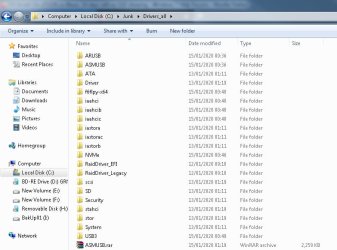
- Since what i have is basically every known driver for this situation, - See Attached Drivers List Image , and i only require the manufacturers/ windows default (which can be extracted from Windows 10 installation media using dism /get-drivers, dism /extract) downloaded from the Intel/ Gigabyte Website and on my Laptop CD, im 100% covered- i think?.

* For those who are unaware;

  • - The gigabyte USB creaiton tool comes with NVMe and USB 3- that is what the tool is for.
  • i have original cd.

* the only drivers i need for the boot.wim [index 1 & 2] and install.wim [My chose index or *] are as follows;

NVMe:


  • Client-x64
  • SetupNVME.exe (for when windows is installed)- unless /x cmd works and this file can be packaged with ISo, im stuck until OS is installed. but i cannot even get SP1 slipstreamed so no hope with yet another exe
Intel RST:

  • SetupRST.exe (As above- stuck with exe until OS is installed, unless someone knows an /X method)
  • RST_F6_Floppyx64_Win7_8_8.1_10_14.8.16.1063.zip
  • f6flpy-x64
Note:
I know for a fact the aforementioned files are all i require because if Win7 is installed on a regular HDD, or external USB, the laptop can boot/ run. Then installing the 2 well known Hotfixies (or three*) && RST && NVMe setup allows the SSD to be seen. I have it partitioned ready, or can clean it, wipe it/ format etc with disk manager. Unfortunately OS still does not install from inside Win10 or Win7 or a regular HDD. with injected ISO's.


My understanding of dism is, (i believe), more than adequate (always open to learn, varied cmd's etc), since i can copy paste easily and have been trying for what 20days?- this forum is full of help i have read, and other forums. Not to mention the Intel Documentation PDF outlines the whole process.

Please take each cmd below with the understanding that not all [package paths] and [file paths] match up, but when i actually do the process i obviously correct the paths as needed.

A few Q.s:

  • Can Windows Updates be renamed?
Code:
E.G.
/PackagePath:C:\updates\Windows6.1-KB947821-v34-x64.msu
becomes
Code:
/PackagePath:C:\updates\1.msu /PackagePath:C:\updates\2.msu
etc

  • Can dism completely break?
- I left an image mounted and rebooted - oops, these folders became completely impossible to delete, i mean even taking ownership in safe mode or using CMD to delete all from within another OS completely failed.
I had to reboot again, start CMD and run dism unmount before i could delete the entire folder LOl- had me perplexed for days...since then everything is messed up.

METHOD: So here is what i do:
  • Create Folders ;
CMD: mkdir C:\
C:\Win7
C:\Win7\DISM
C:\Win7\Xtracted
C:\Win7\Drivers
C:\Win7\updates
C:\Win7\HotFix
C:\Win7\IE11 [.msi or .cab files]
C:\Win7\SP1 [.msi or .cab files]
C:\Win7\NewISO


  • Put files in folders etc
  • Extract IE11:
Code:
IE11-Windows6.1-x64-en-us.exe /X:C:Win7\IE11\IE11_CAB
[code]

[B]
---Check Index:---[/B]
Dism /Get-WIMInfo /WimFile:C:\Win7\Xtracted\sources\install.wim

[B]---unpack (mount Install.wim file):---[/B]
dism /Mount-WIM /WimFile:C:\Win7\Xtracted\sources\install.wim /index:* /MountDir:C:\Win7\dism


[B]--- add updates ---[/B]
[code]
 Dism /Image:C:\Win7\dism/Add-Package /PackagePath:C:\Win7\update\1.msu /PackagePath:C:\Win7\updates\Windows6.1-KB3087873-x64.msu[COLOR=dimgray][I] /ETC ETC ETC[/I][/COLOR]
[COLOR=dimgray][I]
[/I][/COLOR]
--- save/ commit ---
Code:
 Dism /Unmount-WIM /MountDir:C:\Win7\unpacked /Commit
--- add IE11 etc etc ---
Code:
 Dism /Image:C:\Win7\offline /Add-Package /PackagePath:C:\IE11\IE11_CAB

--- Setup BOOT WIM do for index 1 & 2---
Code:
 Dism /Get-WIMInfo /WimFile:C:\Win7\Xtracted\sources\boot.wim
Dism /Mount-WIM /WimFile:C:\Win7\Xtracted\sources\boot.wim /Index:1 /MountDir:C:\Win7\dism

--- Add Drivers:---
Code:
 dism /image:C:\Win7\dism /add-driver:c:\win7\drivers/recurse
Dism /Unmount-WIM /MountDir:C:\Win7\unpacked /Commit
* Now Repeat for Boot.wim Index 2


--- Create an ISO :---
- Just copy th enew files back to USB thus replacing the old "xxx".wim
* OR..use oscdimg
Code:
oscdimg -n -m -bC:\Win7\Xtracted\boot\etfsboot.com C:\Win7NewISO\ C:\MY_NEW_WIN7_ISO.iso

At this point:

  • The one thing i have not tried is using the Windows 10 media "Setup.exe" and "boot.wim" to do the process.
  • I know this will work (i mean it will boot and install), because a Win10/Win7 dual boot can start with the Win10 DualBoot screen to choose OS.
  • ... Unfortunately since the previously mentioned problem wher ei rebooted with a mounted wim, everythign has stopped working.
  • The iso has magically stopped working with Windows USB creator so i cannot start from ISO-USB, then begin dism.
  • i tried reformatting to ensure the .iso is UDF. no luck.

Discrepancies:
- Intel state that the hotfixes 2990941 & 3087873 should be used, but really everyone uses

  • Windows6.1-KB2920188-v7-x64
  • Windows6.1-KB2990941-v3-x64
Windows6.1-KB3087873-v2-x64 is for install incase of error after instaling (say MS website), which probably will not occur when using this dism/ slip[stream process. Either way, all three can be installed or simply the well known 2, i have tried both instances separately to ensure no issues, install works, SSD cannot be found.

No problem coz;

  • The gigabyte Tool uses an XML fiel to provide the driver paths fo rthe USB creator tool, luckily these are nto Driver / file name specific.
  • It is just drivers path = xxx\drivers\ and uses the /recurse cmd when creating
  • Therefore i can add KB2920188 to the folder and the gigabyte tool autmatically now adds all 3, maybe even more updates, i haven't tried
  • this addition of the 3rd update install can be confirmed working with the cmd /get-packages
  • Some driver discrepancies exist, probably from mass downloading in a furious rage. but i 100% have the correct old/ original and new udpated offfical drivers and correct Windows updates i need...
p.s. Windows Updates Release/ Install order:
/example to ensure u see i am doing things correct, this is not extensive. I only care about the SSD working on install. Once that works, i can go back to USB and do the process again with all udpates

  • kb2533552 - prevents "0xC0000034" error when installing Win7 SP1
  • kb976932 - Install Service Pack 1 (2011-15)
  • KB3020369 - Service Stack (2015-05).
  • KB3125574 - Rollup (2016-05).- Contains Updates from SP1 to April 2016.
  • KB4056894 - Rollup (2018-01).
  • KB4100480 - apply immediately after (Important Fix)
  • KB4490628 - servicing stack update (2019-03)
  • KB4474419 - The latest SHA-2 update (2019-08)
  • KB4530734 - Rollup (2019-12)
  • KB4531786 - servicing stack update (2019-12)
  • KB4536952 - The latest Service Stack Update (2020-01)
- P.s. i have all updates download from a long time.


My last available options:

  • Keep tryign and hopefully not failing like a fool
  • Install an OS fully updated on External USB with PC, run it on Laptop to add drivers internall trhrough windows OS, Wait for SSD to be shown. Clone from from USB to SSD. remove USB change boot priority to SSD and hope it boots, if not run cmds to fix boot etc
  • Give up
  • have someone highlight the dumbass mistakes i am making, or point out / help with bizarre occurances
 

Attachments

  • Untitled-2.jpg
    Untitled-2.jpg
    74.4 KB · Views: 0
Last edited:

My Computer My Computer

At a glance

Windows 7 x64bit
Computer type
PC/Desktop
OS
Windows 7 x64bit
Browser
Chrome
1.SP1 cannot be integrated into install.wim using dism commands. It is best to download installation media that already contains SP1. I assume you have that already.

2. .EXE files need to be extracted before integrating with dism. 7-zip provides a graphical interface that can extract most exe files. Drivers need to be in .sys, .cat and .inf format.
7-Zip

3. If you want to integrate the MS nvme updates - they are also msu files. You can make another folder for them, is that what your c:\win7\hotfix folder is for?. Then copy the two ms nvme updates Windows6.1-KB3087873-v2-x64.msu and Windows6.1-KB2990941-v3-x64.msu into the C:\Win7\hotfix folder

Can Windows Updates be renamed?

Yes, but it shouldn't be necessary.

Point dism /add-package command at the folder containing at least one msu/cab file and it will automatically find any other msu/cab files in that folder and also recurse any sub-folders.

e.g. If your mount folder is c:\win7\mount. You need to specify an image number ( in this example 3)


dism /Mount-WIM /WimFile:"C:\Win7\Xtracted\sources\install.wim" /index:3 /MountDir:"C:\Win7\mount"


Dism /Image:"C:\Win7\mount" /Add-Package /PackagePath:"C:\Win7\update"

and to integrate the ms nvme updates in the c:\win7\hotfix folder

Dism /Image:"C:\Win7\mount" /Add-Package /PackagePath:"C:\Win7\hotfix"

and to integrate drivers

dism /image:"C:\Win7\mount" /add-driver:"c:\win7\drivers" /recurse

Dism /Unmount-WIM /MountDir:"C:\Win7\mount" /Commit
 
Last edited:

My Computers My Computers

  • At a glance

    7 X64i5 84002x8gb 3200mhz
    Computer type
    PC/Desktop
    OS
    7 X64
    CPU
    i5 8400
    Motherboard
    gigabyte b365m ds3h
    Memory
    2x8gb 3200mhz
    Hard Drives
    various
    PSU
    pure power 11 400w cm
    Case
    Coolermaster
    Cooling
    cryorig m9i
  • At a glance

    7x64g54008gb ddr4 2400
    Computer type
    PC/Desktop
    OS
    7x64
    CPU
    g5400
    Motherboard
    ga b365m ds3h
    Memory
    8gb ddr4 2400
    PSU
    xfx pro 450w
AAHHHHHHHHHHHHHH FFS!
Thanks for reply SIW2, sort've

- you just re-typed everything i have already typed. - so as before, none of it helped but thanks ?* i have clearly stated everythign i have done, and you tell me to put the 2 damn updates into a folder... wow, first post states "Put files in folders etc"


Might aswel delete the thread guys coz this is going nowehere and i assume the only replies i have had are the only replies i will every get.


1. No i do not have SP1 disc, if i did, i would nto be creating a damn SP1 folder and asking how the f* to extarct the SP1 exe.
2. Beign on SP1 is irreleavnt. AS clearely stated before

"i dno care care about the updates etc"-0 Since the USB will not install the OS with the hotfixes, becuase the drivers do nothing and the SSD will not show, there is fuk all point me slipstreaming anything.
3. i know hwo to add the shit, it just doesnt do anything,. i can add every fing driver to an iso and every known update, install it on PC that doesnt have this SSD nonsense, - that doesnt fix the SSD not showing before the installing begons.
4. i am really pissed off at this, can noone see what i am saying- am i not saying it right?

Im super annoyed at this situation, btu i think i hate myself more for thinking a forum woudl actually help me.


Guys if you have been herre 12 years making 3 posts a day on average, and 2 of them are tellign someoen to do somethign they have already done THEN u have lost the passion!, just typing and not fing reading, then don't bother, take a break , do somethign else.


To re-iterate, pleas eudnerstand what i am saying, i have come for help, peopel are willing/ "trying to help" but whatthey say is not helpful.


My last option:


  • Clone a Win7 OS (built on PC) to USB HDD.
  • Try to make it Boot from Laptop
  • Install Intel RST and all other Laptop Drivers (this cannot be done beforehand)
  • Clone Updated USB HDD to SSD
  • Try to make it Boot
If anyoen knows exaqctly how to do this ans is willing to help great. start from step 1 instead of me doign stepo1 then coming back to someone tellign me to do step1


Come back with real advice, rememeber why u spend so much time on the forum, i am not being nasty, i understadn what 12 years of "peopel asking the same stuff" can do to someone. But trust me - i fukign tried everything


edit:
look at that dumbass reply SIW2 follow up with. waste of time -

 
Last edited:

My Computer My Computer

At a glance

Windows 7 x64bit
Computer type
PC/Desktop
OS
Windows 7 x64bit
Browser
Chrome
But trust me - i fukign tried everything .

No. You haven't followed advice.
 

My Computers My Computers

  • At a glance

    7 X64i5 84002x8gb 3200mhz
    Computer type
    PC/Desktop
    OS
    7 X64
    CPU
    i5 8400
    Motherboard
    gigabyte b365m ds3h
    Memory
    2x8gb 3200mhz
    Hard Drives
    various
    PSU
    pure power 11 400w cm
    Case
    Coolermaster
    Cooling
    cryorig m9i
  • At a glance

    7x64g54008gb ddr4 2400
    Computer type
    PC/Desktop
    OS
    7x64
    CPU
    g5400
    Motherboard
    ga b365m ds3h
    Memory
    8gb ddr4 2400
    PSU
    xfx pro 450w
Back
Top