Solved OS on SSD...

I'm always in favor of starting over with a clean install, but have you tried Gregrocker's recommendations in post 18??

<b>Not yet, I would like to send a pic of "disk management" first.</b>

As I said, a pic of Disk Management would help us visualize things, but all I can see "wrong" is that you have your boot files on the spinning drive, not on the SSD.

<b>Is there a tutorial of how to get to the Disk Management that you want?</b>

Regards, Paul.
 

My Computer

Computer Manufacturer/Model Number
Gateway DX4860
OS
Windows 7
CPU
i7 2600
Motherboard
Gateway IPISB-VR 1.01, Bios Am. Megatrends P02-A2
Memory
Corsair 16 gb
Graphics Card(s)
AMD Radeon HD 6750
Monitor(s) Displays
Dell U2311H
Hard Drives
Mushkin Cronos Deluxe 240 gb
WD20EARX-22PA sB0 with Windows 7
Hitachi with Vista OS from older system
PSU
750 W
Cooling
stock
Keyboard
Logitech wireless
Mouse
Wacom HID pen
Internet Speed
Download 17.5 mbps
Other Info
Amateur Radio: VE3ZT
Sorry, I messed up that reply.
 

My Computer

Computer Manufacturer/Model Number
Gateway DX4860
OS
Windows 7
CPU
i7 2600
Motherboard
Gateway IPISB-VR 1.01, Bios Am. Megatrends P02-A2
Memory
Corsair 16 gb
Graphics Card(s)
AMD Radeon HD 6750
Monitor(s) Displays
Dell U2311H
Hard Drives
Mushkin Cronos Deluxe 240 gb
WD20EARX-22PA sB0 with Windows 7
Hitachi with Vista OS from older system
PSU
750 W
Cooling
stock
Keyboard
Logitech wireless
Mouse
Wacom HID pen
Internet Speed
Download 17.5 mbps
Other Info
Amateur Radio: VE3ZT
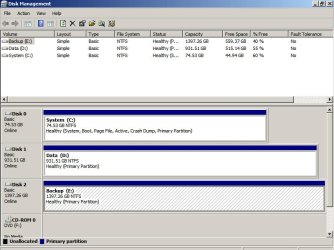
Type disk management in the start box.

That should lead you to a screen that looks like this.

Take a screen capture of it and post the pic.

Try Greg's recommendations in his post 18.
 

Attachments

  • Untitled-1.jpg
    Untitled-1.jpg
    83.6 KB · Views: 30

My Computer

Computer type
PC/Desktop
Computer Manufacturer/Model Number
Ignatz Special; 4 speed manual gearbox; factory air conditioning; one of one
OS
Windows 7 Home Premium SP1, 64-bit
CPU
Intel Skylake i5-6600K, not overclocked
Motherboard
AsRock Z170M Extreme 4, micro ATX
Memory
8 GB HyperX DDR4-2666 (2 x 4 GB)
Graphics Card(s)
none; graphics are integrated on CPU
Sound Card
onboard: Realtek ALC1150; external: USB Behringer UF0-202
Monitor(s) Displays
Dell S2340M 23 inch IPS
Screen Resolution
1600 x 900
Hard Drives
System: Crucial MX100 series SSD, 128 GB;
Data: Samsung Spinpoint 103SJ, 1 TB;
Backup: WD Caviar Green WD30EZRX-00D8PB0, 3 TB
PSU
Rosewill SilentNight 500 watt fanless, semi-modular
Case
Antec Solo II
Cooling
Noctua NH-U12S; Noctua F12 intake, Noctua S12A exhaust
Keyboard
Microsoft 200 6JH-00001 USB
Mouse
Dell or Microsoft optical wired; USB
Antivirus
Microsoft Security Essentials and Malwarebytes Premium
Browser
Pale Moon
Other Info
All fans PWM; speeds at idle: CPU circa 500 rpm; intake circa 600 rpm; exhaust circa 600 rpm; CPU temps 27 idle and 47 C load in a warm room (27 C/81 F) when running Intel Extreme Tuning Utility stress test.
I have print screen as a jpg. How do I insert into this forum thread?

Thanks for your patience.

Paul.
 

My Computer

Computer Manufacturer/Model Number
Gateway DX4860
OS
Windows 7
CPU
i7 2600
Motherboard
Gateway IPISB-VR 1.01, Bios Am. Megatrends P02-A2
Memory
Corsair 16 gb
Graphics Card(s)
AMD Radeon HD 6750
Monitor(s) Displays
Dell U2311H
Hard Drives
Mushkin Cronos Deluxe 240 gb
WD20EARX-22PA sB0 with Windows 7
Hitachi with Vista OS from older system
PSU
750 W
Cooling
stock
Keyboard
Logitech wireless
Mouse
Wacom HID pen
Internet Speed
Download 17.5 mbps
Other Info
Amateur Radio: VE3ZT
I found the page explaining how to post an attachment.
 

Attachments

  • DiskLayout.jpg
    DiskLayout.jpg
    114.4 KB · Views: 36

My Computer

Computer Manufacturer/Model Number
Gateway DX4860
OS
Windows 7
CPU
i7 2600
Motherboard
Gateway IPISB-VR 1.01, Bios Am. Megatrends P02-A2
Memory
Corsair 16 gb
Graphics Card(s)
AMD Radeon HD 6750
Monitor(s) Displays
Dell U2311H
Hard Drives
Mushkin Cronos Deluxe 240 gb
WD20EARX-22PA sB0 with Windows 7
Hitachi with Vista OS from older system
PSU
750 W
Cooling
stock
Keyboard
Logitech wireless
Mouse
Wacom HID pen
Internet Speed
Download 17.5 mbps
Other Info
Amateur Radio: VE3ZT
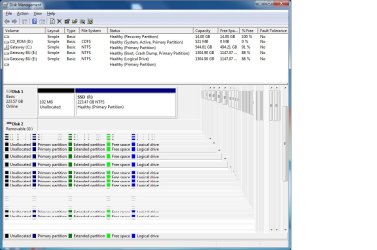
As you can plainly see, the Disk Management screenshot is not fully readable.

Please type Snipping Tool in Start Menu, select Rectangular snip, draw a box around the full drive map and listings, save file then attach.
 
I see enough to know that this is a mess. Looks like we have to go back to square 1.
 

My Computer

Computer Manufacturer/Model Number
HP, Dell, Gateway, Toshiba - 4 laptops and 2 desktops
OS
Vista, Windows7, Mint Mate, Zorin, Windows 8
CPU
from 1.6GHz Duo to i7
Monitor(s) Displays
2x HP w2207
Hard Drives
5x HDD, 7x SSD, 12x Externals
Keyboard
with trackball - no mices
Mouse
Trackball mice
Internet Speed
DSL 6000
Yes, wondering why the only System Active listing is on the CD-ROM drive.

Please tell us what is on each partition once we can see them.
 
Not shown at the bottom is Disk 0, the CD-ROM drive. Previously, a recovery disk was in the drive.

Gateway C: is is the original disk with Windows 7.

Gateway BU E: is a data partition I created on drive C:

SSD F: is the drive I'm trying to get active.

I did use the suggested program in the tutorial to migrate the system files to the SSD.

Thanks for your advice and patience.

Paul.
 

Attachments

  • DiskLayout-2.jpg
    DiskLayout-2.jpg
    94.6 KB · Views: 33

My Computer

Computer Manufacturer/Model Number
Gateway DX4860
OS
Windows 7
CPU
i7 2600
Motherboard
Gateway IPISB-VR 1.01, Bios Am. Megatrends P02-A2
Memory
Corsair 16 gb
Graphics Card(s)
AMD Radeon HD 6750
Monitor(s) Displays
Dell U2311H
Hard Drives
Mushkin Cronos Deluxe 240 gb
WD20EARX-22PA sB0 with Windows 7
Hitachi with Vista OS from older system
PSU
750 W
Cooling
stock
Keyboard
Logitech wireless
Mouse
Wacom HID pen
Internet Speed
Download 17.5 mbps
Other Info
Amateur Radio: VE3ZT
As stated earlier you need to unplug all other HD's when installing to the SSD.

By installing with the old Win7 HD attached it merely updated the System Boot files on the HD System Reserved partition which is now booting both drives.

This is reparable however if you also incorrectly ran the installer from C rather than booting it, then Win7 will not show as C when booted into the SSD as it does when installed correctly from boot.

If that is the case I'd consider a booted reinstall with all other HD's unplugged so you have the boot files onboard the SSD and it shows as C when booted.

If you don't care about it booting as F and only want to repair it, then create a Primary partition in the 100mb Unallocated space on the SSD labeled "System Reserved" and marked Active, power down to unplug all other HD's, boot the Win7 DVD or System Repair Disk to run Startup Repair - Run 3 Separate Times.

After install, plug back in the HD and boot it when needed using the one-time BIOS Boot Menu key given on first boot screen. Make sure the SSD remains set to boot first (after DVD drive) in BIOS setup.
 
Hi Paul, Didn't you use the Paragon Migration tool to transfer the OS to the SSD. If yes, something went wrong. I never had problems with that program.

You can fix the bootmgr in the 100MB partition as Greg suggested, or you can start anew to get it right. Let us know what you prefer.
 

My Computer

Computer Manufacturer/Model Number
HP, Dell, Gateway, Toshiba - 4 laptops and 2 desktops
OS
Vista, Windows7, Mint Mate, Zorin, Windows 8
CPU
from 1.6GHz Duo to i7
Monitor(s) Displays
2x HP w2207
Hard Drives
5x HDD, 7x SSD, 12x Externals
Keyboard
with trackball - no mices
Mouse
Trackball mice
Internet Speed
DSL 6000
Thank you Greg for your suggested remedies and instructions. I have to read several times for this 70-year-old brain to understand and absorb. I've been around confusers since my first one being the original IBM-PC with 512 K of RAM and a processor running at the blazing speed of about 3 mHz! The cost in the early '80s was about $3,400 Cdn. without a HD. The cost for a 40 mb HD at the time was $600.00. A replacement IBM keyboard that was made from steel and weighed several pounds cost $600. new, and $200 reconditioned.

My experience has been mainly programs rather than operating systems, so I usually only have to go through this stuff when I get a new box.

Yes whs, I used the Paragon tool.

I just checked the "windows" directory and contains 15.5 gb in size, 78,472 files in 15,258 folders.

Seem a lot to me, so I think I'll erase the SSD and start afresh.

Regards, Paul.
 

My Computer

Computer Manufacturer/Model Number
Gateway DX4860
OS
Windows 7
CPU
i7 2600
Motherboard
Gateway IPISB-VR 1.01, Bios Am. Megatrends P02-A2
Memory
Corsair 16 gb
Graphics Card(s)
AMD Radeon HD 6750
Monitor(s) Displays
Dell U2311H
Hard Drives
Mushkin Cronos Deluxe 240 gb
WD20EARX-22PA sB0 with Windows 7
Hitachi with Vista OS from older system
PSU
750 W
Cooling
stock
Keyboard
Logitech wireless
Mouse
Wacom HID pen
Internet Speed
Download 17.5 mbps
Other Info
Amateur Radio: VE3ZT
Hi Paul, if you accept some advice from a 74 year old, I suggest you do this.


1. Transfer the bootmgr on the HDD from the 100MB partition to C:. That 100MB partition is pretty useless in your case. Here is my tutorial on how to do that with just a couple of clicks: http://www.sevenforums.com/tutorials/209885-bootmgr-move-c-easybcd.html

2. Delete the partitions on the SSD with Disk management from your currently running system. Make sure you delete the volumes and the partitions so that you end up with freespace

3. Transfer the the OS again with the Paragon Tool

4. Change the bootorder in the BIOS to boot from the SSD. And if this works and Win7 boots well and woks well from the SSD, you can delete the OS partition and the 100MB partition on the HDD - with Disk Management.

PS: If you want to be extra careful. make an image of your C: partition on the HDD to an external disk before you do step 1. Here is how: http://www.sevenforums.com/tutorials/73828-imaging-free-macrium.html?ltr=I That way you can always get back in case something happens to C:. Imaging is the best way to protect yourself. You should do it periodically (e.g. weekly) anyhow. But then from the SSD.
 

My Computer

Computer Manufacturer/Model Number
HP, Dell, Gateway, Toshiba - 4 laptops and 2 desktops
OS
Vista, Windows7, Mint Mate, Zorin, Windows 8
CPU
from 1.6GHz Duo to i7
Monitor(s) Displays
2x HP w2207
Hard Drives
5x HDD, 7x SSD, 12x Externals
Keyboard
with trackball - no mices
Mouse
Trackball mice
Internet Speed
DSL 6000
Hi Paul, if you accept some advice from a 74 year old, I suggest you do this.


1. Transfer the bootmgr on the HDD from the 100MB partition to C:. That 100MB partition is pretty useless in your case. Here is my tutorial on how to do that with just a couple of clicks: http://www.sevenforums.com/tutorials/209885-bootmgr-move-c-easybcd.html

2. Delete the partitions on the SSD with Disk management from your currently running system. Make sure you delete the volumes and the partitions so that you end up with freespace

3. Transfer the the OS again with the Paragon Tool

4. Change the bootorder in the BIOS to boot from the SSD. And if this works and Win7 boots well and woks well from the SSD, you can delete the OS partition and the 100MB partition on the HDD - with Disk Management.

PS: If you want to be extra careful. make an image of your C: partition on the HDD to an external disk before you do step 1. Here is how: http://www.sevenforums.com/tutorials/73828-imaging-free-macrium.html?ltr=I That way you can always get back in case something happens to C:. Imaging is the best way to protect yourself. You should do it periodically (e.g. weekly) anyhow. But then from the SSD.


I'm all set to go. I've done the boot manager transfer as you suggested and am about to perform step 2.

Regards, Paul.
 

Attachments

  • DiskLayout-3.jpg
    DiskLayout-3.jpg
    93.8 KB · Views: 28

My Computer

Computer Manufacturer/Model Number
Gateway DX4860
OS
Windows 7
CPU
i7 2600
Motherboard
Gateway IPISB-VR 1.01, Bios Am. Megatrends P02-A2
Memory
Corsair 16 gb
Graphics Card(s)
AMD Radeon HD 6750
Monitor(s) Displays
Dell U2311H
Hard Drives
Mushkin Cronos Deluxe 240 gb
WD20EARX-22PA sB0 with Windows 7
Hitachi with Vista OS from older system
PSU
750 W
Cooling
stock
Keyboard
Logitech wireless
Mouse
Wacom HID pen
Internet Speed
Download 17.5 mbps
Other Info
Amateur Radio: VE3ZT
Not shown at the bottom is Disk 0, the CD-ROM drive. Previously, a recovery disk was in the drive.

Gateway C: is is the original disk with Windows 7.

Gateway BU E: is a data partition I created on drive C:

SSD F: is the drive I'm trying to get active.

I did use the suggested program in the tutorial to migrate the system files to the SSD.

Thanks for your advice and patience.

Paul.

Am I wrong, or does the MBR still need to move onto the SSD? Just a question?
 

My Computer

Computer type
PC/Desktop
Computer Manufacturer/Model Number
iBuyPower NZXT
OS
Microsoft Windows 10 Home Build 15036
CPU
Intel(R) Core(TM) i7-860 @ 2.80GHz
Motherboard
Gigabyte Technology Co., Ltd. P55-UD3L
Memory
4.00 GB
Graphics Card(s)
NVIDIA GeForce GTX 750
Sound Card
(1) Line 6 UX2 (2) Realtek High Definition Audio
Monitor(s) Displays
23" acer
Screen Resolution
1920 x 1080 x 32 bits (4294967296 colors) @ 60 Hz
Hard Drives
(1) WDC WD5000AAKS-00D2B0 ATA Device (2) Seagate FreeAgent Go 250G USB Device
Cooling
Corsair H75 liquid cooler (Very easy to install, actually)
Internet Speed
60M cable modem-->Linksys E1200-->1Gbps net card
Browser
Chrome
Other Info
This is probably the longest I've ever had a Windows machine run without having to restore it to scratch. I'm used to restoring to "factory" about every 2 yrs. I've run with Win7 since new in 2009 and only recently (Nov, '14) restored to clean up the machine from all my 'xperimenting. LOL!! I may never need another machine.

Upgraded to 10 when it was still free, then installed 2017 update.
I believe he's following Wolfgang's latest suggestion to move System boot files to C then reimage it to SSD again. Is this correct, Paul?

It appears the System boot files have been moved but C still needs to be marked Active, then tested that it will boot. You can use PW CD to Modify>Set to Active. If it fails to boot click on Disk 1 to highlight it then from Disk tab select Rebuild MBR, Apply, reboot.
 
Greg, if he moved the bootmgr with EasyBCD, the SSD partition would automatically be marked 'active'. Unfortunately that is not obvious from the screenshot because this bootable CD does not show the 'Status' column. The OP may have to highlight the partition for it to show up.
 

My Computer

Computer Manufacturer/Model Number
HP, Dell, Gateway, Toshiba - 4 laptops and 2 desktops
OS
Vista, Windows7, Mint Mate, Zorin, Windows 8
CPU
from 1.6GHz Duo to i7
Monitor(s) Displays
2x HP w2207
Hard Drives
5x HDD, 7x SSD, 12x Externals
Keyboard
with trackball - no mices
Mouse
Trackball mice
Internet Speed
DSL 6000
PW screenshot shows that System flag is on C as you suggested, but yet no Active flag which remains on SysReserved.


I assume he's preparing C to image it over to the SSD which he plans to fully Delete first as you suggested. If asked,he wants Track1 and MBR included, C drive letter and for it to remain Primary Active, correct?
 
Dah, as usual you are right. I have set my IE to 175% (because of my bad eyesight) and forgot to move the bottom cursor to the right. So I did not see that column. In my PW, the Status column is in front of the Type column. So I just assumed it was not there. One should never assume.

But now I wonder what happened. In the BCD description it says:


When you confirm the selection, EasyBCD will automatically:
  • Install the BOOTMGR bootloader to the selected partition
  • Make the selected partition active
  • Install the bootloader to both the bootsector and the MBR of the selected partition
  • Copy all entries from the old boot partition to the newly-selected one
  • Update partition references to work with the new boot partition
 

My Computer

Computer Manufacturer/Model Number
HP, Dell, Gateway, Toshiba - 4 laptops and 2 desktops
OS
Vista, Windows7, Mint Mate, Zorin, Windows 8
CPU
from 1.6GHz Duo to i7
Monitor(s) Displays
2x HP w2207
Hard Drives
5x HDD, 7x SSD, 12x Externals
Keyboard
with trackball - no mices
Mouse
Trackball mice
Internet Speed
DSL 6000
Back
Top