Solved OS on SSD...

Attachments

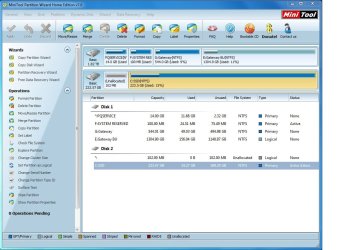
  • DiskLayout-4.jpg
    DiskLayout-4.jpg
    33.1 KB · Views: 13
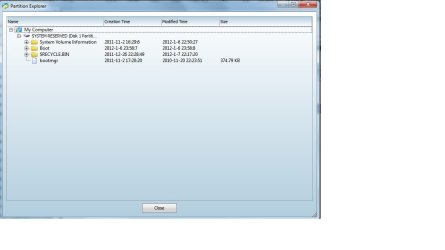
  • DiskLayout-5.jpg
    DiskLayout-5.jpg
    103.5 KB · Views: 12

My Computer

Computer Manufacturer/Model Number
Gateway DX4860
OS
Windows 7
CPU
i7 2600
Motherboard
Gateway IPISB-VR 1.01, Bios Am. Megatrends P02-A2
Memory
Corsair 16 gb
Graphics Card(s)
AMD Radeon HD 6750
Monitor(s) Displays
Dell U2311H
Hard Drives
Mushkin Cronos Deluxe 240 gb
WD20EARX-22PA sB0 with Windows 7
Hitachi with Vista OS from older system
PSU
750 W
Cooling
stock
Keyboard
Logitech wireless
Mouse
Wacom HID pen
Internet Speed
Download 17.5 mbps
Other Info
Amateur Radio: VE3ZT
Greg was right. As far as I can tell, you did not move the bootmgr from the system reserved to C:.
 

My Computer

Computer Manufacturer/Model Number
HP, Dell, Gateway, Toshiba - 4 laptops and 2 desktops
OS
Vista, Windows7, Mint Mate, Zorin, Windows 8
CPU
from 1.6GHz Duo to i7
Monitor(s) Displays
2x HP w2207
Hard Drives
5x HDD, 7x SSD, 12x Externals
Keyboard
with trackball - no mices
Mouse
Trackball mice
Internet Speed
DSL 6000
Greg was right. As far as I can tell, you did not move the bootmgr from the system reserved to C:.

When I run BCD, I get this message: The boot configuration data store could not be found. The system cannot find the file specified. Would you like to manually load a BCD registry for EasyBCD to manage?

Clicking Yes brings up Documents Library, then BCD program window with Edit Boot, Add New Entry window.

I remember when I first ran BCD I got a message indicating that the procedure was successful.

Regards, Paul.
 

My Computer

Computer Manufacturer/Model Number
Gateway DX4860
OS
Windows 7
CPU
i7 2600
Motherboard
Gateway IPISB-VR 1.01, Bios Am. Megatrends P02-A2
Memory
Corsair 16 gb
Graphics Card(s)
AMD Radeon HD 6750
Monitor(s) Displays
Dell U2311H
Hard Drives
Mushkin Cronos Deluxe 240 gb
WD20EARX-22PA sB0 with Windows 7
Hitachi with Vista OS from older system
PSU
750 W
Cooling
stock
Keyboard
Logitech wireless
Mouse
Wacom HID pen
Internet Speed
Download 17.5 mbps
Other Info
Amateur Radio: VE3ZT
Bottom line though is that the bootmgr is still sitting on the system reserved partition. Does the system boot ??
 

My Computer

Computer Manufacturer/Model Number
HP, Dell, Gateway, Toshiba - 4 laptops and 2 desktops
OS
Vista, Windows7, Mint Mate, Zorin, Windows 8
CPU
from 1.6GHz Duo to i7
Monitor(s) Displays
2x HP w2207
Hard Drives
5x HDD, 7x SSD, 12x Externals
Keyboard
with trackball - no mices
Mouse
Trackball mice
Internet Speed
DSL 6000
Power down to unplug the HD, set SSD first to boot in BIOS setup,

Boot PW CD, rightclick Win7 partition to Resize, drag left grey border to the left to take up unallocated space, OK.

Next rightclick on Win7 partition, select Modify>Set to Active, OK.

Now click on the Disk # to highlight it, from Disk tab select Rebuild MBR, Apply all steps, reboot. This may preclude the need to run Startup Repair 3 separate times to write the System boot files to Win7.

If not boot into Win7 DVD Repair console to run Startup Repair - Run 3 Separate Times until Win7 boots on its own and holds the System Active flags.

Power down to plug back in the HD, boot it if needed using one-time BIOS Boot Menu key given on first boot screen.

Is there any special reason you didn't follow the standard steps I gave you? Do you want to reimage SSD for performance reasons?
 
Bottom line though is that the bootmgr is still sitting on the system reserved partition. Does the system boot ??

Well, yes but not from the SSD.

As was mentioned earlier, it seems to be booting from C:
 

My Computer

Computer Manufacturer/Model Number
Gateway DX4860
OS
Windows 7
CPU
i7 2600
Motherboard
Gateway IPISB-VR 1.01, Bios Am. Megatrends P02-A2
Memory
Corsair 16 gb
Graphics Card(s)
AMD Radeon HD 6750
Monitor(s) Displays
Dell U2311H
Hard Drives
Mushkin Cronos Deluxe 240 gb
WD20EARX-22PA sB0 with Windows 7
Hitachi with Vista OS from older system
PSU
750 W
Cooling
stock
Keyboard
Logitech wireless
Mouse
Wacom HID pen
Internet Speed
Download 17.5 mbps
Other Info
Amateur Radio: VE3ZT
Power down to unplug the HD, set SSD first to boot in BIOS setup,

Boot PW CD, rightclick Win7 partition to Resize, drag left grey border to the left to take up unallocated space, OK.

Next rightclick on Win7 partition, select Modify>Set to Active, OK.

Now click on the Disk # to highlight it, from Disk tab select Rebuild MBR, Apply all steps, reboot. This may preclude the need to run Startup Repair 3 separate times to write the System boot files to Win7.

If not boot into Win7 DVD Repair console to run Startup Repair - Run 3 Separate Times until Win7 boots on its own and holds the System Active flags.

Power down to plug back in the HD, boot it if needed using one-time BIOS Boot Menu key given on first boot screen.
Is there any special reason you didn't follow the standard steps I gave you? Do you want to reimage SSD for performance reasons?

Only reason, Greg, is it seem the most difficult to me understand. If all else looks okay (and I don't understand the bit about the boot sys not being on C:, or whether it's necessary, or how to get it there after doing so with BCD.

If no other advice/suggestions/warnings, I'll go with your instructions, Greg.

Thank you all,


Paul.
 

My Computer

Computer Manufacturer/Model Number
Gateway DX4860
OS
Windows 7
CPU
i7 2600
Motherboard
Gateway IPISB-VR 1.01, Bios Am. Megatrends P02-A2
Memory
Corsair 16 gb
Graphics Card(s)
AMD Radeon HD 6750
Monitor(s) Displays
Dell U2311H
Hard Drives
Mushkin Cronos Deluxe 240 gb
WD20EARX-22PA sB0 with Windows 7
Hitachi with Vista OS from older system
PSU
750 W
Cooling
stock
Keyboard
Logitech wireless
Mouse
Wacom HID pen
Internet Speed
Download 17.5 mbps
Other Info
Amateur Radio: VE3ZT
I think I start to understand what went wrong. You were trying to move the bootmgr on the SSD inlieu of moving it on the HDD before you moved C to the SSD. Is that correct.

Besides, you never seem to have changed the BIOS boot sequence and tried to boot from the SSD. Because then you would have seen a 'bootmgr missing' message.
 
Last edited:

My Computer

Computer Manufacturer/Model Number
HP, Dell, Gateway, Toshiba - 4 laptops and 2 desktops
OS
Vista, Windows7, Mint Mate, Zorin, Windows 8
CPU
from 1.6GHz Duo to i7
Monitor(s) Displays
2x HP w2207
Hard Drives
5x HDD, 7x SSD, 12x Externals
Keyboard
with trackball - no mices
Mouse
Trackball mice
Internet Speed
DSL 6000
I think I start to understand what went wrong. You were trying to move the bootmgr on the SSD inlieu of moving it on the HDD before you moved C to the SSD. Is that correct.

Well, I had already moved the OS from the HDD using a migration tool as in one of the tutorials. However, it's thought by someone in this thread that only part of the OS ended up on the SSD. As a test, I was unable to boot from the SSD with the HDD disconnected, even though it looked to me that the OS files were on the SSD.

Also, when changing the boot drive by pressing f12, and selecting the SSD, I think it was still booting from the HDD, as I could hear the HDD being accessed. Booting time with the HDD and SDD are both 35 seconds.

Hope this explanation helps.

Regards, Paul.
 

My Computer

Computer Manufacturer/Model Number
Gateway DX4860
OS
Windows 7
CPU
i7 2600
Motherboard
Gateway IPISB-VR 1.01, Bios Am. Megatrends P02-A2
Memory
Corsair 16 gb
Graphics Card(s)
AMD Radeon HD 6750
Monitor(s) Displays
Dell U2311H
Hard Drives
Mushkin Cronos Deluxe 240 gb
WD20EARX-22PA sB0 with Windows 7
Hitachi with Vista OS from older system
PSU
750 W
Cooling
stock
Keyboard
Logitech wireless
Mouse
Wacom HID pen
Internet Speed
Download 17.5 mbps
Other Info
Amateur Radio: VE3ZT
Besides, you never seem to have changed the BIOS boot sequence and tried to boot from the SSD. Because then you would have seen a 'bootmgr missing' message.

I just finished going into the BIOS again to double check. The boot sequence is set to the SSD. As always, it did in fact boot.

However, to check to see if it's really booting from the SSD, I disconnected the HDD and rebooted. Nada.

Message:
"Boot and select proper boot device or insert boot media in selected boot device and press a key."
 

My Computer

Computer Manufacturer/Model Number
Gateway DX4860
OS
Windows 7
CPU
i7 2600
Motherboard
Gateway IPISB-VR 1.01, Bios Am. Megatrends P02-A2
Memory
Corsair 16 gb
Graphics Card(s)
AMD Radeon HD 6750
Monitor(s) Displays
Dell U2311H
Hard Drives
Mushkin Cronos Deluxe 240 gb
WD20EARX-22PA sB0 with Windows 7
Hitachi with Vista OS from older system
PSU
750 W
Cooling
stock
Keyboard
Logitech wireless
Mouse
Wacom HID pen
Internet Speed
Download 17.5 mbps
Other Info
Amateur Radio: VE3ZT
I'm still betting it's because the Master Boot Record is still on the HDD. The SSD needs to become the drive that the MBR resides on.

It was as simple as fdisk /mbr ( I think ) back in the day. (or was it part of "format"?)
 
Last edited:

My Computer

Computer type
PC/Desktop
Computer Manufacturer/Model Number
iBuyPower NZXT
OS
Microsoft Windows 10 Home Build 15036
CPU
Intel(R) Core(TM) i7-860 @ 2.80GHz
Motherboard
Gigabyte Technology Co., Ltd. P55-UD3L
Memory
4.00 GB
Graphics Card(s)
NVIDIA GeForce GTX 750
Sound Card
(1) Line 6 UX2 (2) Realtek High Definition Audio
Monitor(s) Displays
23" acer
Screen Resolution
1920 x 1080 x 32 bits (4294967296 colors) @ 60 Hz
Hard Drives
(1) WDC WD5000AAKS-00D2B0 ATA Device (2) Seagate FreeAgent Go 250G USB Device
Cooling
Corsair H75 liquid cooler (Very easy to install, actually)
Internet Speed
60M cable modem-->Linksys E1200-->1Gbps net card
Browser
Chrome
Other Info
This is probably the longest I've ever had a Windows machine run without having to restore it to scratch. I'm used to restoring to "factory" about every 2 yrs. I've run with Win7 since new in 2009 and only recently (Nov, '14) restored to clean up the machine from all my 'xperimenting. LOL!! I may never need another machine.

Upgraded to 10 when it was still free, then installed 2017 update.
We try not to guess but use the methods which have worked for thousands of others.

To write the System boot files to a non-System primary partition, you mark it Active, boot the Win7 DVD Repair console or System Repair CD to run Startup Repair up to 3 separate times until Win7 starts on its own and holds the System Active Boot flags.

In your case since you have a drive in preceding order marked System Active from which the SSD was booting, you must unplug it to keep it from interfering while making sure the SSD remains set first HD to boot in BIOS.
 
1. Greg's method will work. If it does not for whatever reason, post back. There are other alternatives. But try that first.

2. If you used the Paragon Migration tool. I am really amazed why that did not work. It has worked 6 times perfectly for me.

Booting time with the HDD and SDD are both 35 seconds
.
How did you measure the boot time. A non-tweaked vanilla SSD OS should boot in under 20 seconds. The best place to check is in:

Event Viewer > Applications and Services Logs > Microsoft > Windows > Diagnostics-Performance > Operational
100 is Boot time
200 is Shutdown time
 
Last edited:

My Computer

Computer Manufacturer/Model Number
HP, Dell, Gateway, Toshiba - 4 laptops and 2 desktops
OS
Vista, Windows7, Mint Mate, Zorin, Windows 8
CPU
from 1.6GHz Duo to i7
Monitor(s) Displays
2x HP w2207
Hard Drives
5x HDD, 7x SSD, 12x Externals
Keyboard
with trackball - no mices
Mouse
Trackball mice
Internet Speed
DSL 6000
Well, I think Greg's procedure worked! I ran the repair disk twice and it is now loading from the SSD. I have not hooked the HDD up yet, but that will be my next step. Then I'll reboot. I was as nervous as a new bride during the process. i'll be back soon...

Regards, Paul.
 

My Computer

Computer Manufacturer/Model Number
Gateway DX4860
OS
Windows 7
CPU
i7 2600
Motherboard
Gateway IPISB-VR 1.01, Bios Am. Megatrends P02-A2
Memory
Corsair 16 gb
Graphics Card(s)
AMD Radeon HD 6750
Monitor(s) Displays
Dell U2311H
Hard Drives
Mushkin Cronos Deluxe 240 gb
WD20EARX-22PA sB0 with Windows 7
Hitachi with Vista OS from older system
PSU
750 W
Cooling
stock
Keyboard
Logitech wireless
Mouse
Wacom HID pen
Internet Speed
Download 17.5 mbps
Other Info
Amateur Radio: VE3ZT
When you plug the HD back in you can boot it using the Gateway F10 one-time BIOS Boot Menu key, or access its files via Explorer.

When you're ready delete HD Win7 in Disk Management or wipe the HD with Diskpart Clean Command .
 
Am having a few problems. It has been freezing up when booting from SSD. Had to turn power off several times. Message came up when loading Chrome that it was corrupt. On next restart, Checkdisk ran and did a lot of stuff, putting files back together on SSD, etc.

Was able to reboot using HDD. Am still experimenting...
 

My Computer

Computer Manufacturer/Model Number
Gateway DX4860
OS
Windows 7
CPU
i7 2600
Motherboard
Gateway IPISB-VR 1.01, Bios Am. Megatrends P02-A2
Memory
Corsair 16 gb
Graphics Card(s)
AMD Radeon HD 6750
Monitor(s) Displays
Dell U2311H
Hard Drives
Mushkin Cronos Deluxe 240 gb
WD20EARX-22PA sB0 with Windows 7
Hitachi with Vista OS from older system
PSU
750 W
Cooling
stock
Keyboard
Logitech wireless
Mouse
Wacom HID pen
Internet Speed
Download 17.5 mbps
Other Info
Amateur Radio: VE3ZT
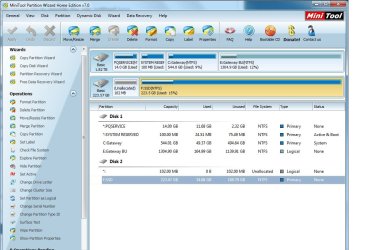
DiskPic-1.jpg
 

My Computer

Computer Manufacturer/Model Number
Gateway DX4860
OS
Windows 7
CPU
i7 2600
Motherboard
Gateway IPISB-VR 1.01, Bios Am. Megatrends P02-A2
Memory
Corsair 16 gb
Graphics Card(s)
AMD Radeon HD 6750
Monitor(s) Displays
Dell U2311H
Hard Drives
Mushkin Cronos Deluxe 240 gb
WD20EARX-22PA sB0 with Windows 7
Hitachi with Vista OS from older system
PSU
750 W
Cooling
stock
Keyboard
Logitech wireless
Mouse
Wacom HID pen
Internet Speed
Download 17.5 mbps
Other Info
Amateur Radio: VE3ZT
In Partition Wizard, right click on SSD, under Modify, both Set Active and Set Inactive are grey-out.
 

My Computer

Computer Manufacturer/Model Number
Gateway DX4860
OS
Windows 7
CPU
i7 2600
Motherboard
Gateway IPISB-VR 1.01, Bios Am. Megatrends P02-A2
Memory
Corsair 16 gb
Graphics Card(s)
AMD Radeon HD 6750
Monitor(s) Displays
Dell U2311H
Hard Drives
Mushkin Cronos Deluxe 240 gb
WD20EARX-22PA sB0 with Windows 7
Hitachi with Vista OS from older system
PSU
750 W
Cooling
stock
Keyboard
Logitech wireless
Mouse
Wacom HID pen
Internet Speed
Download 17.5 mbps
Other Info
Amateur Radio: VE3ZT
The Win7 on SSD does not yet hold the System flag. Have you run Startup Repair 3 times?

Try clicking on Disk 2 to highlight it, then from Disk tab select Rebuild MBR, Apply. This may preclude the need to run the 3 Repairs.

But as stated you need the System flag on the SSD Win7 partition.
 
I ran system recover several times. Now it gives me 2 choices of Windows 7 in the menu to choose. I choose the 2nd one and it loaded the OS from the HDD.

Still haven't been able to access System flag on SSD.

I'm going to reboot and choose the first one which should boot from the SSD.
 

My Computer

Computer Manufacturer/Model Number
Gateway DX4860
OS
Windows 7
CPU
i7 2600
Motherboard
Gateway IPISB-VR 1.01, Bios Am. Megatrends P02-A2
Memory
Corsair 16 gb
Graphics Card(s)
AMD Radeon HD 6750
Monitor(s) Displays
Dell U2311H
Hard Drives
Mushkin Cronos Deluxe 240 gb
WD20EARX-22PA sB0 with Windows 7
Hitachi with Vista OS from older system
PSU
750 W
Cooling
stock
Keyboard
Logitech wireless
Mouse
Wacom HID pen
Internet Speed
Download 17.5 mbps
Other Info
Amateur Radio: VE3ZT
Back
Top