Solved OS size when clean install Windows 7

siliconbeaver

New member
Guru
VIP
Local time
4:07 PM
Messages
350
It's noticed the normal size is about 15 GB - 25 GB, according to my install on Asus, HP, Lenovo, MSI.

however it's about 60-62 GB on my HP Elite 8300.
I have HP Elite 8300 and 800 G1. both shipped with Windows 7, RAID array setup and dual-hdd (two WD 500GB). in recent fresh-install, I deleted RAID array. removed and formatted the dual hdd. keep one only (a test before SSD replace). changed HP BIOS from RAID to AHCI following HP guide.
the newly-installed PC runs fine. running time test is similar on both HP PCs. but HP 8300 OS size displays 60-62 GB in property, either in GPT or MBR format. While HP 800 G1 OS is about 28 GB, much smaller.

btw, HP 8300 OS, its image is still some 4GB. looks normal, (under 60-62 GB OS, I was expecting its image upto 20GB)

Any issue can cause that? OS size swollen on HP Elite 8300.
(it's NOT critical. but for next move, SSD install, it's better save 30-40 GB on OS partition.)
 

My Computers

System One System Two

  • Computer type
    PC/Desktop
    Computer Manufacturer/Model Number
    HP Elite 800 G5
    OS
    Windows 7 Pro 64-bit
    CPU
    I7-9700
    Memory
    32 GB
  • Computer type
    Laptop
    System Manufacturer/Model Number
    ASUS UX305C
    OS
    Windows 7 Pro 64-bit
Did you do a Disk Cleanup after installation?
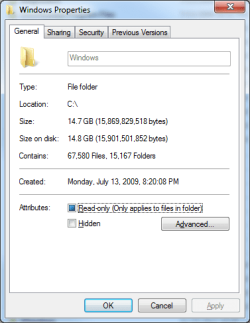
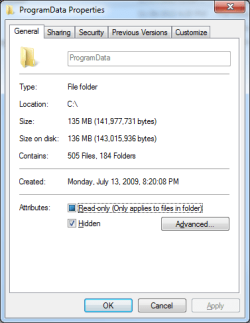
How big is C:\Windows and C:\ProgramData?

- HP normally creates a Drivers and App folder that can be big.
- Virtual memory (pagefile.sys) can be huge depending on the it's settings.
- Hiberfil.sys is the same memory size.

If you're going to do a clean install on the SSD, I recommend you move C:\Users from the SSD to the HDD (D:\Users)
 

Attachments

My Computers

System One System Two

  • Computer type
    PC/Desktop
    Computer Manufacturer/Model Number
    custom build
    OS
    Windows 7 HP 64
    CPU
    i5 6600K - 800MHz to 4200MHz
    Motherboard
    GA-Z170-HD3P
    Memory
    4+4G GSkill DDR4 3000
    Graphics Card(s)
    IG - Intel 530
    Monitor(s) Displays
    Samsung 226BW
    Screen Resolution
    1680x1050
    Hard Drives
    (1) -1 SM951 – 128GB M.2 AHCI PCIe SSD drive for Windows 7 and Lubuntu
    (2) -1 WD SATA 3 - 1T for Data
    (3) -1 WD SATA 3 - 1T for backup
    PSU
    Thermaltake 450W TR2 gold
    Keyboard
    Old and good Chicony mechanical keyboard
    Mouse
    Logitech mX performance - 9 buttons (had to disable some)
    Internet Speed
    500Mb/s
    Browser
    Firefox 64
    Other Info
    TinyWall firewall
  • Computer type
    Laptop
    System Manufacturer/Model Number
    Asus Q550LF
    OS
    Windows 7 Pro
    CPU
    i7-4500U 800MHz to 3.0GHz
    Motherboard
    Asus Q550LF
    Memory
    (4+4)G DDR3 1600
    Graphics Card(s)
    IG intel 4400 + NVIDIA GeForce GT 745M
    Sound Card
    Realtek
    Monitor(s) Displays
    LG Display LP156WF4-SPH1
    Screen Resolution
    1920 x 1080
    Hard Drives
    BX500 120G SSD for Windows and programs +
    1T HDD for data
    Internet Speed
    500 Mb/s
    Browser
    Firefox
    Other Info
    TinyWall firewall
Hi

wondering if windows.old is still present

odd comment you made RE MBR and EUFI..... as far as i know you cant have both running at the same time

can you post your disk Management settings
 

My Computer

Computer type
PC/Desktop
Computer Manufacturer/Model Number
medionl/Aspire 6930G/acer x55a
OS
W7 home premium 32bit/W7HP 64bit/w10 tp insider ring
CPU
E5300 dual core
Motherboard
medion MS7366
Memory
3gb
Graphics Card(s)
Nvidia Geforce 7100 Nforce 630i
Monitor(s) Displays
avixc
Internet Speed
n (isp resticted to 72)
Antivirus
mse/pands
Browser
palemoon
Other Info
Belkin Fd7050 n USB using Railink RT2870 drivers, more upto date
Thanks for response,

the disk was newly-formatted. and during install, almost running cleaning and defragment on every step. as mentioned, (HP 800 G1 OS size looks normal, 28 GB). but HP 8300 OS size is some 60 GB.

windows.pngprogramdata.png


OS size in total (60 GB). about 20GB spare room on partition.

win7pro os.png

I cannot find Virtual memory (pagefile.sys) and Hiberfil.sys to verify. but, y, it's with 24 GB RAM. may it cause the same memory size VM? (i.e. 24 GB VM)


Did you do a Disk Cleanup after installation?
How big is C:\Windows and C:\ProgramData?

- HP normally creates a Drivers and App folder that can be big.
- Virtual memory (pagefile.sys) can be huge depending on the it's settings.
- Hiberfil.sys is the same memory size.

If you're going to do a clean install on the SSD, I recommend you move C:\Users from the SSD to the HDD (D:\Users)
 

My Computers

System One System Two

  • Computer type
    PC/Desktop
    Computer Manufacturer/Model Number
    HP Elite 800 G5
    OS
    Windows 7 Pro 64-bit
    CPU
    I7-9700
    Memory
    32 GB
  • Computer type
    Laptop
    System Manufacturer/Model Number
    ASUS UX305C
    OS
    Windows 7 Pro 64-bit
I cannot find Virtual memory (pagefile.sys) and Hiberfil.sys to verify. but, y, it's with 24 GB RAM. may it cause the same memory size VM? (i.e. 24 GB VM)

That's it.
Pagefile.sys and Hiberfil.sys are system and hidden files and they are on the drive root (C:/)
You can see them if you set Explorer to show system and hidden files.
Control Panel\All Control Panel Items\Folder Options - View tab

I have a small SSD for Windows and programs and a HDD for data.
I had disabled hibernation (powercfg -h off) so I don't have Hiberfil.sys. I disabled virtual memory (pagefile.sys) on C: (SSD) and enabled on D: (HDD). I suggest you do the same.
 

My Computers

System One System Two

  • Computer type
    PC/Desktop
    Computer Manufacturer/Model Number
    custom build
    OS
    Windows 7 HP 64
    CPU
    i5 6600K - 800MHz to 4200MHz
    Motherboard
    GA-Z170-HD3P
    Memory
    4+4G GSkill DDR4 3000
    Graphics Card(s)
    IG - Intel 530
    Monitor(s) Displays
    Samsung 226BW
    Screen Resolution
    1680x1050
    Hard Drives
    (1) -1 SM951 – 128GB M.2 AHCI PCIe SSD drive for Windows 7 and Lubuntu
    (2) -1 WD SATA 3 - 1T for Data
    (3) -1 WD SATA 3 - 1T for backup
    PSU
    Thermaltake 450W TR2 gold
    Keyboard
    Old and good Chicony mechanical keyboard
    Mouse
    Logitech mX performance - 9 buttons (had to disable some)
    Internet Speed
    500Mb/s
    Browser
    Firefox 64
    Other Info
    TinyWall firewall
  • Computer type
    Laptop
    System Manufacturer/Model Number
    Asus Q550LF
    OS
    Windows 7 Pro
    CPU
    i7-4500U 800MHz to 3.0GHz
    Motherboard
    Asus Q550LF
    Memory
    (4+4)G DDR3 1600
    Graphics Card(s)
    IG intel 4400 + NVIDIA GeForce GT 745M
    Sound Card
    Realtek
    Monitor(s) Displays
    LG Display LP156WF4-SPH1
    Screen Resolution
    1920 x 1080
    Hard Drives
    BX500 120G SSD for Windows and programs +
    1T HDD for data
    Internet Speed
    500 Mb/s
    Browser
    Firefox
    Other Info
    TinyWall firewall
I disabled virtual memory (pagefile.sys) on C: (SSD) and enabled on D: (HDD). I suggest you do the same.
This is pretty much the opposite if what you should do. Putting a pagefile on a normal HDD means that you get a slower pagefile and you waste the speed of a SSD. Since the pagefile is a very frequently read and written to, putting it on the fastest drive will achieve the best system performance.

The system drive or a second SSD is the best option, while using a HDD for it means slower response times.
 

My Computer

Computer type
Laptop
Computer Manufacturer/Model Number
Toshiba Sattelite A665-S6092
OS
Windows 7 Ultimate x64
CPU
Intel Core i7-740QM
Memory
8 GB DDR3
Graphics Card(s)
NVIDIA GeForce 330GT
Screen Resolution
1366x768
Hard Drives
Samsung 840 SSD 500GB
1TB USB3 external HD
Cooling
Coolermaster Notepal U3 notebook cooling pad
Internet Speed
3mbps ASDL
Antivirus
ClamWin 0.98.7
Browser
Opera 12.17 x86 (main), Firefox 38 (sec), IE11 (last resort)
This is pretty much the opposite if what you should do. Putting a pagefile on a normal HDD means that you get a slower pagefile and you waste the speed of a SSD. Since the pagefile is a very frequently read and written to, putting it on the fastest drive will achieve the best system performance.

The system drive or a second SSD is the best option, while using a HDD for it means slower response times.

You're right IF your concern is getting low on physical memory and using virtual memory. I have "only" 8G of memory but I never see using more than 50% so i guess it never use the virtual memory
My concern is to avoid writing large files on my SSD and reducing its life. My 128G is no 6 years old and it's 97% heathy
 

My Computers

System One System Two

  • Computer type
    PC/Desktop
    Computer Manufacturer/Model Number
    custom build
    OS
    Windows 7 HP 64
    CPU
    i5 6600K - 800MHz to 4200MHz
    Motherboard
    GA-Z170-HD3P
    Memory
    4+4G GSkill DDR4 3000
    Graphics Card(s)
    IG - Intel 530
    Monitor(s) Displays
    Samsung 226BW
    Screen Resolution
    1680x1050
    Hard Drives
    (1) -1 SM951 – 128GB M.2 AHCI PCIe SSD drive for Windows 7 and Lubuntu
    (2) -1 WD SATA 3 - 1T for Data
    (3) -1 WD SATA 3 - 1T for backup
    PSU
    Thermaltake 450W TR2 gold
    Keyboard
    Old and good Chicony mechanical keyboard
    Mouse
    Logitech mX performance - 9 buttons (had to disable some)
    Internet Speed
    500Mb/s
    Browser
    Firefox 64
    Other Info
    TinyWall firewall
  • Computer type
    Laptop
    System Manufacturer/Model Number
    Asus Q550LF
    OS
    Windows 7 Pro
    CPU
    i7-4500U 800MHz to 3.0GHz
    Motherboard
    Asus Q550LF
    Memory
    (4+4)G DDR3 1600
    Graphics Card(s)
    IG intel 4400 + NVIDIA GeForce GT 745M
    Sound Card
    Realtek
    Monitor(s) Displays
    LG Display LP156WF4-SPH1
    Screen Resolution
    1920 x 1080
    Hard Drives
    BX500 120G SSD for Windows and programs +
    1T HDD for data
    Internet Speed
    500 Mb/s
    Browser
    Firefox
    Other Info
    TinyWall firewall
Back
Top