Other ways to boot in safe mode HP dv6 W7.

xhimi

TonT
Member
Local time
5:43 AM
Messages
45
hi. I have a HP Pavilion laptop DV6.
RAM: 3GB
CPU: 2.1 GHz
Graphic Card: 512MB
WINDOWS 7 ULTIMATE.
I installed a program boujou 4.1.
but when installed, after 2 minutes came a blue screen with some letters and stopped
From that moment did not start windows.
When the switch on, it seems only the hp logo and menu info F1, F2, F9, F11.
and after these seem only this: "_"that turns off the light and there is no other info I tried to start in safe mode but does not start with any of the buttons F1, F2, F3, F4, F5, F6, F7, F8, F9, F10, F11, F12
Can someone tell me other way to start in safe mode?
I did not lose because I made backup documents


Thanks to all.
 

My Computer My Computer

At a glance

w7 home premium2.13gb1gb
OS
w7 home premium
CPU
2.1
Motherboard
amd athlon
Memory
3gb
Graphics Card(s)
1gb
Internet Speed
8MBS/S
F8
Press and hold it, or tap it constantly during boot up.
One of those methods should work.
 

My Computer My Computer

At a glance

Windows 7 Home Premium 64 bitIntel Core i7-4790G.SKILL 8GB (2 x 4GB) DDR3 F3-10666CL9D-8GBNTAMD Radeon R7 250
Computer type
PC/Desktop
Computer Manufacturer/Model Number
Custom Build
OS
Windows 7 Home Premium 64 bit
CPU
Intel Core i7-4790
Motherboard
GA-Z87X-D3H
Memory
G.SKILL 8GB (2 x 4GB) DDR3 F3-10666CL9D-8GBNT
Graphics Card(s)
AMD Radeon R7 250
Sound Card
Realtek ALC892
Monitor(s) Displays
Samsung UN32EH5000, Dell 1703FPT
Screen Resolution
1920 x 1080, 1280 x 1024
Hard Drives
WD5003AZEX
WD10EZEX
Samsung HD103SJ
Samsung 128 GB 840 PRO
PSU
SeaSonic M12II SS-500GM
Case
Fractal Design Define R4
Cooling
Zalman CNPS9900ALED
Keyboard
Logitech K800
Mouse
Logitech M705
Internet Speed
16 Mbps
Antivirus
Avast
Browser
Firefox
Other Info
Bose Companion 2 Multimedia Speakers
F8
Press and hold it, or tap it constantly during boot up.
One of those methods should work.

I try this but nothing is happen,is show the same screen again.
and i haven't change never nothing from boot menu,is by default.
 

My Computer My Computer

At a glance

w7 home premium2.13gb1gb
OS
w7 home premium
CPU
2.1
Motherboard
amd athlon
Memory
3gb
Graphics Card(s)
1gb
Internet Speed
8MBS/S
If it were me xhimi, I would do a System Restore rather than trying to start in Safe Mode. Your new Boujou app may not be compatible with Windows 7 or you may have gotten a corrupted installation. Either way, I would undo it through System Restore before I took a chance on further damaging my system.

By the way, there's help available at the Boujou site as well as a forum for problem solving. Why don't you see if your problem has been addressed?
 

My Computer My Computer

At a glance

Vista 64 bit and 32 bit (SP2)Intel(R) Core(TM)2 Duo Processor T9400 (2.53 GHz4GB DDR2 System Memory (2 Dimm)512 MB NVIDIA GeForce 9600M GT
Computer Manufacturer/Model Number
HP Pavillion dv5t (generation 1)
OS
Vista 64 bit and 32 bit (SP2)
CPU
Intel(R) Core(TM)2 Duo Processor T9400 (2.53 GHz
Memory
4GB DDR2 System Memory (2 Dimm)
Graphics Card(s)
512 MB NVIDIA GeForce 9600M GT
Monitor(s) Displays
15.4" diagonal WSXGA+ High-Definition HP BrightView Widescre
Screen Resolution
1680 x 1050
Hard Drives
320GB 5400RPM SATA Hard Drive with HP ProtectSmart Hard Drive Protection
Keyboard
Built-in HP
Mouse
Built in - Synaptics TouchPad V6.5 on PS/2 Port
Internet Speed
Max
Other Info
~ Intel Next-Gen Wireless-N Mini-card w/Bluetooth ~ Blu-Ray ROM DVD+/-R/RW ~ Integ. HDTV Hybrid Tuner ~ 12 Cell Battery ~ MS Office (Home Premium) 2007 ~
Hi,

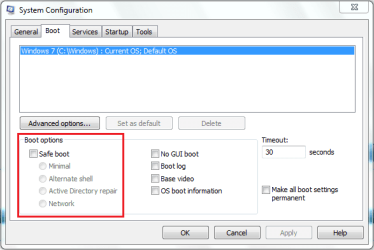
If you manage to get the machine booted at all you can use msconfig to select safe boot on the next restart.

boot.PNG

Also, as soon as the main HP splash screen has disappeared you need to continually tap F8 until the boot options menu appears.
 

My Computer My Computer

At a glance

Windows 7 Ultimate x64AMD Sempron Dual Core3GBNVIDIA GeForce 6150SE nForce 430
Computer Manufacturer/Model Number
Compaq Desktop
OS
Windows 7 Ultimate x64
CPU
AMD Sempron Dual Core
Memory
3GB
Graphics Card(s)
NVIDIA GeForce 6150SE nForce 430
Screen Resolution
1024x768
Hard Drives
150GB Sata
Hi,

If you manage to get the machine booted at all you can use msconfig to select safe boot on the next restart.

View attachment 141528

Also, as soon as the main HP splash screen has disappeared you need to continually tap F8 until the boot options menu appears.

Hi.
I can't start to do this you show me..
I tried and the system restore, but not completed.
I have dvd of installation of w7.
With this I can do anything?
Perhaps the commandprompt, any possibility?
On the dvd I tried startup repair = nothing, system restore = nothing,
At least I have the opportunity to backup.


My Computer My Computer

At a glance

w7 home premium2.13gb1gb
OS
w7 home premium
CPU
2.1
Motherboard
amd athlon
Memory
3gb
Graphics Card(s)
1gb
Internet Speed
8MBS/S
When the the switch on, it seems only the hp logo and menu info F1, F2, F9, F11.
One of these keys (may be F9) should get you into a recovery options screen (pay close attention during logo screen) and browse through the menus carefully as there should be a "system restore" option as Imperfect1 pointed out above or Recovery options.

You only want to use the recovery options as a last resort as those options will either return your computer to factory condition and you will lose any saved media/documents + reinstall all of your programs or option similar to a repair install where you will only have to reinstall all/some of your programs.

Note: option may be labeled "Recover/restore your computer to an earlier time" or something similar.
 

My Computer My Computer

At a glance

Windows 10 Pro x 2/Windows 11 HomeIntel i7 2600K @ 3.40 GHzCorsair Vengeance 16GB DDR3 1600MHz CL8 Dual ...EVGA GeForce RTX 3080 XC3 ULTRA GAMING 10GB G...
Computer type
PC/Desktop
Computer Manufacturer/Model Number
My own abomination, I call it the Money Pit
OS
Windows 10 Pro x 2/Windows 11 Home
CPU
Intel i7 2600K @ 3.40 GHz
Motherboard
ASUS Sabertooth P67
Memory
Corsair Vengeance 16GB DDR3 1600MHz CL8 Dual Channel Kit
Graphics Card(s)
EVGA GeForce RTX 3080 XC3 ULTRA GAMING 10GB GDDR6X
Sound Card
Onboard Realtek or Nvidia High Definition Audio (HDMI)
Monitor(s) Displays
Samsung JS7000 50" SUHD TV or Samsung 27" FHD 60Hz 8ms GTG V
Screen Resolution
1920 x 1080
Hard Drives
1 x Samsung 870 EVO 250 GB SSD (Windows 10 Pro), 1 x Samsung 850 EVO 250 GB SSD (Windows 10 Pro)
PSU
Corsair AX860 - 860W Modular Power Supply
Case
Phanteks Enthoo Luxe Full Tower Case - Black
Cooling
CORSAIR Hydro Series H150i PRO RGB 360mm Liquid CPU Cooler
Keyboard
Logitech K830 Illuminated Living-Room Keyboard
Mouse
Logitech MX Anywhere 2S Wireless Mouse
Internet Speed
100 Mbps
Antivirus
ESET Internet Security
Browser
Latest Version Of Firefox & Microsoft Edge Chromium Stable
Other Info
LG Super Multi Blue Internal Blu-ray Disk Rewriter - BH10LS30
6x2 HDMI Switcher (6 inputs, 2 outputs) so I can send the output of my Cable Box, Roku, or any my 4 computers to either my TV or Monitor separately or simultaneously.

My Computer My Computer

At a glance

Windows 10, Home Clean InstallIntel Core2 processsor Q8200(2.33Ghz 1333FSB)...6 gbATI Radeon 256MB HD3650
Computer type
PC/Desktop
Computer Manufacturer/Model Number
Dell XPS 420
OS
Windows 10, Home Clean Install
CPU
Intel Core2 processsor Q8200(2.33Ghz 1333FSB) Quad Core Tech
Motherboard
Dell
Memory
6 gb
Graphics Card(s)
ATI Radeon 256MB HD3650
Sound Card
Intergrated 7.1 Channel Audio
Monitor(s) Displays
Dell SP2009W 20"
Hard Drives
640 GB Serial ATA Hard drive
Cooling
Fan
Keyboard
Dell USB Keyboard
Mouse
Dell Premium Optical USB
Internet Speed
DSL 2.85
When the the switch on, it seems only the hp logo and menu info F1, F2, F9, F11.
One of these keys (may be F9) should get you into a recovery options screen (pay close attention during logo screen) and browse through the menus carefully as there should be a "system restore" option as Imperfect1 pointed out above or Recovery options.

You only want to use the recovery options as a last resort as those options will either return your computer to factory condition and you will lose any saved media/documents + reinstall all of your programs or option similar to a repair install where you will only have to reinstall all/some of your programs.

Note: option may be labeled "Recover/restore your computer to an earlier time" or something similar.

Just as a point of clarification, System Restore doesn't affect or change any of the user's personal files/folders.
 

My Computer My Computer

At a glance

Vista 64 bit and 32 bit (SP2)Intel(R) Core(TM)2 Duo Processor T9400 (2.53 GHz4GB DDR2 System Memory (2 Dimm)512 MB NVIDIA GeForce 9600M GT
Computer Manufacturer/Model Number
HP Pavillion dv5t (generation 1)
OS
Vista 64 bit and 32 bit (SP2)
CPU
Intel(R) Core(TM)2 Duo Processor T9400 (2.53 GHz
Memory
4GB DDR2 System Memory (2 Dimm)
Graphics Card(s)
512 MB NVIDIA GeForce 9600M GT
Monitor(s) Displays
15.4" diagonal WSXGA+ High-Definition HP BrightView Widescre
Screen Resolution
1680 x 1050
Hard Drives
320GB 5400RPM SATA Hard Drive with HP ProtectSmart Hard Drive Protection
Keyboard
Built-in HP
Mouse
Built in - Synaptics TouchPad V6.5 on PS/2 Port
Internet Speed
Max
Other Info
~ Intel Next-Gen Wireless-N Mini-card w/Bluetooth ~ Blu-Ray ROM DVD+/-R/RW ~ Integ. HDTV Hybrid Tuner ~ 12 Cell Battery ~ MS Office (Home Premium) 2007 ~
When the the switch on, it seems only the hp logo and menu info F1, F2, F9, F11.
One of these keys (may be F9) should get you into a recovery options screen (pay close attention during logo screen) and browse through the menus carefully as there should be a "system restore" option as Imperfect1 pointed out above or Recovery options.

You only want to use the recovery options as a last resort as those options will either return your computer to factory condition and you will lose any saved media/documents + reinstall all of your programs or option similar to a repair install where you will only have to reinstall all/some of your programs.

Note: option may be labeled "Recover/restore your computer to an earlier time" or something similar.

Just as a point of clarification, System Restore doesn't affect or change any of the user's personal files/folders.
EDIT: or programs (depends on restore point chosen)

You are correct Imperfect1 , but I must stress to the OP the pitfalls of picking the Recovery option should the need arise.
 

My Computer My Computer

At a glance

Windows 10 Pro x 2/Windows 11 HomeIntel i7 2600K @ 3.40 GHzCorsair Vengeance 16GB DDR3 1600MHz CL8 Dual ...EVGA GeForce RTX 3080 XC3 ULTRA GAMING 10GB G...
Computer type
PC/Desktop
Computer Manufacturer/Model Number
My own abomination, I call it the Money Pit
OS
Windows 10 Pro x 2/Windows 11 Home
CPU
Intel i7 2600K @ 3.40 GHz
Motherboard
ASUS Sabertooth P67
Memory
Corsair Vengeance 16GB DDR3 1600MHz CL8 Dual Channel Kit
Graphics Card(s)
EVGA GeForce RTX 3080 XC3 ULTRA GAMING 10GB GDDR6X
Sound Card
Onboard Realtek or Nvidia High Definition Audio (HDMI)
Monitor(s) Displays
Samsung JS7000 50" SUHD TV or Samsung 27" FHD 60Hz 8ms GTG V
Screen Resolution
1920 x 1080
Hard Drives
1 x Samsung 870 EVO 250 GB SSD (Windows 10 Pro), 1 x Samsung 850 EVO 250 GB SSD (Windows 10 Pro)
PSU
Corsair AX860 - 860W Modular Power Supply
Case
Phanteks Enthoo Luxe Full Tower Case - Black
Cooling
CORSAIR Hydro Series H150i PRO RGB 360mm Liquid CPU Cooler
Keyboard
Logitech K830 Illuminated Living-Room Keyboard
Mouse
Logitech MX Anywhere 2S Wireless Mouse
Internet Speed
100 Mbps
Antivirus
ESET Internet Security
Browser
Latest Version Of Firefox & Microsoft Edge Chromium Stable
Other Info
LG Super Multi Blue Internal Blu-ray Disk Rewriter - BH10LS30
6x2 HDMI Switcher (6 inputs, 2 outputs) so I can send the output of my Cable Box, Roku, or any my 4 computers to either my TV or Monitor separately or simultaneously.

My Computer My Computer

At a glance

Windows 10 Pro x 2/Windows 11 HomeIntel i7 2600K @ 3.40 GHzCorsair Vengeance 16GB DDR3 1600MHz CL8 Dual ...EVGA GeForce RTX 3080 XC3 ULTRA GAMING 10GB G...
Computer type
PC/Desktop
Computer Manufacturer/Model Number
My own abomination, I call it the Money Pit
OS
Windows 10 Pro x 2/Windows 11 Home
CPU
Intel i7 2600K @ 3.40 GHz
Motherboard
ASUS Sabertooth P67
Memory
Corsair Vengeance 16GB DDR3 1600MHz CL8 Dual Channel Kit
Graphics Card(s)
EVGA GeForce RTX 3080 XC3 ULTRA GAMING 10GB GDDR6X
Sound Card
Onboard Realtek or Nvidia High Definition Audio (HDMI)
Monitor(s) Displays
Samsung JS7000 50" SUHD TV or Samsung 27" FHD 60Hz 8ms GTG V
Screen Resolution
1920 x 1080
Hard Drives
1 x Samsung 870 EVO 250 GB SSD (Windows 10 Pro), 1 x Samsung 850 EVO 250 GB SSD (Windows 10 Pro)
PSU
Corsair AX860 - 860W Modular Power Supply
Case
Phanteks Enthoo Luxe Full Tower Case - Black
Cooling
CORSAIR Hydro Series H150i PRO RGB 360mm Liquid CPU Cooler
Keyboard
Logitech K830 Illuminated Living-Room Keyboard
Mouse
Logitech MX Anywhere 2S Wireless Mouse
Internet Speed
100 Mbps
Antivirus
ESET Internet Security
Browser
Latest Version Of Firefox & Microsoft Edge Chromium Stable
Other Info
LG Super Multi Blue Internal Blu-ray Disk Rewriter - BH10LS30
6x2 HDMI Switcher (6 inputs, 2 outputs) so I can send the output of my Cable Box, Roku, or any my 4 computers to either my TV or Monitor separately or simultaneously.
Finland_orb_small.png

Terve Xhimi, tervetuloa Seiska Foorumille.

Vanhemmissa HP'n Pavilion dv-sarjan läppäreissä esiintyy silloin tällöin kuvalemasi kaltainen buuttiongelma, kun joko akku tai emolevy alkaa olla käyttötaipaleensa loppusuoralla. Kone ei saa aloitettua ns. POST vaihetta (Power On Self Test, käynnistyksen itsetestaus). Ongelman ilmestyminen juuri nyt voi olla ihan puhdas sattuma, sillä ei välttämättä ole mitään tekemistä asentamasi Boujou softan kanssa.

Kokeile tätä resetoidaksesi kone:
  • Sammuta kone
  • Irroita akku ja virtajohto
  • Pidä koneen virtakytkintä alaspainettuna noin 30 sekuntia
  • Odota 15-20 minuuttia, liitä sitten virtajohto mutta ei akkua
  • Käynnistä kone
  • Jos kone käynnistyy, sulje se uudestaan ja laita akku paikalleen ennen uudelleen käynnistystä

Jos kone ei edelleenkään käynnisty, tule takaisin niin kokeillaan jotain muuta.

Toivotaan että onnistuu!

Kari

US-UK.png

Hello Xhimi, welcome to the Seven Forums.

Older HP Pavilion dv series laptops can have this kind of boot problems sometimes when either the battery or motherboard is coming closer its life cycle. The laptop simply can't start the POST (Power On Self Test) and can therefore not boot. That your issue occurred first time just after you installed a new application and got a blue screen can be a pure coincidence.

You could try this to completely reset your laptop:
  • Turn the laptop off
  • Disconnect the power cord, remove the battery
  • Press and hold down the power switch of the laptop at least 30 seconds
  • Wait 15 to 20 minutes, plug the power cord back. Do not insert the battery yet
  • Turn the laptop on
  • If it boots normally now, turn it off again when Windows has booted normally, replace the battery before turning it on again

If your laptop does not boot after this procedure, come back and we'll try something else.

Good luck!

Kari
 

My Computer My Computer

At a glance

Windows 10 Pro x64 EN-GB1.6 GHz Intel Core i7-720QM Processor6 GBATI Mobility Radeon HD 5850 Graphics
Computer type
Laptop
Computer Manufacturer/Model Number
HP ENVY 17-1150eg
OS
Windows 10 Pro x64 EN-GB
CPU
1.6 GHz Intel Core i7-720QM Processor
Memory
6 GB
Graphics Card(s)
ATI Mobility Radeon HD 5850 Graphics
Sound Card
Beats sound system with integrated subwoofer
Monitor(s) Displays
17" laptop display, 22" LED and 32" Full HD TV through HDMI
Screen Resolution
1600*900 (1), 1920*1080 (2&3)
Hard Drives
Internal: 2 x 500 GB SATA Hard Disk Drive 7200 rpm
External: 2TB for backups, 3TB USB3 network drive for media
Cooling
As Envy runs a bit warm, I have it on a Cooler Master pad
Keyboard
Logitech diNovo Media Desktop Laser (bluetooth)
Mouse
Logitech Performance Mouse MX
Internet Speed
50/10 Mbps VDSL
Antivirus
Windows Defender 4.3.9431.0
Browser
Maxthon 3.5.2., IE11
View attachment 141533

Terve Xhimi, tervetuloa Seiska Foorumille.

Vanhemmissa HP'n Pavilion dv-sarjan läppäreissä esiintyy silloin tällöin kuvalemasi kaltainen buuttiongelma, kun joko akku tai emolevy alkaa olla käyttötaipaleensa loppusuoralla. Kone ei saa aloitettua ns. POST vaihetta (Power On Self Test, käynnistyksen itsetestaus). Ongelman ilmestyminen juuri nyt voi olla ihan puhdas sattuma, sillä ei välttämättä ole mitään tekemistä asentamasi Boujou softan kanssa.


Kokeile tätä resetoidaksesi kone:
  • Sammuta kone
  • Irroita akku ja virtajohto
  • Pidä koneen virtakytkintä alaspainettuna noin 30 sekuntia
  • Odota 15-20 minuuttia, liitä sitten virtajohto mutta ei akkua
  • Käynnistä kone
  • Jos kone käynnistyy, sulje se uudestaan ja laita akku paikalleen ennen uudelleen käynnistystä
Jos kone ei edelleenkään käynnisty, tule takaisin niin kokeillaan jotain muuta.

Toivotaan että onnistuu!

Kari

View attachment 141534

Hello Xhimi, welcome to the Seven Forums.

Older HP Pavilion dv series laptops can have this kind of boot problems sometimes when either the battery or motherboard is coming closer its life cycle. The laptop simply can't start the POST (Power On Self Test) and can therefore not boot. That your issue occurred first time just after you installed a new application and got a blue screen can be a pure coincidence.


You could try this to completely reset your laptop:
  • Turn the laptop off
  • Disconnect the power cord, remove the battery
  • Press and hold down the power switch of the laptop at least 30 seconds
  • Wait 15 to 20 minutes, plug the power cord back. Do not insert the battery yet
  • Turn the laptop on
  • If it boots normally now, turn it off again when Windows has booted normally, replace the battery before turning it on again
If your laptop does not boot after this procedure, come back and we'll try something else.

Good luck!

Kari

Hi.
I try and this option but nothing happen.
I see this "safe mode":
I put in the USB with w7 to boot from USB.
I push tthe buton to power on and i press F8 on startup.
I get safe mode but with window "install windows 7" option.
Nothing,the options is to install window clean,fresh... and more.
I don't want to install new window again.
I want to have the old window with my files,doc,pic,and more, i haven't problem the programs.
Anyway, i want to thnx all people here for your help.
i believe i will find some solution.
All the best.
 

My Computer My Computer

At a glance

w7 home premium2.13gb1gb
OS
w7 home premium
CPU
2.1
Motherboard
amd athlon
Memory
3gb
Graphics Card(s)
1gb
Internet Speed
8MBS/S
First, I have to apologize Xhimi that I forgot you are not a Finn although you show Finnish flag under you avatar, so using Finnish language in my previous post was a mistake. Just after posting I remembered who you are, that we've had this discussion earlier :)

Sorry. No more Finnish to you ;)

Then back to your issue. If your computer does not boot past that blinking hyphen on black screen it means POST can not run, which makes computer unable to boot. I still think this could be your issue, and if it was my laptop, I would repeat the resetting procedure once more.

Next thing is to check the connectors of hard disk(s). The HD's are located on the bottom of your laptop, under a lid attached with 4 screws. Open the lid, disconnect and reconnect HD's.

If everything else fails, but as you mentioned you can boot from your installation USB, you can do a repair install. It keeps all your installed applications and personal files. http://www.sevenforums.com/tutorials/3413-repair-install.html

Kari
 

My Computer My Computer

At a glance

Windows 10 Pro x64 EN-GB1.6 GHz Intel Core i7-720QM Processor6 GBATI Mobility Radeon HD 5850 Graphics
Computer type
Laptop
Computer Manufacturer/Model Number
HP ENVY 17-1150eg
OS
Windows 10 Pro x64 EN-GB
CPU
1.6 GHz Intel Core i7-720QM Processor
Memory
6 GB
Graphics Card(s)
ATI Mobility Radeon HD 5850 Graphics
Sound Card
Beats sound system with integrated subwoofer
Monitor(s) Displays
17" laptop display, 22" LED and 32" Full HD TV through HDMI
Screen Resolution
1600*900 (1), 1920*1080 (2&3)
Hard Drives
Internal: 2 x 500 GB SATA Hard Disk Drive 7200 rpm
External: 2TB for backups, 3TB USB3 network drive for media
Cooling
As Envy runs a bit warm, I have it on a Cooler Master pad
Keyboard
Logitech diNovo Media Desktop Laser (bluetooth)
Mouse
Logitech Performance Mouse MX
Internet Speed
50/10 Mbps VDSL
Antivirus
Windows Defender 4.3.9431.0
Browser
Maxthon 3.5.2., IE11
Was this a 'shared' program?
 

My Computer My Computer

At a glance

Windows 7 Ultimate 32bit SP1Intel(R) Core(TM)2 Quad CPU @ 2.40GHz, 2400 MHz4 GBATI Radeon HD 2600 Pro
Computer type
PC/Desktop
Computer Manufacturer/Model Number
Bruce ... somewhere in his 40's
OS
Windows 7 Ultimate 32bit SP1
CPU
Intel(R) Core(TM)2 Quad CPU @ 2.40GHz, 2400 MHz
Motherboard
INTEL/D975XBX2
Memory
4 GB
Graphics Card(s)
ATI Radeon HD 2600 Pro
Monitor(s) Displays
Samsung SyncMaster 914v
Screen Resolution
1280 x 1024
Hard Drives
2/500GB each ... ST3500630AS ATA Device.
One is not connected
PSU
Rocketfish 700 W
Case
G.Skill Gigabyte Chassis
Keyboard
Standard PS/2 Keyboard
Mouse
Microsoft PS/2 Mouse
Internet Speed
DSL
Antivirus
Avira Internet Security
Browser
IE 11
Other Info
ATI HDMI Audio
First, I have to apologize Xhimi that I forgot you are not a Finn although you show Finnish flag under you avatar, so using Finnish language in my previous post was a mistake. Just after posting I remembered who you are, that we've had this discussion earlier :)

Sorry. No more Finnish to you ;)

.....

If everything else fails, but as you mentioned you can boot from your installation USB, you can do a repair install. It keeps all your installed applications and personal files. http://www.sevenforums.com/tutorials/3413-repair-install.html

Kari

Please, do not have to ask forgiveness.
I really enjoy that you remember.
♥♥♥Many thanks for your support and solutions to tell.
But I missed it all, as made clean install, that I lost patience and got bored.
Can "I had saved all the files with the doc doing refresh install.
But this idea came after I had reached the middle of installation.
♥♥♥However, many thanks for your help and everyone here at SEVEN FORUMS.
♥♥♥♥♥
 

My Computer My Computer

At a glance

w7 home premium2.13gb1gb
OS
w7 home premium
CPU
2.1
Motherboard
amd athlon
Memory
3gb
Graphics Card(s)
1gb
Internet Speed
8MBS/S
Back
Top