Outlook 2003

bigmck

Very Senior Member
Guru
Gold Member
VIP
Local time
5:10 AM
Messages
4,745
Location
Houston, Texas
Is it possible to put two email addresses in Outlook so that all mail comes to the same Inbox or even two Inboxes? Thanks,
 

My Computer

Computer type
PC/Desktop
Computer Manufacturer/Model Number
Custom Build
OS
Windows 7 Home Premium 32-Bit - Build 7600 SP1
CPU
Intel Core i3-2120 3.30Ghz
Motherboard
Asus P8Z68-V LX Intel Z68 Socket H2 ATX
Memory
Kingston 4 GB DDR3 1333 mhz
Graphics Card(s)
AMD Radeon HD6670
Sound Card
Sound Blaster Audigy SE 24-Bit
Monitor(s) Displays
Asus VE228
Screen Resolution
1440 X 900
Hard Drives
OCZ Vertex 3 120 GB Sata 3 SSD ==
Kingston SH103/S3 120 G Hyper X 120 GB SSD ==
Western Digital 500 GB Caviar Green 7200 RPM ==
PSU
Corsair CX600M == 600 Watt
Case
NZXT Apollo - Silver with Clear Side Panel
Cooling
Three 120 mm Fans
Keyboard
Microsoft Natural 4000
Mouse
Microsoft Custom Optical 3000
Internet Speed
AT&T Fiber Optic Wireless Network
Antivirus
Microsoft Security Essentials
Browser
Chrome
Other Info
120 mm Blue LED Fan -- Three Blue LED Lazer Light Sticks
I've never used Outlook 2003, but as far as I know, every email client out there supports multiple accounts. Did you want something more??
 

My Computer

Computer Manufacturer/Model Number
Alienware X51
OS
Windows 7 Home Premium x64
CPU
Intel Core i7-2600 @3.40GHz
Memory
8.00GB DDR3
Graphics Card(s)
NVIDIA GeForce GTX 555 w/1.0GB RAM
Monitor(s) Displays
BenQ XL2420TX
Screen Resolution
1920x1080@120Hz
Hard Drives
1TB
PSU
330-watt
Keyboard
Logitech Wireless Illuminated Keyboard K800
Mouse
Razer Orochi
Internet Speed
Campus Internet
Is it possible to put two email addresses in Outlook so that all mail comes to the same Inbox or even two Inboxes? Thanks,

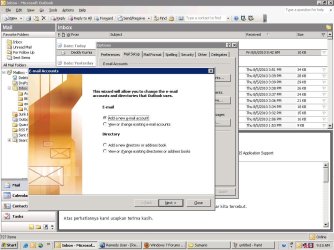
yap..it's can.
you can set the double untitled.JPG
 

My Computer

Computer Manufacturer/Model Number
built up
OS
windows 7
CPU
Phenom II AMD Dragon 3.5Ghz
Memory
DDR3 4GB
Graphics Card(s)
ATI Radeon 512Mb
Monitor(s) Displays
HP L1506
Screen Resolution
1152 x 864
Hard Drives
WDC 1 TB SATA-II Green Power
Keyboard
HP wireless keyboard
Mouse
HP Optic
Internet Speed
1GB
Hi,
bigmck

It is possible to create multiple accounts in outlook 2003. But all the mails will be routed to Inbox.
Two basic ways you can solve your problem, depending on what strategy you want to use.
Step 1:
The first, and perhaps easier, is to create multiple folders then have your messages routed to those folders based on the receiving address. Here are the steps involved, and, yes, you do have to create a rule, but it only takes a minute:
Please find the below attachment which explains how to create rules in Outlook 2003.(this is generic)http://technology.pitt.edu/Documents/email-accounts/accessing-email/outlook/Creating%20Rules%20in%20Outlook%202003.pdf
After opening Rules Wizard--->Select Start from a blank rule---->Select Check messages when they arrive------>Click on Next---->Step 1: Select through the specified account, Step 2: Click on Specified and select the account---->Click Next
--->Step 1: Check move it to the specified folder, Step 2: Click on Specified and select the folder you created--->Click Next----> If there is any exceptions the choose the appropriate option----->Click Finish.
The other way is:
Step 2:
Instead of creating separate accounts you could try creating separate profiles that will give you separate data files;
Go to your Mail Settings, then START --> CONTROL PANEL --> MAIL
Select SHOW PROFILES, then ADD.
Follow through the instructions to set up a profile making sure you have the necessary info from your ISP or POP account ... (account names, passwords, addresses, etc.)
You can create multiple profiles for multiple mails. When ever you open outlook it will ask for the profile and select the profile which you want to access.
 
Last edited:

My Computer

OS
Windows XP
Back
Top