
Outlook 2007 - Can not change .Pst location nor add a new one

jimdot

New member
Power User
Local time
8:41 PM
Messages
35
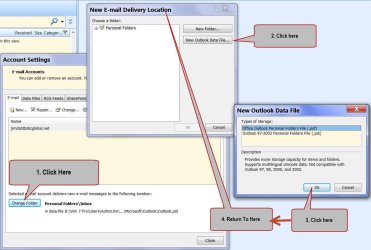
I can not seem to add or point to a new location for my Outlook.Pst file. I go to "Account Setting" then click on "Change Folder", then click "New Outlook Data File", then click "Okay" at next dialog & nothing happens. Nata, zip!! I do not get an Explorer window where I'm able to browse & choose another .Pst file. If I try using the "Data Files" tab & go through the same process & I get the same results. There are no error messages from Outlook. It just doesn't do anything. I've also tried going through the "File" menu & selecting "Open" Then "Outlook Data File". I don't even get any dialogs there. It's as if I've clicked on a do nothing button. I've uninstalled Office completely & then reinstalled it,,, same results. I've also tried running the Repair process on Office & still the same results. I've compared the reg key HKEY_LOCAL_MACHINE\SOFTWARE\Microsoft\Office with the same keys on a machine that Outlook is working on & all the keys & data values look the same.

See the attached screen shot to help explain further. Anyone have any ideas?

Thanks & have a great day,
Jim
 

Attachments
  • Outlook 2007 Screen Shot.jpg
    Outlook 2007 Screen Shot.jpg
    88.1 KB · Views: 18

My Computer My Computer

At a glance

Windows 7 Professional 64Bit
OS
Windows 7 Professional 64Bit
jimdot, follow these steps, you would copy it to the new location first, then point outlook there.

:ar: Locate, move, or backup .pst

To create a new pst use this:ar: recipe
 

My Computer My Computer

At a glance

Windows 10 Pro X64Intel(R) Core(TM) i5-3570K CPU OC@ 4.5GHZ Turbo8.00 GB DDR3 1600MhzMSI Gaming X GTX 1070
Computer type
PC/Desktop
Computer Manufacturer/Model Number
Dude Build
OS
Windows 10 Pro X64
CPU
Intel(R) Core(TM) i5-3570K CPU OC@ 4.5GHZ Turbo
Motherboard
MSI Z77A-G45 Gaming
Memory
8.00 GB DDR3 1600Mhz
Graphics Card(s)
MSI Gaming X GTX 1070
Sound Card
Realtek High Definition
Monitor(s) Displays
Dell S23O9W, HP L1710
Screen Resolution
DELL-1920 x 1080 HP-1280 x1024
Hard Drives
Crucial m4 256 SSD, WD 7200RPM 500GB WD 1TB
PSU
Seasonic X650 GOLD
Case
Zalman Z12
Cooling
Antec Kuhler 920
Keyboard
Logitech
Mouse
MSI DS100 Interceptor
Internet Speed
50 down and 5 up
Antivirus
MSE
Browser
Chrome, IE 11
Other Info
Logitech X-620 Speakers
I've tried all the things suggested in the links you provided & then some. Take another look at the screen shot & follow the numbered steps. At step 3 after clicking "Okay" I am never presented an explorer window where I can browse & point to the Outlook.Pst I want to use.
 

My Computer My Computer

At a glance

Windows 7 Professional 64Bit
OS
Windows 7 Professional 64Bit
After copying the pst, close outlook, then

:ar: Microsoft Office Outlook 2003 and Microsoft Office Outlook 2007
Open Outlook.
On the Tools menu, click Options.
On the Mail Setup tab, click the E-mail accounts button, even if you do not have an email account specified.
On the Data Files tab, click Add.
Click Office Outlook Personal Folders File (.pst), and then click OK.
Find the new location for your .pst file, and then click OK two times.
Click Set as Default.
If this is your default e-mail delivery location, you will receive the following message:

You have changed the default deliver location for your e-mail. This will change the location of your Inbox, Calendar, and other folders. These changes will take effect the next time you start Outlook.

Click OK.
Click the .pst file that was identified in step 4 of the "How to identify the name and location of your personal folder file" section, and then click Remove to remove the local .pst file from your profile.
Click Yes, click Close, and then click OK to close all dialog boxes.
On the File menu, click Exit.
Restart Outlook.


Did you follow this step by step and restart outlook again


I'm confused as you marked the thread solved.
 

My Computer My Computer

At a glance

Windows 10 Pro X64Intel(R) Core(TM) i5-3570K CPU OC@ 4.5GHZ Turbo8.00 GB DDR3 1600MhzMSI Gaming X GTX 1070
Computer type
PC/Desktop
Computer Manufacturer/Model Number
Dude Build
OS
Windows 10 Pro X64
CPU
Intel(R) Core(TM) i5-3570K CPU OC@ 4.5GHZ Turbo
Motherboard
MSI Z77A-G45 Gaming
Memory
8.00 GB DDR3 1600Mhz
Graphics Card(s)
MSI Gaming X GTX 1070
Sound Card
Realtek High Definition
Monitor(s) Displays
Dell S23O9W, HP L1710
Screen Resolution
DELL-1920 x 1080 HP-1280 x1024
Hard Drives
Crucial m4 256 SSD, WD 7200RPM 500GB WD 1TB
PSU
Seasonic X650 GOLD
Case
Zalman Z12
Cooling
Antec Kuhler 920
Keyboard
Logitech
Mouse
MSI DS100 Interceptor
Internet Speed
50 down and 5 up
Antivirus
MSE
Browser
Chrome, IE 11
Other Info
Logitech X-620 Speakers
Dude thanks again, but I've already tried that also. I still get the exact same behavior/results as I described above & in the screen shot. I can not add a new .Pst by way of useing the Data Files tab either.
 

My Computer My Computer

At a glance

Windows 7 Professional 64Bit
OS
Windows 7 Professional 64Bit
Sorry to hear that. Im using my phone now so doing some research is a no go right now. I will take aa look again when I get on my pc
 

My Computer My Computer

At a glance

Windows 10 Pro X64Intel(R) Core(TM) i5-3570K CPU OC@ 4.5GHZ Turbo8.00 GB DDR3 1600MhzMSI Gaming X GTX 1070
Computer type
PC/Desktop
Computer Manufacturer/Model Number
Dude Build
OS
Windows 10 Pro X64
CPU
Intel(R) Core(TM) i5-3570K CPU OC@ 4.5GHZ Turbo
Motherboard
MSI Z77A-G45 Gaming
Memory
8.00 GB DDR3 1600Mhz
Graphics Card(s)
MSI Gaming X GTX 1070
Sound Card
Realtek High Definition
Monitor(s) Displays
Dell S23O9W, HP L1710
Screen Resolution
DELL-1920 x 1080 HP-1280 x1024
Hard Drives
Crucial m4 256 SSD, WD 7200RPM 500GB WD 1TB
PSU
Seasonic X650 GOLD
Case
Zalman Z12
Cooling
Antec Kuhler 920
Keyboard
Logitech
Mouse
MSI DS100 Interceptor
Internet Speed
50 down and 5 up
Antivirus
MSE
Browser
Chrome, IE 11
Other Info
Logitech X-620 Speakers
Thanks, Dude. I gotta leave my macine until latter on also. Ya know the real meat of this issue is that through any of these process to resolve the problem is that I am never presented with a windows explorer window so that I can browse & point/select the .Pst file if want to use.
 

My Computer My Computer

At a glance

Windows 7 Professional 64Bit
OS
Windows 7 Professional 64Bit
Okay when you get back try disabling offline use then re-enable it and see if you can browse to new location
 

My Computer My Computer

At a glance

Windows 10 Pro X64Intel(R) Core(TM) i5-3570K CPU OC@ 4.5GHZ Turbo8.00 GB DDR3 1600MhzMSI Gaming X GTX 1070
Computer type
PC/Desktop
Computer Manufacturer/Model Number
Dude Build
OS
Windows 10 Pro X64
CPU
Intel(R) Core(TM) i5-3570K CPU OC@ 4.5GHZ Turbo
Motherboard
MSI Z77A-G45 Gaming
Memory
8.00 GB DDR3 1600Mhz
Graphics Card(s)
MSI Gaming X GTX 1070
Sound Card
Realtek High Definition
Monitor(s) Displays
Dell S23O9W, HP L1710
Screen Resolution
DELL-1920 x 1080 HP-1280 x1024
Hard Drives
Crucial m4 256 SSD, WD 7200RPM 500GB WD 1TB
PSU
Seasonic X650 GOLD
Case
Zalman Z12
Cooling
Antec Kuhler 920
Keyboard
Logitech
Mouse
MSI DS100 Interceptor
Internet Speed
50 down and 5 up
Antivirus
MSE
Browser
Chrome, IE 11
Other Info
Logitech X-620 Speakers
Where do I disable offline use? thats a new one on me
 

My Computer My Computer

At a glance

Windows 7 Professional 64Bit
OS
Windows 7 Professional 64Bit

My Computer My Computer

At a glance

Windows 10 Pro X64Intel(R) Core(TM) i5-3570K CPU OC@ 4.5GHZ Turbo8.00 GB DDR3 1600MhzMSI Gaming X GTX 1070
Computer type
PC/Desktop
Computer Manufacturer/Model Number
Dude Build
OS
Windows 10 Pro X64
CPU
Intel(R) Core(TM) i5-3570K CPU OC@ 4.5GHZ Turbo
Motherboard
MSI Z77A-G45 Gaming
Memory
8.00 GB DDR3 1600Mhz
Graphics Card(s)
MSI Gaming X GTX 1070
Sound Card
Realtek High Definition
Monitor(s) Displays
Dell S23O9W, HP L1710
Screen Resolution
DELL-1920 x 1080 HP-1280 x1024
Hard Drives
Crucial m4 256 SSD, WD 7200RPM 500GB WD 1TB
PSU
Seasonic X650 GOLD
Case
Zalman Z12
Cooling
Antec Kuhler 920
Keyboard
Logitech
Mouse
MSI DS100 Interceptor
Internet Speed
50 down and 5 up
Antivirus
MSE
Browser
Chrome, IE 11
Other Info
Logitech X-620 Speakers
Offline was already disabled. I enabled it, then disabled it again. Still no change.

Jim
 

My Computer My Computer

At a glance

Windows 7 Professional 64Bit
OS
Windows 7 Professional 64Bit
Offline wasn't enabled in the 1st place so I enabled it, then disabled it again. Still no change.
 

My Computer My Computer

At a glance

Windows 7 Professional 64Bit
OS
Windows 7 Professional 64Bit
jimdot, outlook sure can be a bugger. Try to apply the registry change listed in this How To Geek
 

My Computer My Computer

At a glance

Windows 10 Pro X64Intel(R) Core(TM) i5-3570K CPU OC@ 4.5GHZ Turbo8.00 GB DDR3 1600MhzMSI Gaming X GTX 1070
Computer type
PC/Desktop
Computer Manufacturer/Model Number
Dude Build
OS
Windows 10 Pro X64
CPU
Intel(R) Core(TM) i5-3570K CPU OC@ 4.5GHZ Turbo
Motherboard
MSI Z77A-G45 Gaming
Memory
8.00 GB DDR3 1600Mhz
Graphics Card(s)
MSI Gaming X GTX 1070
Sound Card
Realtek High Definition
Monitor(s) Displays
Dell S23O9W, HP L1710
Screen Resolution
DELL-1920 x 1080 HP-1280 x1024
Hard Drives
Crucial m4 256 SSD, WD 7200RPM 500GB WD 1TB
PSU
Seasonic X650 GOLD
Case
Zalman Z12
Cooling
Antec Kuhler 920
Keyboard
Logitech
Mouse
MSI DS100 Interceptor
Internet Speed
50 down and 5 up
Antivirus
MSE
Browser
Chrome, IE 11
Other Info
Logitech X-620 Speakers
Tried applying the registry fix as you referred me to in the how to geek but I've got the same results & the Personal folder location is still pointing to the default location. you know, just a bit ago did a download with a download manager I've been using for a ling time now. Usually it will let me brows to a location through explorer, but this time it wouldn't let me browse just as outlook is no letting me to choose a new location for the pst files. Hmmm??? I think Maybe there might be something else going on here. I'm going to run system file checker & if that doesn't work then do a system repair. I am bald now as I have no hair left to pull out!!!:)
 

My Computer My Computer

At a glance

Windows 7 Professional 64Bit
OS
Windows 7 Professional 64Bit
Lol, please update us and let us know.
 

My Computer My Computer

At a glance

Windows 10 Pro X64Intel(R) Core(TM) i5-3570K CPU OC@ 4.5GHZ Turbo8.00 GB DDR3 1600MhzMSI Gaming X GTX 1070
Computer type
PC/Desktop
Computer Manufacturer/Model Number
Dude Build
OS
Windows 10 Pro X64
CPU
Intel(R) Core(TM) i5-3570K CPU OC@ 4.5GHZ Turbo
Motherboard
MSI Z77A-G45 Gaming
Memory
8.00 GB DDR3 1600Mhz
Graphics Card(s)
MSI Gaming X GTX 1070
Sound Card
Realtek High Definition
Monitor(s) Displays
Dell S23O9W, HP L1710
Screen Resolution
DELL-1920 x 1080 HP-1280 x1024
Hard Drives
Crucial m4 256 SSD, WD 7200RPM 500GB WD 1TB
PSU
Seasonic X650 GOLD
Case
Zalman Z12
Cooling
Antec Kuhler 920
Keyboard
Logitech
Mouse
MSI DS100 Interceptor
Internet Speed
50 down and 5 up
Antivirus
MSE
Browser
Chrome, IE 11
Other Info
Logitech X-620 Speakers
Hi Jimdot.

If you have the installation for office could you try a repair on office please?
 

My Computer My Computer

At a glance

Windows 7 Ultimate 64-bitIntel Core 2 Duo E6550 @2.33GHz4GB DDR"NVIDIA GeForce 8600 GS
Computer type
PC/Desktop
Computer Manufacturer/Model Number
Dell / Lenovo g550
OS
Windows 7 Ultimate 64-bit
CPU
Intel Core 2 Duo E6550 @2.33GHz
Motherboard
foxconn g33m02
Memory
4GB DDR"
Graphics Card(s)
NVIDIA GeForce 8600 GS
Hard Drives
HDD 1 = 150GB
HDD 2 = 1.5TB
PSU
450W
Cooling
Stock fan
Internet Speed
12Mb
Antivirus
AVG Internet Security
Hi benjy206 & Dude. I've already tried uninstalling, reinstalling & doing repairs at least twice now with no success. Thanks for the suggestion though. As an update, I now believe that something is corrupted on my system & that this problem has nothing to do with Outlook itself. Several other apps that I use where you should be presented with an explorer window in order to select a file aren't working either. We can just close this issue out if both of you would like.

I need to go figure out what's corrupted on the system. Thanks very much for the help from both of you.

Have a great day!!
Jim
 

My Computer My Computer

At a glance

Windows 7 Professional 64Bit
OS
Windows 7 Professional 64Bit

My Computer My Computer

At a glance

Windows 7 Ultimate 64-bitIntel Core 2 Duo E6550 @2.33GHz4GB DDR"NVIDIA GeForce 8600 GS
Computer type
PC/Desktop
Computer Manufacturer/Model Number
Dell / Lenovo g550
OS
Windows 7 Ultimate 64-bit
CPU
Intel Core 2 Duo E6550 @2.33GHz
Motherboard
foxconn g33m02
Memory
4GB DDR"
Graphics Card(s)
NVIDIA GeForce 8600 GS
Hard Drives
HDD 1 = 150GB
HDD 2 = 1.5TB
PSU
450W
Cooling
Stock fan
Internet Speed
12Mb
Antivirus
AVG Internet Security
Back
Top