Outlook 2007 thrashing disc

drcarl

New member
Local time
4:49 AM
Messages
6
Greetings,

(Running Win7 x64, Outlook 2007, MSE and a bunch more)

It seems that FAR too often, I hear my hard drive being accessed....to the point I'd call it thrashing. It's probably some setting I have set, and some program (Win7? Outlook? Win Backup?) is just doing what I told it to do...regardless, I want it to STOP! (lol?)

I am not having serious performance issues since my RAM, CPU, Disc and MoBo combo seems to be handling this repetitious task fairly handily. Still, it just seems to be happening too much...like every 10 or 15 minutes (or less) for 5 minutes of munch munch munch munch...(I have not timed it - just guessing)

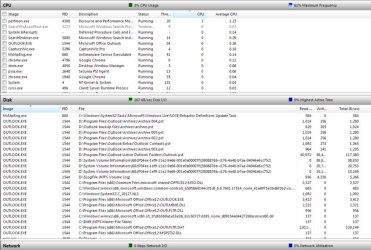
I opened the Resource Monitor and see that the Disc area reports that under the Image column, either "System" OR "OUTLOOK.EXE" are the most active.

(I am unfamiliar with the meaning or significance of the "PID"s)

I have run chkdsk /f on both of my data drives ("D" and "R"), and have run Outlook's Inbox Repair Tool. (SCANPST I think it's called)

I have right-clicked every folder in Outlook and disabled archiving everywhere I could find - and did the same thing from the main menu's Tools>Options>Other>Auto Archive area .....and even after saying "no" to archiving, several of my archive folders (names I created like "Archive 003") STILL seem to be busy per the Resource Monitor!!! What's up with that?

This is driving me crazy - like the death by 1000 cuts, or the water drop torture. It almost seems almost like a Windows backup thing? I'm afraid I am losing my mind and plead for a methodical, step-by-step plan to discover what's happening, and, of course, the solution.

I have booted into Safe Mode while physically disconnected from the router. Waited a bit. Started Outlook (OL)...watched files become active within Resource Monitor. Wondered why the archive folders that I created some time ago (ex: Archive 003, 004, 005, etc) were displayed at all. Made adjustments to Resource Monitor so I could see stuff (with Safe Mode Giant font). Then it started...munch munch munch munch munch.

Noticed at first about 8 "OUTLOOK" files running, then 4, then 10 or 15? -then more...

One of the most active is always D:\program Files\Outlook\Active Outlook Folders\Outlook.pst

Skipped over the Safe Mode with Networking test.

Re-started normally. All was calm. Started OL and several files appeared....4, then 8 (I think). Again I wonder why the "Archive 00X" folders I've made are active.

I believe there is a relationship between all the thrashing/extra activity and send/receive mail (<--set for every 10 minutes; executes when OL is started, too)

MANY entries go active after I hit send/receive (F9). Turned off Outlook's send/receive and all was quiet for a LONG time...maybe 15 minutes? Then, like the zombies...it came back: munch munch munch munch munch munch.

I thought Indexing was turned off (no boxes checked) in Outlooks Search Options. I just unchecked all but the Personal Folders and Closed OL for some peace.

Ran Malwarebytes AntiMalware and it came up clean. I use MSE for real-time coverage. Someone suggested not integrating an antivirus program with Outlook, yet I am not quite sure what that means. Should I exclude any Outlook folders from being scanned by MSE? I feel a little foggy about this...

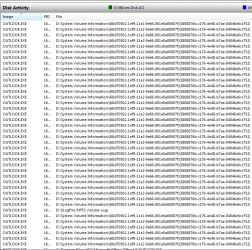
Please see the attached images. I hope they can provide substantial clues. Does "System Volume Information" have something to do with backups?

Help!?!

TIA

drcarl


Since my C: drive is a small SSD, and since I wanted to give the CPU and discs something constructive to do for a while, I stopped Outlook, turned off Windows' Indexing completely, changed the index location to my D drive and am re-indexing.
 

Attachments

  • Outlook_Still_ Thrashing_2012-10-25-uncompressed.jpg
    Outlook_Still_ Thrashing_2012-10-25-uncompressed.jpg
    107.3 KB · Views: 2
  • Outlook_Still_-Thrashing_more_002_2012-10-25-compressed.jpg
    Outlook_Still_-Thrashing_more_002_2012-10-25-compressed.jpg
    96.9 KB · Views: 1
  • OMG_2012-10-26_1.png
    OMG_2012-10-26_1.png
    9.3 KB · Views: 3

My Computer My Computer

Computer Manufacturer/Model Number
Cyberpower
OS
Windows 7 Home Premium x 64 SP1
CPU
Intel i7 920
Motherboard
Gigabyte GA-X58A-UD3R
Memory
6 GB
Graphics Card(s)
Radeon HD 5750 1GB
Sound Card
MoBo
Monitor(s) Displays
NEC EA231WM
Screen Resolution
1920 x 1080
Hard Drives
80 GB SSD, 2x 1TB data drives
Case
SILVERSTONE RV01B-W FULL TOWER W/WINDOW
Cooling
XTREME GEAR HP-1216 HEATPIPE
Internet Speed
24+Mbps

My Computer My Computer

Computer type
PC/Desktop
Computer Manufacturer/Model Number
Own build (new) Desk1 / Asus ROG Win 7 / Desk2 1st build
OS
Desk1 7 Home Prem / Desk2 10 Pro / Main lap Asus ROG 10 Pro 2 laptop Toshiba 7 Pro Asus P2520 7 & 10
CPU
Desk1 i5 3750K / Laptop i7 GTX 860M / Desk2 i5 2500
Motherboard
Desk1 Asus P877-V / Desk2 Gigabyte H67 UD3H / Laptop ?
Memory
Desk1 8GB (1866) / Desk2 16GB (1333) / Laptop 8Gb DDR3
Graphics Card(s)
Desk 1& 2NVidia GTX 650 & Laptops on board Intel
Sound Card
Desk 1 & 2 -XONAR DG Realtek High Def audio Laptop
Monitor(s) Displays
Desk 1 Benq HD 2450 / Desk2 Philips 24" / Laptop 17.5"
Screen Resolution
1920x1080 D1 & D2 & Laptop 1
Hard Drives
Desk1 Samsung 120GB 830 SSD
Asus ROG 256GB 850 Pro SSD
Desk2 Samsung 840 256 SSD
Toshiba 120GB EVO
PSU
Desk 1 Corsair HX 1050/ Laptop ? / Desk 2 Corsair HX 650
Case
Desk 1 Cooler HAF XM ? Toshiba laptop / Desk2 Coolermaster
Cooling
Fans on all Desk1 -2 Desk2 - all Coolermasters 5 Laptop ?
Keyboard
Desk 1 MS Sidewinder X6 Desk 2 MS Sidewinder X 4
Mouse
Desk 1&2 - Gigabyte MS 900 gamer - laptop - Logitec wireless
Internet Speed
ADSL2+
Other Info
One other Desktop (tester) and spare Toshba laptop both with SSD's
Running Kaspersky 2016 ISS on all machines config'd identically
Logitec audio stereo systems on each machine (x3)
Canon MG5250MFC
Router/modem TP-Link running WPA2SK
Outlook accessing System Volume Information looks very suspicious to me, as stated above, run malwarebytes or superantispyware and see if it stops.
 

My Computer My Computer

Computer type
PC/Desktop
OS
Microsoft Windows 10 Professional / Windows 7 Professional
CPU
Intel i5-3570
Motherboard
Lenovo Mahobay
Memory
16GB DDR3
Graphics Card(s)
AMD Radeon HD 7850 2GB
Sound Card
(1) Realtek HD Audio (2) AMD HD Audio
Monitor(s) Displays
LG LS192WS
Screen Resolution
1440 x 900 @ 32bit color
Hard Drives
(1) SUV300S37A/120G (2) ST3500413AS SATA Disk Device AHCI mode enabled.
PSU
Corsair HX620
Case
Thermaltake V4 Black Edition
Cooling
Cooler Master Hyper 212 + Artic Silver 5 on CPU/GPU
Keyboard
Dell SK-8115
Mouse
Razer Copperhead with MAPED mat (awesome!)
Internet Speed
100 Mbps up/down
Browser
Chrome

My Computer My Computer

Computer type
PC/Desktop
Computer Manufacturer/Model Number
Own build (new) Desk1 / Asus ROG Win 7 / Desk2 1st build
OS
Desk1 7 Home Prem / Desk2 10 Pro / Main lap Asus ROG 10 Pro 2 laptop Toshiba 7 Pro Asus P2520 7 & 10
CPU
Desk1 i5 3750K / Laptop i7 GTX 860M / Desk2 i5 2500
Motherboard
Desk1 Asus P877-V / Desk2 Gigabyte H67 UD3H / Laptop ?
Memory
Desk1 8GB (1866) / Desk2 16GB (1333) / Laptop 8Gb DDR3
Graphics Card(s)
Desk 1& 2NVidia GTX 650 & Laptops on board Intel
Sound Card
Desk 1 & 2 -XONAR DG Realtek High Def audio Laptop
Monitor(s) Displays
Desk 1 Benq HD 2450 / Desk2 Philips 24" / Laptop 17.5"
Screen Resolution
1920x1080 D1 & D2 & Laptop 1
Hard Drives
Desk1 Samsung 120GB 830 SSD
Asus ROG 256GB 850 Pro SSD
Desk2 Samsung 840 256 SSD
Toshiba 120GB EVO
PSU
Desk 1 Corsair HX 1050/ Laptop ? / Desk 2 Corsair HX 650
Case
Desk 1 Cooler HAF XM ? Toshiba laptop / Desk2 Coolermaster
Cooling
Fans on all Desk1 -2 Desk2 - all Coolermasters 5 Laptop ?
Keyboard
Desk 1 MS Sidewinder X6 Desk 2 MS Sidewinder X 4
Mouse
Desk 1&2 - Gigabyte MS 900 gamer - laptop - Logitec wireless
Internet Speed
ADSL2+
Other Info
One other Desktop (tester) and spare Toshba laptop both with SSD's
Running Kaspersky 2016 ISS on all machines config'd identically
Logitec audio stereo systems on each machine (x3)
Canon MG5250MFC
Router/modem TP-Link running WPA2SK
Here’s my update

I have run (and have logs where appropriate) the following
SuperAntiSpyware (SAS)
Rogue Killer
Malwarebytes Anti Malware
TDSSKiller
MGTools (including hijackthis)

SAS removed about 75 cookies. The software reports these as a potential, moderate threat. 5 of these had red icons that resemble a bio-hazard symbol. Things (the disc) seemed quieter after these were removed.

I am confident now that this thrashing only happens when Outlook is up an running. The munch and crunch sound start after perhaps 5 or 10 minutes of inactivity.

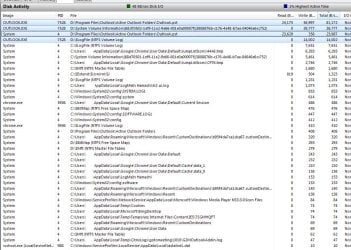
Resource Monitor reports (see attached) a couple of files as active. They are
System - D:\Program Files\Outlook\Active Outlook Folders\Outlook.pst
OUTLOOK.EXE - D:\Program Files\Outlook\Active Outlook Folders\Outlook.pst

I would like to know what is making Outlook work the four files highlighted in the attached screen grab so much....and how to stop it.

Even though this is probably some basic aspect of Outlook that I just don’t understand, I guess I’ll run Spybot – SearchAndDestroy. It found “Win32.downloader.bltu” in the root and removed it.

I hope someone can educate/guide me....
 

Attachments

  • Over active 2012-10-27_1.jpg
    Over active 2012-10-27_1.jpg
    169.9 KB · Views: 2

My Computer My Computer

Computer Manufacturer/Model Number
Cyberpower
OS
Windows 7 Home Premium x 64 SP1
CPU
Intel i7 920
Motherboard
Gigabyte GA-X58A-UD3R
Memory
6 GB
Graphics Card(s)
Radeon HD 5750 1GB
Sound Card
MoBo
Monitor(s) Displays
NEC EA231WM
Screen Resolution
1920 x 1080
Hard Drives
80 GB SSD, 2x 1TB data drives
Case
SILVERSTONE RV01B-W FULL TOWER W/WINDOW
Cooling
XTREME GEAR HP-1216 HEATPIPE
Internet Speed
24+Mbps
Just so we have this right you have two drives? Because the problem certainly looks to come from the D: drive.

That you have found so much stuff in here already is very suspicious too. As a matter of curiosity what security system are you running? Plus are the Windows Updates up to date?

I would be very inclined to run a Seatools test on that drive too just in case it might be a mechanical issue . It certain wouldn't hurt and maybe eliminate another cause, and there again it may even flick up a problem with the drive.
Another physical test is a surface test on the drive with Partition Wizard.

http://www.seagate.com/support/downloads/seatools/
http://partitionwizard.com/partition-manager-server.html?gclid=CKKe9eCporMCFQVcpQodQQ8AmQ
 

My Computer My Computer

Computer type
PC/Desktop
Computer Manufacturer/Model Number
Own build (new) Desk1 / Asus ROG Win 7 / Desk2 1st build
OS
Desk1 7 Home Prem / Desk2 10 Pro / Main lap Asus ROG 10 Pro 2 laptop Toshiba 7 Pro Asus P2520 7 & 10
CPU
Desk1 i5 3750K / Laptop i7 GTX 860M / Desk2 i5 2500
Motherboard
Desk1 Asus P877-V / Desk2 Gigabyte H67 UD3H / Laptop ?
Memory
Desk1 8GB (1866) / Desk2 16GB (1333) / Laptop 8Gb DDR3
Graphics Card(s)
Desk 1& 2NVidia GTX 650 & Laptops on board Intel
Sound Card
Desk 1 & 2 -XONAR DG Realtek High Def audio Laptop
Monitor(s) Displays
Desk 1 Benq HD 2450 / Desk2 Philips 24" / Laptop 17.5"
Screen Resolution
1920x1080 D1 & D2 & Laptop 1
Hard Drives
Desk1 Samsung 120GB 830 SSD
Asus ROG 256GB 850 Pro SSD
Desk2 Samsung 840 256 SSD
Toshiba 120GB EVO
PSU
Desk 1 Corsair HX 1050/ Laptop ? / Desk 2 Corsair HX 650
Case
Desk 1 Cooler HAF XM ? Toshiba laptop / Desk2 Coolermaster
Cooling
Fans on all Desk1 -2 Desk2 - all Coolermasters 5 Laptop ?
Keyboard
Desk 1 MS Sidewinder X6 Desk 2 MS Sidewinder X 4
Mouse
Desk 1&2 - Gigabyte MS 900 gamer - laptop - Logitec wireless
Internet Speed
ADSL2+
Other Info
One other Desktop (tester) and spare Toshba laptop both with SSD's
Running Kaspersky 2016 ISS on all machines config'd identically
Logitec audio stereo systems on each machine (x3)
Canon MG5250MFC
Router/modem TP-Link running WPA2SK
Greetings,

DRIVES:

C: SSD - only 80 GB but it's fast. I run the OS and a few others there. I try to keep most software on....
D: a 1 TB drive -programs and data. Then there is ....
R: another 1 TB drive. Win7 backup. It was supposed to be configured as RAID 1 but the frickin company didn't do it. Now too late, it's kinda hard to make it a RAID 1 now, so I let Windows put a massive backup on there (776 GB used), though not enough for an (what's it called?) --an Image or something. Then there is ...
F: an external drive for stuff.
None are partitioned. All are individual physical drives.
Of course there are the drive letter assignments for the DVD and for when I plug in my phone.

SECURITY:

Microsoft Security Essentials (MSE) and the Windows 7 Firewall. I do system-wide scans perhaps weekly. More frequent than that I clean things up with CCleaner which I (today) reinstalled ~without~ the perhaps too robust CCleaner Enhancer. I run Malwarebytes anti-malware and anti spyware programs at my whim.

UPDATES:

I follow Woody Leonhard at AskWoody.com for advice on when to update. Therefore, my updates usually lag behind the crowd by a week or two (or three). This allows all the other users to have problems and to find solutions without me having to offer-up my system as a guinea pig for a MS experiment. So, I am updated as of the last batch, but not the current batch which, in light of this problem, I am tempted to perform anyway.

I'll run the Partition Magic and SeaTools programs.

Thanks for your consideration of the frustrating issue.
 

My Computer My Computer

Computer Manufacturer/Model Number
Cyberpower
OS
Windows 7 Home Premium x 64 SP1
CPU
Intel i7 920
Motherboard
Gigabyte GA-X58A-UD3R
Memory
6 GB
Graphics Card(s)
Radeon HD 5750 1GB
Sound Card
MoBo
Monitor(s) Displays
NEC EA231WM
Screen Resolution
1920 x 1080
Hard Drives
80 GB SSD, 2x 1TB data drives
Case
SILVERSTONE RV01B-W FULL TOWER W/WINDOW
Cooling
XTREME GEAR HP-1216 HEATPIPE
Internet Speed
24+Mbps
SeaTools seemed like a hassle (where and how to instal the .NET framework 4 or something...

Ran Partition Magic's surface test: no errors.

Also installed updates

Thanks for the suggestions
 

My Computer My Computer

Computer Manufacturer/Model Number
Cyberpower
OS
Windows 7 Home Premium x 64 SP1
CPU
Intel i7 920
Motherboard
Gigabyte GA-X58A-UD3R
Memory
6 GB
Graphics Card(s)
Radeon HD 5750 1GB
Sound Card
MoBo
Monitor(s) Displays
NEC EA231WM
Screen Resolution
1920 x 1080
Hard Drives
80 GB SSD, 2x 1TB data drives
Case
SILVERSTONE RV01B-W FULL TOWER W/WINDOW
Cooling
XTREME GEAR HP-1216 HEATPIPE
Internet Speed
24+Mbps
Right now that .Net Framework 4 stuff is really something you should have on anyways. Yes that Enhancer is a bit much for me too so I just run CC.

Now without sounding a bit off you are not doing yourself a favour by letting things get a bit sloppy in that fact that you state you let that site update you. I am just wondering what with, because your Windows Update and MSE should be set to auto at very least.

Now what about defragmenting - you should have it set to do the two HDD's and on a manual basis but not the SSD it should be in TRIM. That is an inbuilt system of letting the SSD get rid of garbage etc

Now I don't know about RAID and if like you say it isn't running a RAID set up then maybe it might be as well to disconnect that ?R: drive. Personally and this is just me I do not like large drives full stop because if it goes down the gurgler you are left with a lot of data - gone.

Just remind if you would the Outlook is that wholly on the D: drive? Only now I am beginning to think that it might be an idea to grab all the data of that drive and wipe it format it and reinstall the Outlook.
 

My Computer My Computer

Computer type
PC/Desktop
Computer Manufacturer/Model Number
Own build (new) Desk1 / Asus ROG Win 7 / Desk2 1st build
OS
Desk1 7 Home Prem / Desk2 10 Pro / Main lap Asus ROG 10 Pro 2 laptop Toshiba 7 Pro Asus P2520 7 & 10
CPU
Desk1 i5 3750K / Laptop i7 GTX 860M / Desk2 i5 2500
Motherboard
Desk1 Asus P877-V / Desk2 Gigabyte H67 UD3H / Laptop ?
Memory
Desk1 8GB (1866) / Desk2 16GB (1333) / Laptop 8Gb DDR3
Graphics Card(s)
Desk 1& 2NVidia GTX 650 & Laptops on board Intel
Sound Card
Desk 1 & 2 -XONAR DG Realtek High Def audio Laptop
Monitor(s) Displays
Desk 1 Benq HD 2450 / Desk2 Philips 24" / Laptop 17.5"
Screen Resolution
1920x1080 D1 & D2 & Laptop 1
Hard Drives
Desk1 Samsung 120GB 830 SSD
Asus ROG 256GB 850 Pro SSD
Desk2 Samsung 840 256 SSD
Toshiba 120GB EVO
PSU
Desk 1 Corsair HX 1050/ Laptop ? / Desk 2 Corsair HX 650
Case
Desk 1 Cooler HAF XM ? Toshiba laptop / Desk2 Coolermaster
Cooling
Fans on all Desk1 -2 Desk2 - all Coolermasters 5 Laptop ?
Keyboard
Desk 1 MS Sidewinder X6 Desk 2 MS Sidewinder X 4
Mouse
Desk 1&2 - Gigabyte MS 900 gamer - laptop - Logitec wireless
Internet Speed
ADSL2+
Other Info
One other Desktop (tester) and spare Toshba laptop both with SSD's
Running Kaspersky 2016 ISS on all machines config'd identically
Logitec audio stereo systems on each machine (x3)
Canon MG5250MFC
Router/modem TP-Link running WPA2SK
---------------- answers below after dashes like this (too lazy to edit multiple quotes for context)

Right now that .Net Framework 4 stuff is really something you should have on anyways.
---------------- then I'll have to research how to install it because I hit a bump in the road and didn't care to spend another half day derailed. thanks for the suggestion


Yes that Enhancer is a bit much for me too so I just run CC.
---------------- agreed

Now without sounding a bit off
---------------- no worries; it's up to me how and what to take - lol

you are not doing yourself a favour by letting things get a bit sloppy in that fact that you state you let that site update you.
---------------- actually, I said, or meant to say that I don't update until that site says it's OK. I do updating with Windows Update, just a week or two after the updates are released. Updates have been known to break things. I avoid that and still get updated. Visit that site and see if Woody is right when he says "Auto updating is for chumps." lol

I am just wondering what with, because your Windows Update and MSE should be set to auto at very least.
---------------- MSE gets updated frequently
---------------- Windows get's updated when it safe to do so
---------------- (Every day I click on Woody's site. Defcon 2= no updates. Def 4=update is safe

Now what about defragmenting - you should have it set to do the two HDD's and on a manual basis but not the SSD it should be in TRIM. That is an inbuilt system of letting the SSD get rid of garbage etc
---------------- I defrag the two HDDs manually and don't defrag the SSD.
---------------- I will be interested to learn what TRIM is (I typed "fsutil behavior query disabledeletenotify" into an elevated command prompt and am advised that TRIM is enables {that's the Win 7 default, I believe} - still, thanks for this

Now I don't know about RAID and if like you say it isn't running a RAID set up then maybe it might be as well to disconnect that ?R: drive. Personally and this is just me I do not like large drives full stop because if it goes down the gurgler you are left with a lot of data - gone.
---------------------- HAHAHAHAH - disable a 1 TB drive and what? put it in a drawer? LOL. Since making it a RAID 1 is impossible without reinstalling ~everything~ I am tempted to have R: mirror D: like it was supposed to be doing in the first place. I have yet to put together and understand a sensible backup...I know, so spank me - lol

Just remind if you would the Outlook is that wholly on the D: drive?
---------------------- it operates out of the D: drive, though I do have a backup of the .pst on the R: drive.

Only now I am beginning to think that it might be an idea to grab all the data of that drive and wipe it format it and reinstall the Outlook.
---------------------- I am tending to agree with this.
---------------------- Some of my reading mentions something about OL faltering when it gets too big. The old limit in 2002, or 2003 or before was something like 2 GB (or was that MB? - lol). My .pst is at 8 GB now and includes mail from 2010 which could (and probably should) certainly be stored in some other folder. This size thing MIGHT be the culprit. I just have to find someone who really knows OL (I must develop a step-by-step game plan).....gotta love the internet - they're out there somewhere!

Best,

~drcarl
 

My Computer My Computer

Computer Manufacturer/Model Number
Cyberpower
OS
Windows 7 Home Premium x 64 SP1
CPU
Intel i7 920
Motherboard
Gigabyte GA-X58A-UD3R
Memory
6 GB
Graphics Card(s)
Radeon HD 5750 1GB
Sound Card
MoBo
Monitor(s) Displays
NEC EA231WM
Screen Resolution
1920 x 1080
Hard Drives
80 GB SSD, 2x 1TB data drives
Case
SILVERSTONE RV01B-W FULL TOWER W/WINDOW
Cooling
XTREME GEAR HP-1216 HEATPIPE
Internet Speed
24+Mbps
Ok Carl maybe we are getting somewhere. Yep the TRIM is or should be auto. The update site my friend I was meaning I don't trust anything like that these days because they need to scan your system to know what is required (for the most part)

I just got off saying to someone else that driver updates can be got through the cloud but I prefer the Windows way or the manufacturers site/s.

Yeah well point taken I said I didn't know much about RAID but seem to remeber you saying it wasn't working in that feature.

Now what you said about backing stuff up to say an external and redoing the Outlook is looking what I would do personally. Then you can start with a clean slate as it were.
For that I would go the DISKPART route or a wipe with the Partition Wizard on that drive.
This tutorial is part of my Bible for DISKPART on any drive spinner or SSD
http://www.sevenforums.com/tutorials/113967-ssd-alignment.html < I just use that first bit - for HDD's I usually leave out the align bit but ti doesn't matter if you do it as is.

The Partition Wizard I have used on many occasions and just written 0's to the entire drive then readied it with the DISKPART I know that sees a bit of overkill but I like to be absolutely sure.

Partition Manager Server, server partition manager and partition magic server for Windows Server 2000/2003/2008. Server Partition software for Windows Server and None-Server partitions < freeware version - top tool to have around for all sorts of jobs.

Just a bit of other hefty reading for you

http://www.sevenforums.com/tutorials/70822-ssd-tweaks-optimizations-windows-7-a.html

TRIM - Wikipedia, the free encyclopedia


John
 

My Computer My Computer

Computer type
PC/Desktop
Computer Manufacturer/Model Number
Own build (new) Desk1 / Asus ROG Win 7 / Desk2 1st build
OS
Desk1 7 Home Prem / Desk2 10 Pro / Main lap Asus ROG 10 Pro 2 laptop Toshiba 7 Pro Asus P2520 7 & 10
CPU
Desk1 i5 3750K / Laptop i7 GTX 860M / Desk2 i5 2500
Motherboard
Desk1 Asus P877-V / Desk2 Gigabyte H67 UD3H / Laptop ?
Memory
Desk1 8GB (1866) / Desk2 16GB (1333) / Laptop 8Gb DDR3
Graphics Card(s)
Desk 1& 2NVidia GTX 650 & Laptops on board Intel
Sound Card
Desk 1 & 2 -XONAR DG Realtek High Def audio Laptop
Monitor(s) Displays
Desk 1 Benq HD 2450 / Desk2 Philips 24" / Laptop 17.5"
Screen Resolution
1920x1080 D1 & D2 & Laptop 1
Hard Drives
Desk1 Samsung 120GB 830 SSD
Asus ROG 256GB 850 Pro SSD
Desk2 Samsung 840 256 SSD
Toshiba 120GB EVO
PSU
Desk 1 Corsair HX 1050/ Laptop ? / Desk 2 Corsair HX 650
Case
Desk 1 Cooler HAF XM ? Toshiba laptop / Desk2 Coolermaster
Cooling
Fans on all Desk1 -2 Desk2 - all Coolermasters 5 Laptop ?
Keyboard
Desk 1 MS Sidewinder X6 Desk 2 MS Sidewinder X 4
Mouse
Desk 1&2 - Gigabyte MS 900 gamer - laptop - Logitec wireless
Internet Speed
ADSL2+
Other Info
One other Desktop (tester) and spare Toshba laptop both with SSD's
Running Kaspersky 2016 ISS on all machines config'd identically
Logitec audio stereo systems on each machine (x3)
Canon MG5250MFC
Router/modem TP-Link running WPA2SK
Update/summary

Since some time has passed and I have been following leads and making changes, I present for your expert review the following summary and pray for your help.

I do not want to wipe my drive and reinstall everything. I'd consider reinstalling Outlook 2007 (Of Office 2007) as a last resort (and with really clear instructions). I'd really like to know what the real reason for this activity is.

I suppose the highest priority is to stop it so I can leave Outlook open for more than 5 minutes

TIA

~drcarl


Symptom: Crunch crunch crunch crunch crunch crunch crunch crunch crunch crunch...starts ~only~ when Outlook 2007 is opened, and after about 5 and a half minutes of inactivity.

Something isn't right so while I search for a solution, I close Outlook so that I might have some peace and as I hope for an answer.

Here is a list of my system, current settings, procedures and other perhaps relevant information.

SYSTEM
Win 7 x64 Home Premium
Intel i7 920 Quad core
6 GB RAM
80 GB SSD (C:)
1 TB HD (D:) where most programs and data lives
1 TB HD (R:) where Windows and my manual backups live
No drives are partitioned. All are individual physical drives.

SOFTWARE
MSE & Windows Firewall are the only real-time AV/A-Malware running in real time
Occasional scans with Malwarebytes AntiMalware and SuperAntiSpyware
Occasionally use SpybotSearch & Destroy
Office 2007 (Some older archives recently consolidated were VERY old, ’98?)
Photoshop
Lots more

SETTINGS
AutoArchive: on. Default settings save to my file Consolidated Archives
Outlook automatic “send/receive” mail disabled
Outlook.pst and archives excluded from MSE real-time scans
Windows Search: disabled
Windows Indexing: off
Outlook 2007 Search Email Indexer: disabled
I had PageFile disabled; re-enabled C: 500MB, R: System Managed (about 6GB)

PERSISTENT FILES
When the thrashing starts, these are the persistent files seen in Resource Monitor:
(1) OUTLOOK.EXE - D:\Program Files\Outlook\Active Outlook Folders\Outlook.pst
(2) OUTLOOK.EXE - D:\$LogFile (NTFS Volume Log)
(3) System - D:\Program Files\Outlook\Active Outlook Folders\Outlook.pst

PROCEDURES
Outlook: Created UNICODE data file named Consolidated Archives and moved all old archives into it. Currently about 9 GB in size.
Outlook.pst (including Consolidated Archives) currently 13.6 GB
Ran chkdsk /f on D: and R:
Ran Outlook Repair Tool (SCANPST.EXW)
Disabled all Outlook Archiving. Restarted. Thrashing continued. Re-enabled AutoArchiving.
Running Outlook in Safe Mode: thrashing continues
Frequently run CCleaner which I just reinstalled ~without~ the perhaps too robust “CCleaner Enhancer”
Ran MWBAnti-Malware in safe mode and the display went black; had to do hard restart!?!
Ran MWBAnti-Malware after normal startup: nothing detected
SuperAntiSpyware removed 75 cookies, 5 of which had RED icons resembling biohazard icon
SpyBot Search&Destroy removed: Win32.downloader.bltu
In Safe Mode, checked processes and registry for traces – none found
Ran RogueKiller: clean
Ran TDSS Killer: clean
MGTools (including hijackthis) –no repairs made
I believe I remember seeing user/js in the C: root – removed by me or one of my scans
Ran Partition Wizzard's surface test: no errors.
Toggled System Restore for D: drive with no effect


UPDATES
Just updated to current (although I usually wait a week or more following Woody L’s advice)

OTHER
I read online: That Windows 7 has many “developer” logs that can be turned off. Four are listed as essential and should NOT be turned off. Although I turned nothing off (Maybe CCleaner Enhanced did) I do not see the four essential entries. at: start/admin tools>performance monitor>expand data collector sets>Startup Event Trace Sessions. These four referenced as necessary are Application, Security, System, Security Essentials. Are they hidden? Missing?

DURATION/ACTIVITIES BACK THEN
I really am unsure. It’s been a week and a half or two? (I am “time-challenged”). I had installed CCleaner’s Enhancer at some point and checked some things that I’m not sure about; silly me. I disabled the Page File and have since put it back. Otherwise, I don’t recall though I may have done SOMEthing. In fact, I do ultimately suspect ME. I have not tried restoring to an earlier point, nor have I imported any old registries which CCleaner routinely makes.

TIA

~drcarl


I have 5 logs...want 'em?

Here are some screen grabs that may be helpful

http://drcarl.smugmug.com/photos/i-RF6nDxf/0/X3/i-RF6nDxf-X3.jpg

http://drcarl.smugmug.com/photos/i-MwFcnG7/0/X3/i-MwFcnG7-X3.jpg

http://drcarl.smugmug.com/photos/i-78HG3ps/0/X3/i-78HG3ps-X3.jpg

.
 

My Computer My Computer

Computer Manufacturer/Model Number
Cyberpower
OS
Windows 7 Home Premium x 64 SP1
CPU
Intel i7 920
Motherboard
Gigabyte GA-X58A-UD3R
Memory
6 GB
Graphics Card(s)
Radeon HD 5750 1GB
Sound Card
MoBo
Monitor(s) Displays
NEC EA231WM
Screen Resolution
1920 x 1080
Hard Drives
80 GB SSD, 2x 1TB data drives
Case
SILVERSTONE RV01B-W FULL TOWER W/WINDOW
Cooling
XTREME GEAR HP-1216 HEATPIPE
Internet Speed
24+Mbps
Back
Top