Outlook 2010 always unresponsive

codyw

New member
Power User
Local time
7:51 AM
Messages
369
Location
Pennsylvania
I have been using Outlook 2010 for a while now and everyday I get frustrated with it because it is always coming unresponsive while I am using it (e.g. opening mail, replying/forwarding mail, marking mail as spam, etc.) I have the Kaspersky Anti-Spam add-in and when I mark things as spam it takes a while. :(

I started Outlook up in its own safe mode with all add-ins disabled and it still freezes up. A friend of mine has Outlook 2007 on their machine and they don't experience this problem at all. Their computer even runs faster! What could be wrong? :(
 

My Computer

Computer Manufacturer/Model Number
ASUSTeK Computer Inc./Q550LF/Laptop
OS
Windows 7 Ultimate x64 with SP1
CPU
Intel(R) Core(TM) i7-4500U CPU @ 1.80GHz
Motherboard
ASUSTeK Computer Inc.
Memory
8 GB
Graphics Card(s)
Intel(R) HD Graphics Family, NVIDIA GeForce
Hard Drives
Hitachi HTS547575A9E384
Internet Speed
XFINITY
Antivirus
Trend Micro
* You say you have done this I believe -
Open Outlook in Safe > click on Start > All Programs > Accessories > Run > type the following command line in the open box and press Enter
Outlook /safe


* Please provide detailed information for the error related to Outlook not responding using Event Viewer.
Type eventvwr in search.
Go to the windows log > application > in the left hand column note anything that relates to the problem.
Please note the event ID, and the source codes and tell us what they are.


* Have you tried creating a new profile to see if the problem still occurs?


How to create and configure an email profile in Outlook 2010, Outlook 2007, and Outlook 2003
 

My Computer

Computer Manufacturer/Model Number
LAPTOP. HP Pavilion dv7-4010TX .
OS
Win 7 Ultimate 64-bit. SP1.
CPU
Intel i7 -720QM.[1.6GHz Turbo Boost 2.8GHz. 6MB Cache.]
Memory
8 DDR 3 RAM. 1066MHZ
Graphics Card(s)
ATI 1024 MB. DDR3. Radeon HD5650
Monitor(s) Displays
17.3" High Definition Brightview LCD. LED Backlit.
Screen Resolution
1600 x 900.
Hard Drives
640GB
Case
Laptop / notebook.
Mouse
Logitech Anywhere mouse. MX.
Internet Speed
ADSL [ but too slow ]
There are a few issues I see:
Event ID: 1000
Source: Outlook
Description: Add-in execution error. Outlook crashed during the 'GetCustomUI' callback of the 'IRibbonExtensibility' interface while calling into the 'Kaspersky Outlook Anti-Spam Addin' add-in.

Event ID: 1000
Source: Outlook
Description: Add-in execution error. Outlook crashed during the 'GetCustomUI' callback of the 'IRibbonExtensibility' interface while calling into the 'Kaspersky Outlook Anti-Spam Addin' add-in.

Event ID: 1000
Source: Outlook
Description: Add-in execution error. Outlook crashed during the 'GetCustomUI' callback of the 'IRibbonExtensibility' interface while calling into the 'Kaspersky Outlook Anti-Spam Addin' add-in.

Event ID: 1000
Source: Outlook
Description: Add-in execution error. Outlook crashed during the 'GetCustomUI' callback of the 'IRibbonExtensibility' interface while calling into the 'Kaspersky Outlook Anti-Spam Addin' add-in.

Event ID: 1000
Source: Outlook
Description: Add-in execution error. Outlook crashed during the 'GetCustomUI' callback of the 'IRibbonExtensibility' interface while calling into the 'Kaspersky Outlook Anti-Spam Addin' add-in.

Event ID: 27
Source: Outlook
Description: Calendar Folder Created

Event ID: 27
Source: Outlook
Description: Calendar Folder Created

Event ID: 1000
Source: Outlook
Description: Add-in execution error. Outlook crashed during the 'GetCustomUI' callback of the 'IRibbonExtensibility' interface while calling into the 'Kaspersky Outlook Anti-Spam Addin' add-in.

Event ID: 1000
Source: Outlook
Description: Add-in execution error. Outlook crashed during the 'GetCustomUI' callback of the 'IRibbonExtensibility' interface while calling into the 'Kaspersky Outlook Anti-Spam Addin' add-in.

Event ID: 1000
Source: Outlook
Description: Add-in execution error. Outlook crashed during the 'GetCustomUI' callback of the 'IRibbonExtensibility' interface while calling into the 'Kaspersky Outlook Anti-Spam Addin' add-in.

Event ID: 27
Source: Outlook
Description: Calendar Folder Created

Event ID: 27
Source: Outlook
Description: Calendar Folder Created

Event ID: 27
Source: Outlook
Description: Calendar Folder Created

Event ID: 1000
Source: Outlook
Description: Add-in execution error. Outlook crashed during the 'GetCustomUI' callback of the 'IRibbonExtensibility' interface while calling into the 'Kaspersky Outlook Anti-Spam Addin' add-in.

Event ID: 27
Source: Outlook
Description: Calendar Folder Created

Event ID: 1000
Source: Outlook
Description: Add-in execution error. Outlook crashed during the 'GetCustomUI' callback of the 'IRibbonExtensibility' interface while calling into the 'Kaspersky Outlook Anti-Spam Addin' add-in.

Event ID: 1000
Source: Outlook
Description: Add-in execution error. Outlook crashed during the 'GetCustomUI' callback of the 'IRibbonExtensibility' interface while calling into the 'Kaspersky Outlook Anti-Spam Addin' add-in.

Event ID: 1000
Source: Outlook
Description: Add-in execution error. Outlook crashed during the 'GetCustomUI' callback of the 'IRibbonExtensibility' interface while calling into the 'Kaspersky Outlook Anti-Spam Addin' add-in.

Event ID: 1000
Source: Outlook
Description: Add-in execution error. Outlook crashed during the 'GetCustomUI' callback of the 'IRibbonExtensibility' interface while calling into the 'Kaspersky Outlook Anti-Spam Addin' add-in.

Event ID: 1000
Source: Outlook
Description: Add-in execution error. Outlook crashed during the 'GetCustomUI' callback of the 'IRibbonExtensibility' interface while calling into the 'Kaspersky Outlook Anti-Spam Addin' add-in.

Please let me know what I can do. It freezes just when I send an email. I'd really like to keep the Kaspersky Anti-Spam toolbar/add-in running because it's part of the security suite. It wouldn't make sense not to use it.


* You say you have done this I believe -
Open Outlook in Safe > click on Start > All Programs > Accessories > Run > type the following command line in the open box and press Enter
Outlook /safe


* Please provide detailed information for the error related to Outlook not responding using Event Viewer.
Type eventvwr in search.
Go to the windows log > application > in the left hand column note anything that relates to the problem.
Please note the event ID, and the source codes and tell us what they are.


* Have you tried creating a new profile to see if the problem still occurs?

How to create and configure an email profile in Outlook 2010, Outlook 2007, and Outlook 2003
 

My Computer

Computer Manufacturer/Model Number
ASUSTeK Computer Inc./Q550LF/Laptop
OS
Windows 7 Ultimate x64 with SP1
CPU
Intel(R) Core(TM) i7-4500U CPU @ 1.80GHz
Motherboard
ASUSTeK Computer Inc.
Memory
8 GB
Graphics Card(s)
Intel(R) HD Graphics Family, NVIDIA GeForce
Hard Drives
Hitachi HTS547575A9E384
Internet Speed
XFINITY
Antivirus
Trend Micro
codyw,
It is fairly obvious what is causing you grief.
Try disabling the culprit to see what happens.
 

My Computer

Computer Manufacturer/Model Number
LAPTOP. HP Pavilion dv7-4010TX .
OS
Win 7 Ultimate 64-bit. SP1.
CPU
Intel i7 -720QM.[1.6GHz Turbo Boost 2.8GHz. 6MB Cache.]
Memory
8 DDR 3 RAM. 1066MHZ
Graphics Card(s)
ATI 1024 MB. DDR3. Radeon HD5650
Monitor(s) Displays
17.3" High Definition Brightview LCD. LED Backlit.
Screen Resolution
1600 x 900.
Hard Drives
640GB
Case
Laptop / notebook.
Mouse
Logitech Anywhere mouse. MX.
Internet Speed
ADSL [ but too slow ]
I have been using Outlook 2010 for a while now and everyday I get frustrated with it because it is always coming unresponsive while I am using it (e.g. opening mail, replying/forwarding mail, marking mail as spam, etc.) I have the Kaspersky Anti-Spam add-in and when I mark things as spam it takes a while. :(

I started Outlook up in its own safe mode with all add-ins disabled and it still freezes up. A friend of mine has Outlook 2007 on their machine and they don't experience this problem at all. Their computer even runs faster! What could be wrong? :(

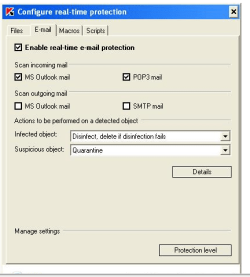
Suggestion :

DISABLE Kaspersky e-mail scanning option.

Image 1.png


Adding :
quote >>> A friend of mine has Outlook 2007 on their machine and they don't experience this problem at all. Their computer even runs faster! What could be wrong?

That friend also has Kaspersky ?
 

My Computer

Computer Manufacturer/Model Number
Acer Aspire 7741Z
OS
Windows 7 Home Premium 64-bit, SP1
CPU
Intel Pentium P6200, Cores 2, 2.13 GHz
Memory
4 GB
Graphics Card(s)
Intel HD
Sound Card
unknown
Monitor(s) Displays
17.3 inches
Screen Resolution
1600 x 900
Hard Drives
640 GB, 5400 PRM
I have created new profiles in the past and freezing still persists. I have also disabled the add-on in the past too and freezing isn't as bad...
 

My Computer

Computer Manufacturer/Model Number
ASUSTeK Computer Inc./Q550LF/Laptop
OS
Windows 7 Ultimate x64 with SP1
CPU
Intel(R) Core(TM) i7-4500U CPU @ 1.80GHz
Motherboard
ASUSTeK Computer Inc.
Memory
8 GB
Graphics Card(s)
Intel(R) HD Graphics Family, NVIDIA GeForce
Hard Drives
Hitachi HTS547575A9E384
Internet Speed
XFINITY
Antivirus
Trend Micro
Back
Top