Outlook 2010 - cannot stop automatic receive at startup

jimbo45

New member
Guru
Gold Member
VIP
Local time
2:19 PM
Messages
5,941
Location
Hafnarfjörður IS
Hi all
Annoying little glitch in Outlook 2010 is that unlike Outlook 2007 and earlier there is NO option (or at least I can't find it) to prevent an automatic RECEIVE at start up. There is a facility for preventing automatic SENDING of mail.


One irritant here is that if you just want to open your email and you are NOT connected to the internet the OPEN takes a long time and gives you the message unable to display contents of your Server folder ( I'm using IMAP where after retrieving messages I move them from the mail server to a local folder on the client computer).

The delay is caused by outlook trying to connect to the mail server --which is EXACTLY what I DON'T want to happen.

The older versions of OUTLOOK gave you the option of NOT connecting to the mail server untill you did a manual SEND / RECEIVE.

I've looked as hard as I can and can't find anyway of preventing Outlook from trying to access the mail server when starting the program. I had IMAP too on Outlook 2007 and didn't have this problem.

I'm using OUTLOOK 2010 in the 32 bit version.

Cheers
jimbo
 

My Computer My Computer

Computer type
PC/Desktop
Computer Manufacturer/Model Number
Custom built, several laptops HP/ASUS
OS
Linux CENTOS 7 / various Windows OS'es and servers
CPU
Intel i7 Intel i5
Memory
8GB, 16GB
Graphics Card(s)
On Motherboard
Sound Card
Realtek HD audio
Monitor(s) Displays
Apple Cinema display, Samsung LCD
Screen Resolution
1920 X 1080
Hard Drives
4 X 1TB SATA
Mouse
Toshiba wireless laser
Internet Speed
> 20MB up
In Outlook goto File / Options / outlook option's / Advanced goto send & receive
 

My Computer My Computer

Computer Manufacturer/Model Number
H.P Compaq-presario
OS
windows 7
CPU
AMD Athion 11 X 215-2.71GHz
In Outlook goto File / Options / outlook option's / Advanced goto send & receive


Hi there
I don't think you read my post.

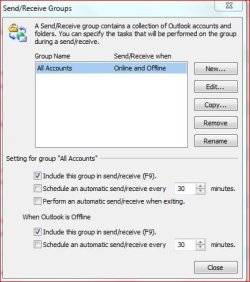
This option only gives you a SEND IMMEDIATELY when connected --there's NO option to prevent RECEIVE immediately on connection.

Screenshot enclosed


Cheers
jimbo
 

Attachments

  • outlook.png
    outlook.png
    39.1 KB · Views: 312

My Computer My Computer

Computer type
PC/Desktop
Computer Manufacturer/Model Number
Custom built, several laptops HP/ASUS
OS
Linux CENTOS 7 / various Windows OS'es and servers
CPU
Intel i7 Intel i5
Memory
8GB, 16GB
Graphics Card(s)
On Motherboard
Sound Card
Realtek HD audio
Monitor(s) Displays
Apple Cinema display, Samsung LCD
Screen Resolution
1920 X 1080
Hard Drives
4 X 1TB SATA
Mouse
Toshiba wireless laser
Internet Speed
> 20MB up
Hi Jimbo

Not sure if removing your accounts from the off-line send and recieve in the options above will do what you want.

You may have to manually set the work off-line flag to get this to work correctly - doing this when you end a session may do what you want anyway - I think playing around with the off-line on-line send& receive settings is the only option that is likely to work anyway - a step backwards IMO
 

My Computers My Computers

System One System Two

  • Computer type
    PC/Desktop
    Computer Manufacturer/Model Number
    ChillBlast - Custom to my design
    OS
    Windows 11 Pro x64 [Latest Release and Release Preview]
    CPU
    Ryzen 9 5950X, 3.8 - 5.2 MHz
    Motherboard
    Asus Prime X570-Pro
    Memory
    64GB [2 x 32GB] DDR4 3200MHz
    Graphics Card(s)
    4GB NVIDIA GEFORCE GTX 1650 Ti
    Sound Card
    On-board SPDIF to 5.1 System + HDMI [5.1 system]
    Monitor(s) Displays
    32" UHD 32 Bit HDR Monitor + 43" UHD 4K 32Bit HDR TV
    Screen Resolution
    2 x 3840 x 2160 @60Hz
    Hard Drives
    1TB M2 SSD OS, 500GB Fast Access SSD, 2 x 8TB Data + Various Externals from 1TB to 4TB, 10TB NAS
    PSU
    NZXT C750 80 PLUS Gold 750W Modular PSU
    Case
    Workstation Case [Matt Black]
    Cooling
    NZXT Kraken X63 280mm CPU Cooler +2x Quiet Case fans
    Keyboard
    Logitech Wireless MX Keys & K400 + others
    Mouse
    Logitech Wireless MX Master 3S
    Internet Speed
    920 MB Down 50 MB Up
    Antivirus
    BitDefender Total Security Pro
    Browser
    Chrome (always run latest Non-Beta)
    Other Info
    Also run ...
    Laptop - Quad 8GB - Windows 10 Pro x64
    Nexus 7 Android tablet x2
    Samsung 10.2" tablet
    Blackview TAB 8 4G Android Tablet c/w Keyboard
    Wacom Intuos Pro Medium Pen Pad
    Wacom Intuos Pro Small Pen Pad
    Wacom Expresskeys Remote
    Loopdeck+ Graphics Controller
    Shuttle Pro v2 Control
  • Computer type
    Laptop
    System Manufacturer/Model Number
    Dell XPS 17 10750H
    OS
    Windows 11 Pro x64 Latest RP
    CPU
    Intel I7 10750H 5.0GHz
    Motherboard
    Dell XPS
    Memory
    32GB [2x16GB] DDR4 2933 MHz
    Graphics Card(s)
    nVidia GTX1650Ti 4 GB GDDR6
    Sound Card
    Stock [Realtek] 4 Speaker
    Monitor(s) Displays
    17" IPS UHD+ Infinity Edge Touchscreen
    Screen Resolution
    3840 x 2400
    Hard Drives
    2TB M2 NVMe, 4TB External + various 500GB & 1TB External NVMe (also have access to spinner HDD from
    PSU
    Stock
    Case
    Stock XPS Aluminium & Carbon Fibre
    Cooling
    Stock - Active Fan Control
    Keyboard
    Backlit + Various Logitech
    Mouse
    Stock Track Pad + Logitech MX Trackball
    Internet Speed
    72 MB Down 18MB Up
    Browser
    Chrome
    Other Info
    Also run ...
    Laptop - Quad 8GB - Windows 10 Pro x64
    Nexus 7 Android tablet x2
    10.2" tablet
    Sony Z3 Android Smartphone
    Wacom Intuos Pro Medium Pen Pad
    Wacom Intuos Pro Small Pen Pad
    Wacom Expresskeys Remote
    Loopdeck+ Graphics Controller
    Shuttle Pro v2 Control Pad
    10TB NAS
Hi
Try this

In Outlook go File / outlook Options / Click on the send/Receive Button / Remove the tick in Schedule an automatic send & receive every time.

I have tried this and the send & receive is disabled
 

My Computer My Computer

Computer Manufacturer/Model Number
H.P Compaq-presario
OS
windows 7
CPU
AMD Athion 11 X 215-2.71GHz
Hi
Try this

In Outlook go File / outlook Options / Click on the send/Receive Button / Remove the tick in Schedule an automatic send & receive every time.

I have tried this and the send & receive is disabled
=============================================

Did not work for me. I, also, can only suppress the sending, not the receiving of emails upon startup.
 

My Computer My Computer

OS
Windows 7 64bit

My Computer My Computer

Computer type
PC/Desktop
Computer Manufacturer/Model Number
Custom built, several laptops HP/ASUS
OS
Linux CENTOS 7 / various Windows OS'es and servers
CPU
Intel i7 Intel i5
Memory
8GB, 16GB
Graphics Card(s)
On Motherboard
Sound Card
Realtek HD audio
Monitor(s) Displays
Apple Cinema display, Samsung LCD
Screen Resolution
1920 X 1080
Hard Drives
4 X 1TB SATA
Mouse
Toshiba wireless laser
Internet Speed
> 20MB up
One solution would be to create a shortcut on the desktop that uses the commad line switch..

/nopollmail Starts Outlook without checking mail at startup.

For more details see..

http://www.howto-outlook.com/howto/commandlineswitches.htm
Welcome to the Seven Forums, CWatters. :D

Thanks for the information.

I agree with jimbo45, +1! :)

EDIT: I've got to curb my enthusiasm. The /nopollmail switch doesn't work on my 2010 Outlook. From what I can gather, the /nopollmail switch is applicable only to Outlook 2003.

If I find further information regarding 2010 Outlook, I'll present it.

Reference this Microsoft information. The /nopollmail switch is no longer available since Outlook 2003.

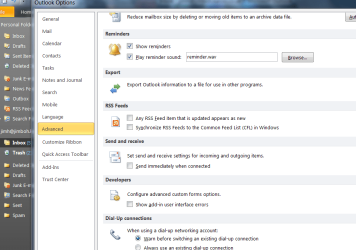
I have payed little attention to this issue, but one might want to check the "Advanced" settings in Outlook options:

ScreenShot00108.jpg

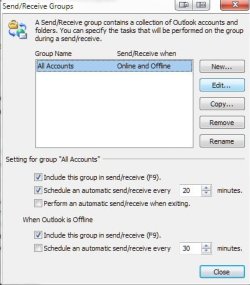
Additionally, check your specific send/receive settings:

ScreenShot00109.jpg
 
Last edited:

My Computer My Computer

Computer Manufacturer/Model Number
Toshiba L355D
OS
Windows 7 Ultimate x64 SP1
CPU
Core2 Duo
Motherboard
Intel
Memory
4 GB
Graphics Card(s)
GM965 on-board
Sound Card
RealTek on-board
Monitor(s) Displays
19"+17"(laptop)
Screen Resolution
1440x900 (x 2)
Hard Drives
500GB Ext. 200GB Internal
PSU
N/A
Case
N/A
Cooling
N/A
seems to have worked for me -- running Office 2010 32 bit and Office 2007

Cheers
jimbo
 

My Computer My Computer

Computer type
PC/Desktop
Computer Manufacturer/Model Number
Custom built, several laptops HP/ASUS
OS
Linux CENTOS 7 / various Windows OS'es and servers
CPU
Intel i7 Intel i5
Memory
8GB, 16GB
Graphics Card(s)
On Motherboard
Sound Card
Realtek HD audio
Monitor(s) Displays
Apple Cinema display, Samsung LCD
Screen Resolution
1920 X 1080
Hard Drives
4 X 1TB SATA
Mouse
Toshiba wireless laser
Internet Speed
> 20MB up
seems to have worked for me -- running Office 2010 32 bit and Office 2007

Cheers
jimbo
Jimbo, the title of this thread is "Outlook 2010 - cannot stop automatic receive at startup." are you saying the /nopollmail switch works with both Outlook 2007 and Outlook 2010?

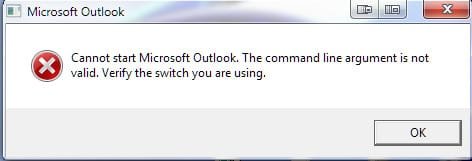
When I add the /nopollmail switch:

ScreenShot00117.jpg

With Outlook 2010 64 bit, I get this:

ScreenShot00118.jpg
 

My Computer My Computer

Computer Manufacturer/Model Number
Toshiba L355D
OS
Windows 7 Ultimate x64 SP1
CPU
Core2 Duo
Motherboard
Intel
Memory
4 GB
Graphics Card(s)
GM965 on-board
Sound Card
RealTek on-board
Monitor(s) Displays
19"+17"(laptop)
Screen Resolution
1440x900 (x 2)
Hard Drives
500GB Ext. 200GB Internal
PSU
N/A
Case
N/A
Cooling
N/A
Sorry for giving you duff information. Seems the command line options on 2010 are dufferent. The official list of options is here and I can't find one that does the job. Gotta love MS sometimes.

Command-line switches for Outlook 2010 - Outlook - Microsoft Office

Google says that on some other versions there was also one called /nopoll that might be worth trying.
 

My Computer My Computer

OS
Window 7 Home Premium 64bit
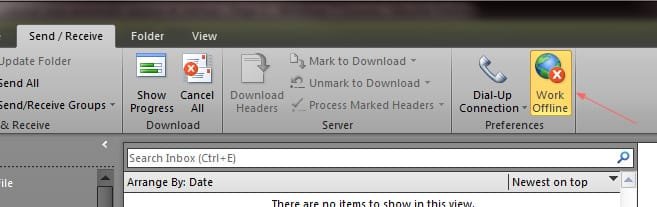
Does putting Outlook offline not work for you? That's all I do. I put it offline before I close the application. Next time I open it, it's still in offline mode and will not send or receive until I put it back online.
 

Attachments

  • offline.jpg
    offline.jpg
    35.4 KB · Views: 19

My Computer My Computer

Computer Manufacturer/Model Number
Dell Inspiron 560
OS
Windows 7 Home Premium x64
CPU
Intel Pentium dual-core E5400 2.7Ghz, 2MB
Motherboard
Dell OK83V0
Memory
6Gb DDR3 SDRAM @ 1066Mhz
Graphics Card(s)
Intel G45/G43 Express Chipset
Sound Card
Realtek High Def Audio
Monitor(s) Displays
24" HD widescreen LCD and 21" widescreen LCD
Screen Resolution
1920x1080 @ 59Hz and 1680x1050 @ 59Hz
Hard Drives
640 Gb internal, 500Gb external and 1Tb external plus about 2TB in various sized external drives that are kept in storage as photo archives/backups
PSU
No idea - whatever the thing came with
Case
Mini tower w/ black bezel
Cooling
No idea - whatever the thing came with - fans, I suppose
Keyboard
Logitech MX3200 wireless laser keyboard
Mouse
Logitech MX3200 wireless laser mouse
Internet Speed
Cable (RoadRunner)
Other Info
CyberPower one-hour UPS, DVD-RW, 19-in-1 card reader, 7-port USB hub, 2-port USB hub on the 21" monitor, built-in webcam with stereo microphones on the 21" monitor
Gemlen is the man

Hi
Try this

In Outlook go File / outlook Options / Click on the send/Receive Button / Remove the tick in Schedule an automatic send & receive every time.

I have tried this and the send & receive is disabled
=============================================

Did not work for me. I, also, can only suppress the sending, not the receiving of emails upon startup.


works like a charm. my gratitude for the simple and effective explanation. The wording Microsoft chose to relay the purpose of the tick is absurdly confusing. Perhaps, they should acquire a new UI lead for Office 2013.
 

My Computer My Computer

OS
Windows 7
Hi I found the place to fix stop emails being processed on starting of computer as well as stopping the outlook 2010 from even processing emails. I use Mailwasher Pro for that so I dont want the rubbish coming into my outlook account. So click on outlook File, then go to options then click on advanced. Then about a third of the way down there is a section called send and recieve. By default its ticked to process emails at start up so untick that box.
Then if you want to click on send recieve on that window and your email account will open.
On that box you can see if you like me use mailwasher pro or want to alter how often the program looks for new mail set it there or untick Schedule an automatic send/recieve every what ever you want in minutes. AS I said I have unticked that box.

I hope that helps everyone out as it is hidden in the bowles of outlook. Its the same if you use a 64 bit as I do or 32 bit outlook 2010,

Cheers guys,

Yendale
:cool: :)
 

My Computer My Computer

Computer Manufacturer/Model Number
Made by myself
OS
Windows 7 32 bit
CPU
Asus
Motherboard
Asus P5Q Deluxe
Memory
4 Gigs
Graphics Card(s)
EAH4850 1GB Ram
Sound Card
onboard
Monitor(s) Displays
Benq
Hard Drives
7 hard drives 1 terrabyte 5 500 megs 1 320 megs
PSU
Duo core
Case
Fancy see through with lots of lights
Cooling
Lots of fans plus CPU liquid cooled as is graphics card
Unchecking "send immediately when connected" does not stop it from doing a send/receive on startup if you still have "Schedule an auto send/receive every X minutes" checked. I want it to run a send/receive every X minutes but I do NOT want it to send/receive on startup. Looks like a case of it's one or the other. Either you can have it set to check your mail every X minutes and it will do a send/receive on startup or no send/receive on startup but also no scheduled mail checks. Geez!
 

My Computer My Computer

OS
win7/xp
One problem that some have is that an automatic send also does a receive but I have a icon on the bar that is send/receive all folders.

I have my outlook 2010 set to not check for messages when I bring it up.

you can't have the check mark for check every so many minutes checked and not start the time frame when you first run outlooks. here is my screen,


Rich
 

Attachments

  • asr-outlook-2010.JPG
    asr-outlook-2010.JPG
    37.8 KB · Views: 8

My Computer My Computer

Computer type
Laptop
Computer Manufacturer/Model Number
Toshiba Laptop Qosimo X870
OS
Windows 7 Pro x64 SP1
CPU
Intel Core I7
Motherboard
Toshiba Qosmio
Memory
16 Gigs
Graphics Card(s)
NVIDIA GeForce GTX 670M
Monitor(s) Displays
17.7" laptop
Screen Resolution
1600 x 900
Hard Drives
256 Gig SanDisk SSD for C
256 Gig Intel SSD for D
Internet Speed
50/25 FIOS
Antivirus
Vipre (all you can eat for 10 machines)
Browser
IE and FF
Other Info
I have dos 6.22, wfwg 3.11, win98, 2000 and xp VHD's available for testing. MS's Virtual PC works great.
correct...

Correct Richnrockville. If you have "schedule an automatic send/receive every X minutes" checked, it will do a send/receive on startup. Unfortunately, I have found no way around that.
 

My Computer My Computer

OS
win7/xp
Back
Top