Hi all
Note to you guys with IMAP and Outlook 2010.
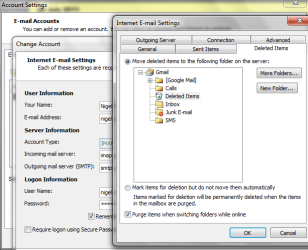
When you DELETE now it works similar to POP3 -- the delete mail now gets moved to the DELETED folder in the IMAP folder which you then delete via the DELETE option in the menu or right mouse click on the item in the folder view.
On Outlook 2007 the item had a LINE through it which you then deleted via PURGE.
I think I prefer the newer method -- but beware if you run more than one computer as DELETE now really does mean DELETE and the item will appear in the deleted items folder.
If you have one computer with Outlook 2007 and another with Outlook 2010 you won't be able to see or DELETE the items in Outlook 2007 if you deleted them in Outlook 2010.
I don't think it's a real problem -- but just be aware of the differences in how the two releases work. (IMAP only -- POP3 works just like it did before)
Cheers
jimbo
Note to you guys with IMAP and Outlook 2010.
When you DELETE now it works similar to POP3 -- the delete mail now gets moved to the DELETED folder in the IMAP folder which you then delete via the DELETE option in the menu or right mouse click on the item in the folder view.
On Outlook 2007 the item had a LINE through it which you then deleted via PURGE.
I think I prefer the newer method -- but beware if you run more than one computer as DELETE now really does mean DELETE and the item will appear in the deleted items folder.
If you have one computer with Outlook 2007 and another with Outlook 2010 you won't be able to see or DELETE the items in Outlook 2007 if you deleted them in Outlook 2010.
I don't think it's a real problem -- but just be aware of the differences in how the two releases work. (IMAP only -- POP3 works just like it did before)
Cheers
jimbo
My Computer
At a glance
Linux CENTOS 7 / various Windows OS'es and se...Intel i7 Intel i58GB, 16GBOn Motherboard
- Computer type
- PC/Desktop
- Computer Manufacturer/Model Number
- Custom built, several laptops HP/ASUS
- OS
- Linux CENTOS 7 / various Windows OS'es and servers
- CPU
- Intel i7 Intel i5
- Memory
- 8GB, 16GB
- Graphics Card(s)
- On Motherboard
- Sound Card
- Realtek HD audio
- Monitor(s) Displays
- Apple Cinema display, Samsung LCD
- Screen Resolution
- 1920 X 1080
- Hard Drives
- 4 X 1TB SATA
- Mouse
- Toshiba wireless laser
- Internet Speed
- > 20MB up