

Hi there
I've got a GMAIL account which I access via OUTLOOK 2010 (IMAP)
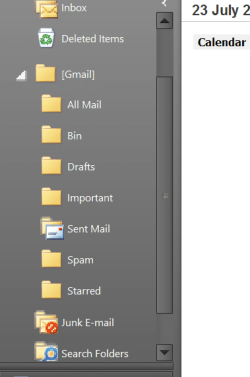
I've googled for this but the solution doesn't work --there's there's no TRASH folder under GMAIL.
How though do you delete PERMANENTLY Email -- If you delete it from the BIN folder it goes to Deleted folder -- if you empty this folder and then click on the gmail all mail folder it all re-appears again.
I've got something like 4500 mails now that I can't seem to get rid of -- if I have to do this via gmail itself then it rather makes the whole point of using OUTLOOK pointless in the first place. The only reason I opened a GMAIL account was because of its integration with OUTLOOK.
Deleting emails goes to the delete folder - now if I empty that the mail is seen again in the ALL mail folder - deleting that goes to the BIn folder and deleting that goes back again to the delete folder -- endless roundabout.
Cheers
jimbo
I've got a GMAIL account which I access via OUTLOOK 2010 (IMAP)
I've googled for this but the solution doesn't work --there's there's no TRASH folder under GMAIL.
How though do you delete PERMANENTLY Email -- If you delete it from the BIN folder it goes to Deleted folder -- if you empty this folder and then click on the gmail all mail folder it all re-appears again.
I've got something like 4500 mails now that I can't seem to get rid of -- if I have to do this via gmail itself then it rather makes the whole point of using OUTLOOK pointless in the first place. The only reason I opened a GMAIL account was because of its integration with OUTLOOK.
Deleting emails goes to the delete folder - now if I empty that the mail is seen again in the ALL mail folder - deleting that goes to the BIn folder and deleting that goes back again to the delete folder -- endless roundabout.
Cheers
jimbo
Attachments
Last edited:
My Computer
At a glance
Linux CENTOS 7 / various Windows OS'es and se...Intel i7 Intel i58GB, 16GBOn Motherboard
- Computer type
- PC/Desktop
- Computer Manufacturer/Model Number
- Custom built, several laptops HP/ASUS
- OS
- Linux CENTOS 7 / various Windows OS'es and servers
- CPU
- Intel i7 Intel i5
- Memory
- 8GB, 16GB
- Graphics Card(s)
- On Motherboard
- Sound Card
- Realtek HD audio
- Monitor(s) Displays
- Apple Cinema display, Samsung LCD
- Screen Resolution
- 1920 X 1080
- Hard Drives
- 4 X 1TB SATA
- Mouse
- Toshiba wireless laser
- Internet Speed
- > 20MB up


