Outlook 2010 imap too slow

jsmoline

New member
Power User
Local time
11:16 AM
Messages
233
Hello,
I have set Gmail in Outlook 2010 and the set up went flawlessly. I have noticed that it takes way too long to check mail. Someone said to configure pop instead of imap and it would be faster. I found a tutorial on this and it did not work. Any one know how to help me with this? Thanks,
John
 

My Computer My Computer

At a glance

Windows 7 Home PremiumIntel(R) Pentium(R) 4 CPU 3.20GHzPhysical Memory : 2048 MB (2 x 1024 DDR2-SDRAM )Video Card : NVIDIA GeForce 7300 SE/7200 GS
OS
Windows 7 Home Premium
CPU
Intel(R) Pentium(R) 4 CPU 3.20GHz
Motherboard
Asus P5VD2-MX-XE
Memory
Physical Memory : 2048 MB (2 x 1024 DDR2-SDRAM )
Graphics Card(s)
Video Card : NVIDIA GeForce 7300 SE/7200 GS
Sound Card
ASUSTeK Computer ALC-660 6-channel CODEC
Monitor(s) Displays
Monitor Type : Acer X183H - 19 inches
Screen Resolution
1366 x 768
Hard Drives
ATA WDC WD1600JS-60NCB1
Keyboard
Logitech
Mouse
Logitech
Internet Speed
DSL 3000
I just tested changing an IMAP Gmail account to use POP instead, following the instructions found on this site. Just choose your Outlook version from the list. Works flawlessly.

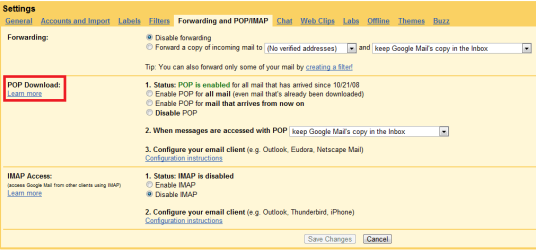
You have to enable POP, of course, from the Gmail settings: Open Gmail web interface, click Settings, and check POP is enabled.

Gmail_POP.png

Kari
 

My Computer My Computer

At a glance

Windows 10 Pro x64 EN-GB1.6 GHz Intel Core i7-720QM Processor6 GBATI Mobility Radeon HD 5850 Graphics
Computer type
Laptop
Computer Manufacturer/Model Number
HP ENVY 17-1150eg
OS
Windows 10 Pro x64 EN-GB
CPU
1.6 GHz Intel Core i7-720QM Processor
Memory
6 GB
Graphics Card(s)
ATI Mobility Radeon HD 5850 Graphics
Sound Card
Beats sound system with integrated subwoofer
Monitor(s) Displays
17" laptop display, 22" LED and 32" Full HD TV through HDMI
Screen Resolution
1600*900 (1), 1920*1080 (2&3)
Hard Drives
Internal: 2 x 500 GB SATA Hard Disk Drive 7200 rpm
External: 2TB for backups, 3TB USB3 network drive for media
Cooling
As Envy runs a bit warm, I have it on a Cooler Master pad
Keyboard
Logitech diNovo Media Desktop Laser (bluetooth)
Mouse
Logitech Performance Mouse MX
Internet Speed
50/10 Mbps VDSL
Antivirus
Windows Defender 4.3.9431.0
Browser
Maxthon 3.5.2., IE11
Thanks,Kari
I went to the site but Outlook 2010 is not listed in the choices. How did you do it?
 

My Computer My Computer

At a glance

Windows 7 Home PremiumIntel(R) Pentium(R) 4 CPU 3.20GHzPhysical Memory : 2048 MB (2 x 1024 DDR2-SDRAM )Video Card : NVIDIA GeForce 7300 SE/7200 GS
OS
Windows 7 Home Premium
CPU
Intel(R) Pentium(R) 4 CPU 3.20GHz
Motherboard
Asus P5VD2-MX-XE
Memory
Physical Memory : 2048 MB (2 x 1024 DDR2-SDRAM )
Graphics Card(s)
Video Card : NVIDIA GeForce 7300 SE/7200 GS
Sound Card
ASUSTeK Computer ALC-660 6-channel CODEC
Monitor(s) Displays
Monitor Type : Acer X183H - 19 inches
Screen Resolution
1366 x 768
Hard Drives
ATA WDC WD1600JS-60NCB1
Keyboard
Logitech
Mouse
Logitech
Internet Speed
DSL 3000
OK, here's how to change Gmail account in Outlook 2010 to use POP instead of IMAP:

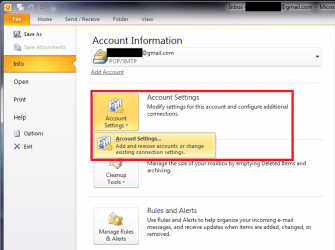
  1. In Outlook 2010, open File > Info > Account Settings

    Gmail_POP_1.png
    .
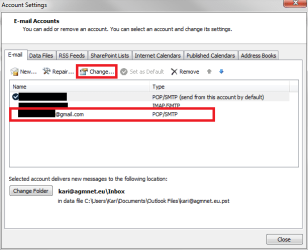
  2. Double click the Gmail account you want to mofify, or choose the account and click Change

    Gmail_POP_2.png
    .
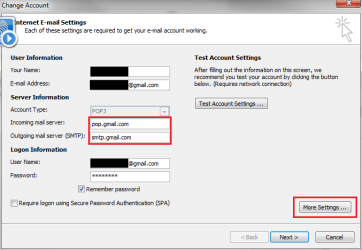
  3. Fill in the credentials. Gmail POP server is pop.gmail.com, SMTP server is smtp.gmail.com

    Gmail_POP_3.png
    .
  4. Click More Settings
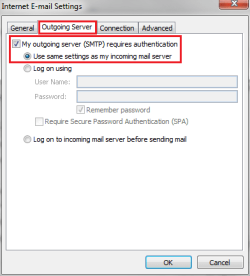
  5. Choose Outgoing server tab
  6. Tick the box in My outgoing server requires authentication, choose Use same settings as my incoming mail server

    Gmail_POP_4.png
    .
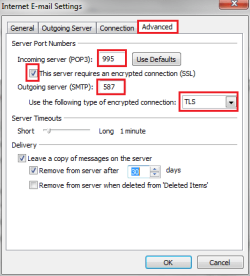
  7. Choose Advanced tab
  8. Fill in port inforrmation. Gmail incoming port is 995, outgoing port is 587. Tick the box This server requires an encrypted connection, choose TLS as encryption type. Click OK

    Gmail_POP_5.png
    .
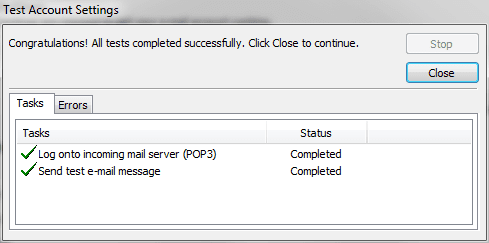
  9. Click Test connection. If everything is OK, both sending and receiving should pass

    Gmail_POP_6.png

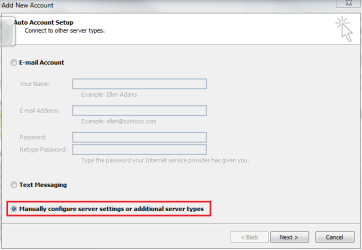
To set up a new Gmail account using POP connection, choose Add account (above list, #1). Choose Manually configure server settings, click Next

Gmail_POP_7.png

Choose Internet email, click Next

Gmail_POP_8.png

Continue as told above (from #3)

Kari
 
Last edited:

My Computer My Computer

At a glance

Windows 10 Pro x64 EN-GB1.6 GHz Intel Core i7-720QM Processor6 GBATI Mobility Radeon HD 5850 Graphics
Computer type
Laptop
Computer Manufacturer/Model Number
HP ENVY 17-1150eg
OS
Windows 10 Pro x64 EN-GB
CPU
1.6 GHz Intel Core i7-720QM Processor
Memory
6 GB
Graphics Card(s)
ATI Mobility Radeon HD 5850 Graphics
Sound Card
Beats sound system with integrated subwoofer
Monitor(s) Displays
17" laptop display, 22" LED and 32" Full HD TV through HDMI
Screen Resolution
1600*900 (1), 1920*1080 (2&3)
Hard Drives
Internal: 2 x 500 GB SATA Hard Disk Drive 7200 rpm
External: 2TB for backups, 3TB USB3 network drive for media
Cooling
As Envy runs a bit warm, I have it on a Cooler Master pad
Keyboard
Logitech diNovo Media Desktop Laser (bluetooth)
Mouse
Logitech Performance Mouse MX
Internet Speed
50/10 Mbps VDSL
Antivirus
Windows Defender 4.3.9431.0
Browser
Maxthon 3.5.2., IE11
Thanks, Kari
That's great info. Worked like a champ.:D I stumbled upon this also. Remove Gmail account from Outlook 2010. Go to gmail settings. Enable pop and Disable imap. Save settings. Open Outlook 2010 and add click on file in the upper left hand corner. Click Info, Then click add account and it will automatically set up Gmail pop. It will act like it did when setting up imap. This is where I got the info.
How-To Configure GMAIL for POP or IMAP Using Outlook 2010
Thanks, Kari
John
 

My Computer My Computer

At a glance

Windows 7 Home PremiumIntel(R) Pentium(R) 4 CPU 3.20GHzPhysical Memory : 2048 MB (2 x 1024 DDR2-SDRAM )Video Card : NVIDIA GeForce 7300 SE/7200 GS
OS
Windows 7 Home Premium
CPU
Intel(R) Pentium(R) 4 CPU 3.20GHz
Motherboard
Asus P5VD2-MX-XE
Memory
Physical Memory : 2048 MB (2 x 1024 DDR2-SDRAM )
Graphics Card(s)
Video Card : NVIDIA GeForce 7300 SE/7200 GS
Sound Card
ASUSTeK Computer ALC-660 6-channel CODEC
Monitor(s) Displays
Monitor Type : Acer X183H - 19 inches
Screen Resolution
1366 x 768
Hard Drives
ATA WDC WD1600JS-60NCB1
Keyboard
Logitech
Mouse
Logitech
Internet Speed
DSL 3000
A google program causes trouble when it is used with a program from Microsoft, what a surprise ;)
Yes I know this is a problem which was fixed easily but why didn't it work the way an account of yahoo would work?
No, really I have sometimes the impression, that microsoft wants to get rid of competitors by trying to prevent the users from installing third-party-programs. For quite a long time I had problems with Outlook and lookeen (also a third-party-program) it turned out that it was only because of the fact that outlook was in its beta-version but it is kind of astonishing sometimes.

Oh by the way thanks for the tip, I also wanted to connect my gmail account with outlook.
 

My Computer My Computer

At a glance

Windows 2007
OS
Windows 2007
So theres no solution to the slow deleting of emails using IMAP?
 

My Computer My Computer

At a glance

Windows 7
OS
Windows 7
Hello guys, anyone solved the slow deleting email issue? Strange thing is, when offline u can delete emails a lot faster, and then when going online it deletes them in the background...
 

My Computer My Computer

At a glance

Windows 7
OS
Windows 7
Frustrating problem

This is a really major issue and I cannot believe there is no follow up to this thread!

Put it this way, a gmail account using Outlook 2010 requires approx 3 seconds delay to delete an email. The same account using Windows Live Mail is more or less instantaneous delete. Don't people at Microsoft talk to each other?!

Because I require calendar and contact sync WLM is no use to me and I require Outlook 2010.

Oh by the way, the reason I use gmail is because Outlook 2010 had major issues syncing folders and emails with....Live Hotmail!!! It is clear the Outlook is only intended for MS Exchange, which is a pity, because it encourages me to look at alternatives and not be forced into using MS Exchange, which I have used for many years but is too functional for my needs now.

I think I answered my own question....!
 

My Computer My Computer

At a glance

HP 322.24gb
Computer Manufacturer/Model Number
Dell
OS
HP 32
CPU
2.2
Memory
4gb
I found a very simple work around for this problem that works for me while using IMAP. Allow Outlook 2010 to download and synch your Gmail accounts and when you’re ready to read your mail, click on the Send / Receive tab and click “Work Offline.” You will now be able to open and delete messages instantly - no hanging, no waiting. Outlook will behave just like it does with Hotmail. Just click “Work Offline” again to go back online and resume synchronization.

I hope MS and Gmail eventually fix this so it works as intended.
 

My Computer My Computer

At a glance

Windows 7
OS
Windows 7
Thanks for that suggestion.

Unfortunately I tried it, but I have a large volume of emails and am frequently moving them into dedicated folders. Being offline does not allow emails to be moved between folders, unless each of my 100+ folders were to be updated / synchronized, and would then cause other problems.

It's staggering that MS has worsened such a problem rather than improving it when they released 2010. My guess is that they are trying to encourage people not to use IMAP with Outlook, rather MAPI for WLM and Exchange....and yet IMAP works just great on Windows Live Mail!

The "funny" thing is that I must use IMAP with Outlook for my Office 365 email account rather than the Exchange connection, because that just gives me some other problems with calendaring / scheduling default locations that cannot be fully resolved.

I decided to now revert back to Outlook / Office 2003 from 2010. It was a painful process that took me 2 days to figure out all the problems. But now it is perfect. IMAP is rapid, Connector works well, and overall Outlook 2003 is much slicker than 2010. I can work more quickly in Office 2003, it's easier to configure, text is more dense, more productive for experienced users, no wide open empty spaces and massive ribbons, etc.
 

My Computer My Computer

At a glance

HP 322.24gb
Computer Manufacturer/Model Number
Dell
OS
HP 32
CPU
2.2
Memory
4gb
Back
Top