Outlook 2010 is not indexing new messages

eemiller

New member
Local time
4:07 AM
Messages
10
I am really hoping someone can help me with this. I am new at this job 2 months and IT can't figure it out. I am the ass't to the CEO of a company and he has me in charge of his email. His email has been saved in folders according to years and then by month within that folder - all the way back to 2009. That's a lot of emails.

He will call me and ask for me to find an email and I can't do a search. Searches will only find items BEFORE January 2011. IT has tried figuring it out, but they have higher priorities than this email problem. My problem is that when my boss calls me and asks me to find an email for him, or references an email, I can't find it. I've spent hours at times looking for a simple email becuase I can't conduct a search. Even if I'm looking at the email in the inbox and conduct a search it won't find it.

I know IT has done research on it. They've tried figuring out why the indexing isn't working for current items. The only idea they can come up with is that there's too much mail to index. At this point, I could care less if it indexes 2009 through 2010. I need 2011 indexed! It's making me look like an idiot when I can't find something from last week!

I really need to get this figured out. Can someone please help me? Also, please keep in mind when your answering that I'm not a computer guru. I'm a secretary!
Thank you ! :)
 

My Computer

OS
XP and 64 bit

My Computer

Computer type
PC/Desktop
Computer Manufacturer/Model Number
Packard Bell
OS
Windows 7 Home Premium 64bit
CPU
Intel(R) Core(TM) i3-2120 CPU @ 3.30GHz
Motherboard
Packard Bell IPISB-AG
Memory
3.00 GB
Graphics Card(s)
(1) Intel(R) HD Graphics (2) VNC Mirror Driver
Sound Card
Realtek High Definition Audio
Monitor(s) Displays
AIO LCD
Screen Resolution
1920 x 1080
Hard Drives
WDC WD10EADX-22TDHB0 ATA Device
Fixed hard disk media
4 partitions
931.51 GB
Keyboard
Wireless
Mouse
Wireless
Antivirus
Microsoft Security Essentials
Browser
IE; Firefox
Other Info
Also:
Samsung N220 Plus Netbook - Windows 7 Home
HP laptop
iPad 5
Thank you for your answer. I was following this, but I don't see where I remove the outlook inboxe(es) from the list of Included Locations. Here is what I see:

Oh, I can't seem to paste a print-screen in here, so I'll type out my options:

Documents and Settings folder
Internet Explorer History (CORPHQ\[bosses name inserted here]
M:\(CORHPQ\ [bosses name inserted here]
mailbox - .....
Microsoft Outlook Express: Main Identity (CORPHQ\ [bosses name inserted here]

What do you think?
 

My Computer

OS
XP and 64 bit
I am assuming that you are using Outlook 2010 (not Outlook Express)...

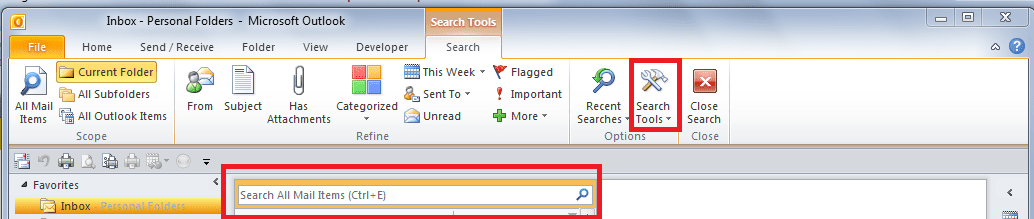
Open Outlook 2010 > at the top of your inbox there is a 'search' box - just left-click into there > then look above on the 'ribbon' and touch the down-arrow on the bottom right of 'Search Tools', then from the sub menu choose Options (at the bottom). Then follow the instructions in the link in my previous post.

(you could perhaps ask your IT department to assist?)...
.
.
 

Attachments

  • Index options.PNG
    Index options.PNG
    26.7 KB · Views: 236

My Computer

Computer type
PC/Desktop
Computer Manufacturer/Model Number
Packard Bell
OS
Windows 7 Home Premium 64bit
CPU
Intel(R) Core(TM) i3-2120 CPU @ 3.30GHz
Motherboard
Packard Bell IPISB-AG
Memory
3.00 GB
Graphics Card(s)
(1) Intel(R) HD Graphics (2) VNC Mirror Driver
Sound Card
Realtek High Definition Audio
Monitor(s) Displays
AIO LCD
Screen Resolution
1920 x 1080
Hard Drives
WDC WD10EADX-22TDHB0 ATA Device
Fixed hard disk media
4 partitions
931.51 GB
Keyboard
Wireless
Mouse
Wireless
Antivirus
Microsoft Security Essentials
Browser
IE; Firefox
Other Info
Also:
Samsung N220 Plus Netbook - Windows 7 Home
HP laptop
iPad 5
I had that part down. It was this part that stumped me because I didnt' see an option "outlook inboxe(es)":
  1. Remove the Outlook inboxe(es) from the list of Included Locations
I would love to ask IT to assist, but
1) I think they've done all of this already. In fact, they did an experiment with Windows 7 (apparenlty I have XP, not Windows 7) and put his email onto it. That didn't work either, so I'm still on XP.
2) IT is swamped or I would just put pressure on them to get this figured out themselves. But, in addition to them being swamped, they are now one man short.

So, I'm trying to get this figured out. There must be someone out there that can figure out why the email won't find anything new. If only I could tell it to stop indexing old stuff and index only the new stuff!
 

My Computer

OS
XP and 64 bit
Oh, and correct - I am using Outlook 2010.
 

My Computer

OS
XP and 64 bit
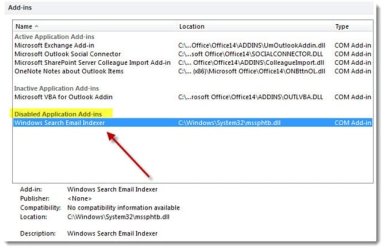
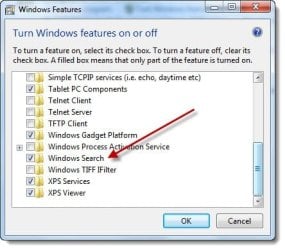
I may have been wrong - moving around I see the words "express" in places. I'm attaching a screenshot from Word.
 

Attachments

My Computer

OS
XP and 64 bit

Attachments

  • outlooksearch-disabledaddin_thumb.jpg
    outlooksearch-disabledaddin_thumb.jpg
    34.6 KB · Views: 244
  • outlooksearch-windowsfeatures1_thumb.jpg
    outlooksearch-windowsfeatures1_thumb.jpg
    31.3 KB · Views: 93

My Computer

Computer type
PC/Desktop
Computer Manufacturer/Model Number
Packard Bell
OS
Windows 7 Home Premium 64bit
CPU
Intel(R) Core(TM) i3-2120 CPU @ 3.30GHz
Motherboard
Packard Bell IPISB-AG
Memory
3.00 GB
Graphics Card(s)
(1) Intel(R) HD Graphics (2) VNC Mirror Driver
Sound Card
Realtek High Definition Audio
Monitor(s) Displays
AIO LCD
Screen Resolution
1920 x 1080
Hard Drives
WDC WD10EADX-22TDHB0 ATA Device
Fixed hard disk media
4 partitions
931.51 GB
Keyboard
Wireless
Mouse
Wireless
Antivirus
Microsoft Security Essentials
Browser
IE; Firefox
Other Info
Also:
Samsung N220 Plus Netbook - Windows 7 Home
HP laptop
iPad 5
I am going to have to has IT look at this for me. I can't seem to find "program" under the "control panel" I'll get back to you. Thanks :)
 

My Computer

OS
XP and 64 bit
this could be because I was wrong and do not have windows 7 - I have XP.
 

My Computer

OS
XP and 64 bit

My Computer

Computer type
PC/Desktop
Computer Manufacturer/Model Number
Packard Bell
OS
Windows 7 Home Premium 64bit
CPU
Intel(R) Core(TM) i3-2120 CPU @ 3.30GHz
Motherboard
Packard Bell IPISB-AG
Memory
3.00 GB
Graphics Card(s)
(1) Intel(R) HD Graphics (2) VNC Mirror Driver
Sound Card
Realtek High Definition Audio
Monitor(s) Displays
AIO LCD
Screen Resolution
1920 x 1080
Hard Drives
WDC WD10EADX-22TDHB0 ATA Device
Fixed hard disk media
4 partitions
931.51 GB
Keyboard
Wireless
Mouse
Wireless
Antivirus
Microsoft Security Essentials
Browser
IE; Firefox
Other Info
Also:
Samsung N220 Plus Netbook - Windows 7 Home
HP laptop
iPad 5
This appears to be over my head. I will see if IT can spend a few minutes figuring this one out. Thanks.
 

My Computer

OS
XP and 64 bit
I asked IT and this is what they've said, "It has already been tried... I am going to upgrade his machine to Windows 7. This means I will back up the entire machine, install a fresh copy of Windows and Office 2010 and see if the problem gets resolved."

Let's cross our fingers!
 

My Computer

OS
XP and 64 bit
Now, he already told me, though, that he tried it in Windows 7, so I don't know how this will actually fix it, but let's hope.
 

My Computer

OS
XP and 64 bit
I will certainly be interested to hear what happens... :D
 

My Computer

Computer type
PC/Desktop
Computer Manufacturer/Model Number
Packard Bell
OS
Windows 7 Home Premium 64bit
CPU
Intel(R) Core(TM) i3-2120 CPU @ 3.30GHz
Motherboard
Packard Bell IPISB-AG
Memory
3.00 GB
Graphics Card(s)
(1) Intel(R) HD Graphics (2) VNC Mirror Driver
Sound Card
Realtek High Definition Audio
Monitor(s) Displays
AIO LCD
Screen Resolution
1920 x 1080
Hard Drives
WDC WD10EADX-22TDHB0 ATA Device
Fixed hard disk media
4 partitions
931.51 GB
Keyboard
Wireless
Mouse
Wireless
Antivirus
Microsoft Security Essentials
Browser
IE; Firefox
Other Info
Also:
Samsung N220 Plus Netbook - Windows 7 Home
HP laptop
iPad 5
Back
Top