outlook 2013 not indexing

hammie123

New member
Local time
8:49 PM
Messages
2
Hello,

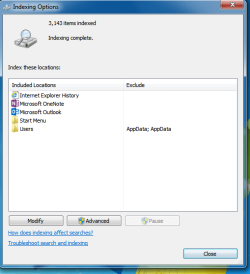
I have a problem with my outlook 2013. Whenever I search for items in my mailbox or all mailboxes in my Outlook there is "no result". This is not possible because I am searching for an email that certainly exists. I've read instructions on how to add Outlook to the indexing options, however in my case there seems to be no option for adding Outlook to the indexing.

index2.png

index1.png


There has to be an option to add Outlook in the included locations.

Does anybody have any suggestions?

Thanks
 

My Computer My Computer

Computer type
PC/Desktop
OS
windows server 2012 r2
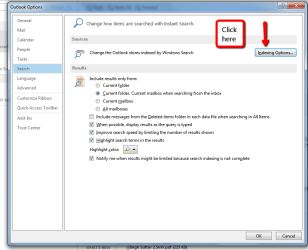
Have you tried this method. Open Outlook, select File, then Options & select Search. See the attached screen shots.

Outlook_search_main.png

Outlook_search.png

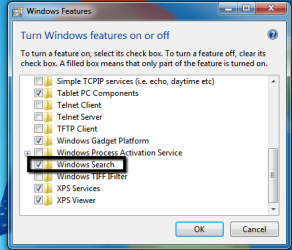
Also check that Windows Search is on. Open Control Panel, select Programs & Features & up on the left hand side near the top is "Turn Windows Features On & Off" select that & a small window will open, scroll down & make sure to tick the box on Windows Search. See screen shot below.

Windows_search..png
 
Last edited:

My Computer My Computer

Computer type
PC/Desktop
Computer Manufacturer/Model Number
Self built using existing case
OS
Windows 7 Home Premium 64 bit sp1
CPU
Intel i5 3570 3.4Ghz Ivy Bridge SKT 1155 quad core
Motherboard
Gigabyte Z77-HD3 SKT 1155 2xSata 3, 4x USB 3.0
Memory
G-Skill Rip Jaws 16Gb (8x2) DDR3 -1600 PC3 12800 CL 10 red
Graphics Card(s)
Gigabyte NVIDIA GT610 1Gb DDR3 810/1200 PCI-E 2.0 Silent
Sound Card
NVIDIA High Definition & Realtech High Definition Audio
Monitor(s) Displays
2 x Philips 226V4L 16:9 aspect ratio
Screen Resolution
1920 x 1080 HD
Hard Drives
Samsung 840 Pro 256gb SSD, SATA 3.
Hitachi Touro Portable 1tb, USB 3.0 HDD used for image b/ups.
PSU
Corsair VS450
Case
Codeng
Cooling
PSU fan & CPU fan
Keyboard
Logitech
Mouse
Logitech Wireless trackball M570
Internet Speed
Wireless 3G. 3mg down & 550kb up.
Antivirus
Bitdefender Internet Security 2020
Browser
Opera (Current Version) & Firefox
Other Info
MS Office 2013 Pro. Davis weather station software. MGE Nova 600 avr UPS.
Hello,

Yes I have tried those options and when I click on the Indexing Options in Outlook I see the same picture as in my screenshots, but Outlook is missing in mine.

This is your screenshot, but I don't have the option to add Outlook to the Included Locations

image.png
 

My Computer My Computer

Computer type
PC/Desktop
OS
windows server 2012 r2
You could try repairing Office 2013. Open Control Panel, select Programs & Features, scroll down to Microsoft Office, right click on it & select Change. This will open a small window with a couple of options for repairing Office.
 

My Computer My Computer

Computer type
PC/Desktop
Computer Manufacturer/Model Number
Self built using existing case
OS
Windows 7 Home Premium 64 bit sp1
CPU
Intel i5 3570 3.4Ghz Ivy Bridge SKT 1155 quad core
Motherboard
Gigabyte Z77-HD3 SKT 1155 2xSata 3, 4x USB 3.0
Memory
G-Skill Rip Jaws 16Gb (8x2) DDR3 -1600 PC3 12800 CL 10 red
Graphics Card(s)
Gigabyte NVIDIA GT610 1Gb DDR3 810/1200 PCI-E 2.0 Silent
Sound Card
NVIDIA High Definition & Realtech High Definition Audio
Monitor(s) Displays
2 x Philips 226V4L 16:9 aspect ratio
Screen Resolution
1920 x 1080 HD
Hard Drives
Samsung 840 Pro 256gb SSD, SATA 3.
Hitachi Touro Portable 1tb, USB 3.0 HDD used for image b/ups.
PSU
Corsair VS450
Case
Codeng
Cooling
PSU fan & CPU fan
Keyboard
Logitech
Mouse
Logitech Wireless trackball M570
Internet Speed
Wireless 3G. 3mg down & 550kb up.
Antivirus
Bitdefender Internet Security 2020
Browser
Opera (Current Version) & Firefox
Other Info
MS Office 2013 Pro. Davis weather station software. MGE Nova 600 avr UPS.
Please use the Indexing Options from the control Panel instead of the one from Outlook to see Outlook in the list of indexed locations. I encountred the same issue and for some reason Outlook 2013 was showing only when opening the indexing from the Control Panel.
 

My Computer My Computer

Computer type
PC/Desktop
Computer Manufacturer/Model Number
Samsung
OS
Windows 8 64Bit
CPU
Intel i5
Motherboard
Samsung
Memory
4GiG
Graphics Card(s)
Samsung
Hard Drives
2 400GIG
Antivirus
Avast
Browser
Firefox
I was having this exact same issue. I was not able to find certain emails that I knew for a fact I had. My solution was to enable the Indexing Service and Windows Search. I did not have to make any changes in Outlook 2013. Go to Control Panel>Programs>Programs and Features>Turn Windows features on or off (located on the left menu). Once the list populates, make sure to check the box for Indexing Service and Windows Search. If they are already checked, uncheck them, re-check them and then restart your computer and it should work. It worked for me and several users (8). Hope this helps!

15n7l1c.png
 
Last edited:

My Computer My Computer

Computer type
Laptop
Computer Manufacturer/Model Number
Dell Latitude E5420M (A01 BIOS)
OS
Windows 7 Professional x32
CPU
Intel Core 2 Duo T6670
Memory
4GB
Monitor(s) Displays
2 x Dell P2212H (Digital)
Screen Resolution
1920x1080
Hard Drives
250GB SATA II
Keyboard
Microsoft Wired Keyboard 400
Mouse
Logitech M510
Internet Speed
75.4mbps Download / 7.6mbps Upload
Antivirus
Trend Micro Office Scan
Browser
Mozilla Firefox 31.0
vhernandez Thanks a bunch for this, it fixed my issue.
 

My Computer My Computer

Computer type
PC/Desktop
Computer Manufacturer/Model Number
Build
OS
Windows 7 Profession x64
CPU
Intel Core i5
Motherboard
Intel DB75EN
Memory
16 GB DDR3
Graphics Card(s)
Intel HD Graphics
Sound Card
Realtek High Definition Audio
Monitor(s) Displays
Dual Viewsonic TD2220 touchscreen displays
Hard Drives
Seagate 500GB 7200 RPM
Case
Slimline
Cooling
Standard Intel heat sink / fan.
Keyboard
Microsoft boring keyboard - it works!
Back
Top