Outlook 2010 Print Selection

Tegiro

New member
Local time
10:39 AM
Messages
32
I have some e-mails which I only want to print portions of the body.
It seems difficult to do, as everytime I try to do this I must print the whole page, mutiple pages or the whole message.
Is there a way one can highlight part of a message then click PRINT, and be able to print "SELECTION" only?
I can't see this in Outlook 2010.

Thank you,
Tegiro
 

My Computer

Computer Manufacturer/Model Number
Acer Aspire M5910
OS
Windows 7 Home Premium (x64) (build 7600)
CPU
2.80 gigahertz Intel Core i7 860
Motherboard
Board: Acer Aspire M5910
Memory
8184 Megabytes Usable Installed Memory
Graphics Card(s)
NVIDIA GeForce GT 320 [Display adapter]
Sound Card
NVIDIA High Definition Audio (4x)
Monitor(s) Displays
Acer X203W [Monitor] (20.0"vis, s/n LAN080244200, October 20
Screen Resolution
1280x800
Hard Drives
1728.88 Gigabytes Usable Hard Drive Capacity
1529.51 Gigabytes Hard Drive Free Space
PSU
500 W (PFC, 80Plus-certified, more than 20% efficiency)
Case
Desktop PC Tower
Cooling
?
Keyboard
Acer keyboard (USB Connected)
Mouse
Acer mouse (USB Connected)
Internet Speed
High Speed LAN (Cable Service)
Hi,

If I'm not mistaken, its never been possible to only print selections of documents (be it in Outlook, or Word).....your best best is to copy and paste the text you are interested in, into a new Word document, and then print that.

Regards,
Golden
 

My Computer

Computer type
PC/Desktop
Computer Manufacturer/Model Number
Golden Mk. I.4
OS
Windows 10 Pro x64 ; Xubuntu x64
CPU
Intel i7 860 @ 2.80 GHz O/C'ed to 4.0GHz
Motherboard
Gigabyte P55A-UD3R Rev.1. Award BIOS F13
Memory
16GB Corsair Vengance DDR3 @ 661 MHz Dual Channel (9-9-9-24)
Graphics Card(s)
EVGA NVidia GTX 560 1024MB
Sound Card
Realtek Integrated
Monitor(s) Displays
Dual Samsung SyncMaster 2494HS
Screen Resolution
1920*1080 and 1920*1080
Hard Drives
1*Samsung 840 EVO 120GB SSD;
1*OCZ Vertex 2 60GB SSD;
2*Samsung F3 SpinPoint 1TB in RAID0;
1*Samsung F1 SpinPoint 1TB;
2*Western Digital 1TB External USB 3.0
1*Western Digital 500GB External USB 3.0
1*Seagate 500GB External USB 2.0
PSU
Thermaltake ToughPower QFan 750W
Case
Thermaltake Element S VK60001W2Z
Cooling
Corsair H60 Water Cooling, 2*230mm and 2*80mm case fans
Keyboard
Logitech G110
Mouse
Logitech MX518
This could be a possibility:

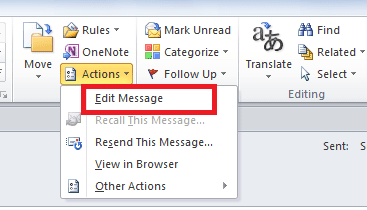
Open the email > touch 'Action', then Edit from the sub menu. You can then delete any text which is not required. Before exiting, use the print menu.

Finally, when you close the email, it will ask if you wish to save the changes - just say No if you would like to retain the email in it's original state.
.
 

Attachments

  • print selection OL.png
    print selection OL.png
    9 KB · Views: 24

My Computer

Computer type
PC/Desktop
Computer Manufacturer/Model Number
Packard Bell
OS
Windows 7 Home Premium 64bit
CPU
Intel(R) Core(TM) i3-2120 CPU @ 3.30GHz
Motherboard
Packard Bell IPISB-AG
Memory
3.00 GB
Graphics Card(s)
(1) Intel(R) HD Graphics (2) VNC Mirror Driver
Sound Card
Realtek High Definition Audio
Monitor(s) Displays
AIO LCD
Screen Resolution
1920 x 1080
Hard Drives
WDC WD10EADX-22TDHB0 ATA Device
Fixed hard disk media
4 partitions
931.51 GB
Keyboard
Wireless
Mouse
Wireless
Antivirus
Microsoft Security Essentials
Browser
IE; Firefox
Other Info
Also:
Samsung N220 Plus Netbook - Windows 7 Home
HP laptop
iPad 5
Back
Top