
Outlook 2010

RonBin79

New member
Member
VIP
Local time
9:06 AM
Messages
311
Location
West Sussex
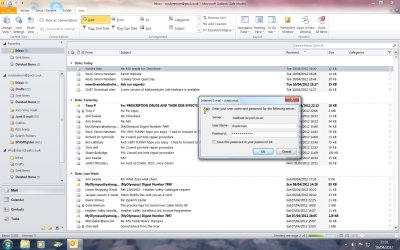
Every time I open Outlook I am asked for the poassword of a email account. Even though I enter it, the screen still keeps coming up. I was experimenting with registgry cleaners recently and downloaded the WinZip Efficient Registry cleaner. I have tried to uninstall it but am told the file does not exist. I went into REGEDIT and deleted the folder from there but it still appears on my list of programmes and I suspect this may be part of the problem.

I have attached a screen shot and done a system restore which has made no difference and am now at a loss. Is it worthwhile restoring back to an earlier date or will that not cure the problem??

RonBin79 Help Please...
 

Attachments
  • classic mail.jpg
    classic mail.jpg
    216.2 KB · Views: 7

My Computer

Computer Manufacturer/Model Number
Dell XP8300
OS
Windows Seven Premium
CPU
Intel Core i5-2300
Motherboard
Unknown
Memory
8GB
Graphics Card(s)
1GB ATI Raedon HD 5450
Sound Card
Integrated 7.1 with THX TrueStudio
Monitor(s) Displays
Dell 17"
Hard Drives
1 Terrabyte Serial ATA
Case
Dell (Metal)
Cooling
None
Keyboard
Dell
Mouse
Dell Laser
Internet Speed
2.8Gb
Ron Bin79.

* Re any Registry Cleaners.

Current accepted wisdom with Win 7 is to NOT use a cleaner.

If you ever think your Registry needs to be cleaned, repaired, boosted, tuned-up, cured, tweaked, fixed, or optimized it shouldn't.

In other words, injudicious use of "Registry cleaners" CAN & indeed DOES cause problems.

* You could try a System File Check. Option 2.
You may need to run it up to 3 times.
Let us know the result at the end please.

Reboot on completion.


Note
If SFC could not fix something, then run the command again to see if it may be able to the next time. Sometimes it may take running the sfc /scannow command 3 or more times to completely fix everything that it's able to.
If not, then you can attempt to run a System Restore using a restore point dated before the bad file occured to fix it. You may need to repeat doing a System Restore until you find a older restore point that may work.
If still not, then you can use the steps in the TIP box in the OPTION THREE section below to manually replace the files that SFC could not fix.
http://www.sevenforums.com/tutorials/1538-sfc-scannow-command-system-file-checker.html

* FYI.

Save password setting not retained in Outlook or Outlook Express
 

My Computer

Computer Manufacturer/Model Number
LAPTOP. HP Pavilion dv7-4010TX .
OS
Win 7 Ultimate 64-bit. SP1.
CPU
Intel i7 -720QM.[1.6GHz Turbo Boost 2.8GHz. 6MB Cache.]
Memory
8 DDR 3 RAM. 1066MHZ
Graphics Card(s)
ATI 1024 MB. DDR3. Radeon HD5650
Monitor(s) Displays
17.3" High Definition Brightview LCD. LED Backlit.
Screen Resolution
1600 x 900.
Hard Drives
640GB
Case
Laptop / notebook.
Mouse
Logitech Anywhere mouse. MX.
Internet Speed
ADSL [ but too slow ]
JMH, thank you. Am I right n asuming I open SFC /scannow from the start box please??

RonBin79
 

My Computer

Computer Manufacturer/Model Number
Dell XP8300
OS
Windows Seven Premium
CPU
Intel Core i5-2300
Motherboard
Unknown
Memory
8GB
Graphics Card(s)
1GB ATI Raedon HD 5450
Sound Card
Integrated 7.1 with THX TrueStudio
Monitor(s) Displays
Dell 17"
Hard Drives
1 Terrabyte Serial ATA
Case
Dell (Metal)
Cooling
None
Keyboard
Dell
Mouse
Dell Laser
Internet Speed
2.8Gb
Start > All Programs > Accessories > Command Prompt
 

My Computer

Computer Manufacturer/Model Number
LAPTOP. HP Pavilion dv7-4010TX .
OS
Win 7 Ultimate 64-bit. SP1.
CPU
Intel i7 -720QM.[1.6GHz Turbo Boost 2.8GHz. 6MB Cache.]
Memory
8 DDR 3 RAM. 1066MHZ
Graphics Card(s)
ATI 1024 MB. DDR3. Radeon HD5650
Monitor(s) Displays
17.3" High Definition Brightview LCD. LED Backlit.
Screen Resolution
1600 x 900.
Hard Drives
640GB
Case
Laptop / notebook.
Mouse
Logitech Anywhere mouse. MX.
Internet Speed
ADSL [ but too slow ]
Back
Top