

Hi there
Whoever designed the base colors for Office 2013 must have been totally STONE DEAF and COLOR BLIND at the same time. I can't believe that comments weren't made before this stuff was allowed out of the door.
There's almost no possibilities to customize the backgrounds or colors and on a large monitor the base white looks really HIDEOUS -- you need a good pair of Sunglasses while working with it.
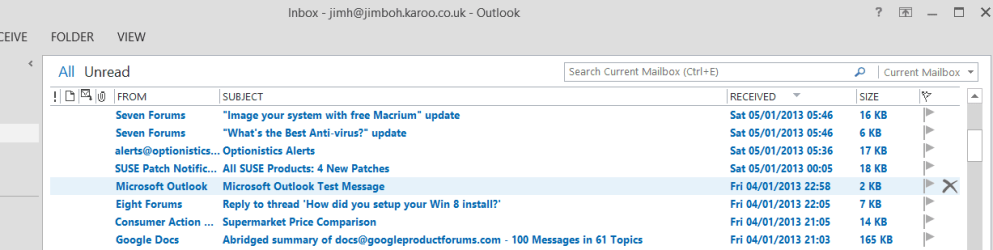
The only other choice is some type of Grey (shown in screenshot) which looks very similar to "The Fruit Company's Window colour scheme. Still looks hideous and that Blue !!!!!.
Outlook also displays the unread message titles in the most sickly blue (can't seem to change it) I've ever seen.
Before I remove this POS from my computer is there anyway to De-Uglify or customize like I had in Office 2010 with the Black background.
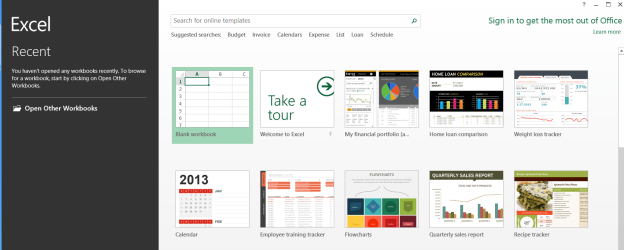
I don't like it opening with a prompt screen before I get the base screen (often needs another TWO keyboard strokes !! -- example for EXCEL 2013 shown) -- I should be able to open it in a Window with the menus just like like Office 2010. It means I now have to make a load of extra keyboard strokes before I actually get a workbook screen to start getting my work done.
I don't want the sign in reminders either -- I don't intend to use Cloud services etc.
Cheers
jimbo
Whoever designed the base colors for Office 2013 must have been totally STONE DEAF and COLOR BLIND at the same time. I can't believe that comments weren't made before this stuff was allowed out of the door.
There's almost no possibilities to customize the backgrounds or colors and on a large monitor the base white looks really HIDEOUS -- you need a good pair of Sunglasses while working with it.
The only other choice is some type of Grey (shown in screenshot) which looks very similar to "The Fruit Company's Window colour scheme. Still looks hideous and that Blue !!!!!.
Outlook also displays the unread message titles in the most sickly blue (can't seem to change it) I've ever seen.
Before I remove this POS from my computer is there anyway to De-Uglify or customize like I had in Office 2010 with the Black background.
I don't like it opening with a prompt screen before I get the base screen (often needs another TWO keyboard strokes !! -- example for EXCEL 2013 shown) -- I should be able to open it in a Window with the menus just like like Office 2010. It means I now have to make a load of extra keyboard strokes before I actually get a workbook screen to start getting my work done.
I don't want the sign in reminders either -- I don't intend to use Cloud services etc.
Cheers
jimbo
Attachments

My Computer
At a glance
Linux CENTOS 7 / various Windows OS'es and se...Intel i7 Intel i58GB, 16GBOn Motherboard
- Computer type
- PC/Desktop
- Computer Manufacturer/Model Number
- Custom built, several laptops HP/ASUS
- OS
- Linux CENTOS 7 / various Windows OS'es and servers
- CPU
- Intel i7 Intel i5
- Memory
- 8GB, 16GB
- Graphics Card(s)
- On Motherboard
- Sound Card
- Realtek HD audio
- Monitor(s) Displays
- Apple Cinema display, Samsung LCD
- Screen Resolution
- 1920 X 1080
- Hard Drives
- 4 X 1TB SATA
- Mouse
- Toshiba wireless laser
- Internet Speed
- > 20MB up


